








A student receives what looks like a routine summer job offer from a trusted school account. The link goes to Google Forms. The email passes authentication. There is no malware, no fake login page, and no strange-looking domain. To the student and to many security tools, it looks harmless.
But this is where modern phishing succeeds: it borrows trust instead of faking it. In this case, Check Point Research observed more than 3,200 copies of a phishing campaign targeting students with the promise of flexible summer work. The emails were sent from a compromised but legitimate school mailbox and directed recipients to a real Google Forms page rather than an attacker-owned website.
That is the gap Check Point Email Security is built to close. Instead of relying only on whether a sender is authenticated or a link belongs to a reputable domain, it evaluates the broader context of the message: who sent it, whether the behavior is unusual, what the message is asking the recipient to do, and whether the destination is being used in a suspicious way.
For attacks like this, that shift matters. The threat was not obvious technical malware. It was intent: recruit students into what appears to be a money mule scheme and collect information that could support future phishing or account compromise.
Check Point Email Security is built to analyze messages before delivery, connect context and behavior, and block threats before users or AI systems can interact with them. In a campaign like this, several signals matter together:
Sender behavior: Was the school mailbox suddenly sending job offers at unusual volume? A compromised account may pass authentication while still behaving abnormally.
Message intent: The email promoted work, but the application lacked employer details and asked for information that could be misused.
With those signals in mind, here is how the scam unfolded.
The email invited students to apply for flexible summer work through a “secure” application form. The form collected basic contact details, but two questions stood out:
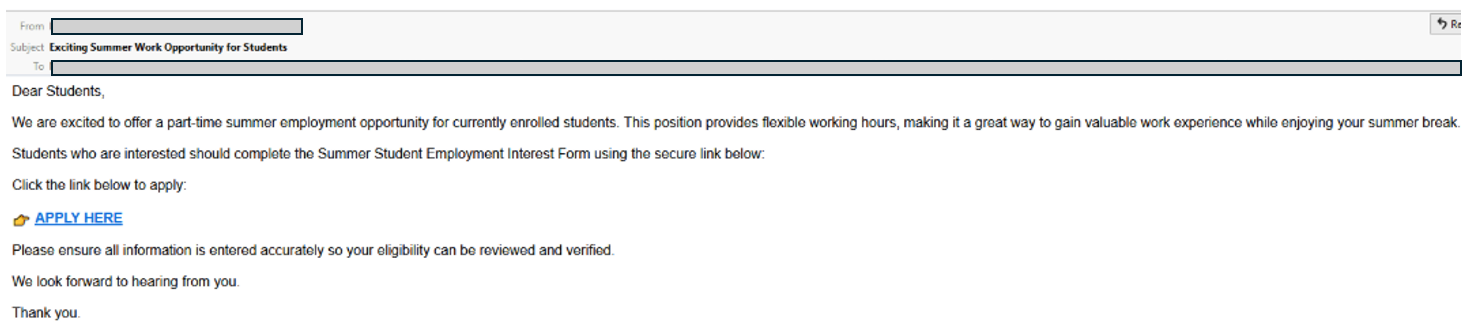
Figure 1: The email
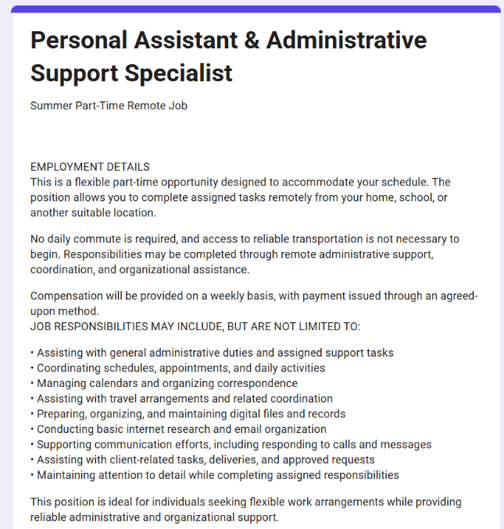
Figure 2: The job offer
The scam worked because it looked ordinary: a school account, a Google Forms link, and a simple job application. For students looking for summer work, that was enough to feel credible. It passed authentication: SPF, DKIM, and DMARC confirmed the message came from a legitimate account, not whether that account was compromised. It used trusted infrastructure: Google Forms gave the link the reputation of a familiar cloud service. It avoided obvious payloads: No attachment. No malware. No fake login page.
Authentication and reputation are useful signals, but they answer narrow questions: did the message come from where it claims, and does the link point to a known service? In this campaign, both answers looked safe. What they could not show was whether the sender had been compromised or the form was being used for fraud. Modern email security has to evaluate intent, context, and behavior—not just authentication or link reputation.
Email is no longer just something people read. It is also content that AI assistants and automated workflows can summarize, route, extract from, and act on. That matters in a scam like this because the message was designed to look routine: a job offer, a form, and a trusted sender. Once that kind of message is delivered, it can be treated as legitimate by the people and systems that rely on the inbox as a source of truth.
This student job scam did not rely on fake domains, malware, or obvious red flags. It relied on trust: a real school account, a real Google form, and a plausible message.
Check Point Email Security is designed for that reality. With AI-native detection, prevention-first inline protection, continuous analysis, and complete email and workspace security, it helps identify malicious intent before sophisticated phishing reaches users, AI assistants, or automated workflows.
此内容由惯性聚合(RSS阅读器)自动聚合整理,仅供阅读参考。 原文来自 — 版权归原作者所有。