
惯性聚合 高效追踪和阅读你感兴趣的博客、新闻、科技资讯
阅读原文 在惯性聚合中打开

推荐订阅源

罗磊的独立博客
Google DeepMind News
MyScale Blog
MyScale Blog
A
About on SuperTechFans
Martin Fowler
Martin Fowler
M
MIT News - Artificial intelligence
Recent Announcements
D
DataBreaches.Net
B
Blog
博客园 - 【当耐特】
爱范儿
爱范儿
有赞技术团队
有赞技术团队
P
Proofpoint News Feed
WordPress大学
WordPress大学
小众软件
小众软件
Apple Machine Learning Research
I
InfoQ
Engineering at Meta
Engineering at Meta
Cyber Security Advisories - MS-ISAC
Last Week in AI
Last Week in AI
Microsoft Azure Blog
雷峰网
雷峰网
量子位
G
Google Developers Blog

Check Point Blog

Reading the Signals in the OWASP LLM Top 10 2026 - Check Point Blog Ransomware Didn't Slow Down in Q2 2026. It Just Spread Out. - Check Point Blog July 2026 Cyber Threats Surge: Ransomware Attacks Double Year over Year as GenAI Data Exposure Widens - Check Point Blog State Sponsored Hackers Use Fake Job Offers to Deliver New Zero Day Exploit - Check Point Blog Lazarus Hackers Exploit Windows Zero-Day in Fake Job Scam Native AI Security Comes to Claude: Why Anthropic's Inference Hooks Matter - Check Point Blog Claude AI Security: How Anthropic Inference Hooks Enable Real-Time Protection The Top Exposure Management Questions Security Leaders Ask (Part 1) - Check Point Blog Black Hat 2026: Check Point Research Takes the Stage - Check Point Blog Check Point Joins the Open Secure AI Alliance to Advance Open, Measurable and Enterprise-Ready AI Security - Check Point Blog Three AI security disclosures, fourteen days: what the warnings signs are telling us - Check Point Blog When Data Becomes Instructions: AI Agents Need a Chain of Custody for Context - Check Point Blog Your VLAN Isn’t an Air Gap: Six Hard Truths From the New CI Fortify Guidance - Check Point Blog Check Point Named a Visionary Leader in the 2026 Frost Radar™ for Enterprise Risk Mitigation and Management Platforms - Check Point Blog AI Escaped a Sandbox. That is Not What Should Worry You - Check Point Blog Introducing the Industry's First AI Network Firewall - Check Point Blog AI Agent Security Just Had Its Catalyst Moment - Check Point Blog Your AI Governance Policy Should Survive Your Next Model Change - Check Point Blog The Branding and Attribution Behind Cybercrime - Check Point Blog Which Brands Are Impersonated Most? Inside the Q2 2026 Brand Phishing Report - Check Point Blog Security Advisory - Action Required - July 2026 Security Update - Check Point Blog What the 2026 Exposure Gap Report Reveals About Remediation - Check Point Blog Inline Email Security and Microsoft 365: A Practical View of Mail Routing, Risk, and Prevention - Check Point Blog The State of Hybrid SASE: Built-In vs. Bolted-On - Check Point Blog AI Appreciation Day: Let's Be Honest About What We're Appreciating - Check Point Blog AI Security Is Never Finished: Building the Continuous Red Teaming Loop  - Check Point Blog AI Security Threats in 2026: Annual Insights from Check Point Research - Check Point Blog AI Agents are Only As Effective as Their Harness - Check Point Blog Email Agent Hijacking: The Hidden Threat That Breaks Post-Delivery Security - Check Point Blog How Check Point Email Security Stopped a Student Job Scam Before It Reached the Inbox - Check Point Blog Redefining the CISO Contract: From Securing the Business to Securely Doing Business - Check Point Blog A New Ransomware Leader Emerges as June 2026 Attack Volumes Climb Worldwide
Attackers Are Turning Microsoft's Trusted Login System In...
Check Point Email Researchers · 2026-07-29 · via Check Point Blog

Attackers are increasingly abandoning fake Microsoft login pages in favor of abusing Microsoft’s legitimate authentication infrastructure, allowing phishing campaigns to bypass many of the warning signs employees have been trained to recognize.

Starting on June 25th through the second week of July, we identified more than 200 phishing emails targeting users across approximately 120 organizations, spanning a wide range of industries and countries worldwide. The messages impersonated Microsoft Teams task notifications from HR and directed recipients to a legitimate Microsoft sign-in page. Victims were then prompted to grant permissions to an attacker-controlled application, allowing the campaign to abuse Microsoft’s trusted authentication flow while concealing its malicious intent.

The Lure

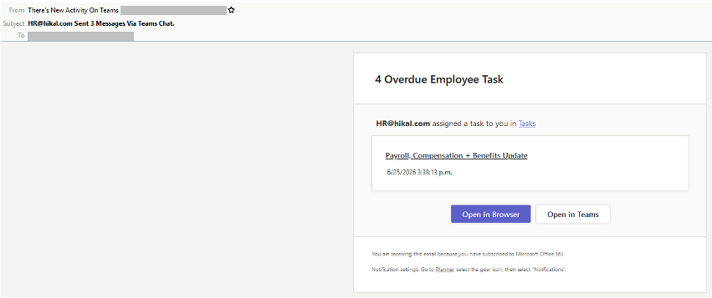
The message impersonates a Microsoft Planner task-assignment notification. The sender name is “There’s New Activity On Team,” and the subject line is “HR@[company].com Sent 3 Messages Via Teams Chat”. The body closely mimics Teams styling and references a “Payroll, Compensation + Benefits Update,” alongside a “4 Overdue Employee Tasks” counter intended to create urgency and encourage a quick click. Every link in the message, including both call-to-action buttons, leads through the same redirect. The visible sender address also belongs to the target’s own organization, meaning the email is sent to the same person it appears to come from.
The Attack Flow
  1. The user clicks the link.
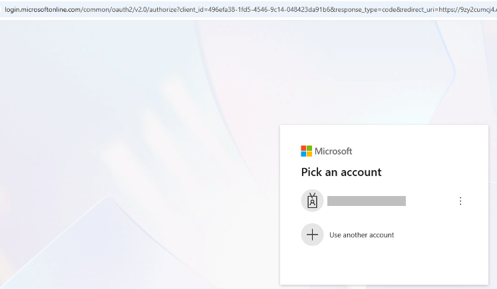
  2. The link opens a legitimate login.microsoftonline.com OAuth authorize URL — not a look-alike domain, which is exactly why it doesn’t look suspicious.
  3. Signing-in walks the user into a permissions prompt — “Approve permissions” or “Accept on behalf of your organization.”
  4. If approved, Microsoft redirects the browser to the redirect_uri specified in the original request. In this campaign, that’s an AWS API Gateway endpoint — attacker-controlled infrastructure, not Microsoft’s.
  5. The authorization code (or token) is delivered to that endpoint, and the attacker exchanges it for access — scope and impact depend entirely on what permissions were granted and whose account approved them.

This technique is already common and becoming increasingly widespread. It is a named and tracked technique in the MITRE ATT&CK framework, and in 2026 it evolved from a targeted, manually built attack into a service that virtually anyone can rent.

Impact to the individual or business

Depending on the permissions the user approves on the consent screen, the attacker-controlled app can operate across the victim’s entire Microsoft 365 environment:

  • Email — read, search, and send from the victim’s mailbox (a common springboard for follow-on BEC fraud from a trusted internal address)
  • Files — any documents the user can open, download, or share
  • Teams — chats, channel messages, and shared conversations
  • SharePoint — company sites, document libraries, and internal content the user can reach
  • OneDrive — the user’s personal cloud storage
  • Calendar — meetings, invites, and attendee details (useful for reconnaissance and timing convincing follow-up lures)

Among customers whose locations could be classified, the geographic distribution was as follows:

  • North America – 98.3%
  • Asia – 0.9%
  • LATAM – 0.9%

Among customers whose sectors could be classified, the leading sectors were as follows:

  • Industrial / Manufacturing — 39 emails (19.3%) across 15 organization
  • Legal / Professional Services — 28 emails (13.9%) across 21 organizations
  • Nonprofit / Associations — 22 emails (10.9%) across 16 organizations
  • Government / Public Sector — 18 emails (8.9%) across 9 organizations
  • Healthcare — 14 emails (6.9%) across 11 organizations
  • Other (the above doesn’t add up to 100% so we should use “other” for the last option.

Based on the findings, Check Point Email researchers believe that attackers have stopped forging Microsoft’s front door and started walking through it. Every screen the victim sees is authentic, the only fake thing in this entire chain is the intent behind the app requesting access.

The campaign is no longer active, but it’s yet another example of how attackers have fundamentally changed how they’re bypassing traditional phishing defenses.

Recommendations
  • Hover over links before clicking and check whether the destination matches the service referenced in the message. Be suspicious when different buttons lead to the same URL.
  • Verify that the sender name, sender address, and sending domain are consistent. In this campaign, the message appeared to come from the recipient’s own email address, while the display name claimed to represent Teams activity.
  • Do not trust an email simply because it appears to come from an internal address. Display names and sender addresses can be spoofed or manipulated.
  • When uncertain, open Teams or other applications directly through the official app rather than using links in the email.

Report suspicious messages immediately. Early reporting allows security teams to investigate the application, revoke malicious consent, identify affected accounts, and block related campaign activity.