
惯性聚合 高效追踪和阅读你感兴趣的博客、新闻、科技资讯
阅读原文 在惯性聚合中打开

推荐订阅源

GbyAI
GbyAI
Y
Y Combinator Blog
Recent Announcements
D
Docker
Blog — PlanetScale
Blog — PlanetScale
罗磊的独立博客
美团技术团队
V
V2EX
Last Week in AI
Last Week in AI
D
DataBreaches.Net
T
The Blog of Author Tim Ferriss
宝玉的分享
宝玉的分享
Microsoft Security Blog
Microsoft Azure Blog
人人都是产品经理
人人都是产品经理
M
MIT News - Artificial intelligence
P
Proofpoint News Feed
B
Blog RSS Feed
博客园_首页
B
Blog
博客园 - 叶小钗
I
InfoQ
WordPress大学
WordPress大学
L
LangChain Blog
Apple Machine Learning Research
freeCodeCamp Programming Tutorials: Python, JavaScript, Git & More
让小产品的独立变现更简单 - ezindie.com
A
About on SuperTechFans
The GitHub Blog
The GitHub Blog
The Register - Security
MyScale Blog
MyScale Blog
云风的 BLOG
云风的 BLOG
博客园 - 司徒正美
Latest news
Latest news
W
WeLiveSecurity
T
The Exploit Database - CXSecurity.com
OSCHINA 社区最新新闻
OSCHINA 社区最新新闻
aimingoo的专栏
aimingoo的专栏
小众软件
小众软件
Cyberwarzone
Cyberwarzone
Scott Helme
Scott Helme
D
Darknet – Hacking Tools, Hacker News & Cyber Security
C
CERT Recently Published Vulnerability Notes
C
CXSECURITY Database RSS Feed - CXSecurity.com
Recent Commits to openclaw:main
N
News and Events Feed by Topic
S
Secure Thoughts
The Hacker News
The Hacker News
Cyber Security Advisories - MS-ISAC
Google DeepMind News

博客园 - 魔豆

oracle中使用unpivot实现列转行 推荐一个可以下载B站视频的工具 学习qt,做了一个小应用:随机点名提问系统 hadoop的eclipse插件 mysql5.5安装到最后一步卡死无响应的解决方法 Hbase各版本支持情况 Comparable接口的使用 css3实现动画效果 HTML5中的Web Worker技术 css3中的盒子模型 使用visual studio code运行html 【转】解决chrome浏览器不支持audio和video标签的autoplay自动播放 spring mvc中添加对Thymeleaf的支持 Eclipse安装代码反编译插件Enhanced Class Decompiler 使用idea创建web项目 shell编程学习笔记(十二):Shell中的break/continue跳出循环 shell编程学习笔记(十一):Shell中的while/until循环 shell编程学习笔记(十):Shell中的for循环 shell编程学习笔记(九):Shell中的case条件判断
HTML5中使用EventSource实现服务器发送事件
魔豆 · 2019-05-27 · via 博客园 - 魔豆

在HTML5的服务器发送事件中,使用EventSource对象可以接收服务器发送事件的通知。

示例:

es.html

 1 <!DOCTYPE html>
 2 <html>
 3 <head>
 4 <meta charset="UTF-8">
 5 <title>Insert title here</title>
 6 <script src="https://cdn.bootcss.com/jquery/1.12.4/jquery.min.js"></script>
 7 <script src="https://cdn.bootcss.com/event-source-polyfill/0.0.9/eventsource.min.js"></script>
 8 </head>
 9 <body>
10 <ul id="list">
11 </ul>
12 <script>
13 var source = new EventSource("test1");
14 source.onmessage = function(event) {
15     var item = $("<li></li>").html(event.data);
16     $("#list").append(item);
17 }
18 </script>
19 </body>
20 </html>

服务端接收我用的是Spring MVC实现的:

Demo1Controller.java

 1 package com.test.controller;
 2 
 3 import java.util.Date;
 4 
 5 import org.springframework.stereotype.Controller;
 6 import org.springframework.web.bind.annotation.RequestMapping;
 7 import org.springframework.web.bind.annotation.ResponseBody;
 8 
 9 @Controller
10 public class Demo1Controller {
11     
12     @ResponseBody
13     @RequestMapping(value="/test1",produces="text/event-stream;charset=UTF-8")
14     public String test6() {
15         return "retry:5000\ndata:" + new Date().toLocaleString() + "\n\n";
16     }
17 
18 }

页面效果:
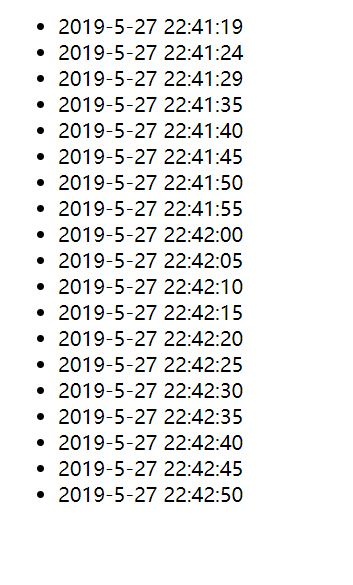
这个示例实现了每隔5秒钟从服务器获取当前服务器时间,并输出到页面上。

下面我解释一下关键代码:

es.html网页第7行,是引入了eventsource.min.js脚本,加入这个脚本是为了让IE8及以上版本的IE可以支持EventSource,EventSource在目前所有版本都不支持。在其他主流浏览器如谷歌,火狐等都是支持的

es.html网页第13行,是创建EventSource对象,并建立和服务端请求test1的连接

es.html网页第14行,是用来接收服务端发来的数据,并进行后续操作

java类第13行,需要在注解添加属性produces="text/event-stream;charset=UTF-8",不然会报错:EventSource's response has a charset ("iso-8859-1") that is not UTF-8. Aborting the connection.

java类第15行,是EventSource接收数据的固定格式:retry:${毫秒数}\ndata:${返回数据}\n\n,retry是指每隔多久请求一次服务器,data是指要接收的数据。注意这个retry参数不是必须的,如果不填写,对应的浏览器会有一个默认间隔时间,谷歌默认是3000毫秒,也就是3秒钟。