


Follow ZDNET: Add us as a preferred source on Google.
Last month, Microsoft took official notice of its customers' many complaints about Windows 11. Pavan Davaluri, the executive vice president who runs the Windows and Devices group, promised sweeping changes to Windows 11. Today, the company announced the first of those changes in a post authored by Alec Oot, who's been the principal group product manager for the Windows Insider Program since January 2024.
Those changes will streamline the Insider program, which has lost sight of its original goals in the past few years. (For a brief history of the program and what had gone wrong, see my post from last November: "The Windows Insider Program is a confusing mess.")
Also: If Microsoft really wants to fix Windows 11, it should do these four things ASAP
If you're currently participating in the Windows Insider Program, these are meaningful changes. Here's what you can expect.
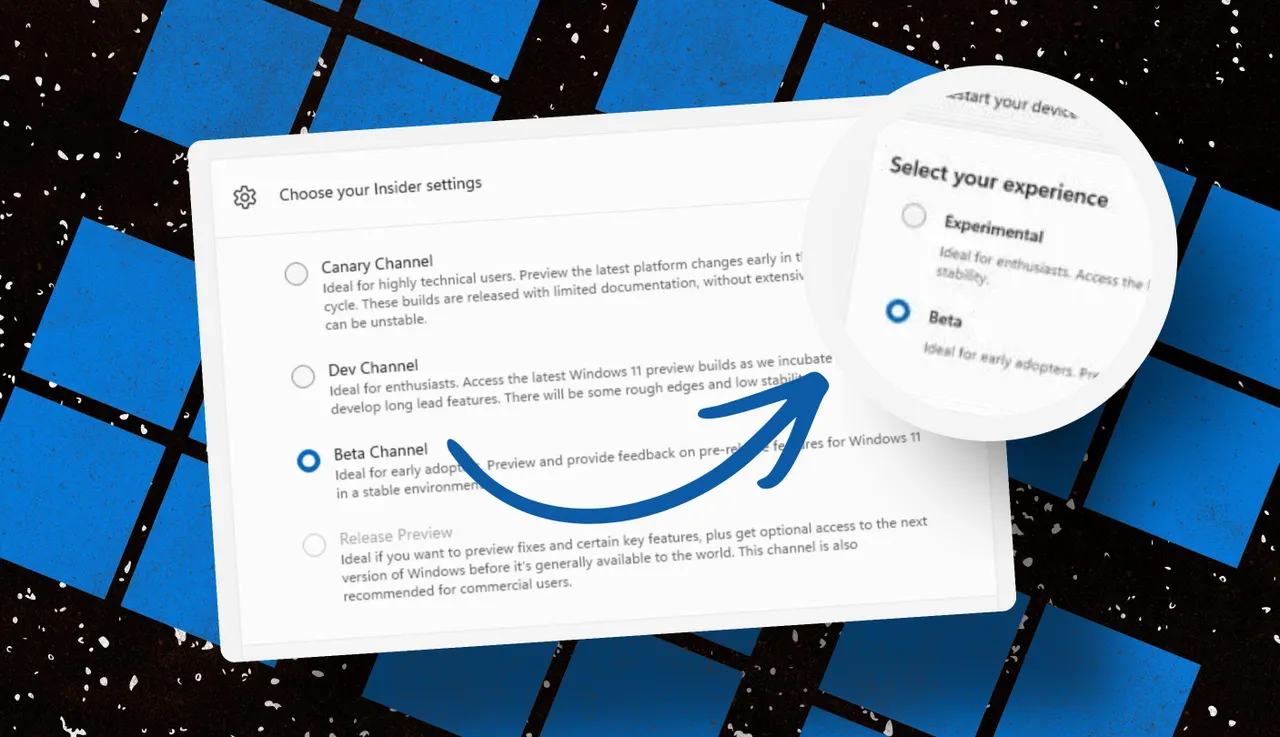
Throughout the Windows 11 era, signing up for the Insider program has required choosing one of four channels using a dialog in Windows Settings. Here's what those options look like today on one of my test PCs.
The current Insider channel lineup is confusing, to say the least.
Which channel should you choose? As the company admitted in today's post, "the channel structure became confusing. It was not clear what channel to pick based on what you wanted to get out of the program."
The new lineup consists of two primary channels: Experimental and Beta. The Release Preview channel will still be available, primarily for the benefit of corporate customers who want early access to production builds a few days before their official release. That option will be available under the Advanced Options section.
This simplified lineup is easier to follow. Beta is the upcoming retail release, Experimental is for the adventurous.
Here's Microsoft's official description of what's in each channel now, with the company's emphasis retained:
These changes will apply to the Windows Insider Program for Business as well.
For those testers who want to tinker with the bleeding edge of Windows development, a few additional options will be available in the Experimental channel. These advanced options will allow you to choose from a platform that's aligned to a currently supported retail build. Currently, that's Windows 11 version 25H2 or 26H1, with the latter being exclusively for new hardware arriving soon with Snapdragon X2 Arm chips.
Also: Microsoft account vs. local account: How to choose
There will also be a Future Platforms option, which represents a preview build that is not aligned to a retail version of Windows. According to today's announcement, this option is "aimed at users who are looking to be at the forefront of platform development. Insiders looking for the earliest access to features should remain on a version aligned to a retail build."
The Future Platforms option is the equivalent of the current Canary channel
Last month, I urged Microsoft to stop using its Controlled Feature Rollout technology, especially for builds in the Beta channel. Apparently, someone in Redmond was listening.
One of the most common questions we receive from Insiders is "why don't I have access to a feature that's been announced in a WIP blog?" This is usually due to a technology called Controlled Feature Rollout (CFR), a gradual process of rolling out new features to ensure quality before releasing to wider audiences. These gradual rollouts are an industry standard that help us measure impact before releasing more broadly. But they also make your experience unpredictable and often mean you don't get the new features that motivated many of you to join the Insider program to begin with.
Moving forward, Insider builds in the Beta channel will no longer suffer from this gradual rollout of features. Meanwhile, the company says, "Insiders in the Experimental channel will have a new ability to enable or disable specific features via the new Feature Flags page on the Windows Insider Program settings page."
Builds in the Experimental channel will include the option to turn new features on or off.
Not every feature will be available from this list, but the intent is to add those flags for "visible new features" that are announced as part of a new Insider build.
The final change announced today is one I didn't see coming. Historically, leaving the Windows Insider Program or downgrading a channel (from Dev to Beta, for example) has required a full wipe and reinstall. That's a major hurdle and a big impediment to anyone who doesn't have the time or technical skills to do that sort of migration.
Also: Why Microsoft is forcing Windows 11 25H2 update on all eligible PCs
Beginning with the new channel lineup, it should be easier to change channels or leave the program without jumping through a bunch of hoops.
To make this a more streamlined and consistent experience, we're making some behind the scenes changes to enable Insider builds to use an in-place upgrade (IPU) to hop between versions. This will allow in most cases Insiders to move between Experimental, Beta, and Release Preview on the same Windows core version, or leave the program without a clean install. An IPU takes a bit more time than your normal update but migrates your apps, settings, and data in-place.
If you've chosen one of the future platforms from the Experimental channel, those options don't apply. To move back to a supported retail platform, you'll need to do a clean install.
The upshot of all these changes should make things a lot clearer for anyone trying to figure out what's coming in the next big feature update. Beta channel updates, for example, should offer a more accurate preview of what's coming in the next big feature update, so over the next month or two we should get a better picture of what's coming in the 26H2 release, due in October.
When can we start to see those changes rolling out to the general public? Stay tuned.
此内容由惯性聚合(RSS阅读器)自动聚合整理,仅供阅读参考。 原文来自 — 版权归原作者所有。