


Telerik UI for WPF拥有超过100个控件来创建美观、高性能的桌面应用程序,同时还能快速构建企业级办公WPF应用程序。UI for WPF支持MVVM、触摸等,创建的应用程序可靠且结构良好,非常容易维护,其直观的API将无缝地集成Visual Studio工具箱中。
在上文中,小编为大家介绍了虚拟键盘的用途、主要的一些功能等(点击这里回顾>>),本文将继续为大家介绍如何为WPF应用程序制作一个虚拟键盘。
自定义
你觉得组件的默认外观太标准了?可以使用控件的 VirtualKeayboardTemplateSelector 属性自定义键盘按钮,让键盘与众不同!
<ResourceDictionary>
<ResourceDictionary.MergedDictionaries>
<ResourceDictionary Source="/Telerik.Windows.Themes.Crystal;component/Themes/System.Windows.xaml"/>
<ResourceDictionary Source="/Telerik.Windows.Themes.Crystal;component/Themes/Telerik.Windows.Controls.xaml"/>
<ResourceDictionary Source="/Telerik.Windows.Themes.Crystal;component/Themes/Telerik.Windows.Controls.Input.xaml"/>
<ResourceDictionary Source="/Telerik.Windows.Themes.Crystal;component/Themes/Telerik.Windows.Controls.Navigation.xaml"/>
</ResourceDictionary.MergedDictionaries>

<Style x:Key="KeyButtonStyle" TargetType="telerik:RadButton" BasedOn="{StaticResource RadButtonStyle}">
<Setter Property="Padding" Value="4"/>
<Setter Property="FontSize" Value="11"/>
<Setter Property="Focusable" Value="False"/>
<Setter Property="Foreground" Value="#4b6159"/>
<Setter Property="CornerRadius" Value="20"/>
<Setter Property="MinWidth" Value="0"/>
</Style>

<DataTemplate x:Key="RegularKeyTemplate">
<telerik:RadButton Command="{Binding KeyCommand}" AutomationProperties.AutomationId="{Binding DisplayText}" Style="{StaticResource KeyButtonStyle}" VerticalContentAlignment="Stretch" HorizontalContentAlignment="Stretch">
<Grid>
<Grid.RowDefinitions>
<RowDefinition/>
<RowDefinition/>
</Grid.RowDefinitions>
<Grid.ColumnDefinitions>
<ColumnDefinition/>
<ColumnDefinition/>
</Grid.ColumnDefinitions>
<TextBlock Text="{Binding ShiftText}" Margin="3 0 0 0" Grid.Row="0" Grid.Column="0" Visibility="{Binding ShowSecondaryText, Converter={StaticResource BooleanToVisibilityConverter}}"/>
<TextBlock Text="{Binding DisplayText}" Grid.RowSpan="2" Grid.ColumnSpan="2" HorizontalAlignment="Center" VerticalAlignment="Center"/>
</Grid>
</telerik:RadButton>
</DataTemplate>
<DataTemplate x:Key="SpecialKeyTemplate">
<telerik:RadButton Content="{Binding DisplayText}" Command="{Binding KeyCommand}" AutomationProperties.AutomationId="{Binding DisplayText}" Style="{StaticResource KeyButtonStyle}" Background="#ffdac1" MinWidth="40" />
</DataTemplate>
<DataTemplate x:Key="NumpadKeyTemplate">
<telerik:RadButton Content="{Binding DisplayText}" Command="{Binding KeyCommand}" AutomationProperties.AutomationId="{Binding DisplayText}" Style="{StaticResource KeyButtonStyle}"/>
</DataTemplate>
<DataTemplate x:Key="LockKeyTemplate">
<telerik:RadToggleButton Foreground="#4b6159" Content="{Binding DisplayText}" Command="{Binding KeyCommand}" IsChecked="{Binding IsChecked}" Background="#b5ead7"
AutomationProperties.AutomationId="{Binding DisplayText}" Focusable="False" FontSize="{Binding FontSize, RelativeSource={RelativeSource AncestorType={x:Type telerikNavigation:RadVirtualKeyboard}}}"
Padding="0" helpers:ThemeHelper.CornerRadius="30" helpers:ThemeHelper.FocusVisualMargin="0"/>
</DataTemplate>
<telerikNavigation:VirtualKeyboardTemplateSelector x:Key="VirtualKeyboardTemplateSelector"
RegularTemplate="{StaticResource RegularKeyTemplate}"
SpecialTemplate="{StaticResource SpecialKeyTemplate}"
NumpadTemplate="{StaticResource NumpadKeyTemplate}"
LockTemplate="{StaticResource LockKeyTemplate}" />
</ResourceDictionary>
让我们来看看:
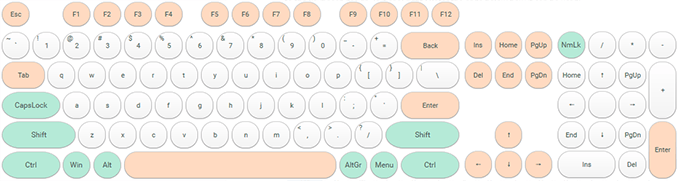
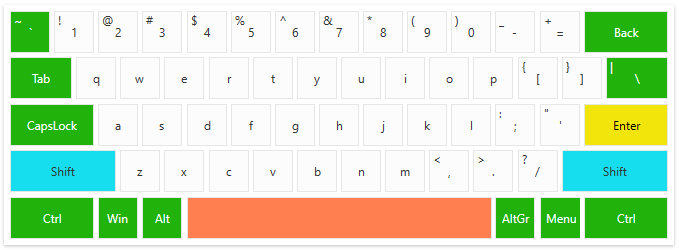
这还不是全部,通过扩展控件的视图模型和可在 VirtualKeyboardTemplateSelector 的 DataTemplates 中使用的其他属性,可以将控件的自定义提升到一个新的水平。您可以将需要实现自定义键的工厂类使用扩展视图模型,现在将演示如何为按钮的背景和前景添加属性。
1. 我们需要创建一个自定义键视图模型来包含背景和前景信息:
public class CustomLockKeyViewModel : LockKeyViewModel
{
public CustomLockKeyViewModel(int virtualKey, double keyWidth, double keyHeight, string displayText)
: base(virtualKey, keyWidth, keyHeight, displayText)
{
}
public Brush Background { get; set; }
public Brush Foreground { get; set; }
}

public class CustomModifierKeyViewModel : ModifierKeyViewModel
{
public CustomModifierKeyViewModel(int virtualKey, double keyWidth, double keyHeight, string displayText)
: base(virtualKey, keyWidth, keyHeight, displayText)
{
}
public Brush Background { get; set; }
public Brush Foreground { get; set; }
}

public class CustomRegularKeyViewModel : RegularKeyViewModel
{
public CustomRegularKeyViewModel(int virtualKey, double keyWidth, double keyHeight, bool showSecondaryText, string displayText = null)
: base(virtualKey, keyWidth, keyHeight, showSecondaryText, displayText)
{
}
public Brush Background { get; set; }
public Brush Foreground { get; set; }
}
public class CustomSpecialKeyViewModel : SpecialKeyViewModel
{
public CustomSpecialKeyViewModel(int virtualKey, double keyWidth, double keyHeight, string displayText)
: base(virtualKey, keyWidth, keyHeight, displayText)
{
}
public Brush Background { get; set; }
public Brush Foreground { get; set; }
}
2. 下一步是创建一个密钥因素:
public class CustomKeyFactory : DefaultKeyFactory
{
private static readonly List<int> specialColorKeyCodes = new List<int>()
{
8, 20, /*CapsLock*/ 9, /*tilde*/ 160,
/*Backspace*/ 226, 162, /*Ctrl*/
91, /*Win*/ 164, /*Alt*/ 165, /*AltGr*/ 93, /*Menu*/
163, /*Ctrl*/ 45, /*Backspace*/ 226, 192
};
public Brush DefaultBrush { get; set; }
public Brush EnterBrush { get; set; }
public Brush SpaceBrush { get; set; }
public Brush SpecialBrush { get; set; }
public Brush ShiftBrush { get; set; }
public Brush DefaultForeground { get; set; }

public CustomKeyFactory()
{
DefaultBrush = new SolidColorBrush((Color)ColorConverter.ConvertFromString("#FCFCFC"));
EnterBrush = new SolidColorBrush((Color)ColorConverter.ConvertFromString("#F2E50B"));
SpaceBrush = new SolidColorBrush((Color)ColorConverter.ConvertFromString("#FF7F50"));
SpecialBrush = new SolidColorBrush((Color)ColorConverter.ConvertFromString("#21B20C"));
ShiftBrush = new SolidColorBrush((Color)ColorConverter.ConvertFromString("#17DEEE"));
DefaultForeground = new SolidColorBrush((Color)ColorConverter.ConvertFromString("#333333"));
}
public override BaseKeyViewModel CreateKey(int virtualKey, KeyType keyType = KeyType.Normal, string displayText = null, double width = 1, double height = 1, int alternateVirtualKey = -1, string alternateText = null, bool showSecondaryText = false)
{
var keyModel = CreateCustomKey(virtualKey, keyType, displayText, width, height, alternateVirtualKey, alternateText, showSecondaryText);

if (virtualKey == 13) // Enter
{
SetCustomViewModelProperty(keyModel, "Background", EnterBrush);
SetCustomViewModelProperty(keyModel, "Foreground", Brushes.Black);
}
if (virtualKey == 13) // Enter
{
SetCustomViewModelProperty(keyModel, "Background", EnterBrush);
SetCustomViewModelProperty(keyModel, "Foreground", Brushes.Black);
}
else if (virtualKey == 32) // Space
{
SetCustomViewModelProperty(keyModel, "Background", SpaceBrush);
}
else if (virtualKey == 160 || virtualKey == 161) // Shift
{
SetCustomViewModelProperty(keyModel, "Background", ShiftBrush);
}
else if (specialColorKeyCodes.Contains(virtualKey))
{
SetCustomViewModelProperty(keyModel, "Background", SpecialBrush);
SetCustomViewModelProperty(keyModel, "Foreground", Brushes.White);
}
return keyModel;
}

private BaseKeyViewModel CreateCustomKey(int virtualKey, KeyType keyType, string displayText, double width, double height, int alternateVirtualKey, string alternateText, bool showSecondaryText)
{
switch (keyType)
{
case KeyType.Normal:
return new CustomRegularKeyViewModel(virtualKey, width, height, showSecondaryText, displayText) { Background = DefaultBrush, Foreground = DefaultForeground };
case KeyType.Special:
return new CustomSpecialKeyViewModel(virtualKey, width, height, displayText) { Background = DefaultBrush, Foreground = DefaultForeground };
case KeyType.Modifier:
return new CustomLockKeyViewModel(virtualKey, width, height, displayText) { Background = DefaultBrush, Foreground = DefaultForeground };
case KeyType.Lock:
return new CustomLockKeyViewModel(virtualKey, width, height, displayText) { Background = DefaultBrush, Foreground = DefaultForeground };
case KeyType.Numpad:
return new NumpadKeyViewModel(virtualKey, width, height, displayText, alternateVirtualKey, alternateText);
default:
throw new ArgumentException("Unknown key type");
}
}

private static void SetCustomViewModelProperty(BaseKeyViewModel viewModel, string propertyName, object value)
{
var propertyInfo = viewModel.GetType().GetProperty(propertyName);
if (propertyInfo != null)
{
propertyInfo.SetValue(viewModel, value);
}
}
}
3. 现在我们将定义键模板选择器:
<telerik:VirtualKeyboardTemplateSelector x:Key="KeyTemplateSelector">
<telerik:VirtualKeyboardTemplateSelector.RegularTemplate>
<DataTemplate>
<telerik:RadButton Command="{Binding KeyCommand}" VerticalContentAlignment="Stretch" HorizontalContentAlignment="Stretch" Padding="0" Background="{Binding Background}" Foreground="{Binding Foreground}">
<Grid>
<Grid.RowDefinitions>
<RowDefinition/>
<RowDefinition/>
</Grid.RowDefinitions>
<Grid.ColumnDefinitions>
<ColumnDefinition/>
<ColumnDefinition/>
</Grid.ColumnDefinitions>
<TextBlock Text="{Binding ShiftText}" Margin="3 0 0 0" Visibility="{Binding ShowSecondaryText, Converter={StaticResource BooleanToVisibilityConverter}}"/>
<TextBlock Text="{Binding DisplayText}" Grid.RowSpan="2" Grid.ColumnSpan="2" HorizontalAlignment="Center" VerticalAlignment="Center"/>
</Grid>
</telerik:RadButton>
</DataTemplate>
</telerik:VirtualKeyboardTemplateSelector.RegularTemplate>
<telerik:VirtualKeyboardTemplateSelector.SpecialTemplate>
<DataTemplate>
<telerik:RadButton Content="{Binding DisplayText}" Command="{Binding KeyCommand}" Padding="0" Background="{Binding Background}" Foreground="{Binding Foreground}"/>
</DataTemplate>
</telerik:VirtualKeyboardTemplateSelector.SpecialTemplate>
<telerik:VirtualKeyboardTemplateSelector.LockTemplate>
<DataTemplate>
<telerik:RadToggleButton Content="{Binding DisplayText}" Command="{Binding KeyCommand}" IsChecked="{Binding IsChecked}" Background="{Binding Background}" Foreground="{Binding Foreground}"/>
</DataTemplate>
</telerik:VirtualKeyboardTemplateSelector.LockTemplate>
</telerik:VirtualKeyboardTemplateSelector>
4. 最后一步是设置自定义密钥因素和模板选择器:
<telerik:RadVirtualKeyboard VirtualKeyboardTemplateSelector="{StaticResource KeyTemplateSelector}" DefaultKeyboardLayout="Compact" Width="675" Height="240">
<telerik:RadVirtualKeyboard.KeyFactory>
<local:CustomKeyFactory />
</telerik:RadVirtualKeyboard.KeyFactory>
</telerik:RadVirtualKeyboard>
Telerik_KendoUI产品技术交流群:726377843 欢迎一起进群讨论
此内容由惯性聚合(RSS阅读器)自动聚合整理,仅供阅读参考。 原文来自 — 版权归原作者所有。