


#include "stdafx.h"
#include <opencv2/opencv.hpp>
#include <iostream>

//using namespace cv;
//using namespace std;


cv::Mat GenMatImg()
{
	// 设置图片尺寸
	const int width = 400;
	const int height = 300;

	// 创建一个空白RGB图像(3通道)
	cv::Mat image(height, width, CV_8UC3, cv::Scalar(0, 0, 0));

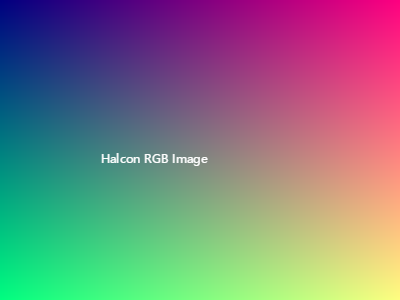
	// 填充颜色 - 创建渐变效果
	for (int y = 0; y < height; y++) {
		for (int x = 0; x < width; x++) {
			// 设置RGB值(注意OpenCV使用BGR顺序)
			int b = 128;  // 蓝色固定值
			int g = static_cast<int>(255 * y / static_cast<float>(height));  // 绿色从上到下渐变
			int r = static_cast<int>(255 * x / static_cast<float>(width));  // 红色从左到右渐变

			image.at<cv::Vec3b>(y, x) = cv::Vec3b(b, g, r);
		}
	}

	// 在图像上添加文字
	cv::String text = "OpenCV RGB Image";
	cv::Point textOrg(50, 150);
	int fontFace = cv::FONT_HERSHEY_SIMPLEX;
	double fontScale = 0.8;
	cv::Scalar color(255, 255, 255);  // 白色文字
	int thickness = 2;
	cv::putText(image, text, textOrg, fontFace, fontScale, color, thickness, cv::LINE_AA);

	return image;
}

bool SaveMat(cv::Mat &image, const cv::String &title)
{
	// 保存图像到文件
	//cv::String outputFilename = "generated_rgb_image.jpg";
	bool isSuccess = imwrite(title, image);
	if (isSuccess)
	{
		std::cout << "图像已成功保存为 " << title << std::endl;
		return true;
	}
	else
	{
		std::cerr << "保存图像失败!" << std::endl;
		return false;
	}
}


#include "Halcon.h"
#include "HalconCpp/HalconCpp.h"
#include <iostream>

using namespace HalconCpp;
using namespace std;

HImage GenHImage()
{
	try {
		// 设置图片尺寸
		const int width = 400;
		const int height = 300;

		// 创建三个单通道图像分别代表R、G、B
		HImage imgR, imgG, imgB;

		// 生成红色分量(从左到右渐变)
		HalconCpp::GenImageConst(&imgR, "byte", width, height);
		for (int y = 0; y < height; y++) {
			for (int x = 0; x < width; x++) {
				int r = static_cast<int>(255 * x / static_cast<float>(width));
				imgR.SetGrayval(y, x, r);
			}
		}

		// 生成绿色分量(从上到下渐变)
		HalconCpp::GenImageConst(&imgG, "byte", width, height);
		for (int y = 0; y < height; y++) {
			for (int x = 0; x < width; x++) {
				int g = static_cast<int>(255 * y / static_cast<float>(height));
				imgG.SetGrayval(y, x, g);
			}
		}

		// 生成蓝色分量(固定值128)
		HalconCpp::GenImageConst(&imgB, "byte", width, height);
		imgB = imgB + 128;

		// 将三个单通道图像合并为RGB图像
		HImage rgbImage;
		HalconCpp::Compose3(imgR, imgG, imgB, &rgbImage);

		// 在图像上添加文字
		HTuple widthText, heightText;
		rgbImage.GetImageSize(&widthText, &heightText);
		HTuple row = heightText / 2.0;
		HTuple column = widthText / 4.0;

		HWindow window;
		window.OpenWindow(0, 0, width, height, 0, "visible", "");
		window.DispObj(rgbImage);
		HalconCpp::DispText(window, "Halcon RGB Image", "image", row, column, "white", "box", "false");

		// 从窗口获取带有文字的图像
		HImage imageWithText = window.DumpWindowImage();

		return imageWithText;
	}
	catch (HException& ex) {
		std::cerr << "Halcon异常: " << ex.ErrorMessage().Text() << endl;
		return HImage();
	}

	return HImage();
}

bool SaveHImg(HalconCpp::HObject image, const char *title)
{
	HalconCpp::HImage hImg(image);
	hImg.WriteImage("bmp", 0, title);
	std::cout << "保存 HImage 完成!" << std::endl;
	return true;
}

#include "visioncomm/IImagePr.h"

int main()
{
	cv::Mat genmat = GenMatImg();
	SaveMat(genmat, "Mat_Image.jpg");

	vsc::PrImage primg = genmat;
	HalconCpp::HObject cnvMatToHobj = primg;
	SaveHImg(cnvMatToHobj, "Mat_Image_cnvMatToHobj");


	HalconCpp::HObject genhImg = GenHImage();
	SaveHImg(genhImg, "HImage");
	primg = genhImg;
	cv::Mat cnvHObjToMat = primg;
	SaveMat(cnvHObjToMat, "HImage_cnvHObjToMat.jpg");

	system("pause");
	return 0;
}

此内容由惯性聚合(RSS阅读器)自动聚合整理,仅供阅读参考。 原文来自 — 版权归原作者所有。