


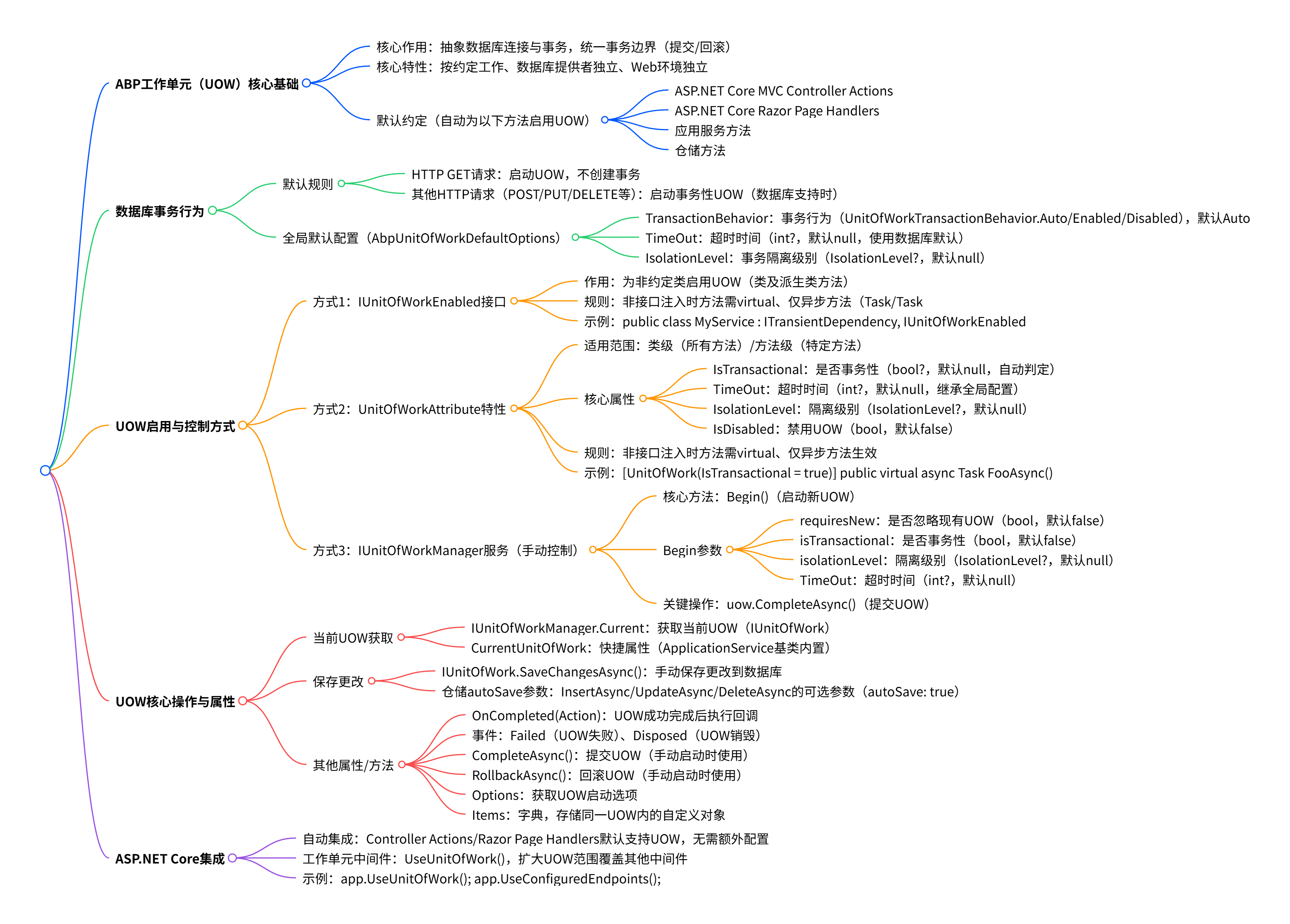
ABP框架的工作单元(UOW)实现提供了对应用程序中的数据库连接和事务范围的抽象和控制。
一旦一个新的UOW启动,它将创建一个环境作用域,当前作用域中执行的所有数据库操作都将参与该作用域并将其视为单个事务边界。操作一起提交(成功时)或回滚(异常时)。
ABP的UOW系统是:
以下方法类型被认为是一个工作单元:
[HttpPost] public async Task CreateOrder(...) 接口方法。OnPostSubmitAsync()。IXXXAppService 接口里的业务方法,比如 OrderAppService.CreateAsync(...)。IRepository<Order>.InsertAsync(...)。UOW自动针对这些方法开始,除非 周围已经有一个(环境) UOW在运行。示例:
DbContext),而UOW由ABP框架处理。所有这些都是由ABP框架自动处理的。
虽然上一节解释了UOW是数据库事务,但实际上UOW不必是事务性的。默认情况下:
这是因为HTTP GET请求不会(也不应该)在数据库中进行任何更改。你可以使用下面解释的选项来更改此行为。
isolationLevel: System.Data.IsolationLevel.ReadUncommitted
isolationLevel: System.Data.IsolationLevel.ReadCommitted
isolationLevel: System.Data.IsolationLevel.RepeatableRead
isolationLevel: System.Data.IsolationLevel.Serializable
| 场景 | 推荐隔离级别 | 原因 |
|---|---|---|
| 财务系统 | Serializable | 数据一致性最重要 |
| 电商库存 | Repeatable Read | 防止超卖 |
| 普通业务 | Read Committed | 平衡性能与一致性 |
| 报表查询 | Read Uncommitted | 性能优先 |
AbpUnitOfWorkDefaultOptions 用于配置工作单元系统的默认选项。在你的模块的 ConfigureServices 方法中配置选项。
Configure<AbpUnitOfWorkDefaultOptions>(options =>
{
    options.TransactionBehavior = UnitOfWorkTransactionBehavior.Disabled;
});
TransactionBehavior(enum : UnitOfWorkTransactionBehavior):配置事务行为的全局点。默认值为 Auto,按照上面“数据库事务行为”一节的说明工作。你可以使用此选项启用(甚至对于HTTP GET请求)或禁用事务。TimeOut(int?):用于设置UOW的超时值。默认值是 null 并使用基础数据库提供程序的默认值。IsolationLevel(IsolationLevel?):如果UOW是事务性的用于设置数据库事务的隔离级别。在某些情况下你可能希望更改常规事务作用域,创建内部作用域或精细控制事务行为。下面几节将介绍这些可能性。
这是为不是按照上面解释的约定作为工作单元的类(或类的层次结构)启用UOW的一种简单方法。
IUnitOfWorkEnabledusing System.Threading.Tasks;
using Volo.Abp.DependencyInjection;
using Volo.Abp.Uow;
namespace AbpDemo
{
public class MyService : ITransientDependency, IUnitOfWorkEnabled
{
public virtual async Task FooAsync()
{
//this is a method with a UOW scope
}
}
}
然后 MyService(和它的派生类)方法都将是UOW。
但是为了使它工作,有些规则应该被遵守:
IMyService)注入服务,则服务的方法必须是 virtual 的(否则动态代理/拦截 系统将无法工作)。Task或Task<T> 的方法)被拦截。因此同步方法无法启动UOW。注意,如果
FooAsync在UOW作用域内被调用,那么它已经参与了UOW,不需要IUnitOfWorkEnabled或其他配置。
UnitOfWork attribute提供了更多的可能性,比如启用或禁用UOW和控制事务行为。
UnitOfWork attribute可以用于类或方法级别。
using System.Threading.Tasks;
using Volo.Abp.DependencyInjection;
using Volo.Abp.Uow;

namespace AbpDemo
{
    public class MyService : ITransientDependency
    {
        [UnitOfWork]
        public virtual async Task FooAsync()
        {
            //this is a method with a UOW scope
        }

        public virtual async Task BarAsync()
        {
            //this is a method without UOW
        }
    }
}
using System.Threading.Tasks;
using Volo.Abp.DependencyInjection;
using Volo.Abp.Uow;

namespace AbpDemo
{
    [UnitOfWork]
    public class MyService : ITransientDependency
    {
        public virtual async Task FooAsync()
        {
            //this is a method with a UOW scope
        }

        public virtual async Task BarAsync()
        {
            //this is a method with a UOW scope
        }
    }
}
同样的规则也适用于此:
IMyService)注入服务,则服务的方法必须是 virtual 的(否则动态代理/拦截 系统将无法工作)。Task或Task<T> 的方法)被拦截。因此同步方法无法启动UOW。IsTransactional(bool?):用于设置UOW是否是事务性的。默认值为 null。如果你让它为 null,它会通过约定和配置自动确定。TimeOut(int?):用于设置UOW的超时值。默认值为 null 并回退到默认配置值。IsolationLevel(IsolationLevel?):如果UOW是事务的,用于设置数据库事务的隔离级别。如果未设置,则使用默认值。IsDisabled(bool):用于禁用当前方法/类的UOW。如果在环境UOW作用域内调用方法,将忽略
UnitOfWork属性,并且该方法参与周围的事务。
using System.Threading.Tasks;
using Volo.Abp.AspNetCore.Mvc;
using Volo.Abp.Uow;

namespace AbpDemo.Web
{
    public class MyController : AbpController
    {
        [UnitOfWork(IsDisabled = true)]
        public virtual async Task FooAsync()
        {
            //...
        }
    }
}
IUnitOfWorkManager 是用于控制工作单元系统的主要服务。下面的部分解释了如何使用此服务(大多数时候你并不需要)。
IUnitOfWorkManager.Begin 方法用于创建一个新的UOW作用域。
using System.Threading.Tasks;
using Volo.Abp.DependencyInjection;
using Volo.Abp.Uow;

namespace AbpDemo
{
    public class MyService : ITransientDependency
    {
        private readonly IUnitOfWorkManager _unitOfWorkManager;

        public MyService(IUnitOfWorkManager unitOfWorkManager)
        {
            _unitOfWorkManager = unitOfWorkManager;
        }

        public virtual async Task FooAsync()
        {
            using (var uow = _unitOfWorkManager.Begin(
                requiresNew: true, isTransactional: false
            ))
            {
                //...

                await uow.CompleteAsync();
            }
        }
    }
}
Begin 方法有以下可选参数:
requiresNew(bool):设置为 true 可忽略周围的工作单元,并使用提供的选项启动新的UOW。默认值为false。如果为false,并且周围有UOW,则 Begin 方法实际上不会开始新的UOW,而是以静默方式参与现有的UOW。isTransactional(bool):默认为 false。| isTransactional | 行为说明 |
|---|---|
true |
该 UOW 会创建一个数据库事务,作用域内的所有数据库操作遵循事务的 ACID 特性: 1. 原子性:所有操作要么一起提交,要么一起回滚; 2. 一致性:事务执行前后数据状态合法; 3. 隔离性:事务之间互不干扰(受隔离级别控制); 4. 持久性:提交后的数据变更永久生效。 |
false(默认值) |
该 UOW不创建数据库事务,只是管理数据库连接的生命周期,每个数据库操作都是独立的、无事务保护的。 这种模式适合纯查询场景(比如只查数据不修改),可以提升性能。 |
isolationLevel(IsolationLevel?):如果UOW是事务的,用于设置数据库事务的隔离级别。如果未设置,则使用默认值。TimeOut(int?):用于设置UOW的超时值。默认值为 null 并回退到默认配置值。| 场景(是否有外层 UOW) | requiresNew 参数 |
isTransactional 参数 |
实际行为 | 事务状态 |
|---|---|---|---|---|
| 无外层 UOW | false(默认) |
true |
创建新 UOW,复用参数配置 | 事务性(由 isTransactional 决定) |
| 无外层 UOW | false(默认) |
false |
创建新 UOW,复用参数配置 | 非事务性(由 isTransactional 决定) |
| 无外层 UOW | true |
true |
创建新 UOW,复用参数配置 | 事务性(由 isTransactional 决定) |
| 无外层 UOW | true |
false |
创建新 UOW,复用参数配置 | 非事务性(由 isTransactional 决定) |
| 有外层 UOW | false(默认) |
任意值 | 复用外层 UOW,忽略当前参数 | 继承外层 UOW 的事务状态 |
| 有外层 UOW | true |
true |
忽略外层 UOW,创建新 UOW | 事务性(由当前 isTransactional 决定) |
| 有外层 UOW | true |
false |
忽略外层 UOW,创建新 UOW | 非事务性(由当前 isTransactional 决定) |
关键规律总结:
requiresNew 无效(false/true 都新建 UOW),isTransactional 决定事务状态。requiresNew: false 复用外层 UOW;requiresNew: true 强制新建 UOW,isTransactional 生效。如上所述UOW是环境的。如果需要访问当前的工作单元,可以使用 IUnitOfWorkManager.Current 属性。
using System.Threading.Tasks;
using Volo.Abp.DependencyInjection;
using Volo.Abp.Uow;

namespace AbpDemo
{
    public class MyProductService : ITransientDependency
    {
        private readonly IUnitOfWorkManager _unitOfWorkManager;

        public MyProductService(IUnitOfWorkManager unitOfWorkManager)
        {
            _unitOfWorkManager = unitOfWorkManager;
        }

        public async Task FooAsync()
        {
            var uow = _unitOfWorkManager.Current;
            //...
        }
    }
}
Current 属性返回一个 IUnitOfWork 对象。
如果没有周围的工作单元,则当前工作单元可以为
null。如上所述,如果你的类是常规的UOW类,你将其手动设置为UOW或在UOW作用域内调用它,那么该值就不会为null。
IUnitOfWork.SaveChangesAsync() 方法将到目前为止的所有更改保存到数据库中。如果你正在使用EF Core,它的行为完全相同。如果当前UOW是事务性的,即使已保存的更改也可以在错误时回滚(对于支持的数据库提供程序)。
using System.Threading.Tasks;
using Volo.Abp.Application.Services;
using Volo.Abp.Domain.Repositories;

namespace AbpDemo
{
    public class CategoryAppService : ApplicationService, ICategoryAppService
    {
        private readonly IRepository<Category, int> _categoryRepository;

        public CategoryAppService(IRepository<Category, int> categoryRepository)
        {
            _categoryRepository = categoryRepository;
        }

        public async Task<int> CreateAsync(string name)
        {
            var category = new Category {Name = name};
            await _categoryRepository.InsertAsync(category);

            //Saving changes to be able to get the auto increment id
            await UnitOfWorkManager.Current.SaveChangesAsync();

            return category.Id;
        }
    }
}
示例的 Category 实体使用自动递增的 int 主键。自动增量PK需要将实体保存到数据库中来获得新实体的ID。
示例是从基类 ApplicationService 派生的应用服务,IUnitOfWorkManager 服务已经作为 UnitOfWorkManager 属性注入,所以无需手动注入。
获取当前UOW非常常见,所以还有一个 UnitOfWorkManager.Current 的快捷属性 CurrentUnitOfWork。所以可以对上面的例子进行以下更改:
await CurrentUnitOfWork.SaveChangesAsync();
由于经常需要在插入,更新或删除实体后保存更改,相应的仓储方法有一个可选的 autoSave 参数。可以将上面的 CreateAsync 方法按如下重写:
public async Task<int> CreateAsync(string name)
{
    var category = new Category {Name = name};
    await _categoryRepository.InsertAsync(category, autoSave: true);
    return category.Id;
}
如果你的目的只是在创建/更新/删除实体后保存更改,建议你使用 autoSave 选项,而不是手动使用 CurrentUnitOfWork.SaveChangesAsync()。
Note-1: 当工作单元结束而没有任何错误时,所有更改都会自动保存。所以除非确实需要,否则不要调用
SaveChangesAsync()和设置autoSave为true。Note-2: 如果你使用
Guid作为主键,则无需插入时保存来获取生成的id,因为Guid主键是在应用程序中设置的,创建新实体后立即可用。
OnCompleted 方法获得一个回调动作,当工作单元成功完成时调用(在这里你可以确保所有更改都保存了)。Failed 和 Disposed 事件可以用于UOW失败和被销毁的通知。Complete 和 Rollback 方法用于完成(提交)或回滚当前 UOW,通常ABP框架在内部使用,如果你使用 IUnitOfWorkManager.Begin 方法手动启动事务,那么你可以手动使用这些方法。Options 可用于获取启动UOW时使用的选项。Items 字典可用于在同一工作单元内存储和获取任意对象,可以实现自定义逻辑。先说明在 BulkBookOperationService 中:
public class BulkBookOperationService : ITransientDependency, IBulkBookOperationService
{
    private readonly IUnitOfWorkManager _unitOfWorkManager; // 手动注入

    public BulkBookOperationService(IUnitOfWorkManager unitOfWorkManager)
    {
        _unitOfWorkManager = unitOfWorkManager;
    }
}
也可以这样(更简洁):
public class BulkBookOperationService : ApplicationService, IBulkBookOperationService
{
    // 直接使用基类的 UnitOfWorkManager,无需构造函数注入
}
| 服务类型 | 推荐基类 | 原因 |
|---|---|---|
应用服务层 (*AppService) |
ApplicationService |
提供完整功能 |
领域服务层 (*Manager) |
ITransientDependency |
轻量级,无状态 |
| 普通工具服务 | ITransientDependency |
简洁为主 |
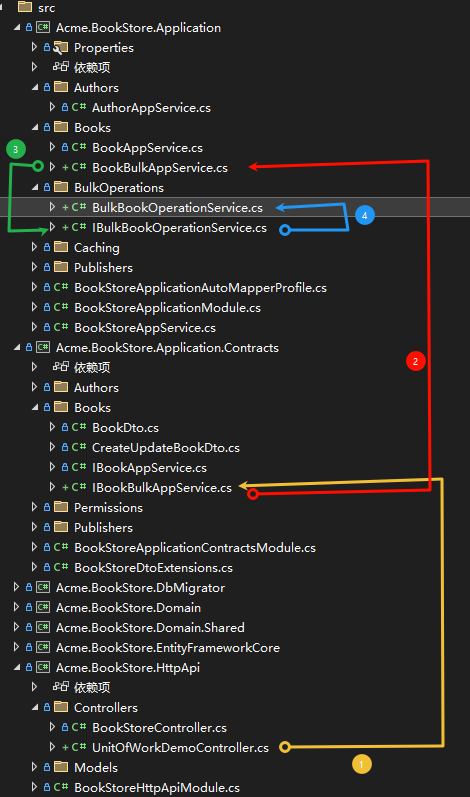
UnitOfWorkDemoController: HTTP API控制器,提供演示端点
namespace Acme.BookStore.HttpApi.Controllers
{
    [Route("api/unitofwork-demo")]
    public class UnitOfWorkDemoController : AbpController
    {
        private readonly IBookBulkAppService _bookBulkAppService;

        public UnitOfWorkDemoController(IBookBulkAppService bookBulkAppService)
        {
            _bookBulkAppService = bookBulkAppService;
        }

      //控制器
}
IBookBulkAppService: 对应的接口
    public interface IBookBulkAppService : IApplicationService
    {
	    //...接口
    }
}
BookBulkAppService: 应用服务层,使用工作单元管理器
    public class BookBulkAppService : BookStoreAppService, IBookBulkAppService
    {
        private readonly IBulkBookOperationService _bulkOperationService;
        private readonly IRepository<Book, Guid> _bookRepository;

        public BookBulkAppService(
            IBulkBookOperationService bulkOperationService,
            IRepository<Book, Guid> bookRepository)
        {
            _bulkOperationService = bulkOperationService;
            _bookRepository = bookRepository;
        }

        //... 方法
   }
BulkBookOperationService: 演示事务性和非事务性工作单元的使用
 public class BulkBookOperationService : ITransientDependency, IBulkBookOperationService
 {
     private readonly IRepository<Book, Guid> _bookRepository;
     private readonly IUnitOfWorkManager _unitOfWorkManager;

     public BulkBookOperationService(
         IRepository<Book, Guid> bookRepository,
         IUnitOfWorkManager unitOfWorkManager)
     {
         _bookRepository = bookRepository;
         _unitOfWorkManager = unitOfWorkManager;
     }

	//... 方法
}
IBulkBookOperationService: 对应的接口定义
namespace Acme.BookStore.BulkOperations
{
    public interface IBulkBookOperationService
    {
        //接口
    }
}
isTransactional: true): 批量更新,原子性提交或回滚批量更新书籍价格,支持原子性提交或回滚
使用 isolationLevel 设置事务隔离级别
异常时自动回滚
.HttpApi
[HttpPost("bulk-update-prices")]
public async Task<IActionResult> BulkUpdatePricesAsync([FromBody] Dictionary<Guid, float> priceUpdates)
{
    // 模拟价格更新数据
    //var priceUpdates = new Dictionary<Guid, float>
    //{
    //    // 这里应该使用实际存在的书籍ID
    //    { Guid.NewGuid(), 29.99f },
    //    { Guid.NewGuid(), 39.99f },
    //    { Guid.NewGuid(), 49.99f }
    //};

    try
    {
        var result = await _bookBulkAppService.BulkUpdatePricesAsync(priceUpdates);
        return Ok(new { Success = result, Message = "批量价格更新完成" });
    }
    catch (Exception ex)
    {
        return BadRequest(new { Success = false, Error = ex.Message });
    }
}
Application.Contracts
接口IBookBulkAppService.cs
  public interface IBookBulkAppService : IApplicationService
  {
	/// <summary>
	/// 批量更新书籍价格
	/// </summary>
	Task<bool> BulkUpdatePricesAsync(Dictionary<Guid, float> priceUpdates);

	//其他接口
  }
Application
BookBulkAppService.cs
/// <summary>
/// 批量更新书籍价格
/// </summary>
public async Task<bool> BulkUpdatePricesAsync(Dictionary<Guid, float> priceUpdates)
{
    // 记录操作信息到工作单元上下文
    if (UnitOfWorkManager.Current != null)
    {
        UnitOfWorkManager.Current.Items["BulkOperation"] = "PriceUpdate";
        UnitOfWorkManager.Current.Items["UpdateCount"] = priceUpdates.Count;
    }

    return await _bulkOperationService.BulkUpdateBookPricesAsync(priceUpdates);
}
BulkOperations/IBulkBookOperationService.cs
public interface IBulkBookOperationService
{
	/// <summary>
	/// 批量更新书籍价格 - 使用事务性工作单元
	/// </summary>
	Task<bool> BulkUpdateBookPricesAsync(Dictionary<Guid, float> bookPriceUpdates);

	//其他接口
BulkOperations/BulkBookOperationService.cs
/// <summary>
/// 批量更新书籍价格 - 使用事务性工作单元
/// 如果任何更新失败,所有更改都将回滚
/// </summary>
public async Task<bool> BulkUpdateBookPricesAsync(
    Dictionary<Guid, float> bookPriceUpdates)
{
    // 创建新的事务性工作单元 (显式指定isTransactional和隔离级别)
    using (var uow = _unitOfWorkManager.Begin(
        requiresNew: true,
        isTransactional: true,
        isolationLevel: System.Data.IsolationLevel.ReadCommitted))
    {
        try
        {
            foreach (var update in bookPriceUpdates)
            {
                var bookId = update.Key;
                var newPrice = update.Value;

                var book = await _bookRepository.GetAsync(bookId);
                if (book == null)
                {
                    throw new InvalidOperationException($"Book with id {bookId} not found.");
                }

                // 业务规则:价格不能为负数
                if (newPrice < 0)
                {
                    throw new ArgumentException($"Price cannot be negative for book {bookId}.");
                }

                book.Price = newPrice;
                await _bookRepository.UpdateAsync(book, autoSave: true);
            }

            // 提交事务
            await uow.CompleteAsync();

            return true;
        }
        catch
        {
            // 发生异常时自动回滚
            throw;
        }
    }
}
isTransactional: false): 只读或性能敏感场景批量插入书籍,提升性能
适合只读或性能敏感场景
.HttpApi
        [HttpPost("create-test-books/{count:int}")]
        public async Task<IActionResult> CreateTestBooksAsync(int count)
        {
            if (count <= 0 || count > 100)
            {
                return BadRequest("数量必须在1到100之间");
            }

            try
            {
                await _bookBulkAppService.BulkCreateTestBooksAsync(count);
                return Ok(new { Success = true, Message = $"成功创建 {count} 本测试书籍" });
            }
            catch (Exception ex)
            {
                return BadRequest(new { Success = false, Error = ex.Message });
            }
        }
Application.Contracts
接口IBookBulkAppService.cs
  public interface IBookBulkAppService : IApplicationService
  {
      /// <summary>
      /// 创建测试书籍并批量插入
      /// </summary>
      Task BulkCreateTestBooksAsync(int count);

	  //其他接口
  }
Application
BookBulkAppService.cs
/// <summary>
/// 创建测试书籍并批量插入
/// </summary>
public async Task BulkCreateTestBooksAsync(int count)
{
    var testBooks = new List<Book>();
    for (int i = 1; i <= count; i++)
    {
        testBooks.Add(new Book
        {
            Name = $"Test Book {i}",
            Type = BookType.Undefined,
            PublishDate = DateTime.Now.AddDays(-i),
            Price = 9.99f * i
        });
    }

    await _bulkOperationService.BulkInsertBooksAsync(testBooks);
}
BulkOperations/IBulkBookOperationService.cs
public interface IBulkBookOperationService
{
    /// <summary>
    /// 批量插入书籍 - 使用非事务性工作单元
    /// </summary>
    Task BulkInsertBooksAsync(List<Book> books);

	//其他接口
BulkOperations/BulkBookOperationService.cs
/// <summary>
/// 批量插入书籍 - 使用非事务性工作单元
/// 适合性能要求高的批量插入场景
/// </summary>
public async Task BulkInsertBooksAsync(List<Book> books)
{
    // 创建新的非事务性工作单元
    using (var uow = _unitOfWorkManager.Begin(requiresNew: true, isTransactional: false))
    {
        foreach (var book in books)
        {
            await _bookRepository.InsertAsync(book, autoSave: true); //一条一条插入,
        }
    }
}
requiresNew: 创建新工作单元或参与现有单元
SaveChangesAsync(): 手动保存更改
CompleteAsync() / RollbackAsync(): 提交或回滚事务
Items 字典: 在工作单元内共享上下文数据
OnCompleted 回调: 事务成功完成的回调
Current 属性: 获取当前工作单元信息
.HttpApi
/// <summary>
/// 演示不同工作单元选项的效果
/// </summary>
[HttpPost("process-selected-books")]
public async Task<IActionResult> ProcessSelectedBooksAsync([FromBody] List<Guid> bookIds)
{
	if (bookIds == null || bookIds.Count == 0)
	{
		return BadRequest(new { Success = false, Error = "书籍ID列表不能为空" });
	}

	try
	{
		await _bookBulkAppService.ProcessSelectedBooksAsync(bookIds);
		return Ok(new { Success = true, Message = $"成功处理了 {bookIds.Count} 本选中的书籍" });
	}
	catch (Exception ex)
	{
		return BadRequest(new { Success = false, Error = ex.Message });
	}
}
Application.Contracts
接口IBookBulkAppService.cs
  public interface IBookBulkAppService : IApplicationService
  {
	/// <summary>
	/// 处理特定书籍并使用共享上下文
	/// </summary>
	Task ProcessSelectedBooksAsync(List<Guid> bookIds);

	  //其他接口
  }
Application
BookBulkAppService.cs
/// <summary>
/// 处理特定书籍并使用共享上下文
/// </summary>
public async Task ProcessSelectedBooksAsync(List<Guid> bookIds)
{
	await _bulkOperationService.ProcessBooksWithSharedContextAsync(bookIds);
}
BulkOperations/IBulkBookOperationService.cs
public interface IBulkBookOperationService
{
	/// <summary>
	/// 使用工作单元Items字典共享数据
	/// </summary>
	Task ProcessBooksWithSharedContextAsync(List<Guid> bookIds);

	//其他接口
BulkOperations/BulkBookOperationService.cs
/// <summary>
/// 使用工作单元Items字典共享数据
/// </summary>
public async Task ProcessBooksWithSharedContextAsync(List<Guid> bookIds)
{
    using (var uow = _unitOfWorkManager.Begin(requiresNew: true))
    {
        // 在工作单元内共享数据
        uow.Items["ProcessStartedAt"] = DateTime.Now;
        uow.Items["ProcessedBooks"] = new List<string>();

        foreach (var bookId in bookIds)
        {
            var book = await _bookRepository.GetAsync(bookId);
            if (book != null)
            {
                // 处理书籍...
                var processedBooks = (List<string>)uow.Items["ProcessedBooks"];
                processedBooks.Add(book.Name);

                // 使用自动保存
                await _bookRepository.UpdateAsync(book, autoSave: true);
            }
        }

        // 注册完成回调
        uow.OnCompleted(() =>
        {
            var processedCount = ((List<string>)uow.Items["ProcessedBooks"]).Count;
            Console.WriteLine($"Processed {processedCount} books successfully.");
            return Task.CompletedTask;
        });
    }
}
POST /api/unitofwork-demo/bulk-update-prices: 批量更新价格
POST /api/unitofwork-demo/create-test-books/{count}: 创建测试书籍
GET /api/unitofwork-demo/uow-status: 获取工作单元状态
POST /api/unitofwork-demo/manual-uow-demo: 手动工作单元演示
GET /api/unitofwork-demo/uow-options-demo: 工作单元选项说明
POST /api/unitofwork-demo/process-selected-books 接收一个书籍ID列表,对这些书籍进行批量处理
工作单元系统已完全集成到ASP.NET Core。它为UOW系统定义了动作过滤器和页面过滤器。当你使用ASP.NET Core MVC控制器或Razor页面时,它可以正常工作。
使用ASP.NET Core时,通常你不需要做任何操作配置UOW。
AbpUnitOfWorkMiddleware 是可以在ASP.NET Core请求管道中启用UOW的中间件。如果你需要扩大UOW范围以涵盖其他一些中间件,可以这样做。
app.UseUnitOfWork();
app.UseConfiguredEndpoints();
此内容由惯性聚合(RSS阅读器)自动聚合整理,仅供阅读参考。 原文来自 — 版权归原作者所有。