


If your website feels sluggish even after optimizing images, minifying code, and upgrading hosting, the problem might not be where you think it is. One of the most overlooked causes of a slow-loading site is slow DNS lookup, and it can quietly add hundreds of milliseconds to every single page load without showing up in the obvious places.
For every page view on your site, browsers have to convert your domain name to its IP address before starting to load any part of your site. The process itself takes time, and the longer it takes, the more users will be idle, which negatively affects your bounce rate and site performance.
This article describes how to resolve this issue of slow DNS lookup, how it can happen, and, finally, gives you 9 proven ways to fix it.
Domain Name System (DNS) means exactly what you think: it is the address book of the Internet. Every time an end-user enters the domain name in a web browser to visit a website, it is the DNS protocol that will turn this readable domain name into the IP address of the server where the particular website is hosted. Otherwise, end-users would need to remember the IP addresses of each website they visit online.
The following is a basic explanation of the process:
The entire process takes place within a fraction of a second, but whenever there is some delay in one of these steps because of something like an overloaded resolver, remote nameserver, or poorly configured DNS infrastructure, then we have a slow DNS lookup, which will slow down everything else that follows.
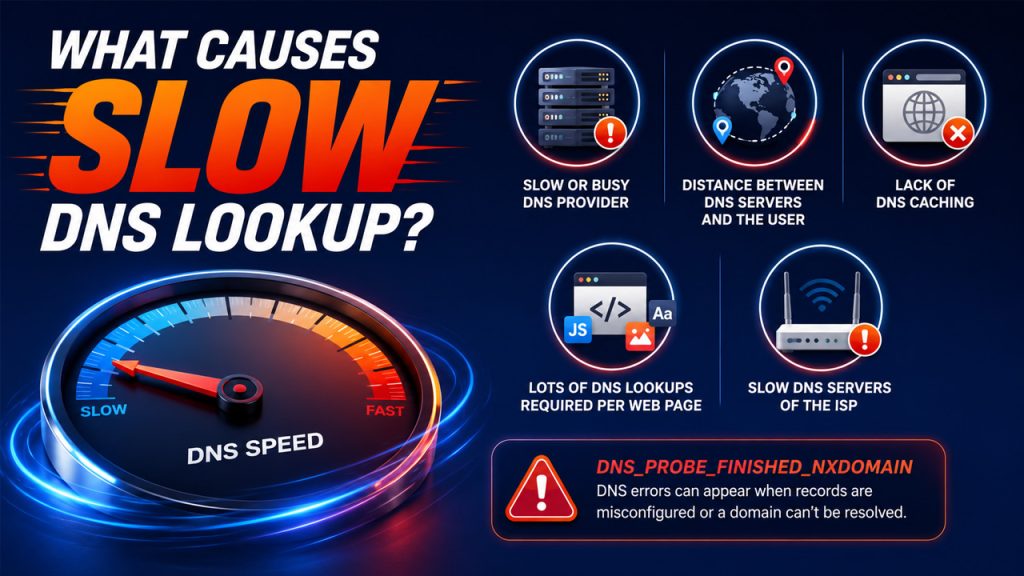
It is essential to know why the problem occurs before fixing it. There are multiple reasons for the slow DNS lookup, which makes it easy to apply the most appropriate remedy.
DNS errors like DNS_PROBE_FINISHED_NXDOMAIN are also commonly linked to these underlying issues, often appearing when DNS records are misconfigured or a domain simply can’t be resolved at all.
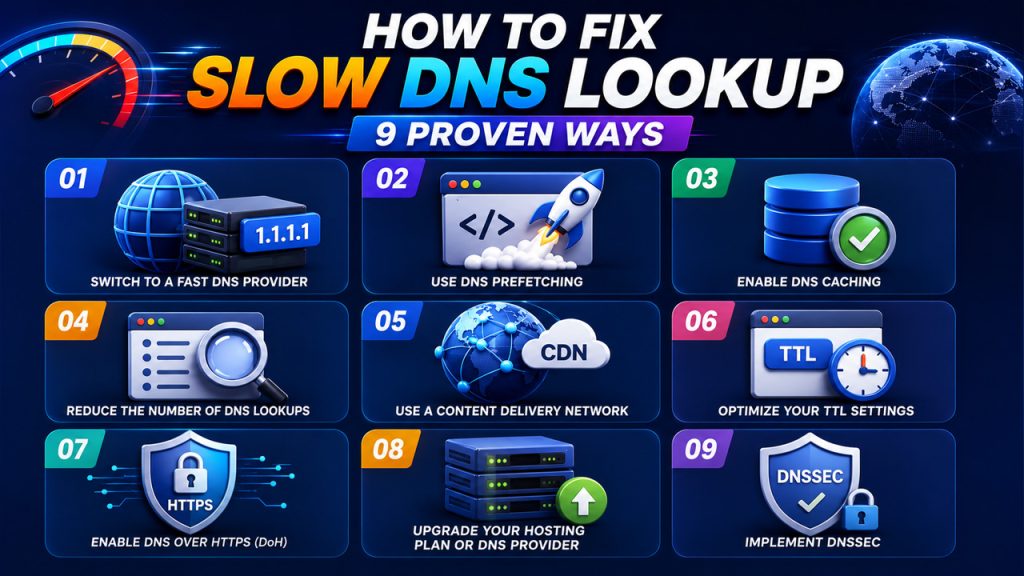
If you’ve confirmed that slow DNS lookup is dragging down your website speed, here are 9 proven ways to fix it, starting with one of the most impactful changes you can make.
There are many ways to try and find out how to resolve slow DNS lookup issues, but one of the easiest and fastest would be using a fast DNS service. Your ISP assigns you a default DNS, which may not be as fast and optimized as some other third-party DNS services.
Changing the DNS is an easy task that only takes several minutes and significantly speeds up the lookup process.
DNS prefetching is a simple but effective technique that tells the browser to resolve domain names in the background before a user actually clicks a link or loads a resource.
By resolving DNS in the background before it’s needed, prefetching removes lookup delays from the critical path of your page load entirely.
DNS caching allows your browser, operating system, and DNS resolver to store the IP addresses of websites for a set period of time. This means that the next time someone visits the same website, the DNS lookup is already done, and the browser can skip straight to loading the page instead of going through the full resolution process all over again.
By keeping DNS results cached at multiple levels, you significantly reduce the number of full lookups needed and keep your website speed optimization efforts working in the right direction.
Every third-party resource your page loads, whether it’s a font, an ad network, or a social media widget, triggers its own DNS lookup. These individual lookups might seem small on their own, but they stack up quickly and can add significant delays to your overall page load time.
Cutting down on unnecessary DNS lookups is one of the most direct ways to address DNS lookup issues and improve how quickly your page starts rendering for visitors.
A CDN is a network of servers distributed across different geographic locations designed to serve your website’s content from whichever server is closest to the visitors. Beyond just speeding up content delivery, a good CDN also helps reduce slow DNS lookup times by handling DNS resolution closer to where your visitors actually are.
A CDN doesn’t just make your content load faster; it makes the entire DNS resolution process faster too, which pays off for every single visitor regardless of where they’re browsing from.
TTL, or Time-to-Live, controls how long DNS resolvers cache a response before fetching a fresh one. Getting this right is one of the more overlooked ways to fix slow DNS lookup, but it directly affects how quickly your domain resolves for repeat visitors.
Finding the right TTL balance keeps DNS records cached long enough to speed things up, without causing stale record issues that affect how your site resolves for different visitors.
DNS over HTTPS is a protocol that encrypts DNS queries by sending them through HTTPS connections instead of plain, unencrypted requests. Beyond the privacy and security benefits, DoH can also help reduce DNS lookup issues by routing queries through faster, more reliable encrypted resolvers rather than the default ones assigned by your ISP.
Enabling DNS over HTTPS adds a layer of security while also giving your DNS queries a faster, more reliable path, making it a worthwhile fix for both website speed optimization and overall browsing safety.
Sometimes the root cause of slow DNS lookup isn’t a configuration issue at all; it’s simply that your current hosting plan or DNS provider isn’t fast enough to keep up. Budget hosting plans often come with shared, slower DNS infrastructure that becomes a bottleneck as your site grows.
Upgrading your DNS infrastructure is one of those fixes that pays off consistently over time, since faster resolution benefits every single visitor who lands on your site, not just a portion of them.
DNSSEC, or Domain Name System Security Extensions, is a security protocol that adds a layer of verification to the DNS lookup process, ensuring that the responses your visitors receive haven’t been tampered with or redirected maliciously.
A correctly configured DNSSEC setup protects your visitors from DNS-based attacks while keeping the resolution process running smoothly, making it a worthwhile addition to any serious website speed optimization strategy.
This table gives you a quick at-a-glance view of the most common causes behind slow DNS lookup and the corresponding fix for each.
| Cause | Fix |
| Slow or overloaded DNS provider | Switch to a faster DNS provider (Cloudflare, Google DNS) |
| Too many third-party DNS lookups | Reduce DNS lookups and use DNS prefetching |
| DNS responses not being cached | Enable DNS caching at browser, server, and OS level |
| TTL values set too low or too high | Optimize TTL settings to around 3600 seconds |
| Geographic distance to DNS servers | Use a CDN with built-in DNS and Anycast routing |
| Unencrypted DNS queries are slowing resolution | Enable DNS over HTTPS (DoH) |
| Budget hosting with slow DNS infrastructure | Upgrade hosting plan or switch to a dedicated DNS provider |
| DNS records vulnerable to tampering | Implement DNSSEC for secure, reliable resolution |
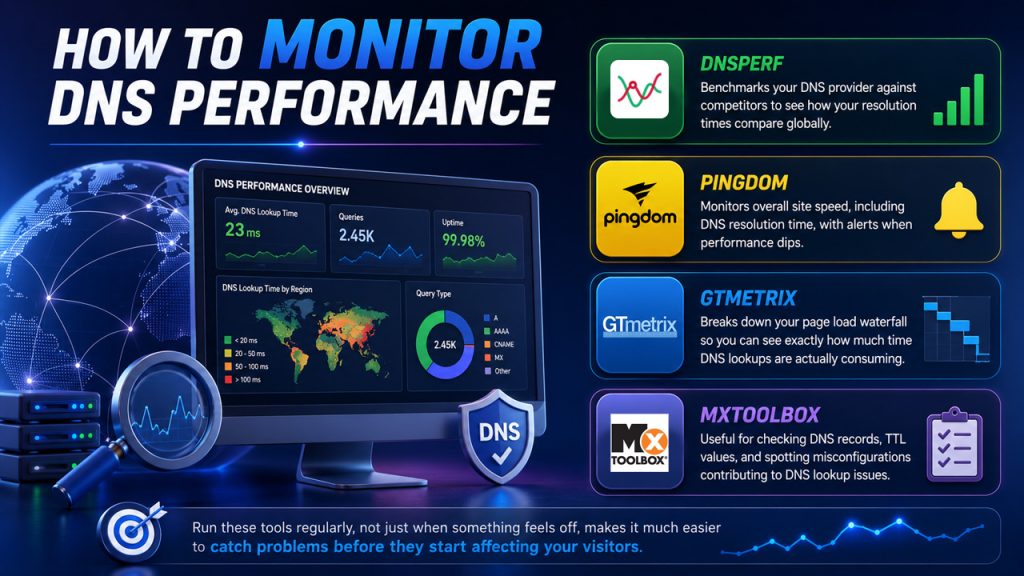
Fixing slow DNS lookup is only half the job; keeping an eye on performance over time ensures issues don’t creep back in unnoticed.
Here are a few reliable tools worth bookmarking:
Running these tools regularly, not just when something feels off, makes it much easier to catch problems before they start affecting your visitors.
Slow DNS lookup is one of those performance issues that’s easy to overlook but hard to ignore once you realize how much it’s affecting your site. Every millisecond added to the DNS resolution process is a millisecond your visitors spend waiting before your page even begins to load.
The good news is that most DNS lookup issues are fixable without a complete infrastructure overhaul. Whether it’s switching to a faster DNS provider, enabling caching, using a CDN, or fine-tuning your TTL settings, each fix we’ve covered contributes to a faster, more reliable experience for everyone who visits your site.
The key is to treat website speed optimization as an ongoing effort rather than a one-time fix. Along with improving DNS performance, understanding what is a runtime environment and ensuring your server is properly configured can further enhance your website’s speed, stability, and overall user experience. DNS performance can change over time as your traffic grows, third-party services change, or your hosting setup evolves. Keeping an eye on it regularly with the right monitoring tools ensures the improvements you make today continue to hold up tomorrow.
此内容由惯性聚合(RSS阅读器)自动聚合整理,仅供阅读参考。 原文来自 — 版权归原作者所有。