
惯性聚合 高效追踪和阅读你感兴趣的博客、新闻、科技资讯
阅读原文 在惯性聚合中打开

推荐订阅源

月光博客
月光博客
D
Docker
腾讯CDC
J
Java Code Geeks
大猫的无限游戏
大猫的无限游戏
The Cloudflare Blog
Martin Fowler
Martin Fowler
MongoDB | Blog
MongoDB | Blog
博客园 - Franky
博客园 - 三生石上(FineUI控件)
Recent Announcements
F
Fortinet All Blogs
IT之家
IT之家
WordPress大学
WordPress大学
M
MIT News - Artificial intelligence
爱范儿
爱范儿
Microsoft Azure Blog
Vercel News
Vercel News
钛媒体:引领未来商业与生活新知
钛媒体:引领未来商业与生活新知
小众软件
小众软件
N
Netflix TechBlog - Medium
T
Tailwind CSS Blog
Engineering at Meta
Engineering at Meta
博客园 - 【当耐特】

博客园 - 张占岭

keycloak~缓存对象的介绍与作用 wso2-apim-mcp2改版分析 mcp1和mcp2对比 为什么前端项目使用ts比js要多了 多个IDP的用户联合方案的分析 apisix~forward-auth外部认证 apisix~response-rewrite响应头重写 springboot~关于构造方法注入和字段注入的选择 apisix~OpenResty各阶段的介绍 keycloak~aud受众字段的作用及如何生成 wso2~关于workbuddy中mcp在wso2中的授权端点 k8s~避免调度资源碎片化 WEB安全~csrf介绍 WEB安全~DPoP的介绍 WEB安全~csp的介绍 什么是中间人攻击 WEB安全~xss的介绍 k8s~pod资源限制和JVM的XMX配置 关于对wso2和keycloak的token交换的调研 keycloak~实现OAuth 2.0 Token Exchange backstage~实体的介绍及它们的关系 backstage~openapi的接入与protobuf的对比 backstage~将java服务添加到backstage backstage~开始一个backstage应用 apisix~graphQL的支持 wso2几个核心项目介绍 docker~BuildKit的介绍 k8s~secret资源的使用 算法~时间戳计算两个日期是否为同天同时同分 wso2~4.5升级到4.6需要更新的数据表
backstage~对接github和gitlab
张占岭 · 2026-04-14 · via 博客园 - 张占岭

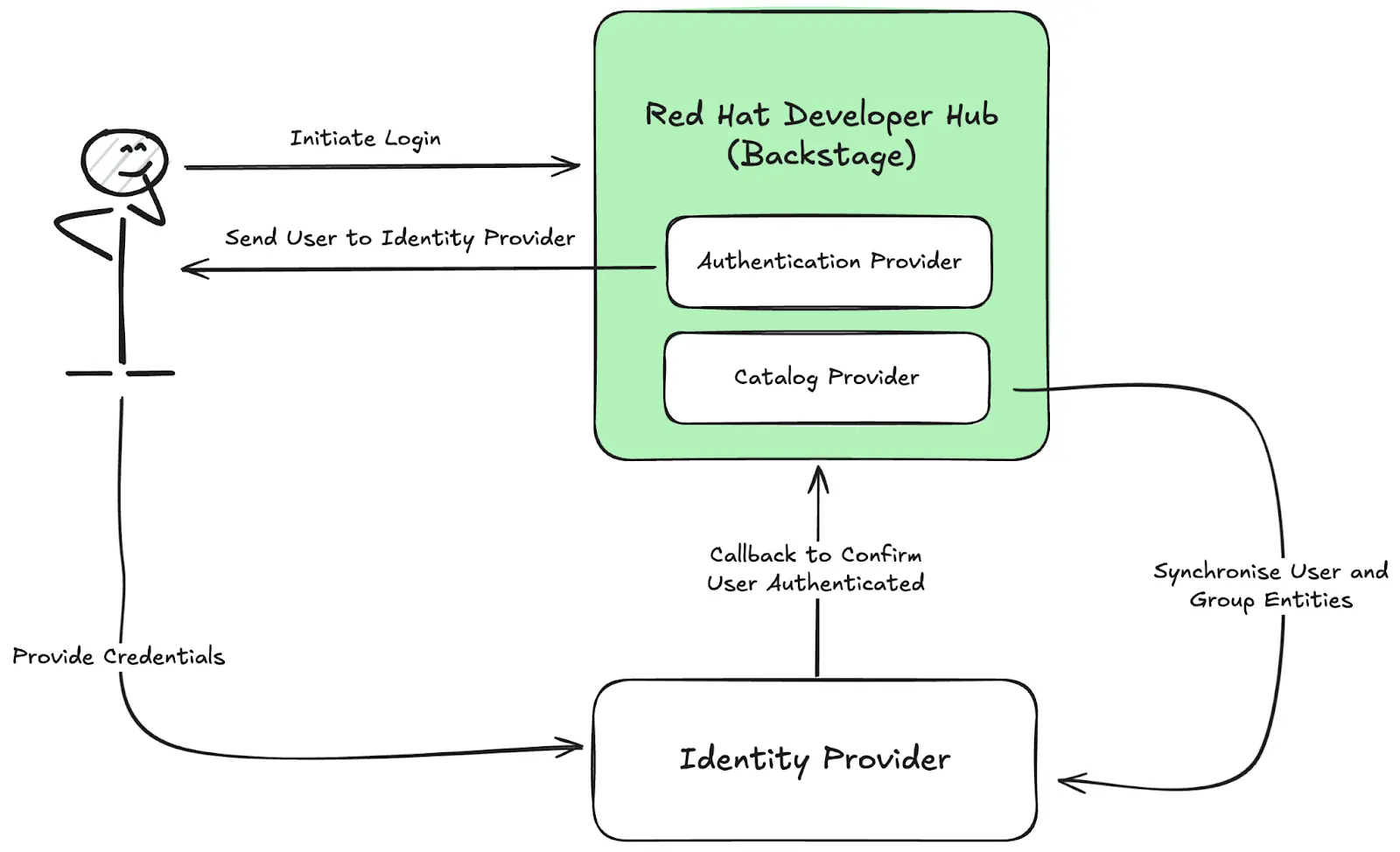
1 统一社区认证

1.1 对接github登录

1.2 对接gitlab登录

1.3 添加认证方式添加到登录页

  • /app/src/App.tsx
const app = createApp({
  apis,
  components: {
    SignInPage: props => (
      <SignInPage
        {...props}
        auto
        providers={[
          'guest',
          {
            id: 'github-auth-provider',
            title: 'GitHub',
            message: 'Sign in using GitHub',
            apiRef: githubAuthApiRef,
          },
          {
            id: 'gitlab-auth-provider',
            title: 'GitLab',
            message: 'Sign in using GitHub',
            apiRef: gitlabAuthApiRef,
          },
        ]}
      />
    ),
  },
  ...

1.4 已登录的其它认证方式入口

图片

1.5 注意事项

需要安装github插件

  • yarn workspace backend add @backstage/plugin-auth-backend-module-github-provider
  • 安装后,backend 的 index.ts 中添加它backend.add(import('@backstage/plugin-auth-backend-module-github-provider'));
  • 本地http调试时,环境变量,禁用ssl,添加:NODE_TLS_REJECT_UNAUTHORIZED=0
  • 安装gitlab与上面的github类似,直接安装@backstage/plugin-auth-backend-module-gitlab-provider包即可

2 从github或者gitlab拉取catalog

2.1 配置可信任域名

  • 配置gitlab白名单
backend:
    reading:
        allow:
          - host: 192.168.xx.xx# 允许访问这个IP地址
          - host: github.com    # 通常已默认允许
          - host: gitlab.com    # 通常已默认允许

2.2 在github和gitlab上生产访问资源的token

图片

2.2 配置github和gitlab的token

integrations:
  github:
    - host: github.com
      # This is a Personal Access Token or PAT from GitHub. You can find out how to generate this token, and more information
      # about setting up the GitHub integration here: https://backstage.io/docs/integrations/github/locations#configuration
      token: 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
  gitlab:
      - host: 192.168.xx.xx
        apiBaseUrl: http://192.168.xx.xx/api/v4
        token: hW_qU_iE7GGgXwzf2hZy

添加catalog从三方仓库

刷新catelog

第三方资源文件有变更后,可以直接刷新它,来更新backstage中的信息
图片