
惯性聚合 高效追踪和阅读你感兴趣的博客、新闻、科技资讯
阅读原文 在惯性聚合中打开

推荐订阅源

Threat Intelligence Blog | Flashpoint
T
Troy Hunt's Blog
Scott Helme
Scott Helme
T
Threat Research - Cisco Blogs
T
Tenable Blog
L
LINUX DO - 热门话题
V
Visual Studio Blog
I
Intezer
Blog — PlanetScale
Blog — PlanetScale
Cisco Talos Blog
Cisco Talos Blog
A
Arctic Wolf
C
Cyber Attacks, Cyber Crime and Cyber Security
F
Fortinet All Blogs
aimingoo的专栏
aimingoo的专栏
Know Your Adversary
Know Your Adversary
CTFtime.org: upcoming CTF events
N
Netflix TechBlog - Medium
SecWiki News
SecWiki News
I
InfoQ
Microsoft Security Blog
Project Zero
Project Zero
W
WeLiveSecurity
Microsoft Azure Blog
A
About on SuperTechFans
Recorded Future
Recorded Future
Cyber Security Advisories - MS-ISAC
Vercel News
Vercel News
S
Securelist
Spread Privacy
Spread Privacy
L
LangChain Blog
云风的 BLOG
云风的 BLOG
G
Google Developers Blog
MongoDB | Blog
MongoDB | Blog
Google DeepMind News
Recent Commits to openclaw:main
D
Darknet – Hacking Tools, Hacker News & Cyber Security
C
CERT Recently Published Vulnerability Notes
罗磊的独立博客
K
KPMG report finds enterprise disconnect between AI and its ROI | CIO
The Last Watchdog
The Last Watchdog
Attack and Defense Labs
博客园 - 司徒正美
Help Net Security
Help Net Security
L
Lohrmann on Cybersecurity
人人都是产品经理
人人都是产品经理
Forbes - Security
Forbes - Security
Hacker News - Newest:
Hacker News - Newest: "LLM"
PCI Perspectives
PCI Perspectives
博客园 - 【当耐特】
T
Tor Project blog

博客园 - Insus.NET

User Profile Service 服务未能登录 Visual Studio2026创建Vue项目 安装与配置node.js HTTP Error 403.14 - Forbidden VisualStudio2026回滚上一版本 消息认证码(加强) 网站无法使用插值字符串语法 HMAC(Hash-based Message Authentication Code)认证示例 浏览器自动发送域凭据 企业内小网站兼用Windows验证登录 访问用户控件的函数 onblur事件改为监听处理 将警报消息改为吐司消息 内容有无变化OnBlur即时更新引起的问题与解决 混合式提高用户编辑与操作效率 光标离开文框后即刻更新 WebForm实现Web API JavaScript对GridView删除行后并重新给其数据绑定 把CS值传给JS使用 v2 确认信息confirm由C#后端移至javascript前端 无法发布网站Web Site JavaScript判断字符是否为decimal 点击单元格弹出窗口处理数据返回父页 GridView数据控件中实现单选功能 GridView对行进行全选或单选 TextBox文本框允许用户输入正或负小数 用户单击文本并复制至剪帖板 Vue3格式化日期时间与插值 SQL Server中验证大小字母和数字 MS SQL Server 数据加密与解密实例 相册由原来Lightbox升级至Vue2瀑布流 从Visual Studio 2022升级至Visual Studio 2026 报表应用图表charts显示数据 钉钉(DingTalk)免登录 Upgrade Outlook Connector 程序中真实应用SignalR Web API路径与IIS站点应用程序名或虚拟目录 在您可以登录前,此副本的 Windows 必须被 Microsoft 激活。您想现在激活它吗 电脑系统由Win10降级Win7折腾还是折腾 System.ComponentModel.Win32Exception: Access is denied
文本框输入完后直接按回车提交数据
Insus.NET · 2026-04-02 · via 博客园 - Insus.NET

开发时,一般这样子,一个文本框,一个按钮,
用户输入完,再鼠标点击铵钮来提交数据。
这样子,习惯与效率均会有影响。

另一种情况,在文本框TextBox添加:

 AutoPostBack="true" OnTextChanged="xxx_click"

2个属性与事件,这样会引起页面闪动与回发。

还有一种情况,使用Javascript的焦点事件blur来实现,虽然不会冒泡,亦得用户鼠标点击文本框外来触发。

下面来改变一下。
按照用户操作习惯,在文本框中输入完文本后,往往直接按回车,而不是再转手用鼠标点击。

 <asp:TextBox ID="TextBoxSheBeiBianHao" runat="server" AutoPostBack="false"></asp:TextBox>
 <asp:Button ID="ButtonVerify" runat="server"
     Text="设备编码"
     OnClick="ButtonVerify_Click"
     Style="display: none;" />

把铵钮Button隐藏起来, style="display:none"

再写javascript程序,监听用户铵回车Enter或

e.keyCode === 13


对了,选引用jQuery:
<script src="https://code.jquery.com/jquery-3.6.0.min.js"></script>
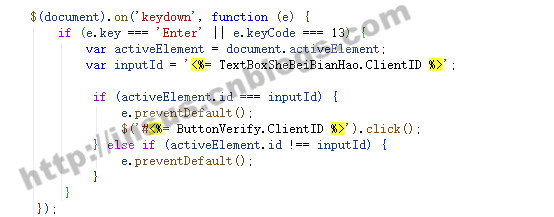
2026-04-02_13-45-54

<script type="text/javascript">
$(document).on('keydown', function (e) {
    if (e.key === 'Enter' || e.keyCode === 13) {
        var activeElement = document.activeElement;
        var inputId = '<%= TextBoxSheBeiBianHao.ClientID %>';

         if (activeElement.id === inputId) {
             e.preventDefault();
             $('#<%= ButtonVerify.ClientID %>').click();
         } else if (activeElement.id !== inputId) {
             e.preventDefault();
         }
     }
 });
</script>

View Code

 protected void ButtonVerify_Click(object sender, EventArgs e)
 {
    //这里拿到文本框用户输入的值。
    //进行处理......
}