With gaming handhelds becoming an increasingly popular way to play, many people have gotten used to the Steam Deck's multitude of inputs, including buttons, joysticks, touchpads, back buttons, and gyroscope. But when you go to play at your TV, those controls don't typically come with you.
With the Steam Controller, that's no longer the case. Valve's $99 gamepad loyally recreates the Steam Deck's various ways to play, while also adding a few new features, like drift-free TMR joysticks and a new Grip Sense feature that can tell if you're holding the controller in your hand.
Design and Comfort of the Steam Controller
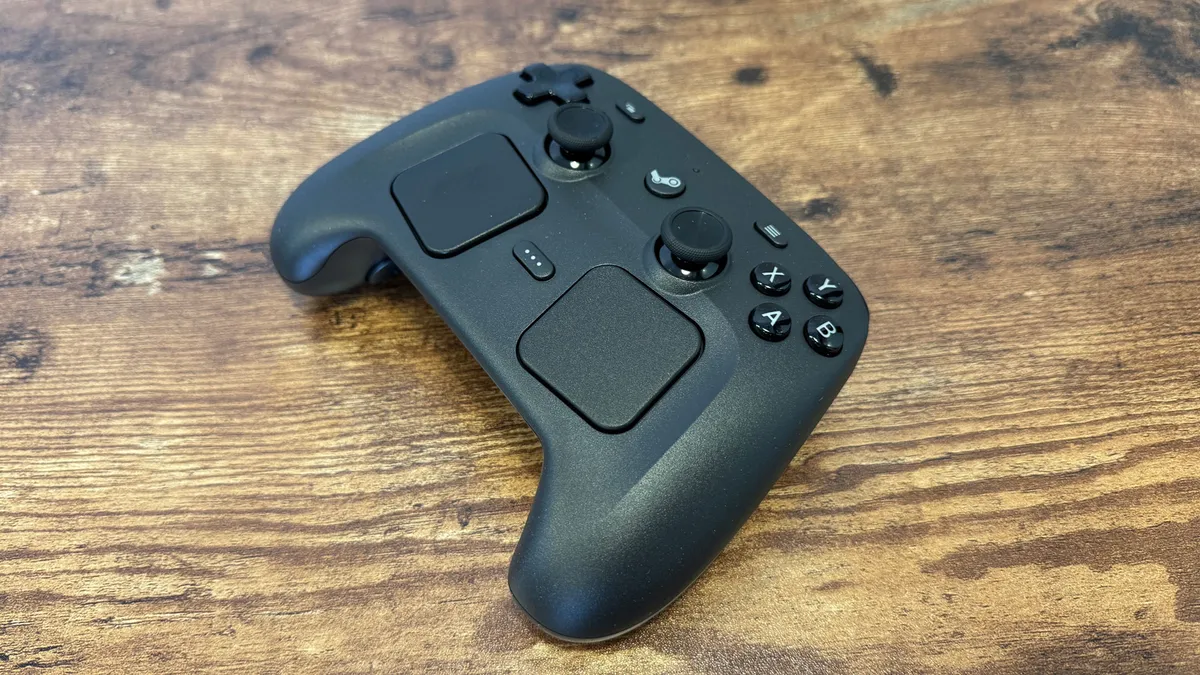
The Steam Controller looks far chunkier than it feels. At first glance, the addition of touchpads below a jammed-together, Playstation-style layout with symmetrical thumbsticks seems to make for a bulky device. But even in my average-sized (at best) hands, it fit well. All of that heft is in the front, and the long grips prevent you from even touching it in the back.
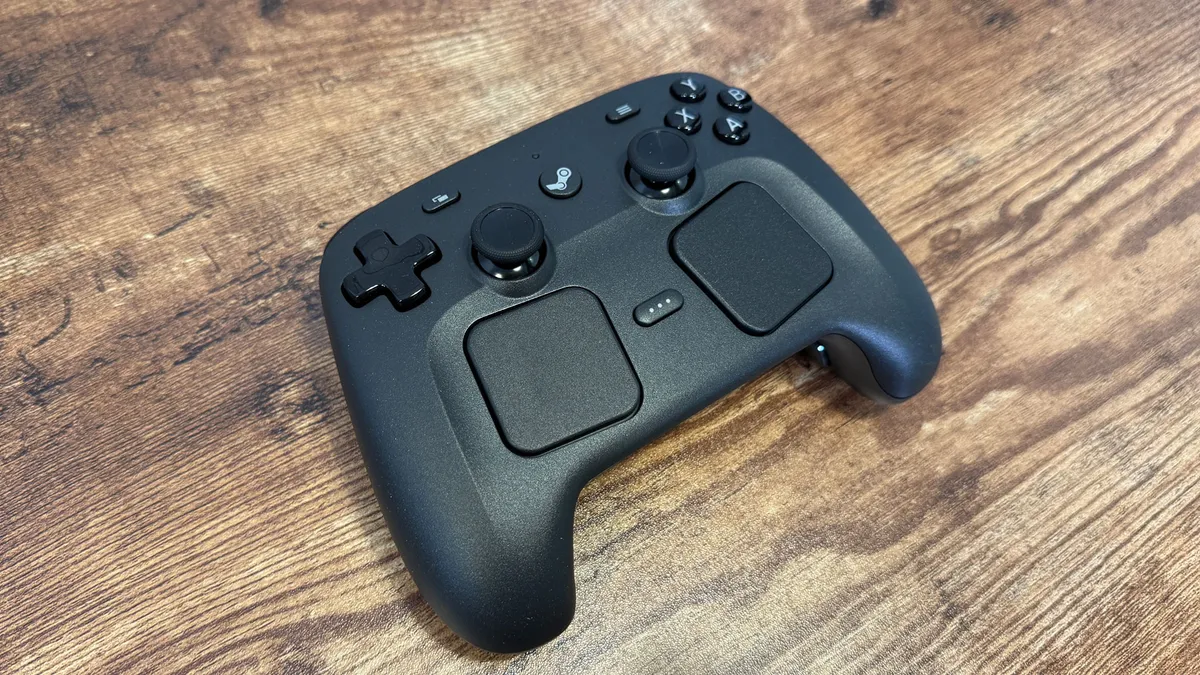
At 292 grams, or about 0.64 pounds, it's in line with an Xbox Series X/S controller when you include the pair of AA batteries required to power Microsoft's option. It's heavier than the Sony's DualSense for the PS5. The Steam Controller can be a bit weighty, but I never had a problem with it.
Unsurprisingly, the Controller looks and feels like a Steam Deck, largely due to the black matte plastic, similar buttons and D-pad, and the touchpad. The joysticks, which look similar to the ones on the Steam Deck OLED (but not so much the gray ones on the LCD Steam Deck), are superior to the ones on Valve's handhelds in one major way: They use TMR (Tunnel Magnetoresistance), which helps reduce drifting and should make them more accurate.
The layout should be largely familiar to anyone who has used either a Steam Deck or a PlayStation controller. Like the PlayStation DualSense Edge, the sticks are symmetrical. Like the Steam Deck, you get identical buttons and touchpads. Unlike Microsoft and Sony's controllers, the Steam Controller doesn't feature a headphone jack for passthrough audio.
Image
1
of
2
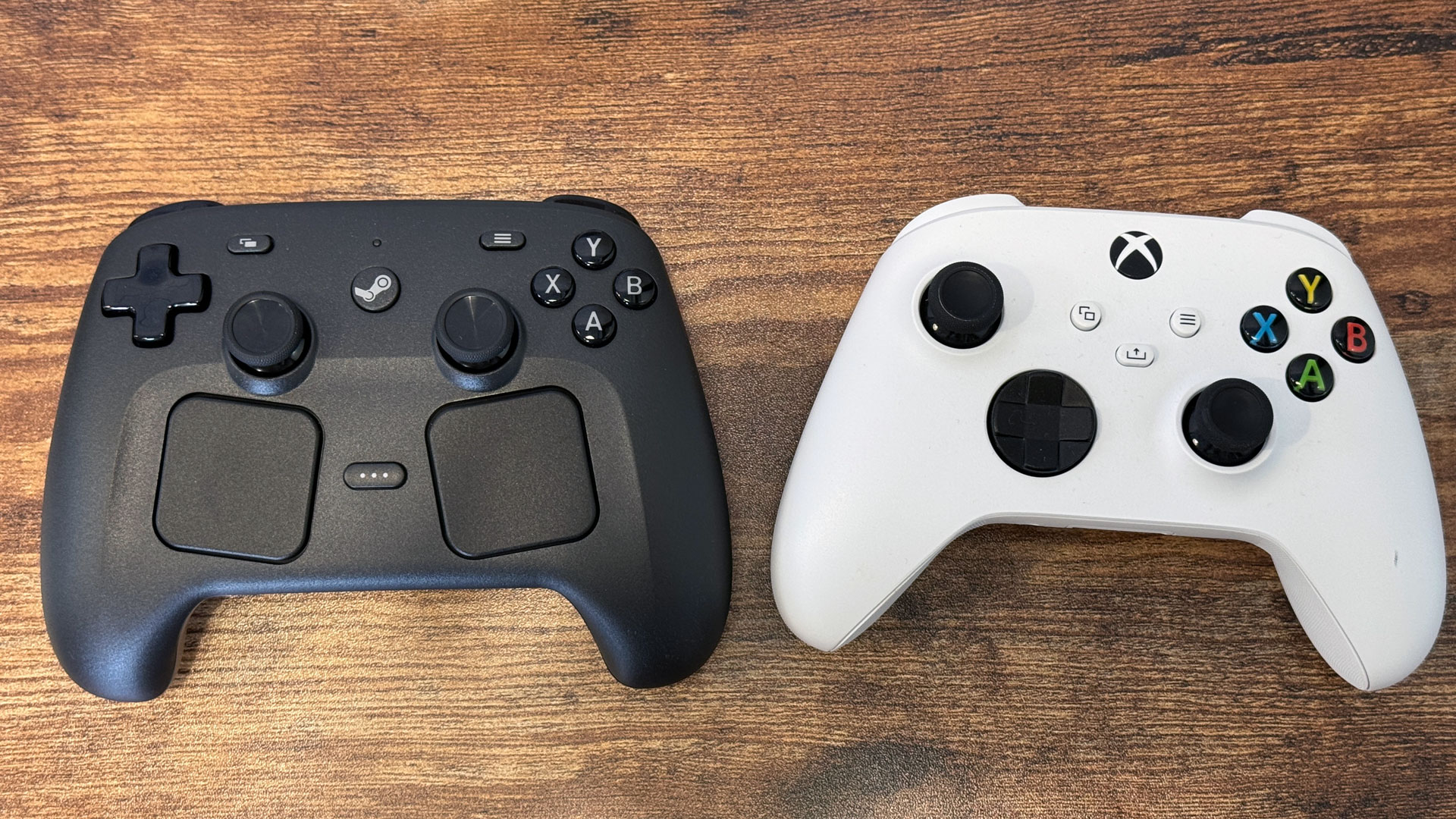
There are a few changes to the Steam Deck formula. For one, the touchpads are slightly angled, to align with the grips on the controller. And while all the Steam Deck's Steam and Quick Access buttons are still here, they're in different places than on the Steam Deck itself. The Steam button is where a more traditional Xbox or PlayStation button is, which makes sense, while the Quick Access button is a slight reach between the touchpads. I've used the Deck a lot, so this messed with my muscle memory the first few times I used the controller.
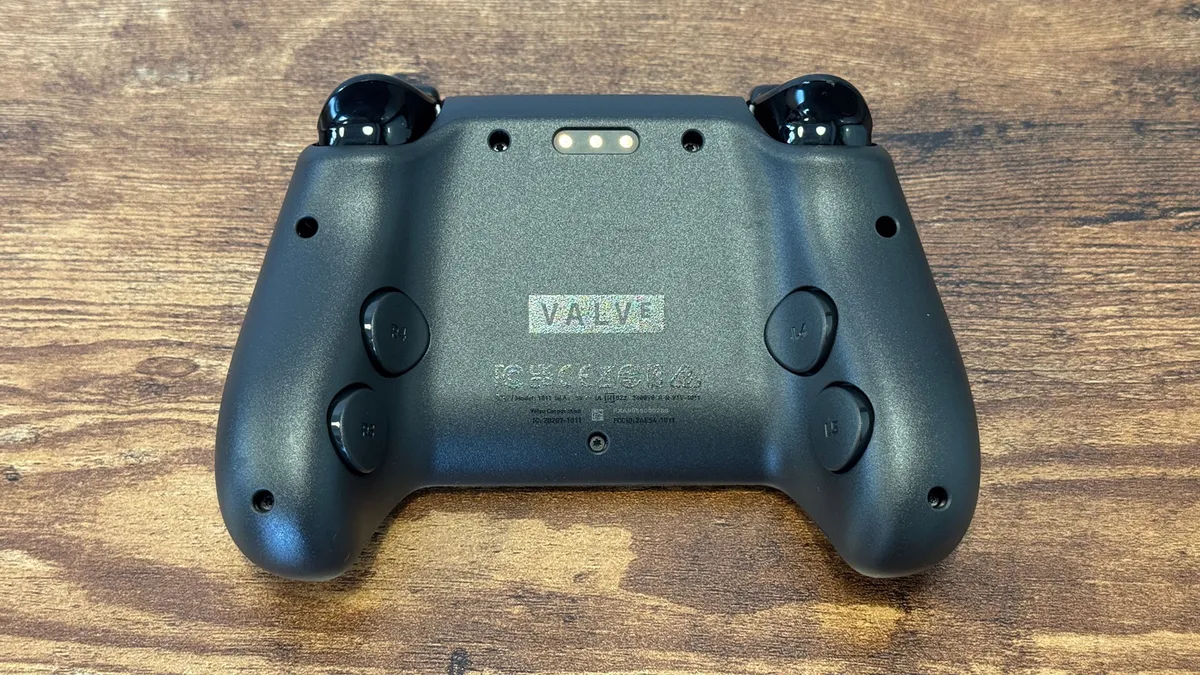
One huge improvement from the Steam Deck layout is the four back buttons. On the Steam Deck, they're effectively flat and kind of hard to press. Here, they're on the grips and fall naturally in your hands, making them easier and more comfortable to press if you want to use them.
The triggers and bumpers are made of a more plasticky material than the Deck's, similar to the button material. There's a slight click to the triggers, and the bumpers are definitely nicer than your standard Xbox controller.
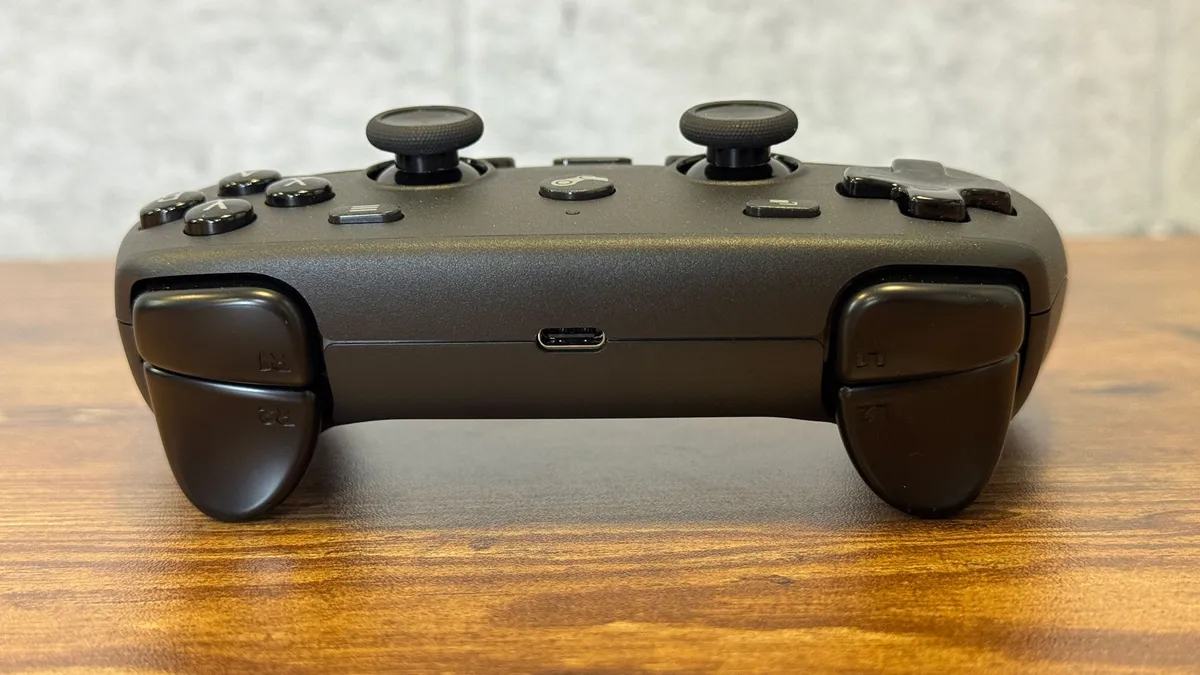
On top of the controller, there's a USB Type-C port, while there's a small 3-pin connector on the back. These are what you use to charge and connect the controller to your Steam Deck or PC. If you want to use a wired connection, you can just plug the included USB-C to USB-A cable straight into the port. Otherwise, you can plug it into the included Steam Controller Puck.
Image
1
of
3
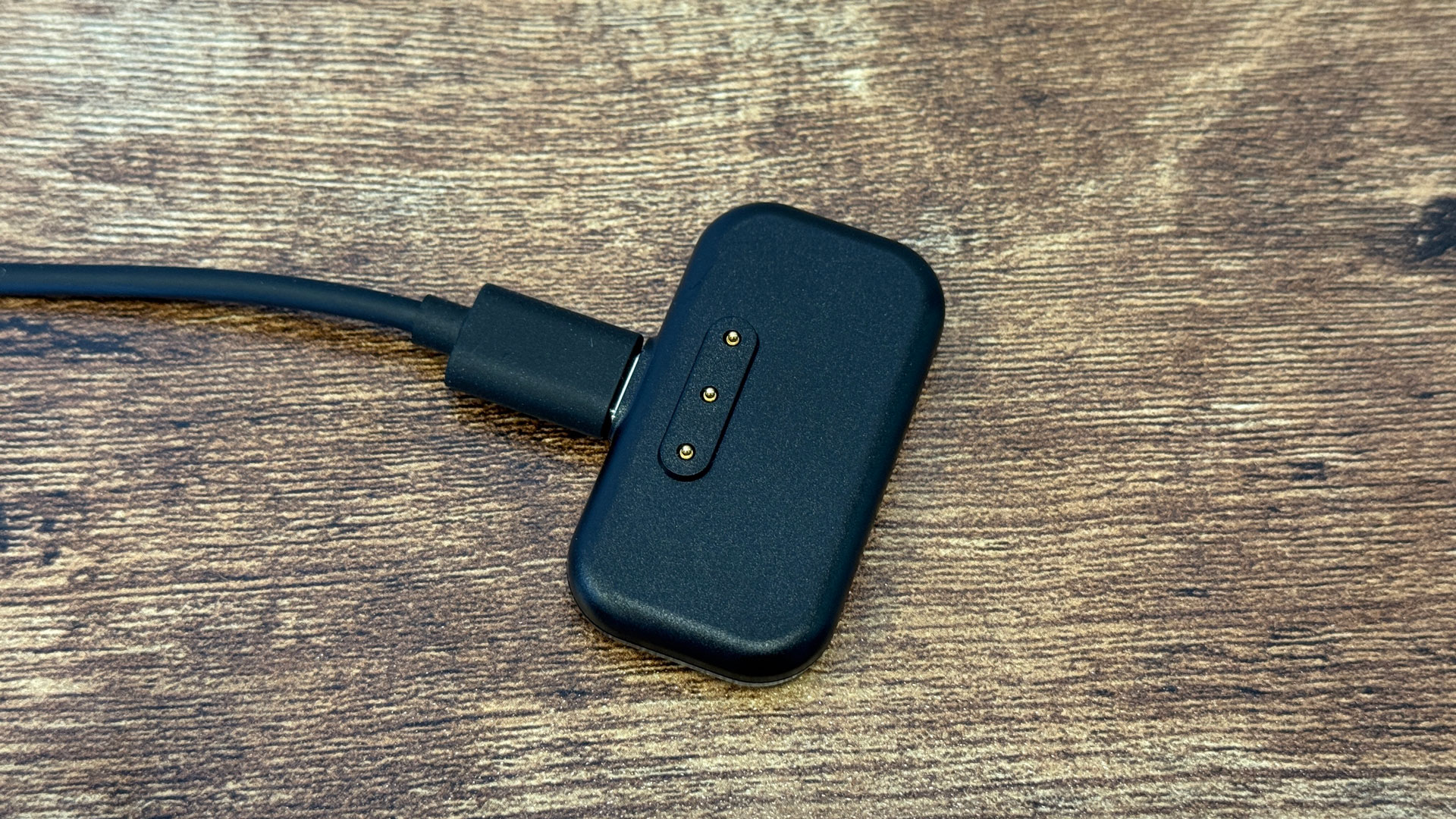
The Puck serves dual roles: It’s a 2.4 GHz wireless transmitter when attached to the USB cable, and a charging station when you're not playing. If you leave it on your desk, it's extremely easy to attach magnetically to the pins on the back of the controller and charge it. If you prefer a Bluetooth connection, that's also possible by holding B and the right bumper to jump into pairing mode.
The back buttons, TMR joysticks, touchpads, gyroscope and some touch sensitivity, make the Steam Controller more fully featured than a standard Xbox or DualSense controller. For those, you have to move up to more expensive Elite and Edge controllers, respectively, and they still don't match every feature (but have some that the Steam Controller doesn't, like adjustable triggers). More expensive competitors also come with more accessories, including paddle and joystick options, and carrying cases.
Swipe to scroll horizontally
Steam Controller | $99 |
Xbox Wireless Controller | $49 - $64 (street price, color dependent) |
Sony PlayStation DualSense | $74-$85 (street price, color dependent) |
Xbox Elite Series 2 Wireless Controller | $149.99 (street price) |
Sony PlayStation DualSense Edge | $199.99 |
This all puts the $99 Steam Controller somewhere in the middle of the pack in terms of price and features, before you get into other third-party controllers.
Steam Controller Specifications
Swipe to scroll horizontally
Weight | Approx. 292 grams (0.64 pounds) |
Battery Life | Claimed 35+ hours of gameplay, less when tracking with Steam Frame |
Connectivity | Steam Controller Puck (2.4 GHz wireless), Bluetooth, USB-C tethered |
Joysticks | 2x TMR with capacitive touch |
Price | $99 |
Steam Controller Setup and Functionality
Setting up has surprisingly little hand-holding, which I guess fits in with Valve's whole PC gaming ethos. When turning it on (and a few times through the pre-release review process), I was instructed to plug in my controller and/or puck for firmware updates. Other than being told on screen that holding the Steam button could enable Big Picture mode, there's very little training to instruct first-time users on how to use features such as Grip Sense or gyro, which have to be turned on per game.
Image
1
of
2
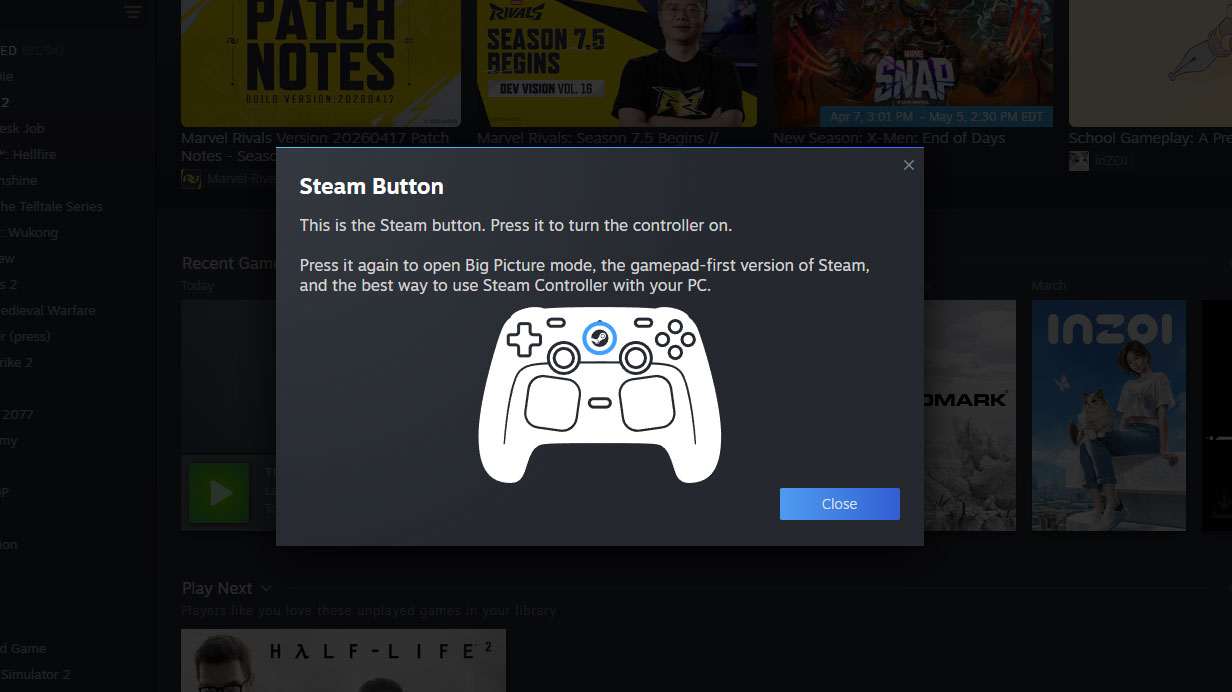
There's an assumption that if you buy this controller, you're a Steam die-hard and know how to use a controller with the platform.
Steam has a massively detailed controller configurator that can be set up on a per-game basis. Every button, joystick, and even the trackpads are remappable.
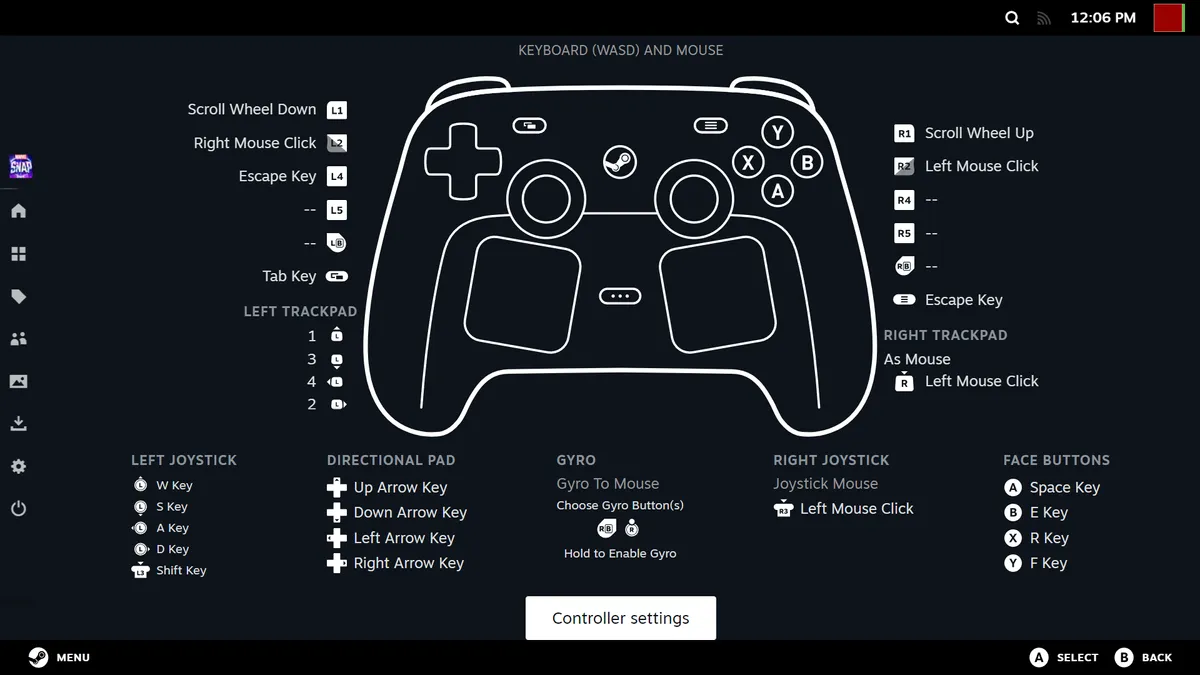
But these aren't features unique to the Steam Controller. For instance, a PlayStation 5 DualSense controller on my desk has many of the same features, including changing how the gyrometer works, remapping buttons, calibrating buttons and joysticks, and adjusting rumble.
That's not a knock on the Steam Controller. What it means is that you really just need to be a Steam power user to get the most out of the device, and if you're not, you're going to have to dig through menus, because Valve isn't going to hold your hand. That's the same for other controllers, but with all these features baked in, it would be nice to have an optional tutorial. For what it's worth, Valve mechanical engineer Steve Cardinali told me that the Controller team is working on some Steam Input tutorials, some of which should land "around launch day."
Still, the controller largely "just works," at least in Steam. Most of the games I tried either had their own profiles ready to go (thanks to Valve's work on the Steam Deck), or were able to use one of Steam Input's standard controller profiles to get there without me doing any further work.
The Steam Controller works with systems running Steam, including Windows PCs, Macs, and the Steam Deck. Valve told the press that it "is not compatible with consoles." And indeed, the controller just didn't work on Windows and macOS without going through Valve's launcher. Both just saw the Steam Controller as a mouse, where you could scroll or move the cursors with the touchpads and click with the triggers. For what it's worth, I tried the Steam Controller on a PlayStation 5, and, similar to the Mac and PC, the console saw the Steam Controller as a USB mouse. I could launch a game, but the controller wouldn't work in it afterwards.
You can play non-Steam games on the Steam Controller — you just need to run them through Steam's "Add a Non-Steam Game to My Library…" option.
Gaming on the Steam Controller
I played a variety of games with the Steam Controller to get a good feel for it and its myriad functions.
Resident Evil 9, my current game of the moment, felt great. I happened to have been playing a lot of that on the Steam Deck when I can squeeze in some spare time, so it made sense to play it here. And other than the game looking significantly more detailed on my desktop with a discrete GPU, the game felt largely the same to play, a testament to the fact that I find Valve's layouts to be quite comfortable.
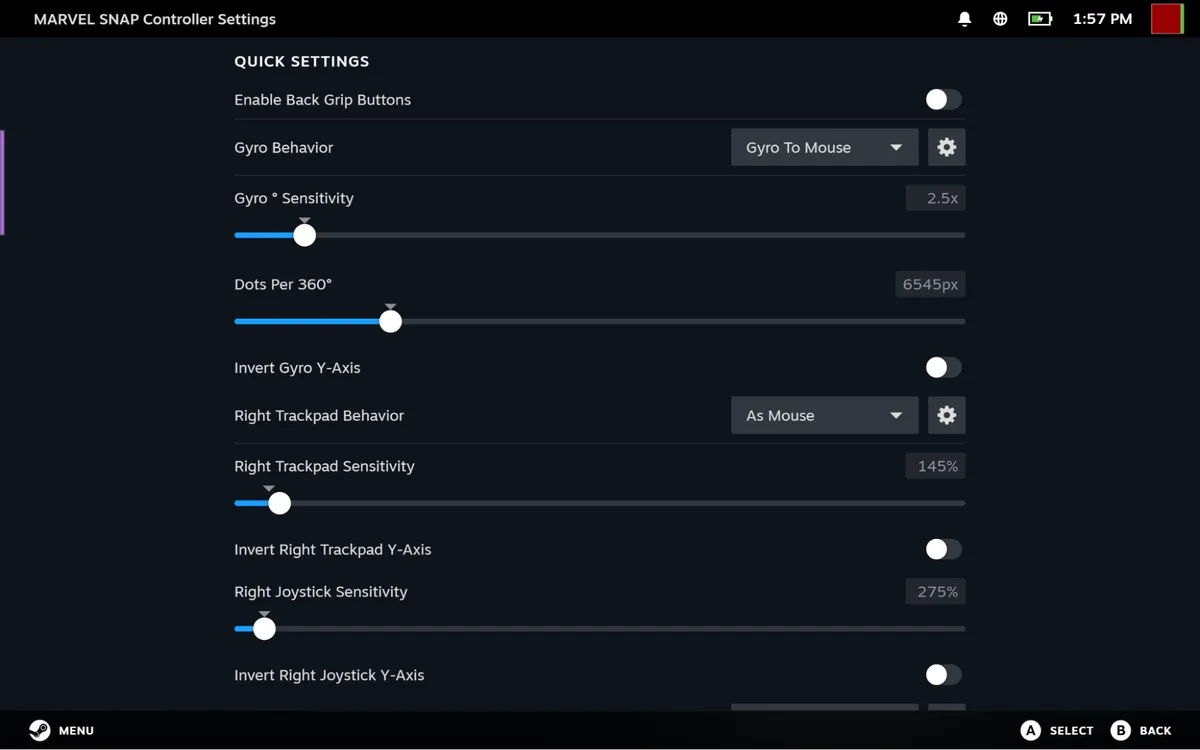
I don't love using gyro for shooters, but I actually found it to be quite useful kicking back with some Marvel Snap, which I usually play on a touchscreen. I had to make gyro a bit more sensitive than the defaults, but with that tuned and the escape key mapped to L4, I could use the controller like a remote. In fact, Grip Sense made it so I can have gyro active while holding the controller in two hands, but turn it off between turns by removing a hand. People who use motion controllers for shooting games could probably come up with some extremely creative uses for this.
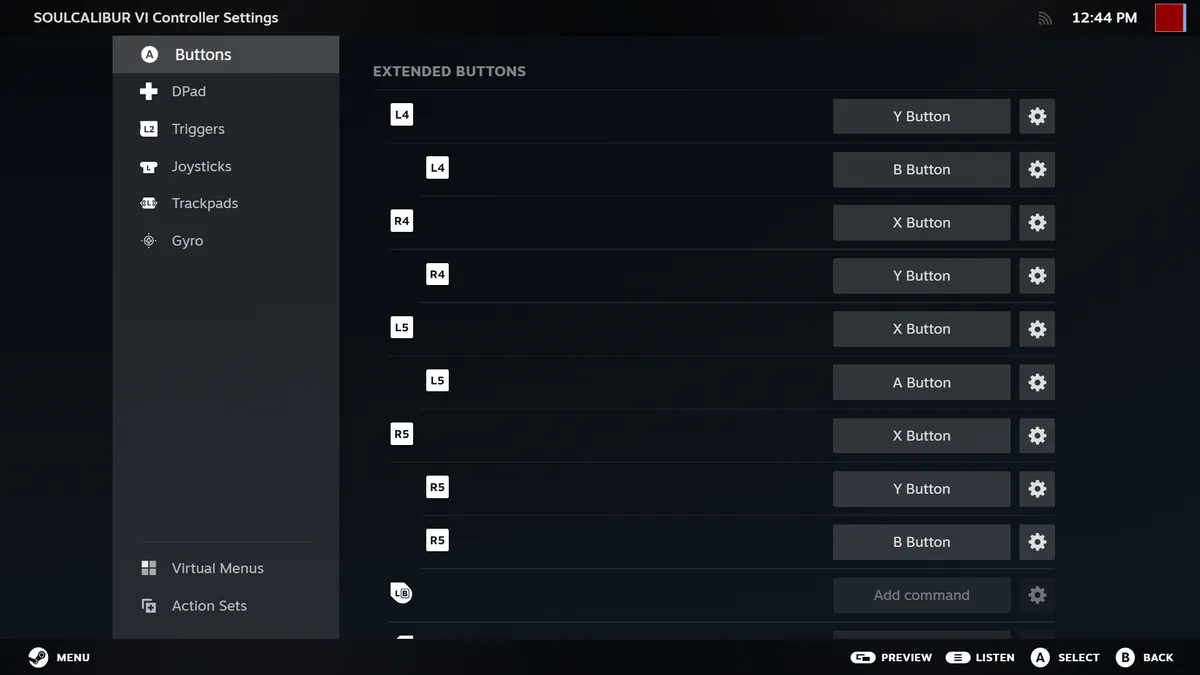
In SoulCalibur 6, I mapped throws and stances to back buttons to devastate enemies in arcade mode. I tried similar combinations with tricks in Tony Hawk's Pro Skater 3 + 4, but couldn’t get the timing right for a single-button 900.
I didn't use the touchpads a ton. For me, the best use for it is for the on-screen keyboard. But if you play a game like Civilization, it's a great way to move the cursor. They're just not for me when it comes to aiming.
There are games that don't work great. Namely, ones that have their own launchers and won't import into Steam. Fortnite was one big game I tried for this purpose. With some massaging, I got it through the "Add a Non-Steam Game to My Library…" flow, but the right joystick wasn't working. Valve recommended changing the desktop behavior for the Steam Deck, with a template designed for keyboard and mouse, and then running the game through Epic Games. I did that, and the controller did work, though I had to use the mouse to navigate menus and keyboard glyphs never changed to match the controller, making it a subpar experience.
In an interview conducted while I was testing out the controller, I asked why Valve doesn't let its controller work more like a standard Xbox controller with launchers other than Steam. I was told that Valve finds it easier to keep control in Steam, rather than working on operating system-level adjustments.
"I think we'd rather just make it as easy as possible to get it added to Steam so you can, you know, benefit from that functionality without needing any sort of kernel driver that would potentially, down the line, cause system instability or things like that," said Valve programmer Pierre-Loup Griffais. "Like, we're really happy with not having a kernel driver, because it comes with the onus of not messing it up, right? And so right now, the current method of supporting the controller is pretty safe."
For the vast majority of games that run through Steam, it worked much better.
Steam Controller Battery Life
The Steam Controller has an 8.39 WHr battery on board. Valve rates it for 35 hours on a charge, unless you use it for tracked gameplay with a Steam Frame (which we couldn't test, as we don't yet know when that will release).
Out of the box defaults include haptics and gyro off. You set those on a game-by-game basis, and having those disabled makes sense because you may not want them anyway. That being said, what you turn on in the games you play could have some effect.
I never hit 35 hours before charging, but even that guess is better than the 5 hours I got out of the DualSense Edge. But if you use the Steam Puck for 2.4 Ghz wireless, as I did in most of my testing, topping up between sessions is so easy you don't even have to think about it.
I've never been a fan of the AA batteries required to run an Xbox controller wirelessly, but I know some folks who swear by them. Like all batteries, eventually this one will start to wear. But with how easy it is to charge, I can deal with that.
Bottom Line
The Steam Controller is a comfortable, fully-featured controller at a sensible price point between basic controllers on the market and their more customizable counterparts. It's a bit weighty, but it's comfortable, and if you love your Steam Deck, you'll feel right at home.
That being said, the Steam Controller really only makes sense if you do the entirety (or at least most) of your gaming on Steam. If you play elsewhere, an Xbox, PlayStation, or Switch Pro controller are cheaper and could work on both Steam and your console of choice. The PS5 controller even has a gyro.
If you are on Steam, the new controller will get you just about every major input possibility you can reasonably expect. It's comfortable, if slightly heavy, and is so easy to recharge with the puck that you may not even need to worry about the claimed 35-hour battery life.The Steam Controller may become more of a must-have as the ecosystem grows, for owners of the Steam Machine and especially the Steam Frame, which will be able to sense the Steam Controller's infrared LEDs. Though again, other controllers will work there.
In a world where you carry the Steam Deck with you and play a Steam Machine at home, I can see the Steam Controller feeling like the perfect way to bridge the gap. It already may if you have a PC hooked up to your TV and run Steam in Big Picture mode. But without the broader ecosystem, the Steam Controller feels like a way to make other devices feel like a Steam Deck. I love the Steam Deck and the way it has combinations of inputs that work across most games, so for me, that's great. If you're happy with other controllers, Valve isn't forcing you to buy this one to get the work it's done on customization. The Steam Controller just happens to be pretty nice.