

Taylor Blau is a Principal Software Engineer at GitHub where he works on Git.


The open source Git project just released Git 2.55 with features and bug fixes from over 100 contributors, 33 of them new. We last caught up with you on the latest in Git back when 2.54 was released.
To celebrate this most recent release, here is GitHub’s look at some of the most interesting features and changes introduced since last time.
Returning readers of this series may recall our coverage of incremental multi-pack indexes and incremental multi-pack reachability bitmaps. In case you could use a refresher, here’s the short version.
Git stores the contents of your repository as individual objects: commits, trees, and blobs. Those objects usually live in packfiles, which are compressed collections of objects. A packfile has a corresponding pack index that lets Git locate any object inside the pack quickly. But large repositories do not usually have just one packfile: over time, fetches, pushes, maintenance tasks, and repacks can leave many packs behind.
A multi-pack index (or MIDX) gives Git a single index over many packs. Instead of opening and searching each pack’s individual index, Git can ask the MIDX which pack contains a given object and at which offset. This is especially useful for large repositories, and it is one of the building blocks behind GitHub’s repository maintenance strategy.
As we covered when Git 2.47 introduced the incremental MIDX format, a repository can store its MIDX as a chain of layers instead of as a single MIDX covering every pack. A single-file MIDX is simple and efficient to read, but it has an important maintenance cost; since that file includes every pack it covers, even a small update can require a large write in an already-large repository.
Incremental MIDXs address that by storing a chain of MIDX layers. Each layer covers some collection of packs, and the chain file records the order of those layers. Appending a new layer to the tip of the chain does not invalidate the older layers, so Git can index newly created packs without rewriting a single MIDX that covers the entire repository.
Git 2.55 teaches git repack how to write those incremental MIDX chains directly:
$ git repack --write-midx=incremental Without any other options, that mode is append-only: Git writes a new layer for the packs created by the repack and leaves the existing layers alone. That is already useful when you want to minimize how much metadata gets rewritten during a maintenance run.
But an append-only chain cannot grow forever. If each maintenance run adds a new layer, then eventually the chain itself becomes the thing you need to maintain. Git 2.55 also supports combining --write-midx=incremental with geometric repacking:
$ git repack --write-midx=incremental --geometric=2 -dWhen those modes are used together, each repack creates a new tip layer, then decides whether adjacent layers should be compacted together. The default rule is controlled by repack.midxSplitFactor: if the accumulated object count in newer layers grows large enough relative to the next older layer, Git merges those layers into a single replacement layer. Otherwise, the older layers are left untouched.
At a high level, the algorithm works like this. Below, NN refers to the repack.midxNewLayerThreshold value, and ff refers to the repack.midxSplitFactor value:
To see how the pieces fit together, let’s start with a repository that already has an incremental MIDX chain. The older layers are on the left, and the tip layer is on the right. Meanwhile, normal repository activity keeps producing new packs. Those packs are not covered by any MIDX layer yet, which means the next maintenance run has two jobs: decide what to repack, and decide how much of the MIDX chain to rewrite.
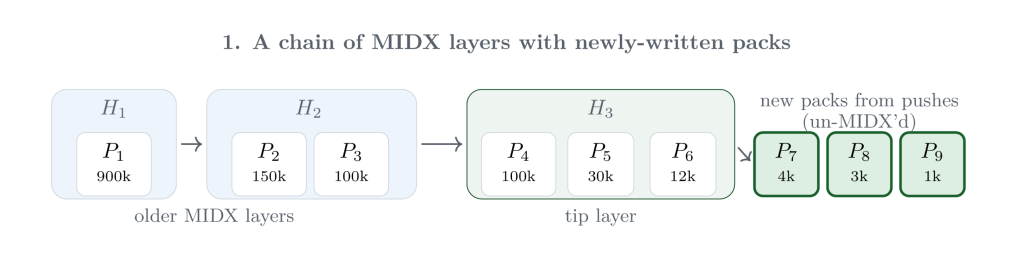
Ordinarily, those un-MIDX’d packs are the only geometric repacking candidates: Git can write a new pack and a new tip MIDX layer without disturbing any existing layer. The figure below shows the more interesting case, where the current tip layer has accumulated enough packs to meet the configured repack.midxNewLayerThreshold. Once that threshold is met, packs from the tip layer can join the newly written packs as geometric repacking candidates.
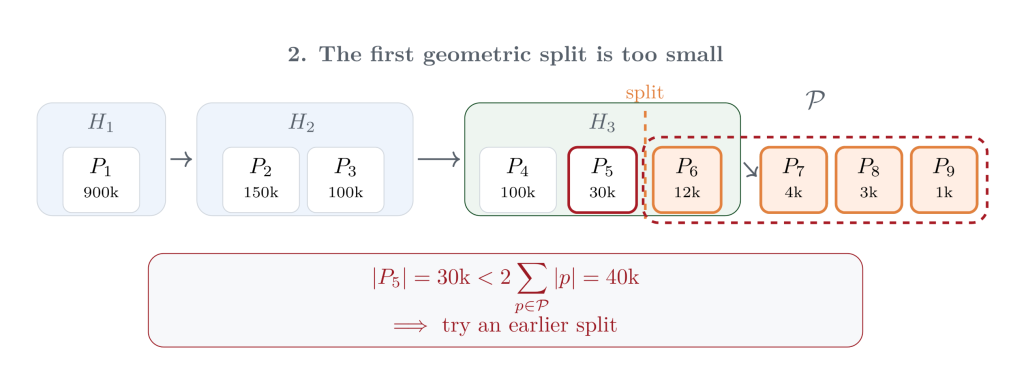
Geometric repacking then asks a local question about the newest candidate packs. Geometric repacking then asks a local question about the newest candidate packs: is the pack immediately to the left of some suffix of packs (𝒫\mathcal{P}) large enough to preserve the geometric progression if Git rolls up 𝒫\mathcal{P}? In the first attempt below, 𝒫\mathcal{P} contains the smallest pack from the current tip layer along with the new un-MIDX’d packs. But the pack to the left of the split is only 30,000 objects, which is smaller than twice the size of 𝒫\mathcal{P}, so this split is too far to the right.
So Git moves the split one pack earlier and asks the same question again. Now 𝒫\mathcal{P} includes one more pack from the tip layer. The pack immediately to the left has 100,000 objects, which is at least twice the size of the selected suffix. That is the point where the geometric invariant holds, so Git can roll up exactly those packs into a new pack.
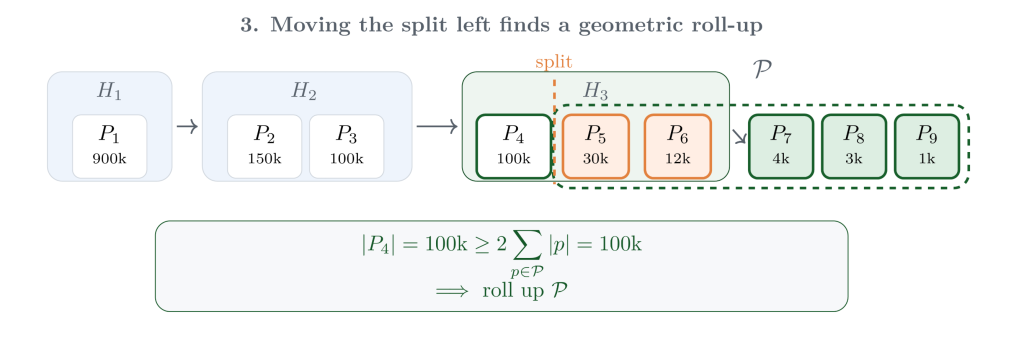
After writing that new pack, Git writes a new tip MIDX layer over the surviving pack from the previous tip layer and the newly written roll-up pack. At this point, the packfiles themselves are in good shape, but the MIDX chain may still have accumulated too many small adjacent layers. Git applies the same “newer compared to older” instinct to the MIDX layers themselves: if the newer layer is large enough relative to its neighbor, compact their metadata into a replacement layer.
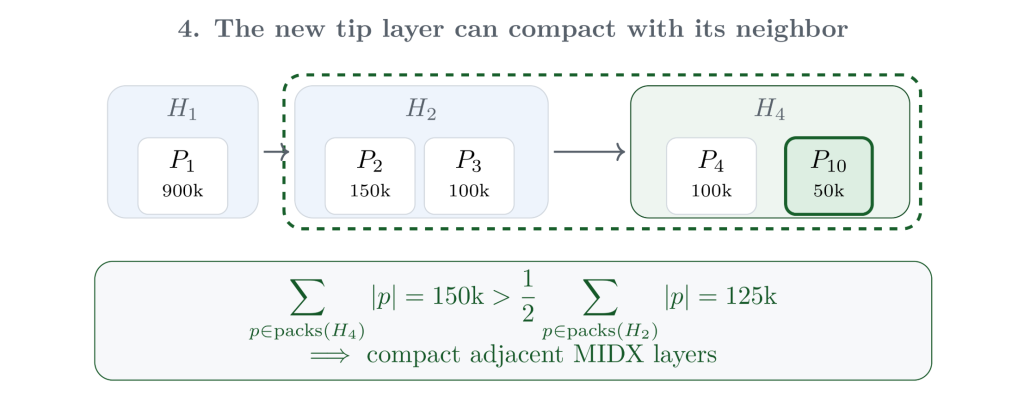
That compaction step is deliberately metadata-only. Git does not repack the objects from those layers again; it writes a new MIDX layer that covers the same packfiles. Then it considers the next older layer. Here, the compacted layer is still smaller than half of the deeper layer, so Git stops. The older layer remains untouched, which is the key property that keeps this maintenance incremental.
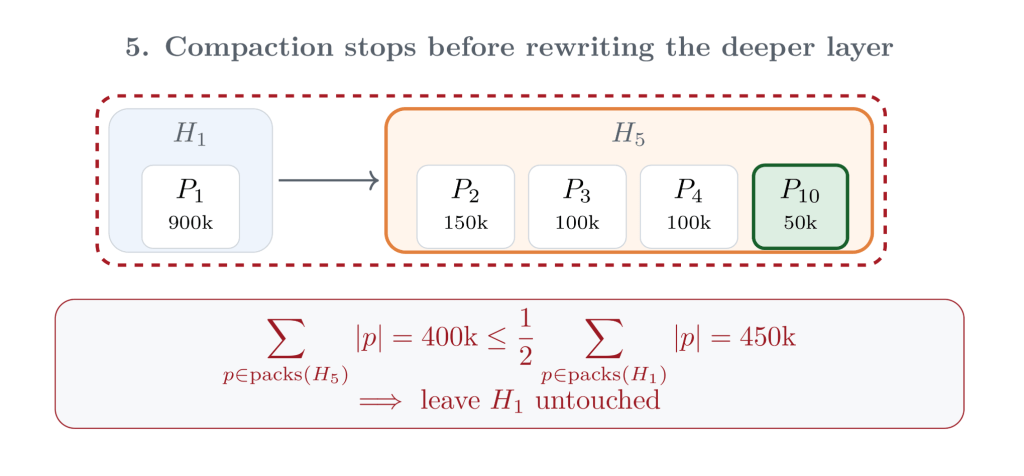
The result is a compromise between two extremes. A single-file MIDX minimizes lookup complexity, but can require large rewrites during maintenance. A purely append-only incremental MIDX minimizes each write but allows the chain to grow without bound. Geometric incremental repacking keeps the number of layers logarithmic in the total number of objects, while ensuring that the newest, smallest layers are rewritten more often than older, larger ones.
This also integrates with Git’s existing repack machinery. Newly written packs that are not yet covered by the MIDX chain are always candidates for the geometric repack; packs in deeper MIDX layers are left alone. Packs in the tip MIDX layer join the candidate set only after the tip layer has at least repack.midxNewLayerThreshold packs. If the tip layer is still smaller than that threshold, Git skips disturbing it entirely and simply appends a new layer for the newly written packs.
For repositories that receive a steady stream of new objects, this means routine maintenance can update the repository’s pack metadata incrementally, without forcing each maintenance run to rewrite a single MIDX covering the entire object store.
[source]
git historyAnyone who has polished a commit series before sending it for review has probably had this experience: you notice that a change in your working tree really belongs in an earlier commit, not at the tip of the branch.
Today, one common way to handle that is to create a fixup commit and then autosquash it:
$ git commit --fixup=<commit>
$ git rebase --autosquash <commit>^
That works, but it asks you to spell out the mechanism instead of the intent. Git 2.55 builds on the experimental git history command, which Git 2.54 introduced, by adding a new fixup subcommand. It applies the changes currently staged in the index to an earlier commit:
$ git history fixup <commit>Here is a small example. The first commit introduced a pancake recipe, followed by a few more commits on top. Later, we realize that the recipe was missing maple syrup. After staging that one-line change, git history fixup <commit> folds it into the original recipe commit and replays the descendant commits on top.
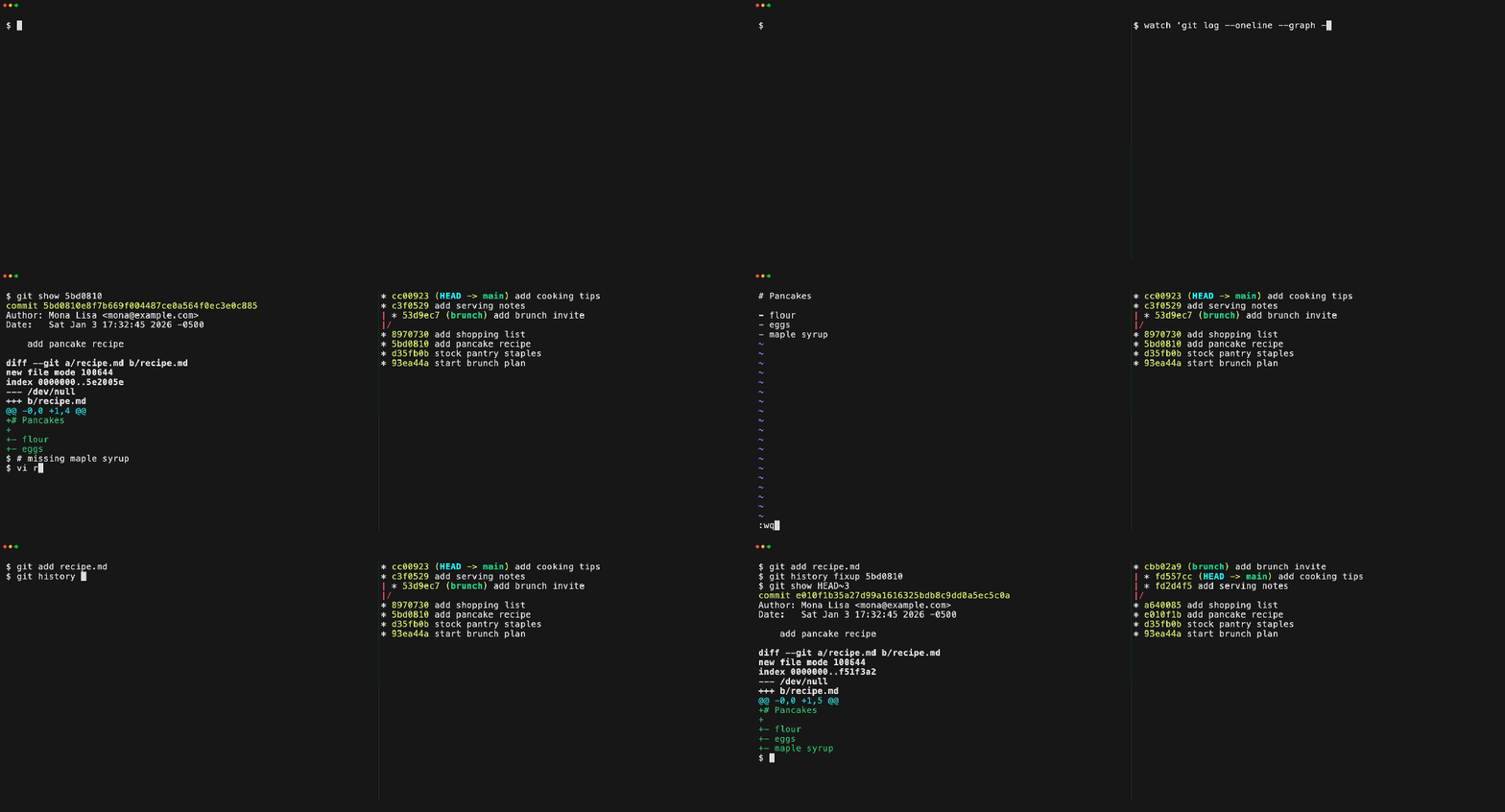
Here the staged change becomes part of the target commit itself. The target commit keeps its message and authorship by default, unless you pass --reedit-message, and Git rewrites the commits that follow so the branch ends at an equivalent history with the fix in the right place.
Like the rest of git history, this command is still experimental. It is also intentionally conservative. Because fixup reads from the index, it needs a working tree and cannot operate in a bare repository; if applying the staged change would produce a conflict, the command aborts instead of leaving you in the middle of a stateful rewrite.
[source]
Now that we’ve covered the largest changes in more detail, let’s take a look at a selection of some other new features and updates in this release.
Returning readers of this series may remember our coverage of config-based hooks from Git 2.54, which let you define hooks in your Git configuration rather than only as executable files in $GIT_DIR/hooks. Hooks are the scripts Git runs at well-known points in your workflow, like before creating a commit or after receiving a push. Moving them into configuration makes those hooks easier to share, compose, and selectively disable without copying scripts into each repository’s hooks directory.
Git 2.55 extends that work by allowing compatible configured hooks to run in parallel. For example, a project might have independent pre-commit hooks for linting and unit tests; if both declare hook.<name>.parallel = true, Git can run them at the same time. The number of concurrent jobs can be controlled globally with hook.jobs, per event with hook.<event>.jobs, or on the command line with git hook run -j. Hooks that need shared state, like commit-message hooks or other hooks that inspect the index or working tree, continue to run serially.
[source]
If you have ever run git status only to be greeted by a long pause at your terminal, you may have used Git’s built-in filesystem monitor to speed things back up. When core.fsmonitor is enabled, commands like git status can ask a long-running daemon which paths have changed instead of scanning the entire working tree.
Until now, that built-in daemon was available only on macOS and Windows. Git 2.55 adds support for Linux, where the implementation uses inotify. That works without elevated privileges, but requires one watch per directory, so very large repositories may need to raise the fs.inotify.max_user_watches limit. As on other platforms, the daemon is conservative around network-mounted repositories, which remain opt-in.
[source]
Reachability bitmaps are one of the tricks Git uses to answer questions like “which objects are reachable from this commit?” without walking the entire object graph from scratch. They make object traversals faster, but Git still has to build and update those bitmaps during maintenance tasks like git repack --write-midx-bitmaps.
Git 2.55 makes that generation path faster by avoiding unnecessary tree recursion, reusing already-computed selected bitmaps, caching object positions, and sorting bitmaps before XORing them together. In benchmarks from the patch series, those general improvements reduced bitmap generation time in one large repository from about 612 seconds to about 294 seconds.
The same series also improves pseudo-merge bitmaps, which group related references together so Git can combine precomputed bit arrays during a traversal instead of rediscovering the same objects repeatedly. In one benchmark, pseudo-merges made a full git rev-list --objects --use-bitmap-index traversal nearly 20 times faster, but previously nearly doubled bitmap generation time. After these changes, pseudo-merges keep most of their traversal speedup while adding much less work to the bitmap generation path.
If you use partial clones, filtered packs, or other workflows where Git intentionally omits some objects, pack size still matters. The git pack-objects --path-walk mode, introduced in Git 2.51, groups objects by path before performing a second compression pass, which can produce better deltas when path locality matters.
In Git 2.55, --path-walk can be combined with filters including blob:none, blob:limit=<n>, tree:0, object:type=<type>, sparse:<oid>, and compatible combine: filters. That makes packing using --path-walk available in more partial-clone and filtered-pack workflows. In one benchmark on Git’s own repository, a blob-less path-walk repack produced a pack roughly 16% smaller, at the cost of a slower fresh-delta computation.
[source]
Git learned a new experimental command, git format-rev, for pretty-formatting revisions from standard input. Unlike git log, which walks a range of history, git format-rev is designed for cases where you encounter commits one at a time or embedded in other text.
For example, suppose you’re using git last-modified to print the commit that last modified each path in some directory. What if you wanted to know who last modified each path, not just which commit did it? You could replace those commits with author names by piping its output through something like this:
$ git last-modified | perl -F'\t' -lane '
  chomp($F[0] = qx(git show -s --format=%an $F[0]));
  print join "\t", @F
'
Junio C Hamano	builtin/commit.c
[...]
That works, but it has to start a new Git process for each row just to format the commit. In Git 2.55, git format-rev can handle that part as a normal pipeline:
$ git last-modified |
  git format-rev --stdin-mode=text --format=%an
Junio C Hamano	builtin/commit.c
[...]
The command’s text mode can also rewrite full commit object names found in freeform text, which makes it useful for commit-message hooks or other scripting workflows.
[source]
When you push your repository somewhere, you may have noticed output that starts with remote::
$ git push origin main
Enumerating objects: 5, done.
[...]
remote: Resolving deltas: 100% (2/2), completed with 1 local object.
When a client fetches or pushes, Git can multiplex different streams over the same connection: one sideband carries packfile data (the actual objects being transferred), another carries progress messages that the client usually prints to stderr, and a third carries errors from the remote.
Those progress messages are useful, but they also come from the other side of the connection and may be printed directly to your terminal. Before Git 2.55, that meant a server could include arbitrary terminal control sequences in sideband output, including sequences that move the cursor or erase text. Git now masks most of those control characters by default while still allowing ANSI color sequences, so colored progress output continues to work.
[source]
Suppose you are halfway through editing a file when you realize that you started from the wrong branch. If the branch you want to switch to changed the same path, a plain git checkout <branch> will refuse to move and risk clobbering your work. git checkout -m <branch> is the “try to carry my local edits with me” version of that operation.
But what happens when the other side has modifications against that same path? Previously, git checkout -m gave you one chance to resolve the resulting conflicts immediately. Git 2.55 makes that safer by using an autostash internally, so the conflicted local changes are saved as a stash entry that you can either resolve right away or reapply later.
[source]
Some projects need to publish the same branch to more than one place, like a primary host and one or more mirrors. Remote groups have long been available to git fetch, where a group is configured with remotes.<name> as a whitespace-separated list of remotes. Git 2.55 lets git push use the same shorthand:
$ git config remotes.publish "github gitlab mirror"
$ git push publish main
This is equivalent to pushing to each remote in the group in sequence. Since atomicity can only be guaranteed for a single transport connection, --atomic is not supported when pushing to a group.
[source]
git log --graph is great for visualizing branch structure, right up until the graph itself gets too wide to read. In repositories with many parallel branches, the graph lanes can consume most of the terminal before you get to the commit subject.
Git 2.55 adds --graph-lane-limit=<n> to git log --graph and related commands. Lanes beyond the limit are replaced with `~`, making graph output more manageable in repositories with very wide histories.
[source]
Suppose you want to list the 10 most recent commits on your branch. That is easy enough: git log -n 10 does exactly that. But what if you want the 10 oldest commits? If you are thinking, “it surely isn’t git log --reverse --10,” then congratulations: you’re a veteran Git user! Instead of reversing the history and then printing 10 commits, Git takes the 10 most recent commits and reverses their order.
You can get there by post-processing the whole range (for example with git log --reverse <range> | tail -10) but doing so still asks Git to print and format all of the commits that the shell is going to throw away. Git 2.55 adds a new --max-count-oldest=<n> option to git rev-list and the git log family of commands, which selects the oldest n commits in a range instead.
[source]
During a fetch, the client and server negotiate by having the client advertise commits it already has as have lines. That lets the server avoid sending objects the client can already reach. But in repositories with many references, the negotiation algorithm may skip a ref that is especially important for finding common history.
Git 2.55 adds new controls for which references participate in negotiation. The new include and restrict options, along with corresponding remote.* configuration, allow users to require certain refs to be sent as have lines or to limit negotiation to a specific set of refs.
[source]
That’s just a sample of changes from the latest release. For more, check out the release notes for 2.55, or any previous version in the Git repository.
Taylor Blau is a Principal Software Engineer at GitHub where he works on Git.
此内容由惯性聚合(RSS阅读器)自动聚合整理,仅供阅读参考。 原文来自 — 版权归原作者所有。