









A January 2022 research (1) revealed that 55% of marketers and enterprises find managing and organizing digital assets a significant challenge (1). With the rise of omnichannel marketing and the digitization of commerce, digital asset creation has skyrocketed. From traditional images and videos to interactive content, 3D photographs, and several other new formats. Digital asset management becomes easier to master when each digital asset is viewed and managed through the various phases of its life cycle.
A digital asset, much like an organism's lifecycle, goes through various stages from the time of its conception till it is archived or deleted. Each of these stages entails a series of changes and actions.
Typically, there are five stages in a digital asset lifecycle:
- Creation
- Management
- Retrieval
- Distribution
- Archival

How we treat a digital asset depends on its current stage. For instance, access to digital creative at the ideation or creation stage must be restricted, whereas an approved version of a logo must be unrestricted and tagged accurately for easy retrieval by all employees of an organization.
Explained: The five stages of the digital asset lifecycle
Understanding each stage of the digital asset lifecycle helps streamline the creative workflow and increase the efficiency of managing and tracking digital assets. Let us study the five stages in detail.
Create: The creation of a digital asset begins with ideation and planning. It involves researching your audience, studying the competitors, and brainstorming on the content needed to meet your business requirement. Once an idea takes shape, design, collaboration, reviews, execution, and approvals follow to finalize and ready the asset for use.
Manage: Once a digital asset is ready, it must be tagged, organized, and uploaded to a central location with the necessary governance to ensure it stays up-to-date and is easily accessible to all relevant users. An asset that is well-managed and stored appropriately becomes easy to retrieve and use.
Retrieve: Once an asset has been saved, searching for it in a repository that contains thousands of creatives (often identical except for minor differences) is not easy unless we make it ‘discoverable’. Teams usually have their phrases, slang, and terms that they use to describe assets and processes. They might use the same catchphrase when searching for items in the DAM.
They expect instantaneous and quick results even with these personal search phrases choices. The retrieval stage is about catering to the needs of different user groups (marketers, legal departments, sales teams) by serving search results that match the user's expectations based on their search criteria.
Distribute: A digital asset serves its purpose only when it is shared or distributed to meet the needs of the business, which could mean sending it to your external partners or internal teams or using it for your intranet or social media channels. Easy, secure accessibility that can be tracked is the key element of this stage.
Archive: The life of a digital asset can be extended beyond its immediate use if it is preserved in an archive. When used regularly, a digital asset must be available in active storage, but after it has met its purpose, it can be moved to an archive as ‘inactive’ content. This declutters your primary digital asset storage yet ensures the availability of retired assets for re-purposing in the future. Assets that are no longer needed are deleted to ensure there is no risk of confidential or outdated information getting out of the system.
How DAM solves digital asset lifecycle management challenges
One must understand the requirements and challenges of every stage of the digital asset lifecycle to support and improve them further. A DAM provides several features and tools that enable you to manage each stage of the digital asset lifecycle efficiently.
Create
Challenge: Bringing together all digital assets in a centralized location.
Solution: DAM acts as a centralized repository—a single source of truth for all digital assets.
The first stage of the lifecycle requires seamless workflows, strong collaboration, and a well-integrated central repository with other MarTech systems. A DAM serves as the single source of truth for all digital assets managed by an organization. It provides a centralized media library that can be integrated with email applications, content management systems, legal systems, editing tools, content delivery networks, clouds storage services, and more.
Such robust integration allows users to view, access, edit, and download assets with complete visibility and avoid conflicts. Coordinating and collaborating becomes transparent and effortless.
Creation also requires analytics to measure the relevance and need for a particular asset. Answers to questions such as, “Should we create an infographic or a video? “How many types of banners do we need for the campaign?” must be data-driven. DAM provides data on asset usage that form the basis of content strategies and optimal asset utilization.

Manage
Challenge: Organizing a huge library of digital assets for quick retrieval
Solution: DAM provides AI-based auto-tagging, custom metadata, and advanced search functions
Real-time updates, synchronized access, and intelligent tagging can ensure digital assets stay current and can be accessed quickly. Many DAMs offer AI-based auto-tagging, custom metadata, folder management, and advanced search functions that help optimize and manage images efficiently. Features such as secured access, version control, and data encryption protect your digital assets when they are in storage and during transit. Most DAM systems offer powerful interoperability by employing a wide range of industry standards and APIs for integrating with other systems making asset management easier.
Retrieve
Challenge: Searching and locating the right variant of the asset
Solution: DAM offers advanced search functions, including semantic AI search
A DAM acts as an advanced media search engine for its repository of digital assets. It saves files in standard formats and templates and uses encoding and indexing to facilitate easy retrieval. Advanced search is made possible through search filters that helps narrow down assets that meet specific criteria.
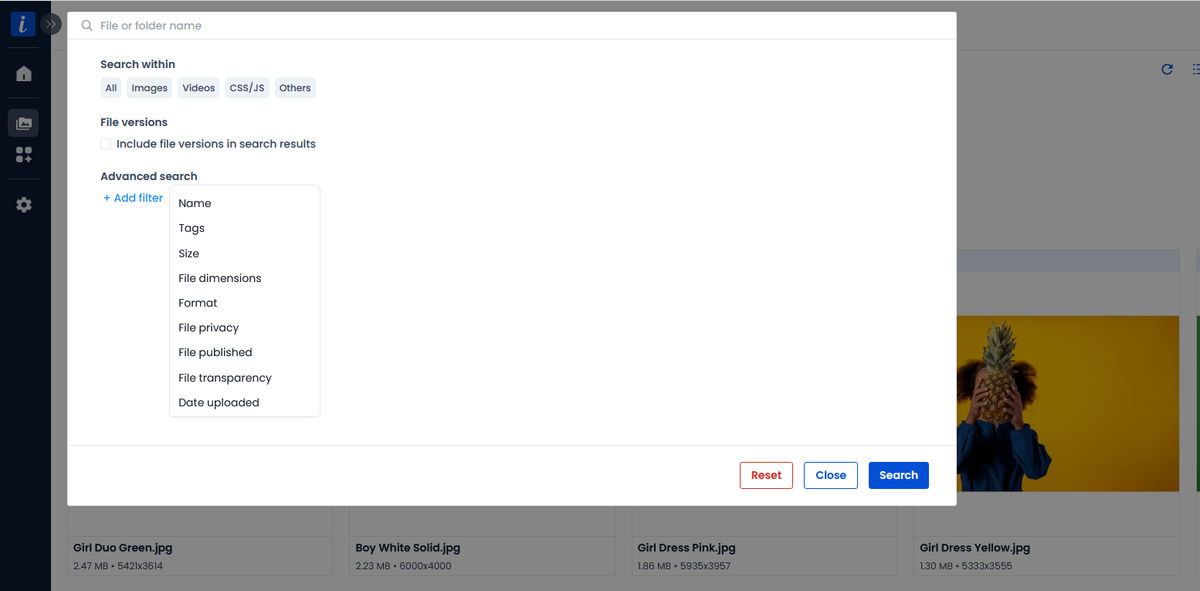
A well-thought, customized taxonomy allows the search function to review the results thrown up in the context of the organization’s definition of things or its vocabulary, for example, the use of internal acronyms. It can also take care of incorrect spellings used in the search term. Features such as in-document search, pinned search, and saved search are very useful in saving retrieval time.
Many DAM systems leverage AI to simplify the search process by enabling visual search to find visually similar assets in your DAM, and they also offer Autocomplete suggestions for relevant content as you type your queries.
Distribute
Challenge: Ensuring access to the right asset in the shortest time possible for end-users
Solution: DAM simplifies secured asset distribution with URL-based sharing
The ability to distribute assets in the right format, at the right time, and in a secure manner is critical. URL-based transformations, centralized media library, default images, and user access management are DAM features that make asset distribution seamless.
Archive
Challenge: Ensuring safe storage of archived assets until they are needed again
Solution: With DAM, it is easier to take data backups and compress files for bulk uploads
Traditionally, older and seldom used or unused assets were moved to physical storage devices such as tapes. Today, cloud-based storage is cheaper and can be scaled on demand. Cloud-based DAM reduces the effort needed to identify, categorize, and move assets to the archive. Tiered storage management and automated archival workflows can free your team from worrying about outdated assets. Data backup and sync functions, restricted access, batch resizing, and bulk compressions are efficient tools available in a DAM that support the archival process.
DAM Capabilities you can bet on to streamline the digital asset lifecycle
One can effectively streamline the digital asset lifecycle by understanding and leveraging the following capabilities that most DAM offer.
Cloud-readiness
A cloud-based media library that can be integrated with a DAM allows one to store digital assets optimally. It becomes easier to store very large-resolution images, take backups, and provide access to remote workers. One can resize assets in real-time without creating multiple variations. The advantage of using a cloud-based solution is it is expandable and supports a wide range of file formats in addition to no-code integration with existing infrastructure.
Artificial Intelligence (AI)
AI can significantly accelerate the digital asset lifecycle in many ways. We already mentioned how AI-based auto-tagging can make it easier to locate and use digital assets. AI in DAM can also help in automating workflows that otherwise require manual intervention.

Automation
Automation can ease the digital asset creation process to a large extent. Most DAM systems use it to streamline the creative workflow. Mundane and repetitive routine tasks such as adding keywords or tags can be automated using digital asset management workflows to allow team members to focus on other strategic work. Automatic assignment of tasks to different task managers ensures no interruption, and automated alerts safeguard against missed communications or timelines. Automated asset transformation and optimization features can assist users in image format conversion or enhancing an asset on the fly.
Security
Security protocols are essential to protect digital assets across the five lifecycle stages. Identity and user access management, multi-factor authentication, SSO-based access, data loss management, and business continuity plans are required to maintain control over your assets and must be part of your asset management strategy.
APIs or Application programming interfaces
APIs are a set of programming codes that allows two different systems to communicate with each other. They can ease the digital asset lifecycle by creating custom integrations between different systems that are typically used to create, manage and distribute digital assets. For instance, a DAM can be integrated with a content management system or CMS using APIs.
DAM APIs allow you to upload assets from different sources or distribute them from one single repository to multiple devices or systems. Modern-day DAMs come with operational APIs that ease developers' routines; for example, ImageKit’s List and Search files API can be used to search for images by tags programmatically.
Version control
Version control allows users to create multiple versions and variants of the same image by changing formats and dimensions. Even with multiple versions, the user can maintain control over the identity of the master asset and subsequent versions by documenting its history and controlling its access.
Managing the digital asset lifecycle is the best way to gain control over your digital assets
Poor digital asset lifecycle management could cause content production overload, underutilization of created assets, or an excessive slowdown of the creative process.
By leveraging the digital asset lifecycle to manage your digital assets, one can bring structure and predictability to the process. You gain visibility into the status of each asset and determine what action it needs. You can optimize asset usage, never lose them, and ensure they remain safe. In other words, it ensures that you always find the assets you are looking for.
A DAM is the most convenient way of managing the life cycle of your digital assets. It combines all the capabilities required to support and accelerate each lifecycle stage.
If you are looking for a DAM solution that can improve your organization’s digital asset lifecycle, check out ImageKit.
Get started with a free trial and discover an effortless way of managing the digital asset lifecycle for your organization.