


Given multiple image formats to choose from, it often becomes difficult for developers to make sure that images on their website and app are in the correct format. Among other image optimization techniques, this is one of the very important ones.
What is right image format?
The right format for a particular image depends on the content of that image, and available format support in the requesting browser (or device).
For example:
Example 1
 (WebP 21.6KB) (WebP 21.6KB) |  (JPG 24.3KB) (JPG 24.3KB) |  (PNG 47.1KB) (PNG 47.1KB) |  (No format specified) (No format specified) |
|---|
WebP – Use parameter f-webp. It won’t render in non-supporting browsers like Safari, FireFox, and IE.
https://ik.imagekit.io/demo/tr:w-200,f-webp/medium_cafe_B1iTdD0C.jpgJPG – Use parameter f-jpg
https://ik.imagekit.io/demo/tr:w-200,f-jpg/medium_cafe_B1iTdD0C.jpgPNG – Use parameter f-png
https://ik.imagekit.io/demo/tr:w-200,f-png/medium_cafe_B1iTdD0C.jpgImageKit automatic best image format selection
When you don’t specify any format parameter, i.e, f-png or f-jpg like below, then ImageKit chooses the best possible image format depending upon browser support and image content.
https://ik.imagekit.io/demo/tr:w-200/medium_cafe_B1iTdD0C.jpg
ImageKit automatically handles this selection of the best format amongst possible image formats. The browser support for WebP image format is checked on every incoming image request. ImageKit further analyses if the image is suitable to be delivered in WebP image format. If both the criteria are fulfilled for a particular image, then ImageKit automatically delivers the image in WebP format. Otherwise, it chooses the next best possible format for that image.
Example 2: Format selection based upon image content
 (WebP 6KB) (WebP 6KB) |  (PNG 2.8KB) (PNG 2.8KB) |  (JPG 2.9KB) (JPG 2.9KB) |  (No format specified) (No format specified) |
|---|
This image has transparency layer, and JPG doesn’t support transparency, so the only two possible candidates are PNG and WebP. Although WebP offers much better compression, but in this particular case, the smallest image is PNG. With ImageKit automatic image format selection, a PNG is served when you don’t specify any format.
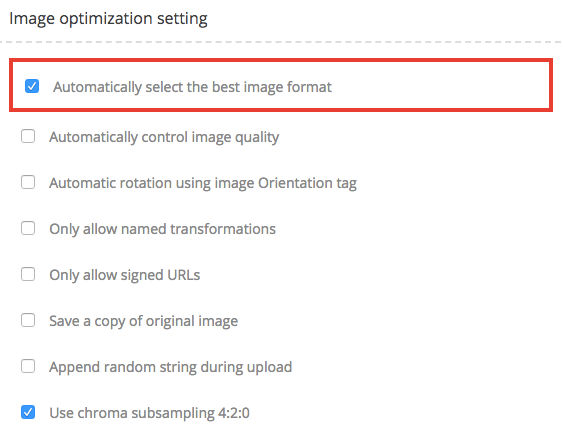
https://ik.imagekit.io/demo/imagekitwebsite/static/build/img/logo-dark.pngThis automatic format selection works out of the box. You don’t have to add or change anything to your image URL. However, if you want to turn it off, you can do so with your ImageKit dashboard settings.
Let’s wrap it up!
So now you know that no single image format is “correct”. It largely depends upon the content of image and browser support. You can use this knowledge and improve your in-house image management software or try out ImageKit for free and automate this!