


This article is also available in Chinese 简体中文.
Welcome to AI for Game Development! In this series, we'll be using AI tools to create a fully functional farming game in just 5 days. By the end of this series, you will have learned how you can incorporate a variety of AI tools into your game development workflow. I will show you how you can use AI tools for:
Want the quick video version? You can watch it here. Otherwise, if you want the technical details, keep reading!
Note: This tutorial is intended for readers who are familiar with Unity development and C#. If you're new to these technologies, check out the Unity for Beginners series before continuing.
In Part 3 of this tutorial series, we discussed how text-to-3D isn't quite ready yet. However, the story is much different for 2D.
In this part, we'll talk about how you can use AI to generate 2D Assets.
This tutorial describes a collaborative process for generating 2D Assets, where Stable Diffusion is incorporated as a tool in a conventional 2D workflow. This is intended for readers with some knowledge of image editing and 2D asset creation but may otherwise be helpful for beginners and experts alike.
Requirements:
Diffusion models such as Stable Diffusion work by reconstructing images from noise, guided by text. Image2Image uses the same process but starts with real images as input rather than noise. This means that the outputs will, to some extent, resemble the input image.
An important parameter in Image2Image is denoising strength. This controls the extent to which the model changes the input. A denoising strength of 0 will reproduce the input image exactly, while a denoising strength of 1 will generate a very different image. Another way to think about denoising strength is creativity. The image below demonstrates image-to-image with an input image of a circle and the prompt "moon", at various denoising strengths.

Image2Image allows Stable Diffusion to be used as a tool, rather than as a replacement for the conventional artistic workflow. That is, you can pass your own handmade assets to Image2Image, iterate back on the result by hand, and so on. Let's take an example for the farming game.
In this section, I'll walk through how I generated a corn icon for the farming game. As a starting point, I sketched a very rough corn icon, intended to lay out the composition of the image.

Next, I used Image2Image to generate some icons using the following prompt:
corn, james gilleard, atey ghailan, pixar concept artists, stardew valley, animal crossing
I used a denoising strength of 0.8, to encourage the model to be more creative. After generating several times, I found a result I liked.
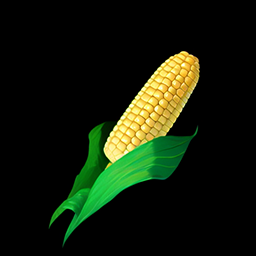
The image doesn't need to be perfect, just in the direction you're going for, since we'll keep iterating. In my case, I liked the style that was produced, but thought the stalk was a bit too intricate. So, I made some modifications in photoshop.
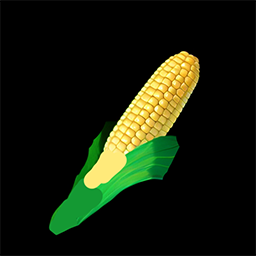
Notice that I roughly painted over the parts I wanted to change, allowing Stable Diffusion to fill the details in. I dropped my modified image back into Image2Image, this time using a lower denoising strength of 0.6 since I didn't want to deviate too far from the input. This resulted in an icon I was almost happy with.
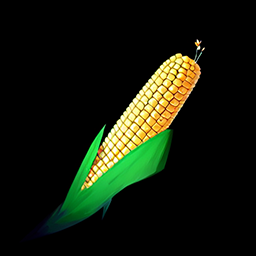
The base of the corn stalk was just a bit too painterly for me, and there was a sprout coming out of the top. So, I painted over these in photoshop, made one more pass in Stable Diffusion, and removed the background.
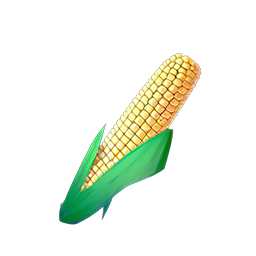
Voilà, a game-ready corn icon in less than 10 minutes. However, you could spend much more time to get a better result. I recommend this video for a more detailed walkthrough of making a more intricate asset.
In many cases, you may need to fight Stable Diffusion a bit to get the result you're going for. For me, this was definitely the case for the scythe icon, which required a lot of iteration to get in the direction I was going for.

The issue likely lies in the fact that there are way more images online of scythes as weapons rather than as farming tools. One way around this is prompt engineering, or fiddling with the prompt to try to push it in the right direction, i.e. writing scythe, scythe tool in the prompt or weapon in the negative prompt. However, this isn't the only solution.
Dreambooth, textual inversion, and LoRA are techniques for customizing diffusion models, making them capable of producing results much more specific to what you're going for. These are outside the scope of this tutorial, but are worth mentioning, as they're becoming increasingly prominent in the area of 2D Asset generation.
Generative services such as layer.ai and scenario.gg are specifically targeted toward game asset generation, likely using techniques such as dreambooth and textual inversion to allow game developers to generate style-consistent assets. However, it remains to be seen which approaches will rise to the top in the emerging generative game development toolkit.
If you're interested in diving deeper into these advanced workflows, check out this blog post and space on Dreambooth training.
Click here to read Part 5, where we use AI for Story.
此内容由惯性聚合(RSS阅读器)自动聚合整理,仅供阅读参考。 原文来自 — 版权归原作者所有。