


2026-05-13
6 min read
We’ve enabled higher usage limits, faster performance, and better reliability for Browser Run by rebuilding on top of Cloudflare’s Containers.
You can now spin up 60 browsers per minute via the Workers binding and run up to 120 concurrently — 4x the previous limit. Also, Quick Action response times dropped more than 50%. You don't need to change anything: these improvements are live today. On top of that, we’re shipping fixes and new features faster than before. Read on to learn how we did it and see the data.
Remind me: what is Browser Run?
Browser Run enables developers to programmatically control and interact with headless browser instances running on Cloudflare’s global network. That’s useful for end-to-end testing of web applications, securely investigating suspicious URLs, and leveraging how browsers can easily render PDF documents, amongst other quick actions like capturing screenshots and extracting content. More recently, it’s become a critical enabler of AI agents to interact with the web. We’re building Browser Run to be the go-to platform to responsibly utilize automated browsers securely at massive scale.
Outgrowing our bunk bed
Before adopting Cloudflare Containers, we shared infrastructure with Browser Isolation (BISO). While technically similar, BISO’s larger container images slowed startup and development. Crucially, BISO browsers lacked optimal global distribution, compromising resiliency and latency. Additionally, typical BISO users’ long, steady sessions clashed with Browser Run’s short, spiky usage, creating scaling bottlenecks and availability delays.
Thankfully, after much internal development, Cloudflare released Durable Object (DO)-enabled Containers open beta last year, meaning we were ready for a tentative adoption that ultimately benefited both product platforms. Like most successful product platforms, we’re committed to building on our own platform wherever feasible so that we can feel and fix any pain points ahead of any external customers.
The migration: Containers
We started a gradual migration by inserting a Worker in our incoming request paths to provide some Container-powered browsers to a handful of users alongside those from BISO. This dual support during development was key: it allowed us to compare performance, isolate implementation bugs and ultimately gain confidence in the benefits of the Container-driven approach.
Ramping up adoption, we first used the Container browsers for all of our Quick Actions endpoints, then for connections via the Workers browser binding on free accounts, followed by pay-as-you-go accounts in order to validate stability before we rolled it out to all remaining contract customers, ensuring a transition that required no action or existing worker redeployments from our customers.
Challenges: performance and scale bottlenecks
On our end, though, we faced a fresh set of challenges getting familiar with a novel, unstable early-stage Containers platform interface that was light on documentation, light on observability, and light on colleagues in an overlapping timezone. However, our feedback to our own teams as Customer Zero meant that we could provide a tight feedback loop leading to substantial upgrades that benefit our external customers too. Nevertheless, there was a lot of friction to overcome initially, most of which were to be expected for a closed beta in active development. Other hurdles to overcome were intrinsic to the new technical environment.
For example, once our browsers could run globally, our architecture had to adapt. DO-enabled Containers create a Durable Object as close to the incoming request as possible, but the connected Container may spin up on the other side of the world. This works fine for one-shot messages like "start my app," but when you're establishing a WebSocket between them and exchanging dozens of messages for a screenshot request, those extra milliseconds crossing the globe start adding up.
Our solution? Create regional pools of pre-warmed DO-backed browser containers to constrain the max distance (and hence max latency) between DOs and containers. When a request comes in, we pick a DO-container pair closest to the user within that region. This keeps latency low on both hops: user to DO, and DO to container. It adds a few more moving parts to our overall architecture, but we figured that was worthwhile so long as we had observability into the global state of each browser so that we could allocate and re-allocate capacity according to changing demand. A perfect use case for Workers KV…to a point.
Demand for our headless browsers has been ramping up since the beginning of last year. In short, AI agent builders discovered Browser Run and quickly brought request volumes outpacing our existing capacity. We quickly hit the limits of how quickly we could adjust our pool capacity to serve this new demand with a scalable approach. KV’s eventual consistency of around 30 seconds was becoming a bottleneck on our critical request path. You might check KV, see a container as "available," but by the time you route to it (30 seconds later), it's already claimed. That lag creates race conditions and overallocation of browsers, severely limiting how fast we could scale to meet demand spikes.
Migrating from KV to D1 + Queues
We previously stored each container state in KV. This meant that we could keep getting a minute old state due to cache TTL (recently KV changed the minimum cache TTL to 30 seconds, but even so that value is still too high).
We decided to migrate the container state into D1 instances instead. D1's transactional nature is a good fit here. Once we assign a browser to a user, it's exclusively theirs. Browsers are not shared resources. SQLite transactions ensure atomic assignment and prevent race conditions where two requests might claim the same browser simultaneously.
Here’s a simplified version of our browser acquisition query:
WITH candidate_pool AS (
    -- candidate pool logic to pick based on latency and other rules
)
UPDATE containers
SET status = 'picked'
WHERE sessionId IN (
    SELECT sessionId
    FROM candidate_pool
    ORDER BY RANDOM()
    LIMIT ?5
)
RETURNING data
We keep D1 shards per location and given that we may have several thousand containers running, and that each container needs to update its state every 5 seconds, we kept running into a problem: we would overload the database. For instance, if each write takes 1ms we can only write at most 1,000 times, which at one row per write would mean that we could only have 5,000 containers before overloading the database.
However, if we batch those writes, we can get much higher values, because batch writes are not significantly longer than individual ones, so we can increase the throughput in orders of magnitude. In our case, we use 100 row batches, which means we can now update a maximum of 500,000 containers per location. This headroom means capacity planning is no longer a bottleneck.
Currently, our P95 for batch write is 0.1ms!
To batch writes, we use Queues: every 5 seconds, each container computes its own state and adds it to its location queue. We then configure a worker consumer with 100 batch size and 1 second batch timeout:
{
    ...
    "queues": {
        "consumers": [
            {
                "queue": "production-core-containers-queue-weur",
                "max_batch_size": 100,
                "max_batch_timeout": 1,
                "max_retries": 1,
            },
            ...
        ]
        ...
    }
}
With this configuration, we achieve acceptable lag times well below 2 seconds. That said, queue backlogs can still cause stale state. When this happens, each region falls back to a designated backup region until the primary queue catches up.
Additional perks for quick actions
With dedicated infrastructure, we could now make upgrades to the browser container image without unwanted side effects or bloat for other products like BISO. This opened the door to optimize quick actions like screenshots and content extraction. Previously, our workers established a WebSocket to the remote browser and sent instructions one at a time: open a page, navigate to the URL, wait for it to load and take the screenshot. Each step had to be completed before the next could begin.
However, now we send all parameters in a single HTTP request directly to the container, and the entire flow executes internally without any back-and-forth between the worker and browser.
Results: massive performance boost and increased limits
We’ve seen a sharp decrease in average quick-action response time, as users are able to get what they need from a browser session in less time: less time waiting for browsers to be ready and faster processing of their DevTools Protocol messages.
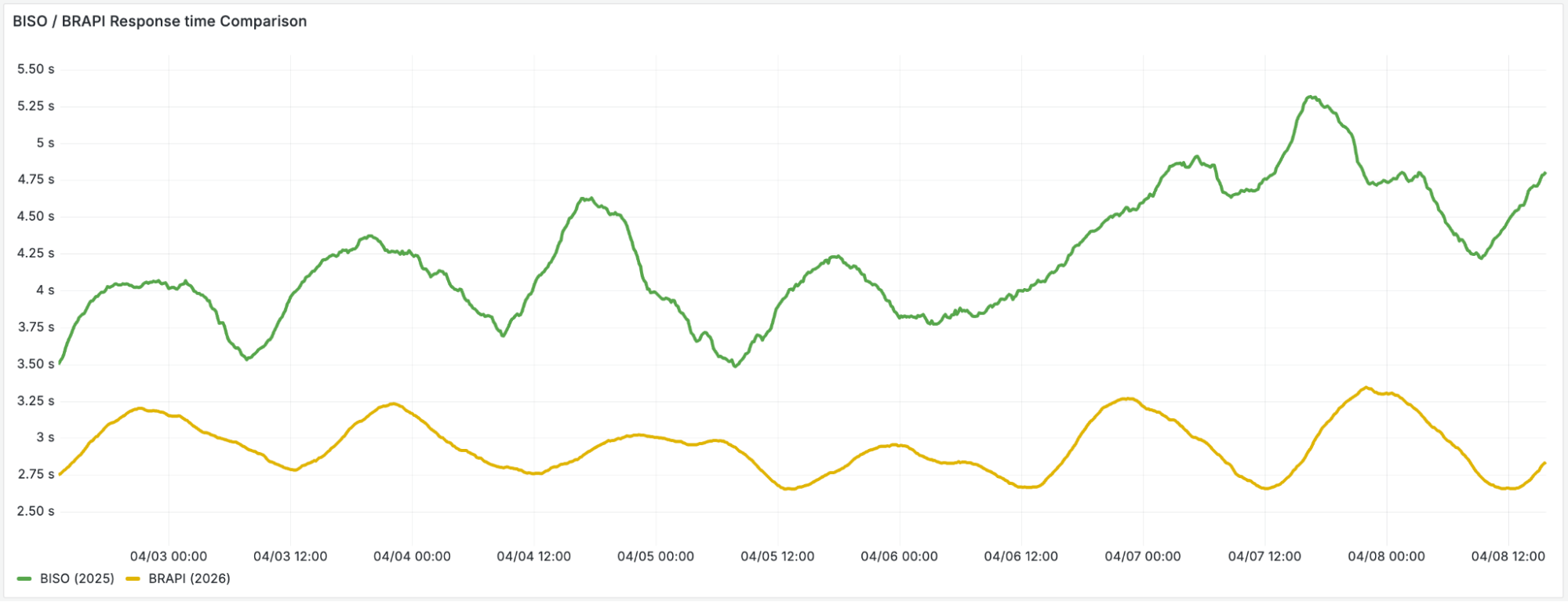
Overcoming our real-time state management at this new scale meant we could spend more time in the playground, discovering and cooking up new features such as our recently launched /crawl endpoint.
Better browser flexibility
We also benefitted from another important perk by leaving behind shared Browser Isolation containers: faster upgrades.
When our browsers ran on shared product infrastructure, upgrading Chrome meant coordinating across multiple teams and products, each with their own roadmap and priorities. However, now that we run our own container image, we can upgrade at a faster tempo. For example, WebGL, a much-requested feature, is now available for browser-based rendering along with WebMCP (Model Context Protocol for the web) which enables new agentic interaction patterns. Both are made possible because we can control the browser version and flags without unwanted side effects in other Cloudflare products.
In a nutshell, we’re just getting started with unleashing the power of browsers at scale, especially for agentic development. We hope you’re diving in too — check out our docs.
Get started
Browser Run is available on all Workers plans. Start with the quick start guide, explore the Quick Actions, or try the /crawl endpoint to deeply extract data from any webpage, following links across the site.
Building AI agents? Check out our Agents SDK with built-in Browser Run support.