
惯性聚合 高效追踪和阅读你感兴趣的博客、新闻、科技资讯
阅读原文 在惯性聚合中打开

推荐订阅源

G
GRAHAM CLULEY
V
V2EX
WordPress大学
WordPress大学
博客园 - Franky
Last Week in AI
Last Week in AI
博客园 - 司徒正美
有赞技术团队
有赞技术团队
freeCodeCamp Programming Tutorials: Python, JavaScript, Git & More
博客园 - 【当耐特】
V
Visual Studio Blog
C
CERT Recently Published Vulnerability Notes
OSCHINA 社区最新新闻
OSCHINA 社区最新新闻
cs.CL updates on arXiv.org
Jina AI
Jina AI
Attack and Defense Labs
腾讯CDC
The Hacker News
The Hacker News
Hugging Face - Blog
Hugging Face - Blog
K
KPMG report finds enterprise disconnect between AI and its ROI | CIO
J
Java Code Geeks
人人都是产品经理
人人都是产品经理
阮一峰的网络日志
阮一峰的网络日志
T
Tailwind CSS Blog
S
SegmentFault 最新的问题
大猫的无限游戏
大猫的无限游戏
小众软件
小众软件
A
Arctic Wolf
量子位
博客园 - 聂微东
奇客Solidot–传递最新科技情报
奇客Solidot–传递最新科技情报
N
News and Events Feed by Topic
雷峰网
雷峰网
博客园_首页
Google Online Security Blog
Spread Privacy
Spread Privacy
罗磊的独立博客
H
Hacker News: Front Page
让小产品的独立变现更简单 - ezindie.com
月光博客
月光博客
TaoSecurity Blog
TaoSecurity Blog
Exploit-DB.com RSS Feed
博客园 - 三生石上(FineUI控件)
宝玉的分享
宝玉的分享
IT之家
IT之家
The Cloudflare Blog
爱范儿
爱范儿
博客园 - 叶小钗
Threat Intelligence Blog | Flashpoint
Apple Machine Learning Research
酷 壳 – CoolShell
酷 壳 – CoolShell

Starred Articles

Improvements to Web for AI Should Benefit All Users New to the web platform in April  |  Blog  |  web.dev Delivering a dynamic hexagonal world map in just 10kb | Calibre Eames Pavilion System Squarespace & Web Standards: How We Helped Bring HTML Video & Audio Lazy Loading to Today’s Browsers | Scott Jehl, Web Designer/Developer The Web is a Guitar Amp Now (Literally) I used Claude Code and GSD to build the accessibility tool I’ve always wanted - blakewatson.com Sizing chaos Scroll indicators on tables with background colours using animation-timeline Webspace Invaders Fresh Hot CSS: Trig Functions The Year Of The Linux Desktop (for fitness games) Almost Plain Text, Nicely Done – Email is good. Uncrate's 100-ish favorite things on Amazon VS Code – highlight just the active indent guide How musicals use motifs to tell stories Good Tidings! Review: MoErgo Go60, a split ergonomic and fully programmable keyboard The line and the stream. — Ethan Marcotte Testing HTML Light DOM Web Components: Easier Than Expected! Enhancing Web Components Safely with Self-Destructing CSS | Scott Jehl, Web Designer/Developer Steam Machine Caira AI Mirrorless Camera A Treatise on AI Chatbots Undermining the Enlightenment Talking CSS, Web Components, App Design and (gulp) AI on ShopTalk Show Microsoft™ Ergonomic Keyboard (now sold by Incase) A new, new logo for the W3C Chris Coyier Solved by CSS Scroll State Queries: hide a header when scrolling down, show it again when scrolling up. closedBy=any · October 16, 2025 Paxos accidentally mints more than twice the global GDP in PayPal stablecoins The CSS Podcast is back! And I’m a co-host now. Who needs a flying car when you have display: grid Junior Dev Tip: "Scroll Up" WWW Ep212 With Dave Rupert · October 2, 2025 DHH Is Way Worse Than I Thought | jakelazaroff.com A custom --light-dark() function in CSS that works with any type of value (not just colors!) in just 3 LOC Make accessible carousels  |  Blog  |  Chrome for Developers 37 pm · Paul Robert Lloyd Against the protection of stocking frames. — Ethan Marcotte “Why would anybody start a website?” Necropolis Should Men Be the Head of Every Household? The History of Themeable User Interfaces Speeding up my Learning Log process Eight years of Jessie How our dog increased my appreciation for accessibility In the Future All Food Will Be Cooked in a Microwave, and if You Can’t Deal With That Then You Need to Get Out of the Kitchen Somewhere Between Lost and Found Impact of AI on Tech Content Creators Progressive Enhancement and Web Components Sizzle Rizzle · July 4, 2025 The Cascade
Making keyboard navigation effortless
Microsoft Edge Blog · 2026-03-06 · via Starred Articles

Written By published March 5, 2026

Do you use a keyboard to navigate websites? If so, you’ve probably run into countless accessibility issues where groups of inputs or widgets are not easy, or even possible to get to with just the keyboard.

A keyboard-accessible website lets you easily reach its various sections and then navigate within them in an intuitive way.
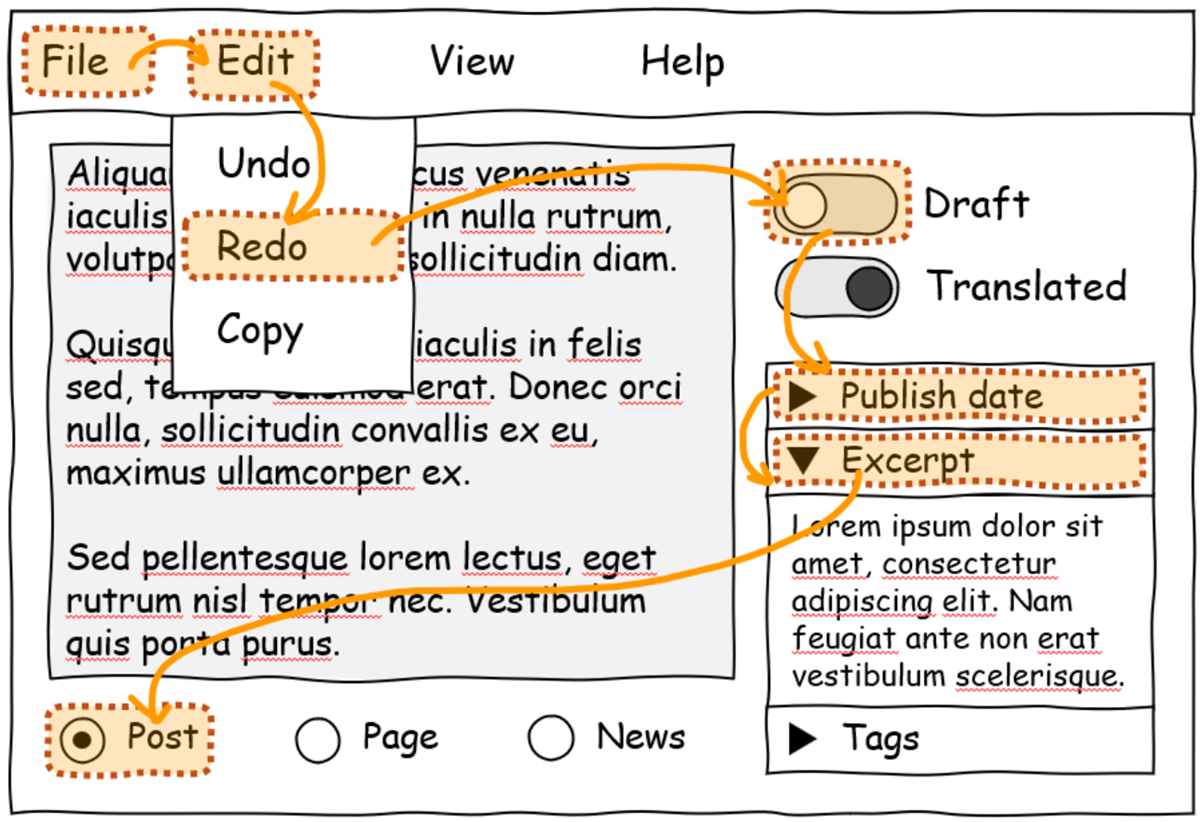
An app UI mockup which contains a menubar, various switch controls, radio bottoms, and disclosure elements. An orange overlay highlights a hypothetical keyboard navigation flow across the UI.

Unfortunately, inaccessible websites are common on the internet. The Web Almanac reports that about 50% of websites don’t use tabindex, a common technique for making keyboard navigation possible on the web.

The issue is complex, though. Web developers can create keyboard-accessible sites by using the technologies at their disposal today. But, often, these technologies don’t make things easy for them. Creating a fully keyboard-accessible site, especially one that has complex widgets such as menus, submenus, toolbars, tabs, and other groups of inputs, isn’t free; it requires a lot of work and knowledge.

In fact, if you are a web developer yourself, you have probably been confronted with the following common issues when trying to improve the accessibility of your website:

  • Setting an incorrect tabindex value or forgetting to set it at all.
  • Forgetting to call the focus() function to move the focus to the right element.
  • Not preventing the default browser behavior when handling arrow keys.
  • Focusing disabled or hidden inputs by mistake.
  • Implementing a keyboard navigation pattern that doesn’t match your users’ expectations.
  • Not properly handling all text directions.
  • Not restoring the previously selected element on refocus.
  • And more.

Even if you’ve managed to solve all of these issues, you’ve still faced the consequences: you either had to write a lot of complicated code or had to use a JavaScript library. In both cases, you now have more code to maintain, and your website loads more code on startup.

This, in turn, impacts the users of your website too. The more code your website needs, the more time it will take for the site to load and become usable.

Introducing focusgroup

This keyboard accessibility problem has been on our minds for a long time. We designed an early solution for it in 2021, called focusgroup, and we then started collaborating with others on it, as part of the OpenUI community group, in 2022.

Taking the problem and an early solution to a broad collaborative forum allowed us to mature the focusgroup idea and go through iterations, taking many perspectives into account. This led to a better, more complete solution for web developers.

Today, we’re happy to announce that the focusgroup feature is available for early testing by web developers in Microsoft Edge.

Developers can also test the feature in other Chromium-based browsers. We contributed the implementation to the Chromium open-source project to reach as many web users as possible, and we’ll be working with other browser vendors to implement focusgroup for the entire web.

If you’re a web developer, focusgroup makes your life much easier:

  • You don’t need to write any tabindex roving code yourself or import a library for it.
  • Using focusgroup is easy; a single HTML attribute is often the only thing you need to add.
  • The arrow keys are handled for you, across all text directions and skipping over disabled and hidden elements.
  • The keyboard navigation patterns that focusgroup provides are based on guidelines from the ARIA Authoring Practices Guide.
  • Focusgroup also works for elements in shadow DOM.

More importantly, the impact that focusgroup will have for users who navigate websites with a keyboard is huge:

  • Sites will load faster!
  • You will get a more consistent keyboard navigation experience across websites.
  • While tabbing will let you navigate through the main sections of a page, the top, right, bottom, and left arrow keys will work as you’d expect and let you access the various elements or inputs inside of a section.

We’re excited to have web developers try our early implementation of focusgroup in Microsoft Edge and let us know what they think. With your help, we can make the solution even better and eventually ship it as a stable feature of the web platform.

To learn more about the feature and how to use it, check out our post on the Chrome for developers blog, and let us know what you think.

Together, let’s create a more accessible web.