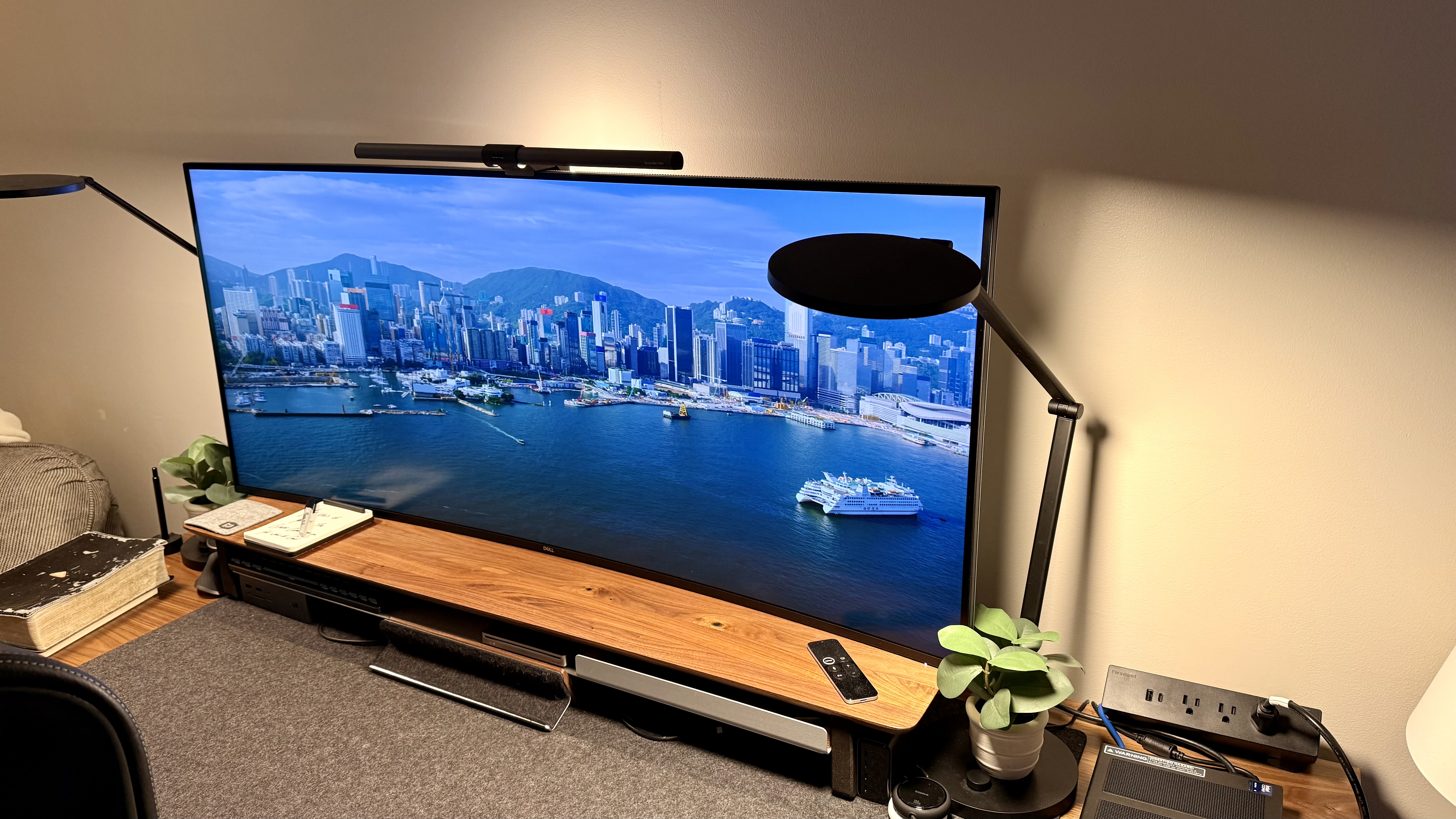
I remember it like it was yesterday. I got an email in my inbox with a link to preview an unreleased Dell display. The very moment that I saw the specs, I thought I was dreaming: 52 inches, 6K display, Thunderbolt dock, fast response time. And, from one of, if not the largest, display makers in the world.
I've said for years now that Dell monitors are a staple in the workspace; however, this is nowhere near the norm or regular in the average workspace. Most people who have seen this monitor on my desk, in the background of photos, or in virtual meetings assume it's a TV mounted on my wall. Some have even thought it's a window, depending on the content I have on it.

Dell UltraSharp 52 U5226KW: Unboxing and First Impressions
Keep in mind I also review an insane amount of desks, and I regularly will come home or check my cameras and see massive boxes on my front porch when this monitor got delivered, I saw it while pulling up to my house, and I immediately assumed it was a desk that I was waiting for. In fact, as I write this, I realize that one of my regularly used desks that I'm currently testing is actually smaller than this panel is — madness.
Dell sends all the goodies that it normally sends with its monitors in the box, including cables, power supply, and a base that I love to hate on a little bit. Just to try it out, I put this model on the base at first, and then realized that the base is also significantly larger than others to hold this gargantuan of a panel.
So, I quickly took it off and put it on the monitor arm and realized that my nice monitor arm could not support the insane weight of this panel on its own. I resorted to resting the weight on my Grove made desk shelf and using the monitor arm to route cables and hold the monitor from falling forward and backward.
Once I plugged in my first machine to test this panel with it, it took me about two minutes to set my display preferences correctly on my machine and make sure that all my devices were plugged into all the different ports; then I got to work.
Dell UltraSharp 52 U5226KW: Design & Build Quality
I've mentioned it a little bit, but this monitor, outside of being massive in size, actually retains a pretty standard aspect ratio. It really does truly feel like just a properly scaled up version of a standard monitor, unlike ultra-wide, where you very clearly get extra width on the side, or a 16:10, where you clearly get some extra height. This one feels pretty standard when it comes to aspect ratio.
That's not to say that you will probably ever actually use anything in full screen on this display, unless it's for a movie, potentially a large virtual main, or presenting content. If you are truly using this as a productivity machine, odds are you'll have a myriad of windows open spread across this entire thing, with some shoved up in corners that are just reference materials, others that are dead center, and the like.
The panel itself continues to hold the quality of a standard Dell monitor, which I've spoken about many, many times. It feels like it will last a lifetime and like I will never have any issues with it as long as I treat it with basic decency.
One thing that becomes glaringly obvious when you have a giant display like this is desk depth. Because it's so large and it only has a slight curve to it, you'll need to make sure that you are sat far enough away from the desk to actually be able to utilize the full amount of screen without straining your neck to be able to see the edges.
The ports stay in the center back of the monitor, which are phenomenal once you have everything plugged in and pushed back to where you may want it. For changing things out, if you do have this monitor tucked back on the edge of a desk, potentially against a wall, it will be slightly difficult to get around, as your arm can't just reach in from the edges like a standard monitor. If you are able to get up and under the monitor from the front, you could do that and find your port if needed.
Originally, I was planning on putting this on a very hefty monitor arm like what I have for my main display, which is a very large (large is now a relative term, since Dell's display dwarfs my BenQ MA320U).
However, after setting my monitor on top of my shelf, supported by a monitor bent for mid to normally large I fell in love with the sleek, floating look and decided to keep and now I am thrilled with it. It keeps my cables clean. It makes it to where I can swivel out the monitor to plug in test machines and swap out docking stations I'm testing, all while looking fantastic and having very high functionality.
Dell UltraSharp 52 U5226KW: In use

I've tried to use this monitor every single day since getting it set up around a hundred days ago. If this was a YouTube review, I'm sure I would have a hundred-day test somewhere in the title or metadata, like all the YouTubers do. In that time, it really does feel like I have found a cheat code that gives me the ability to have multiple monitors, all while not having the annoyance of bezels or managing multiple monitors in whatever OS I'm working with.
There are times that I don't even use more than two-thirds of the available real estate. I've learned to understand that that's 100% okay and doesn't mean that I'm not fully utilizing what is in front of me.
There are other times that I have been working on large research projects, grinding on an insanely busy day and having a thousand things that I'm doing at once and having to triple task on things. Or other days where I'm in large meetings while also presenting, and I'm able to fit it all on a screen without even needing to have my laptop open.
On my other desk setups, I'm used to swapping between desktops on my Mac or context switching a lot with multiple windows open and hidden, and having to remember what's on the other screens when I can't fit it all. On this one, I can keep it all open, and then all I have to do is remember which zip code it is in (ok it’s not THAT big).
I will say that if you have the cash for it, this is an easy choice over an ultra-wide, as you still have that vertical space that you don't have on an ultra-wide.
While using this monitor, I have tested every single computer that has come through my studio on it. I have run gaming systems just for kicks and giggles. I have worked on it as many days as possible, and I have had it in the background of almost every virtual meeting I've had, simply just as an incredibly cool background that people either think is fake or a window.
At all times, I have an Apple TV, two docking stations, a display port running to whatever desktop I am testing at the time and HDMI running to whatever extra device I may want to plug-in on the fly. For the two docking stations, I rotate the different laptops I have, testing between those, and I'm able to pop them up on the panel or run picture-in-picture or picture-by-picture.
There were a few laptops and a few desktops that I was testing that were more budget-friendly and not as high-performance as the others. I was able to quickly spot which had the cheaper or lower-performance graphics cards, as they were not able to scale to the high resolution and sheer size of this panel. This made it glaringly obvious which ones had a higher graphical output.
If there's such a thing as an endgame monitor, this would probably be it. While it may not be the best thing for gamers, and I'm sure that there aren't going to be any businesses that buy this for the cubicles. When it comes to overall productivity and business performance, I'd be willing to bet that this monitor can outperform just about all of them.
Dell UltraSharp 52 U5226KW: Final verdict

This monitor has officially entered a class of its own. I know many people who don't even have TVs that are this large, and for sure there are most people who don't have monitors that have these kinds of specs.
To have both the size of a TV and the specs that outperform even some of the best monitors on the market, this monitor is in a class of its own. Like I said before, it truly transcends the idea of what a monitor can be and turns an expansion of your laptop into a true environment of productive mastery at whatever you are working on.
While I can't say this scientifically, I'd also be willing to bet that this monitor makes you smarter, more productive, better at your job, and whatever else it takes to be able to try and convince your boss to let you buy one for the office.
Image
1
of
10