


Astro’s 5.0 beta has released a stable version of its astro:env module. This allows for developers to configure a schema for their environment variables and then take advantage of new feature this opens.
When checking the new features for Astro 5.0, I realized this is a continuation of the Astro team’s long-standing history of taking features that we as developers take as the status quo, and updating them with new features that allow for a better developer experience. To me, this is right up there with adding type checking to frontmatter in Markdown. I’d never have thought to improve that functionality on my own, but I have a better experience now that the feature is here.
Let’s talk about the setup for this feature. First and foremost, we need to be running Astro 5.0. This is currently in beta, but it’s very stable from what I’ve seen and Astro’s goal has been to get it to production by the end of the year.
If you’re starting from scratch, run the create command with these flags:
npm create astro@latest -- --ref nextIf you’re upgrading an existing project run (while still in beta, otherwise just run upgrade):
npx @astrojs/upgrade betaOther than the latest version of Astro, we also need a .env file in our project.
Here’s a sample that I’ll be using throughout the blog post.
API_URL=this is my string here anyone can have it
ONLY_SERVER="this is my server string, but it will be in the bundle"
SERVER_SECRET="this is a server string, that won't be bundled"
NUMBER=13With the addition of the .env file, we now have environment variables that can be used.
To use them, we use Vite’s default environment object: import.meta.env. Each of our variables is a property of that object. To take advantage of type checking and safety, we need to provide Astro with a schema to map each variable to its type. To do that, we create a new object in our astro.config.mjs file.
import { defineConfig, envField } from 'astro/config';

// https://astro.build/config
export default defineConfig({
    env: {
        schema: {
            API_URL: envField.string({
                context: "client", access: "public", optional: true
            }),
            NUMBER: envField.number({
                context: "client", access: "public"
            }),
            ONLY_SERVER: envField.string({
                context: "server", access: "public"
            }),
            SERVER_SECRET: envField.string({
                context: "server", access: "secret"
            }),
        }
    }
});
This lets Astro know a few things about each of the environment variables:
.env file. The key of each property should match the key of the variable in .envenvField typing. .string() creates a string type; .number() a number type and so on. Available types: string, number, boolean, and enum (fun side note: enum lets you set acceptable values for the variable)client or server and will allow you to receive errors if you try to use server variables in a client scriptpublic (all client variables) or should this be secret (things like API keys, etc.). A secret variable won’t be included in the bundle that Astro builds.At this point, we have type-safe environment variables for use. Let’s talk about putting them into our codebase.
It’s important to note, this only works in Astro contexts. Middlewares, routes, endpoints, components and modules. This won’t work in the configuration file itself or in non-Astro scripts.
We’ll take this at its basics and just use them in our /src/pages/index.astro route.
We start by importing the variables. This can be either in the frontmatter of the page or in a script for the client. We import them from the astro:env package, but from a “subdirectory” of the package that corresponds to either the client context or the server. This gives us plenty of clarity into what’s happening.
---
// import from the proper context
import {API_URL, NUMBER} from 'astro:env/client'
import {ONLY_SERVER, SERVER_SECRET} from "astro:env/server"

console.log({API_URL, ONLY_SERVER, SERVER_SECRET})
---

<script>
	/* This will throw a type error */
	import {SERVER_SECRET} from "astro:env/server"
	/* This will NOT throw a type error */
	import {API_URL} from 'astro:env/client'

	console.log(API_URL, SERVER_SECRET)
</script>
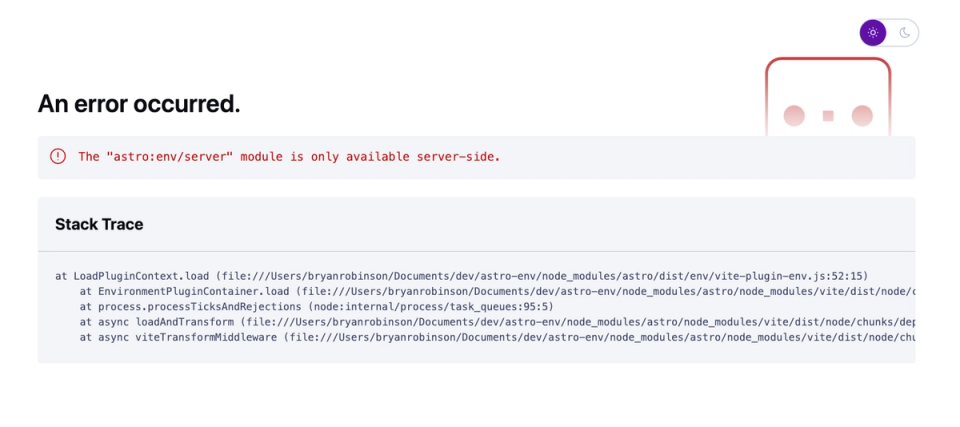
If you implement that as written, your frontend will throw a type error. Inside of a client <script> the import for /server isn’t allowed. Instead of just getting an “undefined” error, though, we get a proper type error that makes sense. Obviously, this is not what we want, so after testing, delete that from the client script.
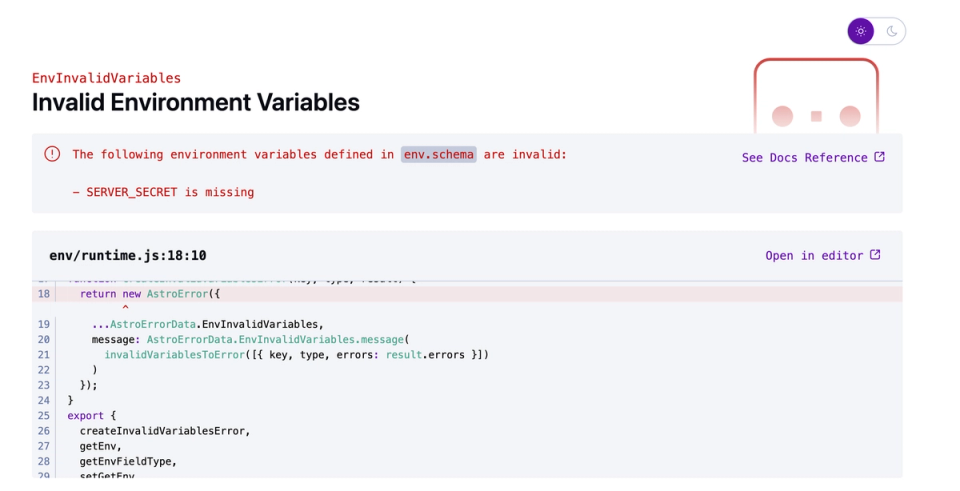
Now to test things even more, go into your .env file and remove the SERVER_SECRET variable. The next time the site tries to build (you may need to restart the astro dev command locally), a type error will be thrown. This time, the fact that SERVER_SECRET is missing. Again, no question here. Everything is spelled out.
Did you know that if you put a number in your environment variables that it’s actually a string? I hadn’t honestly thought about it, but it’s true.
Since we have a number in our .env file, let’s test it out.
In your index route, let’s get the NUMBER variable in the standard way and check the type.
---
import {NUMBER, BOOLEAN} from 'astro:env/client'
---
That’s a string!
Now, let’s compare it to importing via astro:env .
---
import {NUMBER, BOOLEAN} from 'astro:env/client'

console.log(typeof import.meta.env.NUMBER, typeof NUMBER)
---
That’s a number. Astro is handling our coercion for us! A handy extra piece of functionality.
Will this completely revolutionize your codebase? No. But it’s darn handy to have. I think the more I dive into the various options, the more I’ll see bigger applications for this.
此内容由惯性聚合(RSS阅读器)自动聚合整理,仅供阅读参考。 原文来自 — 版权归原作者所有。