
惯性聚合 高效追踪和阅读你感兴趣的博客、新闻、科技资讯
阅读原文 在惯性聚合中打开

推荐订阅源

钛媒体:引领未来商业与生活新知
钛媒体:引领未来商业与生活新知
B
Blog RSS Feed
W
WeLiveSecurity
I
InfoQ
L
Lohrmann on Cybersecurity
Simon Willison's Weblog
腾讯CDC
S
Schneier on Security
酷 壳 – CoolShell
酷 壳 – CoolShell
T
Threat Research - Cisco Blogs
P
Palo Alto Networks Blog
Attack and Defense Labs
I
Intezer
Recent Commits to openclaw:main
D
Darknet – Hacking Tools, Hacker News & Cyber Security
Last Week in AI
Last Week in AI
WordPress大学
WordPress大学
Cisco Talos Blog
Cisco Talos Blog
T
The Exploit Database - CXSecurity.com
S
Securelist
T
Tailwind CSS Blog
CTFtime.org: upcoming CTF events
美团技术团队
Stack Overflow Blog
Stack Overflow Blog
T
Tor Project blog
博客园 - 叶小钗
Engineering at Meta
Engineering at Meta
Microsoft Security Blog
Project Zero
Project Zero
C
Cybersecurity and Infrastructure Security Agency CISA
Apple Machine Learning Research
V
Visual Studio Blog
Know Your Adversary
Know Your Adversary
T
The Blog of Author Tim Ferriss
N
News and Events Feed by Topic
小众软件
小众软件
G
Google Developers Blog
F
Full Disclosure
O
OpenAI News
The Last Watchdog
The Last Watchdog
G
GRAHAM CLULEY
TaoSecurity Blog
TaoSecurity Blog
U
Unit 42
Jina AI
Jina AI
S
SegmentFault 最新的问题
cs.AI updates on arXiv.org
P
Proofpoint News Feed
Y
Y Combinator Blog
N
News and Events Feed by Topic
K
Kaspersky official blog

Bryan Robinson's Blog

Does our technology still work for us? Product pricing, dev bad habits, and the role of the pit of success Astro Server Island for latest Bluesky post (heavily cached!) Type-safe environment variables in Astro 5.0 New Website, but really is it? Netlify Durable Cache: Caching for a third-party world Introducing the Hygraph Astro Content Loader Integrating Astro.js Starlight Documentation into a Next.js Project Using Proxies Jamstack is meaningless 😱 Book Release: Eleventy by Example – Learn 11ty with 5 in-depth projects 11ty Second 11ty: Creating Template Filters 11ty Second 11ty: Global Data files (JS and JSON) 11ty second 11ty: The Render Plugin Part 1 Help needed: Netlify Frontend environment variables with Astro.js Quick experiment with the Slinkity 11ty plugin Creating a dynamic color converter with 11ty Serverless Using 11ty JavaScript Data files to mix Markdown and CMS content into one collection How to show your template code in 11ty blog posts New City, New Job, New Content Using Nunjucks Climbing the 11ty Performance leaderboard with Cloudinary, critical CSS and more Three JAMstack movements to watch in 2020 Create a Codepen promo watermark with no additional HTML, CSS or JS Use CSS Subgrid to layout full-width content stripes in an article template Adapt client-side JavaScript for use in 11ty (Eleventy) data files CSS Gap creates a bright future for margins in Flex as well as Grid Create your first CSS Custom Properties (Variables) Use CSS Grid to create a self-centering full-width element Creating an 11ty Plugin - SVG Embed Tool Now offering design and code reviews at PeerReviews.dev Routing contact-form emails to different addresses with Netlify, Zapier and SendGrid Create an Eleventy (11ty) theme based on a free HTML template Client work and the JAMstack Grid vs. Flex: A Tale of a "Simple" Promo Space Using Eleventy The Tech Barrier to Entry What Can We Learn from CERN Let Practical CSS Grid - Launching My First Course Build Trust on the Web incorporating User Worries with your User Stories 2019 The Year of Markup-First Development Refactoring CSS into a Sass mixin Starting a new journey with Code Contemporary Dynamic Static Sites with Netlify and iOS Shortcuts Top 3 uses for the ::before and ::after CSS pseudo elements How To: Use CSS Grid to Mix and Match Design Patterns Use CSS ::before and ::after for simple, spicy image overlays Modern CSS: Four Things Every Developer and Designer Should Know About CSS 3 Strategies for Getting Started with CSS Grid CSS Tip: Use rotate() and skew() together to introduce some clean punk rock to your CSS The 5 Stages of Grid Love How To: A CSS-Only Mobile Off Canvas Navigation How To: Use CSS Grid Layout to Make a Simple, Fluid Card Grid Make a More Flexible Cover Screen with CSS Grid Can CSS Grid open up interesting CMS Layout options? Firefox 52 to Introduce New Box-Alignment Values Falling Forward — Rethinking Progressive Enhancement, Graceful Degradation and Developer Morality Start Exploring the Magic of CSS Grid Layout I Converted My Blog to CSS Grid Layout and Regret Nothing Feature Queries are on the Rise CSS Shapes — Let the Text Flow Around You Flexbox -- Let Memorializing Prince and Print vs. The Web I went to Italy and noticed UX fails How to Get Designers to Contribute in Open Source The True Gift of Your Former Code
3 underused CSS features to learn for 2020
2019-12-17 · via Bryan Robinson's Blog

Banner image featuring multi-column vector illustration with title "CSS Features for 2020"

CSS has a whole lot of power. There are properties and values for any number of amazing designs. With all that power comes a lot to remember.

If you don’t know about all the tools in your toolbox, how will you find the right one for the job?

In this post, we’ll take a look at three lesser-used, but super useful tools for various jobs in CSS.

1. How to have readable line-lengths with the ch unit

There is a plethora of amazing length units in CSS, so why let px and rems have all the fun?

We’ve known for a long time that line length has a lot to do with how easily a person can read content. We’ve had more issues determining the proper size with static lengths like pixels. Enter the ch length unit in CSS.

The definition of the ch unit is the width of the 0 character in the current font size. While not perfect, this allows us to specify a width for a column of content to be equal to an “ideal” number of characters. In the Smashing Magazine article linked above, the author indicates a comfortable line length to be between 45 and 85 characters wide. Instead of doing calculations and figuring out the proper amount of pixels, we can substitute the “character unit” to keep things balanced.

.centered-column {
    width: 90vw;
    max-width: 75ch;
    margin-left: auto;
    margin-right: auto;
}

With this snippet, you now have a centered column that will never exceed a maximum recommendation.

If you adjust the font size at various breakpoints, the max-width of the column will expand or contract. If you decide to change fonts, the max-width will adjust.

The one caveat I’ll throw in here is that you don’t want to use this for precise measurements. This should always be approximations. Since the ch unit keys off of the 0 glyph in the font, greater or fewer characters may be on each line. Take this relatively simple example.
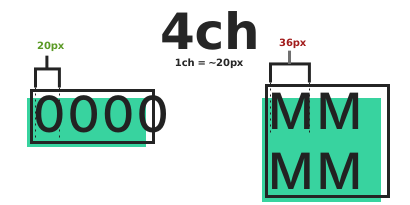
Image showing four 0s side by side and a group of Ms where only 2 Ms fit next to each other

In the image above, only two M characters fit side by side in the same space as four 0 characters. That’s because each capital M is roughly 36 pixels wide; each 0 is 20 pixels. Combine this with each font having different glyphs and you get something not precise. Since our code example doesn’t worry about precision and just wants the line length around 75 characters wide, we’re safe.

2. How to simplify your CSS with CSS Attribute selectors

I’m not overly surprised that ch units don’t have much popularity. They feel very tied in with design concerns. Attribute selectors, however, shock me in their lack of use. They’re so versatile and feel very programatic.

At their core, Attribute selectors allow you to select an HTML element that has a specific attribute or has a certain value of an attribute.

One of my favorite new uses of the attribute selector comes from Andy Bell’s amazing new CSS reset.

In his reset — which is full of well-thought-out configurations — he uses attribute selectors to remove margins and paddings only from uls and ols that have classes. The thinking being that if you set a class on the item, you probably are resetting the list’s styles. If you don’t have a class, you probably want a bulleted or numbered list.

ul[class],  
ol[class] {  
   padding: 0;  
   margin: 0;
}

You could also apply this to anchor tags that have a target attribute. Use this in conjunction with an ::after element to add a small icon for links that will take a user into a popup window.

a[target] {
    padding-right: 2ch;
}

a[target]::after {
    background-image: url(icon.svg);
    width: 1.75ch;
    height: 1em;
    ...etc.
}

Using that same method for icons, you could apply a Twitter logo to any URLs that begin with Twitter’s URL.

a[href^="https://twitter.com"] {
    ...styles
}

This will target any anchor tag with an href that starts with the string “https://twitter.com”.

Conversely, you can also check the end of a string for perhaps .pdf to find all the links to PDFs on the page.

a[href$=".pdf"] {
    ...styles
}

There are so many handy recipes you can concoct with the attribute selectors. I wish more people knew about them and used them.

3. How to create multiple columns of flowing text or elements with CSS Multi-column

Image of multicolumn in 3 columns at desktop and 2 at tablet

Even before CSS Grid became available, we could do some minor work in columns outside of tables. CSS Multi-column is a specification that allows us to have text and elements flow through multiple columns.

You can use it with any amount of text and give it either a specific number of columns or a column-width to match against.

This can create interesting interstitial layouts in the middle of a blog post.


.column-content {
    column-width: 250px; /* Columns with max-width of 250px
/*  column-count: 2;   Always 2 columns */
    column-gap: 2rem;     /* Columns with 2rem of space in between */
}

There’s even more you can do with things like column-rule for borders, and column-span to create breaks in your columns for new headers.

A bright future for CSS with the past

While the second half of the 2010s has been amazing for new CSS (things like Flexbox and Grid), it’s important to remember there are a lot of additional powers from the past.

The features mentioned in this post have been in browsers for years and don’t get a lot of use. While experimenting with new cool toys this holiday season, don’t forget to remember the past cool toys.

Question: What CSS feature do you think is underutilized by the industry as a whole?

Send me a Tweet to let me know.