
惯性聚合 高效追踪和阅读你感兴趣的博客、新闻、科技资讯
阅读原文 在惯性聚合中打开

推荐订阅源

N
News and Events Feed by Topic
GbyAI
GbyAI
博客园 - Franky
宝玉的分享
宝玉的分享
Blog — PlanetScale
Blog — PlanetScale
Google DeepMind News
Cyber Security Advisories - MS-ISAC
人人都是产品经理
人人都是产品经理
Microsoft Azure Blog
The Register - Security
腾讯CDC
freeCodeCamp Programming Tutorials: Python, JavaScript, Git & More
I
InfoQ
The Cloudflare Blog
OSCHINA 社区最新新闻
OSCHINA 社区最新新闻
Engineering at Meta
Engineering at Meta
MongoDB | Blog
MongoDB | Blog
有赞技术团队
有赞技术团队
CTFtime.org: upcoming CTF events
F
Full Disclosure
cs.AI updates on arXiv.org
Vercel News
Vercel News
博客园 - 【当耐特】
Exploit-DB.com RSS Feed
S
Schneier on Security
cs.CV updates on arXiv.org
Project Zero
Project Zero
量子位
M
MIT News - Artificial intelligence
Stack Overflow Blog
Stack Overflow Blog
C
Cyber Attacks, Cyber Crime and Cyber Security
美团技术团队
Attack and Defense Labs
C
Cybersecurity and Infrastructure Security Agency CISA
T
The Blog of Author Tim Ferriss
cs.CL updates on arXiv.org
T
Troy Hunt's Blog
Google Online Security Blog
罗磊的独立博客
P
Proofpoint News Feed
Schneier on Security
Spread Privacy
Spread Privacy
S
SegmentFault 最新的问题
L
LINUX DO - 最新话题
Simon Willison's Weblog
爱范儿
爱范儿
博客园 - 聂微东
A
About on SuperTechFans
PCI Perspectives
PCI Perspectives
D
Docker

Ahmad Shadeed

Better fluid sizing with round() Use Cases for Field Sizing The Basics of Anchor Positioning Item Flow CSS Relative Colors Balancing Text In CSS Should masonry be part of CSS grid? CSS display contents CSS Grid Areas CSS Cap Unit An Interactive Guide to CSS Container Queries CSS :has() Interactive Guide CSS Nesting UX in DevTools CSS Nesting Rebuilding a comment component with modern CSS Conditional CSS with :has and :nth-last-child CSS Text balancing with text-wrap:balance CSS Masking Do we need CSS flex-wrap detection? My CSS Wishlist Conditional CSS CSS Style Queries Inside the mind of a frontend developer: Article layout Inside the mind of a frontend developer: Hero section CSS container queries are finally here The CSS behind Figma First Look At The CSS object-view-box Property Learn CSS Subgrid CSS :has Parent Selector Aligning Content In Different Wrappers Flexbox Dynamic Line Separator Hello, CSS Cascade Layers Building UI Components With SVG and CSS A Deep CSS Dive Into Radial And Conic Gradients Defensive CSS Building Real-life Components: Facebook Messenger Conditional Border Radius In CSS CSS Container Query Units Less Absolute Positioning With Modern CSS Aligning a Button Label Vertically Comparing Design Mockups To Code Result Using HSL Colors In CSS Custom Scrollbars In CSS Let CSS Container Queries For Designers The State of CSS Cross-Browser Development Overflow Issues In CSS Inspect Element As A Way To Increase Your Curiosity Handling Text Over Images in CSS Digging Into CSS Logical Properties Clipping Scrollable Areas On The inline-start Side Understanding Clip Path in CSS The Art of Building Real-life Components Handling Short And Long Content In CSS CSS Scroll Snap A Deep Dive Into CSS Grid minmax() CSS Variables 101 Finding The Root Cause of a CSS Bug Learn CSS centering How to detect browser support for Flexbox Gap CSS Mistakes While On Autopilot Digging Into the Flex Property Understanding CSS Multiple Backgrounds Aligning Logo Images in CSS Grid for layout, Flexbox for components Colors in CSS Thinking About The In-between Design Cases min(), max(), and clamp() CSS Functions Image Techniques On The Web Everything About Auto in CSS Learn Box Alignment Let Learn CSS Positioning Intrinsic Sizing In CSS CSS Grid Template Areas In Action Hiding Elements On The Web Creating a Variable Color Font From Scratch Building a Football Ticket With CSS and SVG Blending Modes in CSS CSS Variables With Inline Styles Implementing Dark Mode For My Website Rebuilding Apple Music Header in HTML & CSS Accessible Checkbox Layout Flickering On Browser Resize Enhancing The Clickable Area Size Custom Underlines with SVG Part 3: The Process of Implementing A UI Design From Scratch Part 2: The Process of Implementing A UI Design From Scratch Building An Old Nav Design CSS Flexbox: 5 Real World Use Cases I Used CSS Inline Flex For The First Time The Process of Implementing A UI Design From Scratch Common CSS Issues For Front-End Projects Handling Long and Unexpected Content in CSS How to Build Web Form Layouts With CSS Grid Grid Layout Ah-ha Moment Enhancing Our Components with CSS :empty Building Resizeable Components with Relative CSS Units CSS Writing Mode The Journey of Learning Front End Web Development on a Daily Basis
Future CSS: State Container Queries
Ahmad Shadeed · 2023-06-22 · via Ahmad Shadeed

The Layout Maestro

I spent years teaching CSS layout on this blog. I put everything I know into The Layout Maestro course: 70+ lessons and 150+ interactive examples that teach you how to think CSS layouts, not just memorize syntax.

Get the course

Wait, what? Yes, you heard that right. The Chromium team is experimenting with a new type of query, which is called State Query. Last year, size container queries got supported in all major browsers. They let us query a container based on its width.

.card-wrapper {
  container-type: inline-size;
  container-name: card;
}

@container card (min-width: 400px) {
  .card {
    display: flex;
    align-items: center;
  }
}

Adding on that, we now have Style queries, which let us query a container and check if a CSS variable persists.

.special-wrapper {
  --theme: dark;
  container-name: stats;
}

@container stats style(--theme: dark) {
  .stat {
    /* Add the dark styles. */
  }
}

This is still in Chrome Canary only for now.

Back to state queries. While watching Una’s talk on CSS Day I spotted something that got me excited to check what this is all about.
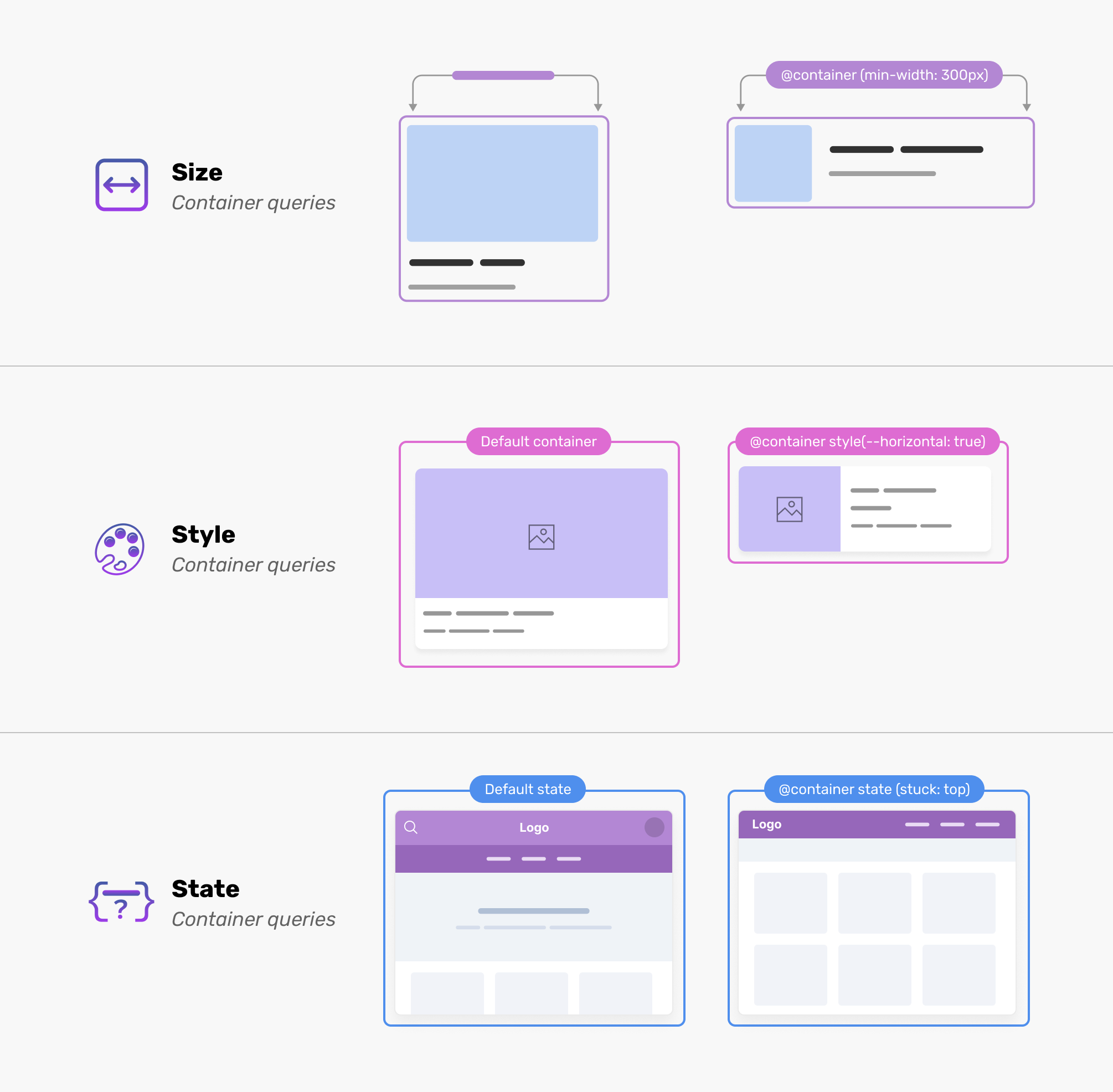
In my 2023 CSS wishlist, one of the things was getting a way to check if an element is stuck, meaning that position: sticky is active. I got so much excitement when I knew that the Chrome team is experimenting with it!

Sneaking over the Chromium bug, it works like this:

  • Define the container type as sticky
  • Use the state query
  • Check if stuck: direction is active

That means, when the header is sticky, we need to update the padding. Or maybe hide or show something. It’s up to you!

Let’s explore how it works.

State queries examples

Stuck state query

A use case for the stuck state is when we have a header that will change its design based on whether it’s stuck or not. By stuck, I mean that the position: sticky took action.

Consider the following example:
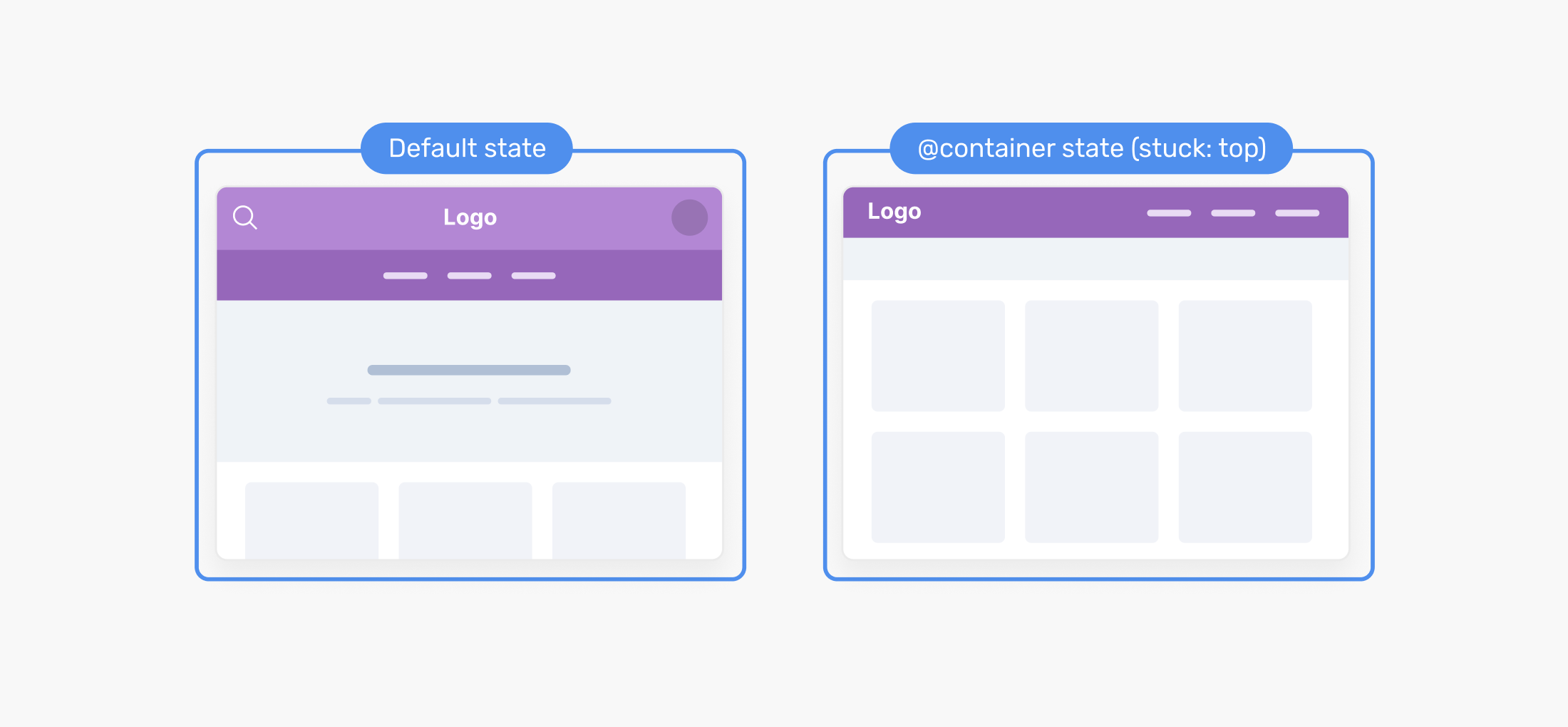
When the header is sticky, I want to simplify its design. The reason is that it’s not always a good practice to keep elements taking a part from the screen real-estate.

I used to detect that with Javascript, but now we might get that in CSS soon.

.page {
  container-name: sticky-header;
  container-type: sticky;
}

.site-header {
  position: sticky;
  top: 0;
}

@container state(stuck: top) {
  .site-header__bottom {
    display: none;
  }

  .site-header__actions {
    display: none;
  }
}

I feel that the current syntax will change, as I’m not sure about using sticky for container-type and stuck for the query.

Wrap state query

State queries aren’t only about sticky positioning. Earlier this year, I published a blog post asking Do we need CSS flex-wrap detection?

Consider the following figure:
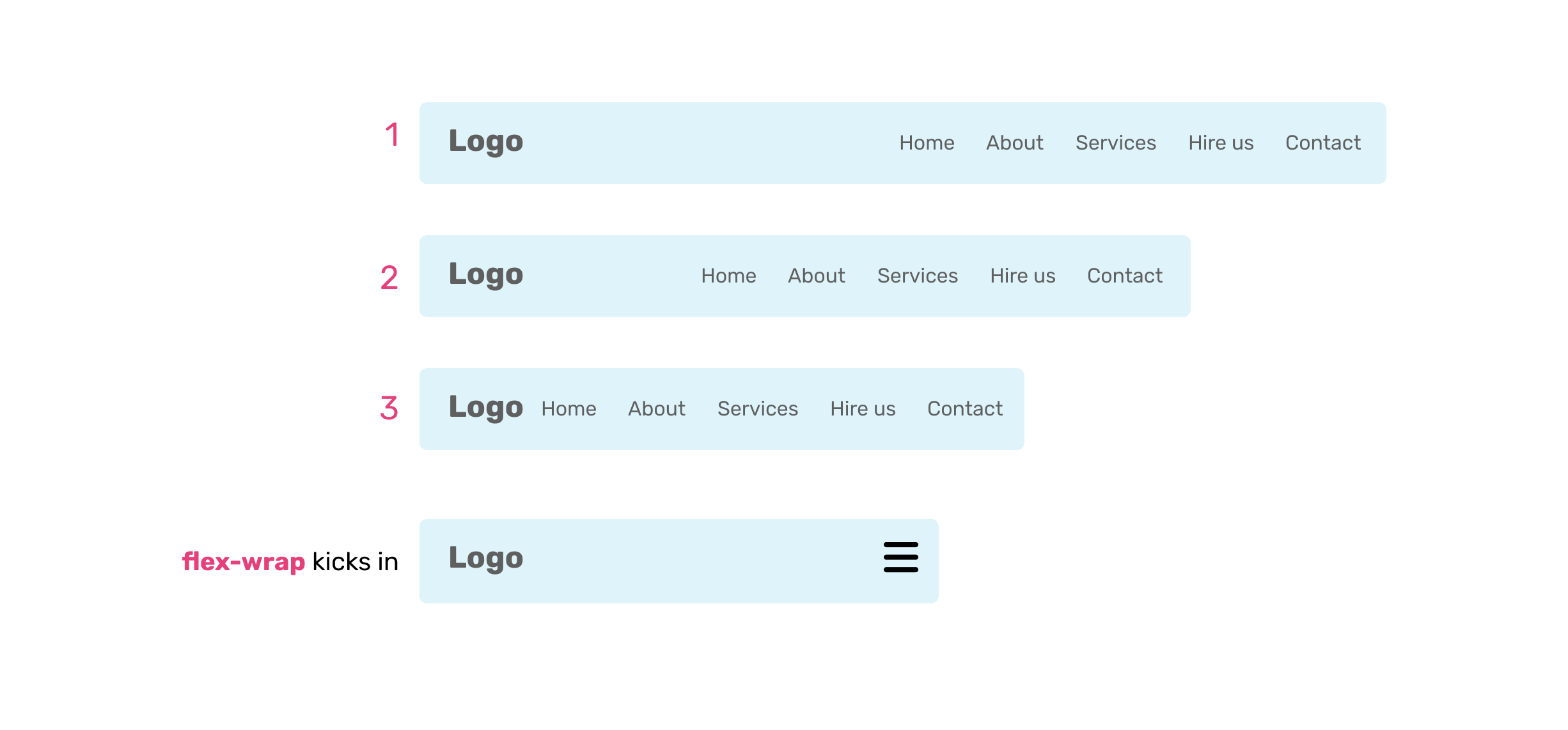
We have a site header that is built with flexbox. When the items wrap, I want to hide the navigation and replace it with a toggle menu button.

.site-header {
  container-type: wrap;
  container-name: header;
  display: flex;
  flex-wrap: wrap;
  align-items: center;
}

@container header state(wrap: true) {
  .site-header__nav {
    display: none;
  }

  .nav-toggle {
    display: block;
  }
}

Being able to detect when a flex container is wrapped will be very helpful. Note: this is still an idea and hasn’t been implemented in any browser yet.

Empty state

Currently, we can use the :empty pseudo-class to check if an element is empty.

.figcaption:empty {
  display: none;
}

That works fine, but if there is a space character within the <figcaption> element, it will fail. Can we do better with state queries?

Consider the following HTML. Notice that I intentionally added an empty space.

<section class="section"></section>

I don’t know how exactly this should work since we can’t apply CSS to the container itself, but here is a pseudo code.

section {
  container-type: empty;
}

@container state(empty: true) {
  display: none;
}

Empty here means when the container doesn’t have any child elements.

Detecting the document direction

I’m not sure if this can be considered a state, but a lot of times I need to know if the container direction is ltr or rtl. For example, I might want to flip an icon.
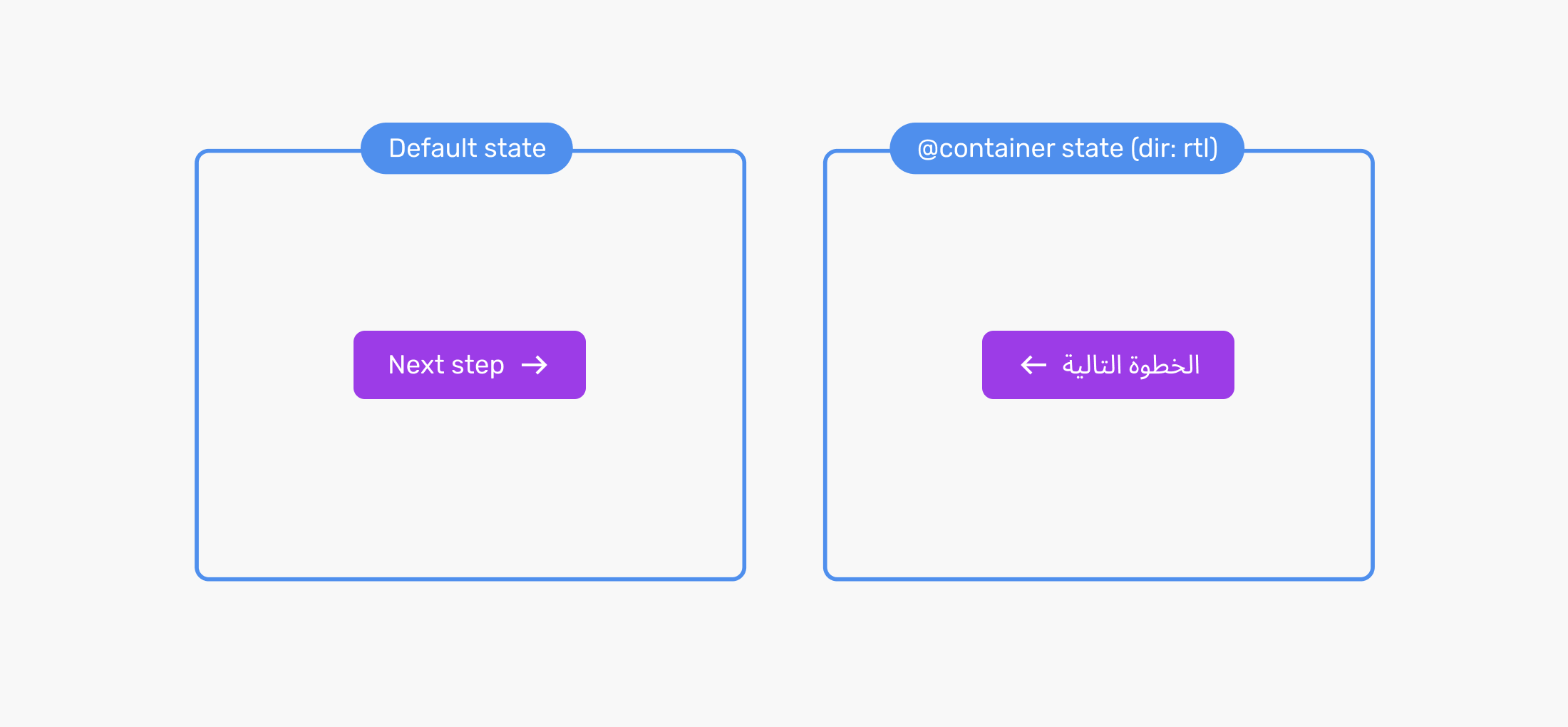
With a state query for the document direction, this might help a lot.

/* Instead of.. */
html[dir="rtl"] .button-icon {
  transform: scaleX(-1);
}

/* We do this */
@container state(dir: rtl) {
  .button-icon {
    transform: scaleX(-1);
  }
}

That’s it for this quick post. What do you think? Do you have any ideas on other state queries? I would love to hear from you on Twitter @shadeed9.

Thank you for reading.