


I spent years teaching CSS layout on this blog. I put everything I know into The Layout Maestro course: 70+ lessons and 150+ interactive examples that teach you how to think CSS layouts, not just memorize syntax.
One year and three months ago, I decided to learn HTML and CSS. I felt that if I can make it, my skills will be better and I will code my designs. Basically, I was only a designer who only made deliverable web mockups using Photoshop, and then passed it to a developer to implement them. Unfortunately, most of them don’t care about pixel perfection, so they simply ignore any part of the UI that needs more work. Really? Why should I bear that? 😡 What if I can make it myself by learning HTML and CSS?
In this article, I will explain the different approaches I followed to stick to this daily practice, and share the mistakes I made, tools that helped me and a few lessons I learned the hard way.
Throughout this practice, I learned that passion is to work day and night without feeling tired. Passion is to wake up every day to work on something you love. Passion is to read a book about something you love and put it under your pillow (Yes!) in the hope of dreaming about it. There is nothing that can beat what you love since you are doing it with all your heart. 😍
One year ago, I didn’t have experience in Web Design. I wasn’t aware that we should design for the web based on a grid system. I was feeling sad when a developer ignored an idea I suggested without knowing why.
I tried to learn Web Development in the past, but I failed two or three times. The process was I watch a video course, apply what I learned, and after a month I forgot everything! This is a huge issue that most people encounter when they want to learn something new, out of their comfort zone, and mostly the reason is that we want to be professionals in a very short period of time.
 Screenshot from Commit app.
In late June 2014, I decided to learn daily by using Commit app. The idea of the app is that you create a habit by giving it a name, and everyday you must tap on the ‘yes’ button so it can count for you. If you skip practicing for a day, the counter will start again from zero. My first day was on Wednesday, July 2, 2014. I started by coding a design I made earlier for my blog.
On my first practice day, I was very excited and kicked it off with the home page of my blog design. Of course, I encountered some issues and documented them as below
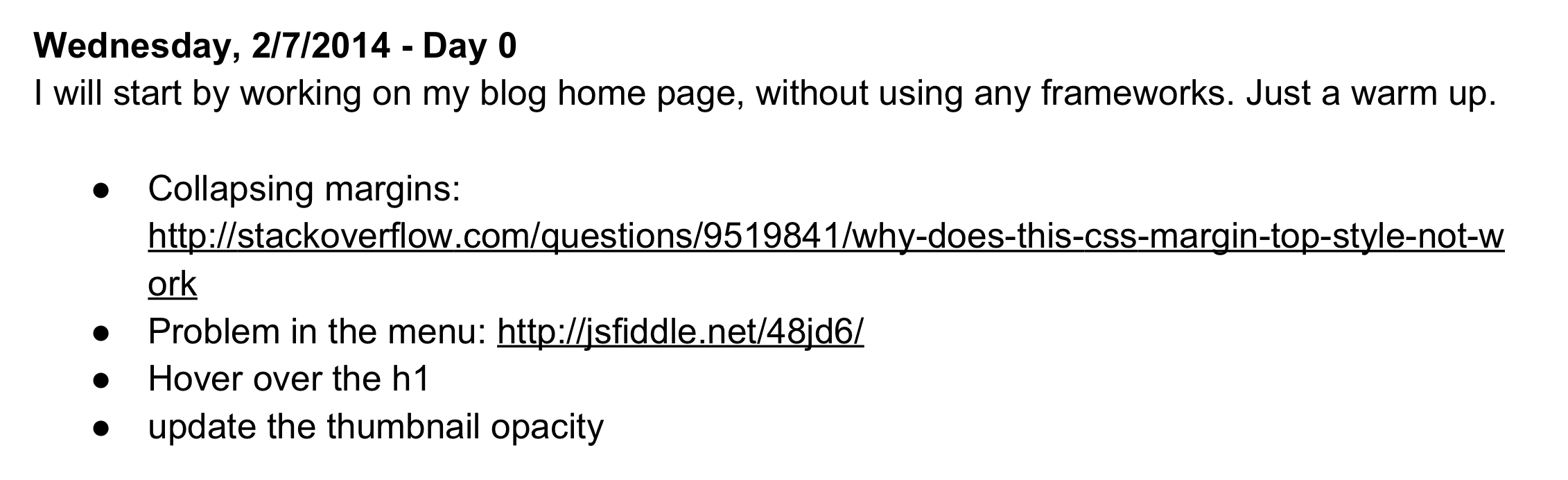 The note I documented for the first day of my front end journey.
During the first days of practice, you won’t have much experience, so it will be hard to plan what to learn the next days. You will ask yourself a lot, Am I going to succeed in tomorrow’s practice? A lot of questions in mind that can simply stop you from learning!
One of the mistakes you might make is taking one day off and saying to yourself “I’m tired, I want to take some rest”. Mostly, you will take all the days off 😀 😂. Don’t take a day off! Keep your streak going, you must work hard, because it’s your future, you know.
And the journey began, I started downloading a lot of PSD files from all over the internet and tried to make them in HTML and CSS, or pick designs from projects I worked on in the past. The picking process is a bit hard sometimes, since you should pick PSDs that have some new ideas and challenges. Whenever I didn’t face a problem/challenge on a certain day, I realized that I didn’t learn anything new. Learning is to overcome your problems and challenges.
The idea of the app is simple, it asks me every day about my practice and When I tap on the ‘Yes’ button, then it will show you a counter like ‘450 days in a row’. If you skip a day, the counter will reset to zero.
What’s nice about the app is that it encourages people with its simplicity and very awesome idea. This helps and makes learning new things that need commitment a more enjoyable thing.
I use it to document what I learned and practiced for each day. So far, it has reached about 75 pages of notes for each day. Be sure to document your journey, some day you will go back and read it, it will mean a lot to you. Also, it’s possible to enhance its content and make it as a book that can be useful to other people.
You will face times in your day where if you don’t say no, you will finish your day without doing your practice. It’s better to say No and not be shy from anyone. Make your journey a way to organize your whole life. Don’t only learn something new, but also develop your skills in time management.
Example: You can plan to go out with friends, in that day you should do your practice before going out, actually it’s better to do it early in the morning. That way, your mood will be good and you won’t spend your time thinking about your practice and why you should learn today. Because you already did it in the morning!
Unfortunately, most of the PSDs available online are very similar to each other. What I did was browse Behance or Dribbble and pick designs in JPG format and start implementing them. After this experiment, I noticed that there is no big difference between the PSD and JPG files. Simply because as a web designer, it’s easy for you to inspect the design in a tool like Photoshop and check the font sizes, colors, distance between design elements.
During travel, you will encounter a lot of unexpected things, like an issue in the internet connection for example, or the place you are at is not comfortable to you, time zone, being tired and a lot of things that let your subconscious mind say “Don’t practice today. Don’t… Don’t…”.
Simply say No, I will do my today practice in spite of you. :)
When traveling, I prepare a practice plan for at least two weeks in advance, so I don’t waste time every day looking for a practice. Also, don’t forget to read books while you are on the plane or maybe you can do your practice as well.
Sometimes, I depend on resources that don’t work without internet, like web fonts. Try to download everything you need offline and prepare carefully for the unexpected things that might happen.
Dribbble, Behance and Pinterest.
It’s good to share what you learned and get feedback, they will know that you are committed to learning something new every day. On day 28 of my practice, I published a screenshot from Commit app on my Facebook page. Then, I realized that people are waiting for something from me, they are interested to see what I’m doing. That’s encouraged me to do more and more practices. To be honest, maybe if I didn’t share this screenshot, then my learning would have stopped. Thanks, people.
From the day 45 I started working on a real Front End project for a client, the experience was really awesome and I learned a lot from it. So far, I worked on more than 10 projects. I didn’t imagine that I will start working on real projects before finishing my learning. So what I learned is, daily practice is a critical thing to each human being, it can completely change his life if he uses it well.
One of the most common mistakes that the learner might make is to use those frameworks without understanding the idea behind them. Don’t use them if you are still a beginner, you will waste your time learning how to use them, instead of learning the core basics of a grid layout. A lot of people think that it’s possible to make a responsive layout using Bootstrap framework for example, this misunderstanding is a catastrophe. Again, don’t use them if you don’t have an idea about how it works. Use it with care.
Personally, I love using frameworks for prototyping a quick layout for a client, it only takes a few minutes to create something interactive. Otherwise, I prefer to write my own CSS.
It’s really hard to name CSS, maybe it’s the hardest thing when you are working on a large project. Things might get messy if you are not careful with the naming process.
Naming CSS is a lot harder than the situation when parents want to pick a name for their new child.
To make things better, you should stick to a naming method like BEM, SMACSS, ITCSS… Check out Harry Roberts blog if you are interested in learning more about CSS architecture.
In the meantime, I’m learning more about Javascript and reading the whole CSS spec. I’m also interested in CSS Architecture topic.
This article was written on day #468 of my journey.
Thanks a lot for reading. Have a nice day! :)
Thanks to the awesome Mai El-Awini for her help in proofreading the article.
此内容由惯性聚合(RSS阅读器)自动聚合整理,仅供阅读参考。 原文来自 — 版权归原作者所有。