


I spent years teaching CSS layout on this blog. I put everything I know into The Layout Maestro course: 70+ lessons and 150+ interactive examples that teach you how to think CSS layouts, not just memorize syntax.
You might have used the attr() function in CSS before to get the text content for a pseudo-element.
<p data-title="This text is before the title">Hello World</p>
.title:before {
  content: attr(data-title);
}
The result is as follows:
CSS is awesome
There is nothing new or groundbreaking here, it’s useful for some cases.
However, when we want to use a value other than text, it will not work. In the following HTML, I added data-color attribute to the p element.
<p data-color="red">CSS is awesome</p>
And then used the attribute in CSS.
.title:before {
  color: attr(data-color);
}
It’s not working because the attr() function only supports text values.
CSS is awesome
attr()
Limited availability
Supported in Chrome: no.
 Supported in Edge: no.
 Supported in Firefox: no.
 Supported in Safari: no.

This feature is not Baseline because it does not work in some of the most widely-used browsers.
Now, we can use attr() and define the type of value we want to use.
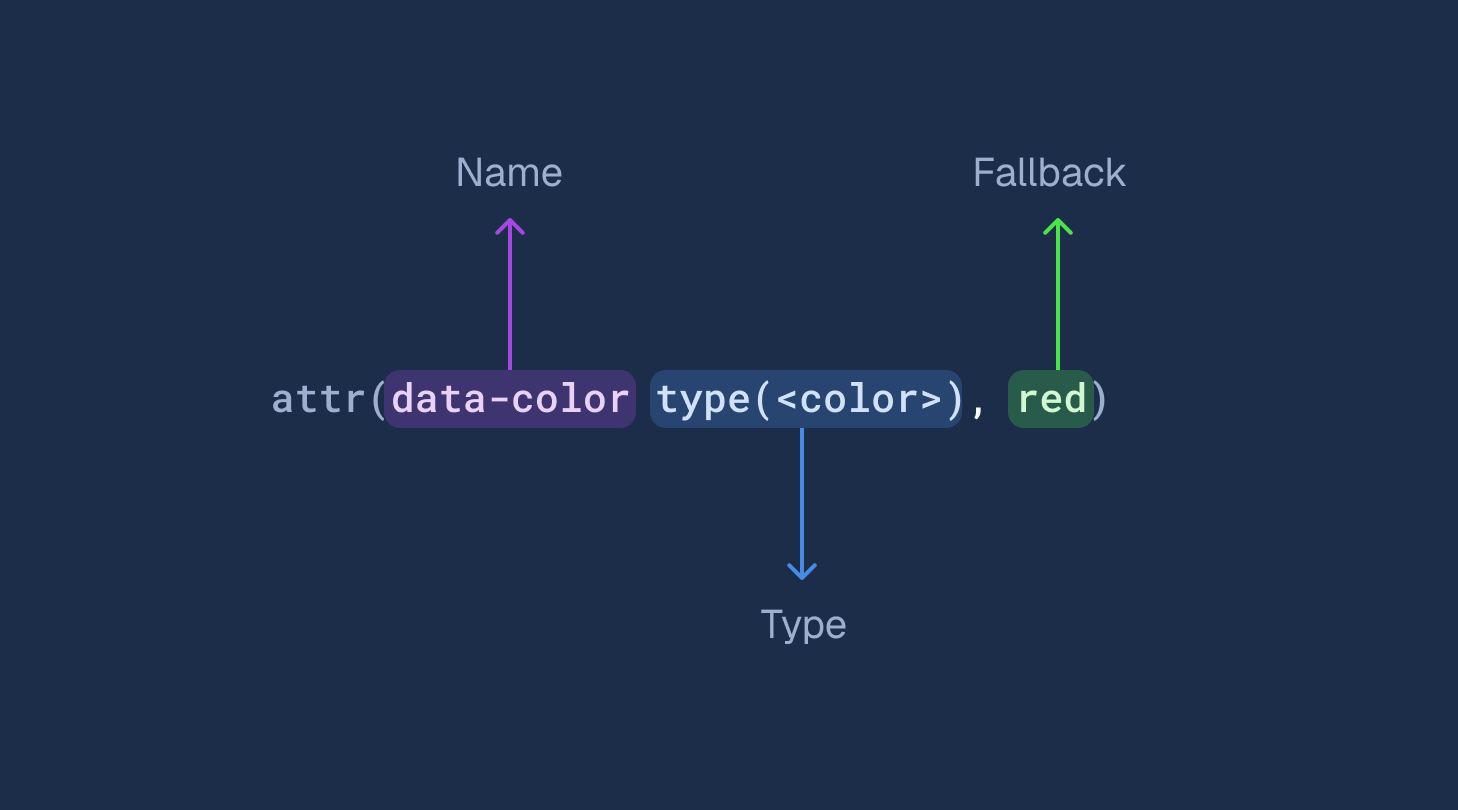
For example, in this case, we need to get the color value.
<p data-color="red">CSS is awesome</p>
.title:before {
  color: attr(data-color type(<color>));
}
CSS is awesome
According to MDN, the new data type can take different value types:
The
type()function takes a<syntax>as its argument that specifies what data type to parse the value into. The<syntax>can be<angle>,<color>,<custom-ident>,<image>,<integer>,<length>,<length-percentage>,<number>,<percentage>,<resolution>,<string>,<time>,<transform-function>, or a combination thereof.
That gives us a lot of new flexibility that we didn’t have before. Where that might be useful? That’s what I will explore in this article.
We can check for the modern attr() support with CSS @supports. Here is an example:
@supports (x: attr(x type(*))) {
  /* modern attr() works */
}
If you are using Sass, the above won’t be parsed. I escaped it to make it work in .scss files:
@supports (#{"x: attr(x type(*))"}) {
  /* modern attr() works */
}
When using a CSS grid, we can assign column numbers to each child of the grid.
In this example, I defined data-col-start and data-col-end on a grid item to set the start and end of the column.
In CSS, I can retrieve the numbers like so:
.layout {
  > * {
    grid-column-start: attr(data-col-start type(<number>), 2);
    grid-column-end: attr(data-col-end type(<number>), 3);
  }
}
If the attribute isn’t set, it will fall back to 2 and 3 as I specified. Play with the following demo and see how it works:
<div data-col-start="1" data-col-end="-1">
<img src="desk.jpg" alt="" />
</div>
Lorem ipsum dolor, sit amet consectetur adipisicing elit. Quam deleniti officia aut nulla vero cumqu.
Veritatis, tempore itaque accusamus alias voluptate illum cupiditate eius incidunt et laudantium?
If the attributes are not set, the grid-column-start and grid-column-end will default to the fallback values.
See the following demo:
<div data-col-start="1" data-col-end="-1">
<img src="desk.jpg" alt="" />
</div>
Lorem ipsum dolor, sit amet consectetur adipisicing elit. Quam deleniti officia aut nulla vero cumqu.
Veritatis, tempore itaque accusamus alias voluptate illum cupiditate eius incidunt et laudantium?
We can use the rows attribute and multiply it by a threshold number.
textarea {
  min-height: calc(attr(rows type(<number>)) * 50px);
}
Check out the demo below:
<textarea rows="3"></textarea>
Write a brief description about your product idea:
Another great usage of modern attr() is to delay an animation. Since attr() works with the <time> type, we can take this to our advantage.
In the following HTML, we have a list of items. Each item has a data-delay attribute. We can take this and use it in CSS.
<div class="itemsWrapper">
  <div class="item" data-delay="0.3s"></div>
  <div class="item" data-delay="0.6s"></div>
  <div class="item" data-delay="0.9s"></div>
  <div class="item" data-delay="1.2s"></div>
</div>
To use the value, we need to call the attribute and then define its type. If not defined, it will fall back to a default delay of 0.5s.
See the following CSS:
.item {
  animation-delay: attr(data-delay type(<time>), 0.5s);
}
Here is an interactive demo that shows how it works:
<div class="itemsWrapper">
<div class="item" data-delay="0.3s"></div>
<div class="item" data-delay="0.6s"></div>
<div class="item" data-delay="0.9s"></div>
<div class="item" data-delay="1.2s"></div>
</div>
By having a unique number for each html element, we can use it to change the color lightness as per its index.
In this example, I’m using the data-index attribute to get the value for lightness while using CSS relative colors.
.item {
  background-color: oklch(
    from #ab4ef8 calc(l + calc(attr(data-index type(<number>)) / 20)) c h
  );
}
Check the demo below:
<div class="itemsWrapper">
<div class="item" data-index="1"></div>
<div class="item" data-index="2"></div>
<div class="item" data-index="3"></div>
<div class="item" data-index="4"></div>
<div class="item" data-index="5"></div>
<div class="item" data-index="6"></div>
<div class="item" data-index="7"></div>
</div>
In that regard, we now have sibling-index in the works! Exciting times.
I used attr() to define the value of grid-gap. What’s nice here is that we can define multiple options for the value. In this case, I defined the types <length> or <percentage>.
.layout {
  gap: attr(data-gap type(<length> | <percentage>));
}
Try to change the length values in the below demo:
<div class="layout" data-gap="1rem"></div>
One of the powerful features of CSS grid is using grid named areas. I thought about why not trying to define the grid template area with data attributes?
At first, I tried the following:
<div
  class="layout"
  data-areas="'featured item-1' 'featured item-2' 'item-3 item-4'"
></div>
Though it didn’t work. I think it’s invalid CSS (Please correct me if I’m wrong). To make it work, I’ve to define each row individually as the following:
<div
  class="layout"
  data-row-1="featured item-1"
  data-row-2="featured item-2"
  data-row-3="item-3 item-4"
></div>
Then, I used that in CSS like so. Notice that I didn’t define the type since the default is <string>.
.layout {
  grid-template-areas:
    attr(data-row-1)
    attr(data-row-2)
    attr(data-row-3);
}
Here is a demo that shows it in action:
Featured
Item 1
Item 2
Item 3
Item 4
<div class="layout"
data-row-1="featured item-1"
data-row-2="featured item-2"
data-row-3="item-3 item-4">
</div>
An example of where we can use attr() is with background images. Usually, when we have a dynamic background that is set via JavaScript, we tend to set background-image on each element or use a CSS variable.
We can set an attribute and use that in CSS. It gives the same result as using the inline CSS variable, but it feels cleaner to me.
<!-- Inline CSS Variable -->
<div style="--bg: linear-gradient(45deg, #9c3ce7,#3d53cc)"></div>

<!-- The new attr() -->
<div data-bg="linear-gradient(45deg, #9c3ce7,#3d53cc)"></div>
In CSS, we can use it like so:
.element {
  background: attr(data-image type(<image>)) no-repeat;
}
<div data-bg="linear-gradient(45deg, #9c3ce7, #3d53cc)"></div>
In this demo, I wanted to see how the attr() will work when used in a CSS variable. I defined data-color and data-progress on the main container.
<div class="bar" data-color="#a548e3" data-progress="55">
  <div class="bar__current"></div>
</div>
Then, in CSS, I:
.bar {
  --progress: attr(data-progress type(<number>));
  --color: attr(data-color type(<color>));
  background-color: oklch(from var(--color) calc(l + 0.35) c h);
}

.bar__current {
  width: calc(var(--progress) * 1%);
  background-color: oklch(from var(--color) l c h);
}
It works! Here is a demo:
<div class="bar" data-color="#a548e3" data-progress="55"></div>
<div class="bar" data-color="#afe348" data-progress="75"></div>
<div class="bar" data-color="#e38148" data-progress="40"></div>
If we compare this to the approach of using an inline CSS variable, it will quickly become harder to read/scan.
<!-- Inline CSS Variable -->
<div class="bar" style="--color: #a548e3; --progress: 55"></div>

<!-- Modern Attr -->
<div class="bar" data-color="#a548e3" data-progress="55"></div>
I had an idea in mind when I first started exploring attr() and I’m glad it’s not just me.
What if we can use attr() to have a mini CSS framework or utility classes to be used within a system? In the following snippet, I added px which stands for the padding on the horizontal sides.
<div px="1rem"></div>
In CSS, I need to define this only once:
[px] {
  padding-inline: attr(mx type(<length));
}
And I can use it on many elements as needed:
<div px="1rem"></div>
<div px="10px"></div>
<div px="0"></div>
I defined the CSS once and reused the utility attribute multiple times. Isn’t that cool? I took this further and built a bit more attributes:
Some content in here
Some content in here
<div
max-w="500px"
px="1rem"
py="1rem"
bg-color="#fff"
color="#222">
</div>
<div
max-w="300px"
px="2rem"
py="2rem"
bg-color="var(--brand-1)"
color="#fff">
</div>
When I published this article, I had the understanding that we can’t use keywords like auto. Turned out, it’s possible to do this with the type <custom-ident>. Thanks to Temani Afif, I learned that it’s possible.
I wish that there was a way to have a “keyword” type. For example, If I have an attribute that could be a length value or an auto, I need to allow multiple values.
[mx] {
  margin-inline: attr(mx type(<length> | <custom-ident>));
}
<div mx="auto"></div>
Or we can use a length value:
<div mx="2rem"></div>
Also, we can use the universal selector to make it accept any value.
[mx] {
  margin-inline: attr(mx type(*));
}
Another idea is to allow either a length type or the auto keyword. Thanks to Bramus and Dannie Vinther
for suggesting this.
[mx] {
  margin-inline: attr(mx type(<length> | auto));
}
When using data-* for an attribute name, we can access it by using dataset. If we have an attribute data-color, we can do the following:
element.dataset.color = "blue";
When using modern attr(), we can separate the content from the styling and so making the HTML easier to scan.
<!-- Inline CSS Variable -->
<div class="bar" style="--color: #a548e3; --progress: 55"></div>

<!-- Modern Attr -->
<div class="bar" data-color="#a548e3" data-progress="55"></div>
When using data attributes, it’s not possible to mess up with CSS. We can have an API-like way to style our pages. In a design system, using attr() can prevent the developers from accidentally overwriting styles and it makes the CSS more predictable.
Modern attr() provide us with a powerful way write CSS based on data attributes. At the time of writing, it’s Chrome only and I wish more browsers will follow soon.
此内容由惯性聚合(RSS阅读器)自动聚合整理,仅供阅读参考。 原文来自 — 版权归原作者所有。