
惯性聚合 高效追踪和阅读你感兴趣的博客、新闻、科技资讯
阅读原文 在惯性聚合中打开

推荐订阅源

G
GRAHAM CLULEY
S
Security @ Cisco Blogs
P
Proofpoint News Feed
Cisco Talos Blog
Cisco Talos Blog
D
Darknet – Hacking Tools, Hacker News & Cyber Security
C
Cyber Attacks, Cyber Crime and Cyber Security
T
Tor Project blog
WordPress大学
WordPress大学
Project Zero
Project Zero
S
Schneier on Security
P
Proofpoint News Feed
小众软件
小众软件
P
Privacy International News Feed
美团技术团队
L
LangChain Blog
Know Your Adversary
Know Your Adversary
J
Java Code Geeks
奇客Solidot–传递最新科技情报
奇客Solidot–传递最新科技情报
The Register - Security
N
Netflix TechBlog - Medium
Microsoft Security Blog
Engineering at Meta
Engineering at Meta
I
InfoQ
量子位
Vercel News
Vercel News
博客园 - 三生石上(FineUI控件)
Spread Privacy
Spread Privacy
D
DataBreaches.Net
Threat Intelligence Blog | Flashpoint
U
Unit 42
P
Privacy & Cybersecurity Law Blog
C
Cybersecurity and Infrastructure Security Agency CISA
T
The Blog of Author Tim Ferriss
Latest news
Latest news
K
Kaspersky official blog
MongoDB | Blog
MongoDB | Blog
L
LINUX DO - 热门话题
Simon Willison's Weblog
云风的 BLOG
云风的 BLOG
S
Securelist
AWS News Blog
AWS News Blog
F
Fortinet All Blogs
T
Threat Research - Cisco Blogs
Stack Overflow Blog
Stack Overflow Blog
Scott Helme
Scott Helme
Help Net Security
Help Net Security
Y
Y Combinator Blog
宝玉的分享
宝玉的分享
CTFtime.org: upcoming CTF events
T
Tenable Blog

CodePen

433: CodePen 2.0 is Backward Compatible with Any Classic Pen or Project 432: Trends of 2026 (So Far) 431: Versions are Deeply Integrated into CodePen Chris’ Corner: Layers of Layers 430: The Wild World of Keyboard Shortcuts in Web Apps Chris’ Corner: Makin’ Stuff 429: Why CodePen Rebuilt Its Realtime Service Chris’ Corner: The Edge, Man 428: Improving The Entire Billing System (is Very Worth It) Chris’ Corner: A11Y 427: Next.js and The Journey of SSR 426: Browserslist in CodePen 2.0 Chris’ Corner: Finding Type Chris’ Corner: View Transitions 425: Help Your Users Help You with Debug Logs Chris’ Corner: Check It B4 U Wreck It Chris’ Corner: Import Maps 424: File List Optimization Chris’ Corner: ZIP first? 423: 2.0 Templates Chris’ Corner: URLs 422: Supporting Packages Chris’ Corner: Share What You Do 421: View Control of the 2.0 Editor Chris’ Corner: Design Chris’ Corner: Even Grids Chris’ Corner: Processing 420: What are Blocks? Chris’ Corner: Anchors 419: Why 2.0? Chris’ Corner: Cool Things Chris’ Corner: SVG Tools 418: CodeMirror 6 Chris’ Corner: All Together Now Chris’ Corner: Light & Boxes Chris’ Corner: Lovingly Esoteric CSS Chris’ Corner: Type Chris’ Corner: Two Liners Chris’ Corner: Type Chris’ Corner: Freshly-Fallen CSS Chris’ Corner: Cloud Four Chris’ Corner: HTML Chris’ Corner: Web Components Chris’ Corner: Kagi Blog Typography 417: Iframe Allow Attribute Saga Chris’ Corner: Cursors Chris’ Corner: Browser Feature Testing 416: Upgrading Next.js & React Chris’ Corner: AI Browsers 415: Babel Choices 414: Apollo (and the Almighty Cache) Google Chrome & Iframe `allow` Permissions Problems Chris’ Corner: Stage 2 413: Still indie after all these years Chris’ Corner: Design (and you’re going to like it) 412: 2.0 Embedded Pens Chris’ Corner: Discontent 411: The Power of Tree-Sitter Chris’ Corner: Word Search 410: Trying to help humans in an industry that is becoming increasingly non-human Chris’ Corner: Little Bits of CSS 409: Our Own Script Injection Chris’ Corner: Terminological Fading 408: Proxied Third-Party JavaScript Chris’ Corner: Simple, Accessible Multi-Select UI 407: Our Own CDN Chris’ Corner: Clever Clever 406: Hot Trends of 2025 Chris’ Corner: Pretty Palettes 405: Elasticsearch → Postgres Search Chris’ Corner: Faces Chris’ Corner: Browser Wars Micro Edition 404: Preventing Infinite Loops from Crashing the Browser Chris’ Corner: Scroll-Driven Excitement 403: Privacy & Permissions Chris’ Corner: AI for me, AI for thee 402: Bookmarks Chris’ Corner: We Can Have Nice Things 401: Outgoing Email Chris’ Corner: Tokens Chris’ Corner: Modern CSS Features Coming Together Chris’ Corner: Liquid Ass Chris Corner: For The Sake of It Chris’ Corner: Type Stuff! Chris’ Corner: Doing a Good Job Chris’ Corner: Design Do’s and Don’ts Chris’ Corner: CSS Deep Cuts Chris’ Corner: GSAP, more like FREESap Chris’ Corner: Reacting Chris’ Corner: Rounded Triangle Boxes and Our Shapely Future Chris’ Corner: Fairly Fresh CSS Chris’ Corner: 10 HTML Hits Chris’ Corner: CSS Powered Componentry Chris’ Corner: The New Web Safe Chris’ Corner: PerformanCSS Chris’ Corner: Color Accessibility Chris’ Corner: onChange Chris’ Corner: Accessible Takes Chris’ Corner: Creative Coding
Chris’ Corner: Design
Chris Coyier · 2026-06-09 · via CodePen

I’ve been doing computers for a good minute, but the Scroll Lock key still predates me. There may have been a day when I could have explained what it does, but that knowledge had evaporated until I read Marcin Wichary’s Lock Scroll With a Vengeance. It’s fascinating that the technology that deprecates the Scroll Lock key is… the mouse (and scrollbars and trackpads). Stuff that’s been around. I’m very sure Excel nerds still use love it.

If I must fingersplain a fairly visual concept (I must): scroll Lock, when enabled, keeps the visually selected thing right where it was as you scroll, rather than requiring the selected thing to be butted up against an edge to trigger scrolling movement as it pushes beyond that edge. I think that was a perfect sentence, but your call. Go look at Marcin’s post to see how this effect has actually made its way into modern interfaces, without the key’s opt-in. My take is that if you’re going to do this, the selected item should be very centered so you can see other items in all directions around it. The examples from HBO Max and YouTube just forced the locked item to the other edge. I’d bet a donut it’s so users “see more sooner”.

Welp, we’re getting a smidge reflective about design, here’s a zinger from Barry Prendergast: The worst designer I’ve ever worked with was also the most productive. It’s exactly what you think it is:

This ambitious young designer pumped out more screens in a day than more-experienced designers would in a week. Leadership adored them. They saw the speed, the volume, the ‘beast mode’ energy — and mistook it for value creation.

It didn’t go well. The lesson?

Good designers slow down when it matters. To clarify the problem. To align with their team. To create outcomes that matter.

I can feel how really talented designers at big orgs are, especially feeling the AI anxiety. Whippin’ out screens ain’t it, which is what AI (and, apparently, particularly energetic and misguided junior devs) are good at. Real design has always been a much more nuanced affair. Jem Gold hits it nicely in Design Is How It Tastes with a banger subhead:

If our design specs only tell models what the interface is made of, they have already forgotten what the interface is for

I admit I’m very impressed at what coding agents can do these days, but I remain skeptical that AI can really understand the human experience, a prereq for great design. At the moment, AI is headed for the more rote instructions-following output:

A few months ago, Google Labs released DESIGN.md. The idea is sound: codify your design ethos in a single markdown file so that coding agents can implement it consistently. Write it once, ship it everywhere. Portability matters because interfaces are increasingly built by or with agents.

But read a typical DESIGN.md and you will find language like this:

Use 8px radii. Use a neutral palette with a pink accent. Buttons should have primary and secondary states. Cards should have subtle borders.

Useful, but thin. It describes the produced object. It does not preserve the intended encounter.

I used the word “great” design above. A worthy distinction. Certainly AI can poop out generic but decent design. I see live design work powering successful companies regularly that would probably benefit from letting an AI loose on their pages. Bringing up the average bar is probably a good thing for the web. But great design remains a human endeavor. CodePen Alum Jake Albaugh opens his Design is the work article with:

We’re in a moment where it has never been cheaper or faster to build something convincing.

There is all this stuff we know that is absolutely vital to what we build. Jake lists a small handful of that stuff:

AI doesn’t know your constraints. It doesn’t know your strategy. It doesn’t know what moment in the market you’re in, what your team is trying to prove, or what your customers actually need versus what they’ve said they want. The expectation — the definition of what good looks like — is something only you can provide.

Blech enough AI for one Chris’ Corner.

How about a nice little design lesson from Jono Hey:
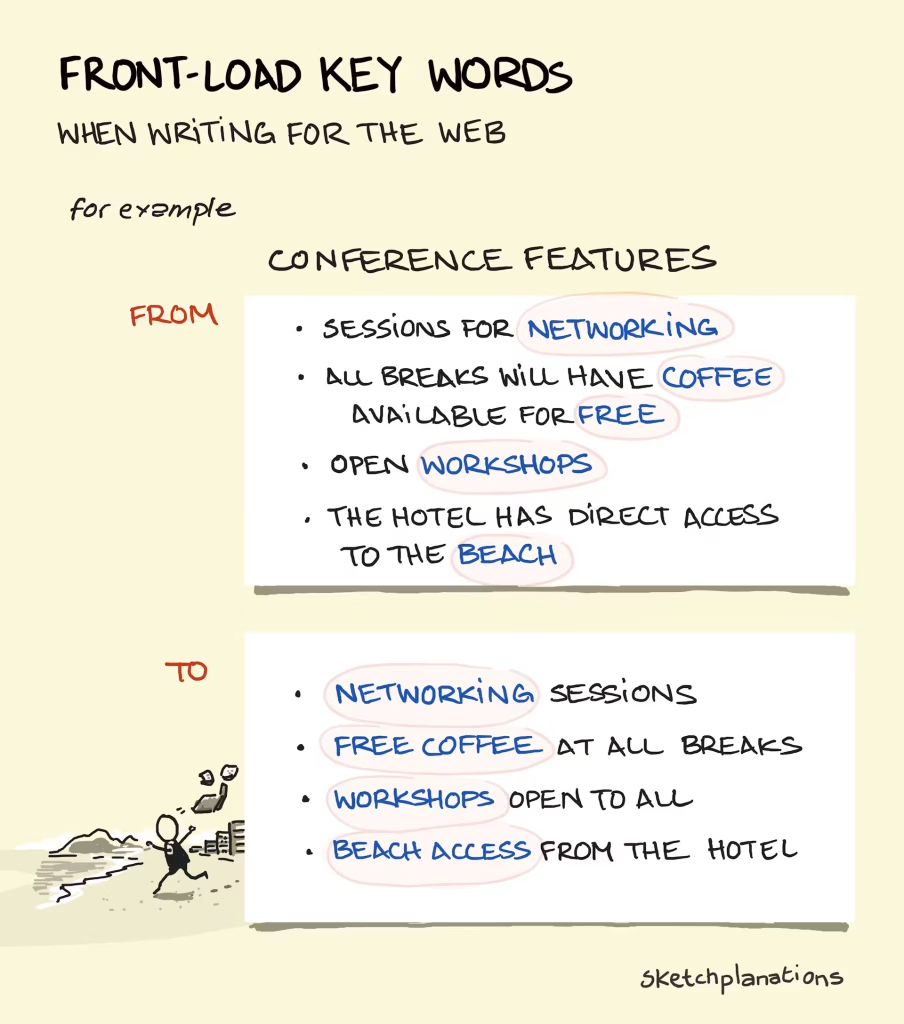
Writing, you say? Word choice is absolutely a part of design. Great design, anyway.

I’ll leave you with Design. Regret. Confess. — a site for all you designers out there to share your profession disasters, then commisurate through reading others.

I once copied a logo from Logos That Slap for some concept sketch and it got approved.

lol I mean AI copies, but humans copy.