


While fixing accessibility issues on a project, I noticed a huge problem with a page that relied on CSS Flex Layout, specifically with the order property. If you are not familiar with CSS order, it allows developers to make the visual order of elements on the page different than their DOM order. For example, you can have this code:
<div class="flex-example shuffled">
  <button class="btn">
    <strong>1</strong>
    <br> This appears first in source order.
  </button>
  <button class="btn">
    <strong>2</strong>
    <br> This appears second in source order.
  </button>
  <button class="btn">
    <strong>3</strong>
    <br> This appears third in source order.
  </button>
  <button class="btn">
    <strong>4</strong>
    <br> This appears fourth in source order.
  </button>
</div>
with CSS like this:
.flex-example {
  display: inline-flex;
  justify-content: space-around;
  width: 100%;
}

.example-main > div .btn {
  width: 23%;
}

div.shuffled .btn:nth-child(1) {
  order: 2;
}

div.shuffled .btn:nth-child(2) {
  order: 4;
}

div.shuffled .btn:nth-child(3) {
  order: 1;
}

div.shuffled .btn:nth-child(4) {
  order: 3;
}
look like this:
Note that the order property changes the how the order of the elements appear visually in the design. Neat, huh?
Among it’s other use-cases, I have found the order property is extremely useful when the order of elements change from breakpoint to breakpoint. However, it opens up a huge accessibility issue in the desktop version of Firefox. When a user employs a keyboard to navigate the page, all other browsers have the tabbing order to be the same as the DOM order, as shown in this animation:
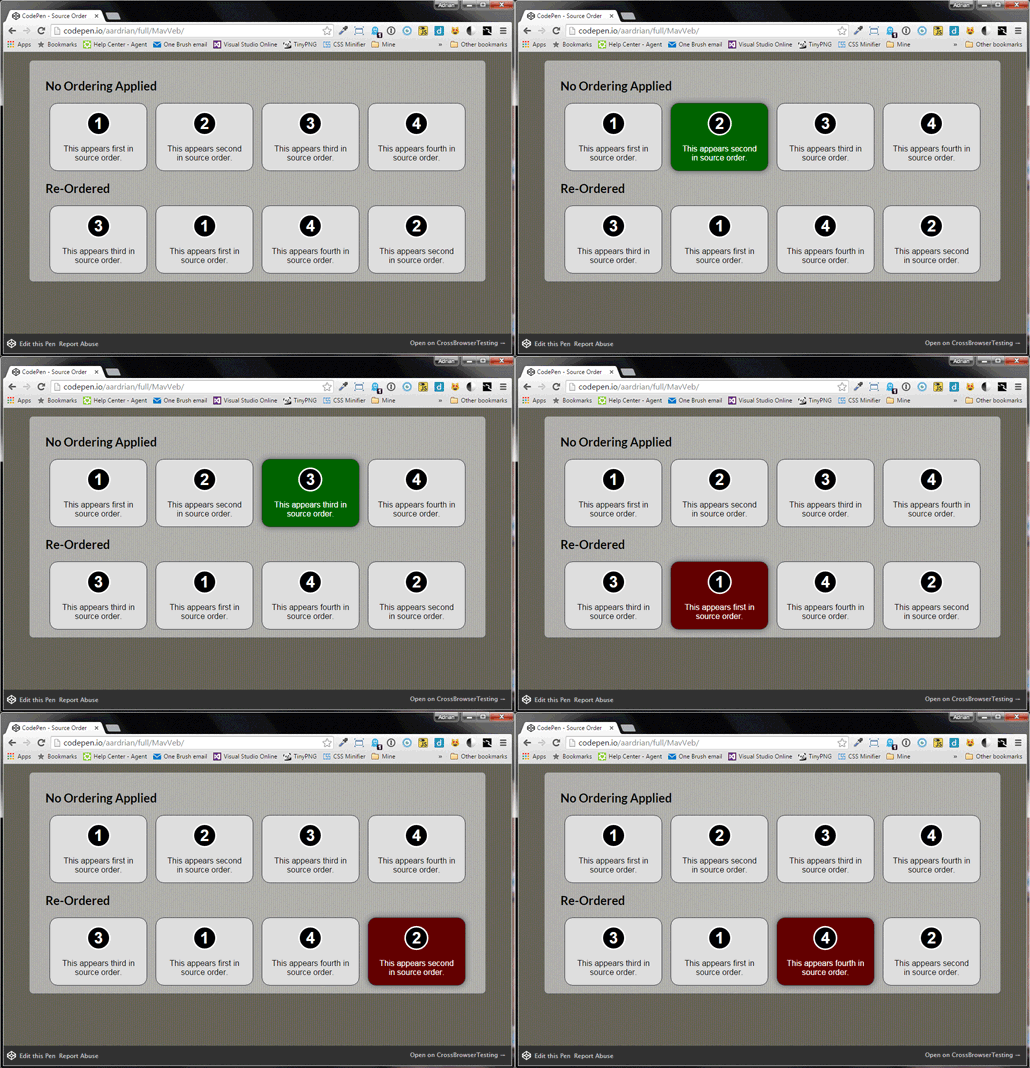
Animated GIF showing the tabbing order of elements with flex-layout’s order CSS property (bottom) and without (top). Note the tabbing order is the DOM order, not visual order.
Unfortunately, the desktop version of Firefox is different — it makes the tabbing order the same as the visual order, as seen here:
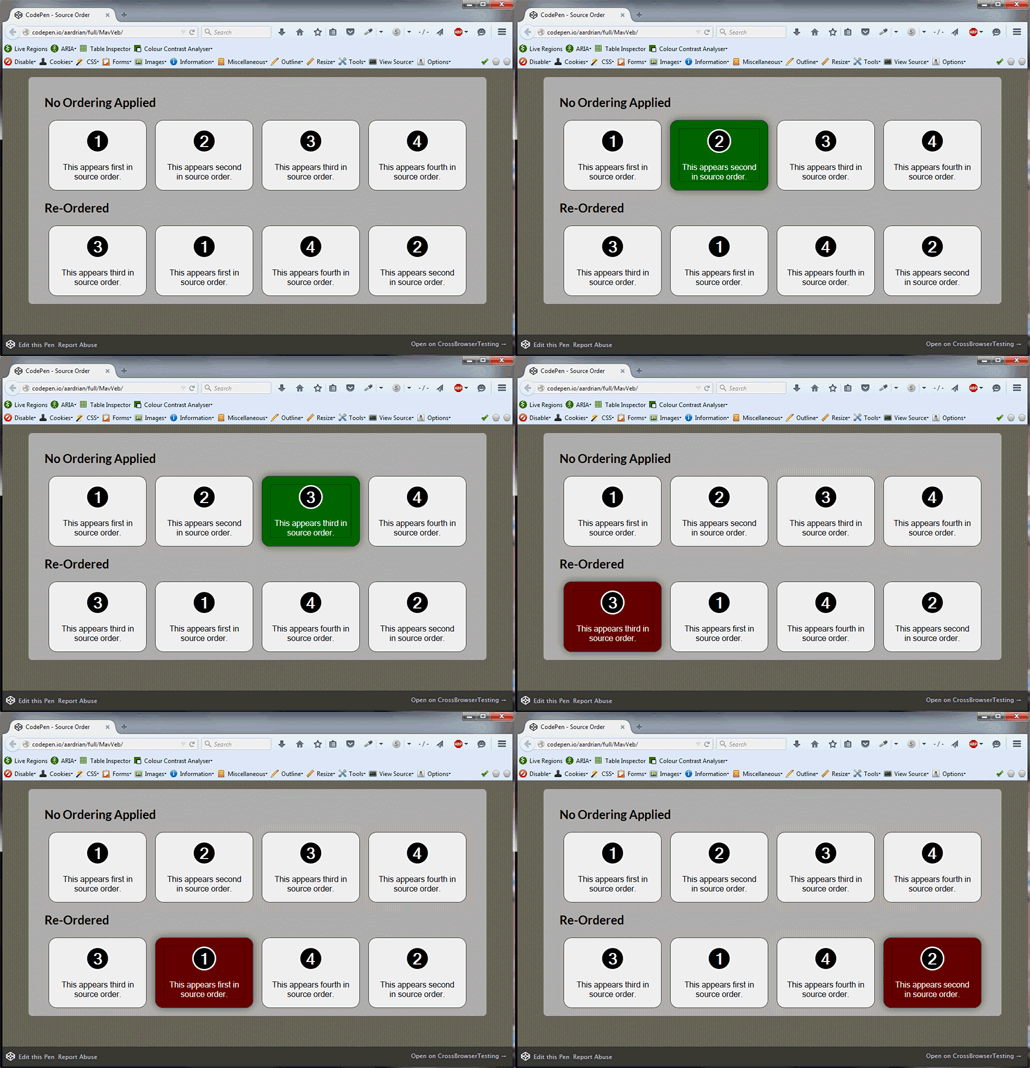
Animation showing tabbing order of the same example in Firefox. Note the tabbing order is the visual order, not the DOM order.
These examples were originally made for the excellent article HTML Source Order vs CSS Display Order by Adrian Roselli. In it, he mentions that this will likely be fixed due to this bug report asking to fix the issue. It is unclear, however, if/when it will be fixed (the bug was reported in 2012!), so I implemented a fix using JavaScript to fix this issue. Note that this bug only appears in the desktop version of Firefox, the Android version of Firefox 50 doesn’t have this bug when using Talkback gestures.
Load the above example with the Firefox Flex Layout Keyboard Navigation Fix.
This fix uses event delegation to listen to all focus and blur events on the page. When a tabbable element gains focus, we set the tabindex property of it and the tabbable DOM elements before and after it so that tabbing order repects DOM order. The tabindex values used are the highest three that the can be used, in order to ensure we are not interfering with the tabindex of any other element. When a tabbable element is blurred (and on keypress when the TAB key is pressed), the tabindex of these three elements are set back to what they were before they the focus event.
This fix will only be executed in Firefox, since it is the only browser that has this issue (at the moment).
a11y-fix-firefox-flexbox class to the <body> of your document.There is quite a bit of debate on this right now. If you look at the comments on the Firefox bug on the issue, quite a few people understandably think visual order makes sense. However, this is contrary to what the official Flexbox spec says (which states “The order property does not affect ordering in non-visual media (such as speech). Likewise, order does not affect the default traversal order of sequential navigation modes (such as cycling through links, see e.g. tabindex [HTML5]).
Regardless of your stance on which is right, I am frustrated with Mozilla’s decision on keeping this bug active for such a long time — in the Canadian Province of Ontario, web accessibility is a legal requirement and companies and other organizations of a certain size must implement accessible websites that follow WCAG level A. Making web sites accessible is also a legal requirement is other parts of the world as well. While probably having good intentions, Mozilla has made it impossible for developers to create designs using the CSS order property that are truly accessible across all browsers without JavaScript. As a developer who cares about accessibility (as well as the legal well-being of his clients) I hope someone from Mozilla reads this article and helps developers out by fixing this bug.
I am not saying visual order should or shouldn’t affect tabbing order — I have seen some great arguments for the “Tabbing order should be the same as visual order” argument. I just think that Mozilla should try to change the standard instead of making a decision that breaks cross-browser accessibility.
此内容由惯性聚合(RSS阅读器)自动聚合整理,仅供阅读参考。 原文来自 — 版权归原作者所有。