


Earlier this month, OpenAI released the GA version of its realtime API. This includes many capabilities that the Beta didn’t have, including video support. I started out doing an update to the The Unofficial Guide to OpenAI’s Realtime WebRTC API I made for the Beta release last November. I discovered there were enough WebRTC updates to do a more focused post on that, so we will strictluy focus on WebRTC in this post. I also reexamined the latest ChatGPT Web-based Voice Assistant to see how that WebRTC implementation compared to the gpt-realtime API one (spoiler alert: no difference).
In addition, I updated my single-html-file demo to match the new GA endpoint and object changes. See that immediately below.
Lastly, thank you again to pion founder and webrtcHacks interviewee, Sean DuBois of OpenAI for his suggestions and review! 
Live Example
You can see the new gpt-realtime model with audio and video by clicking the button below. You must click the Settings button and paste your OpenAI key for this to work. This is a client-side only demo – there is no webserver involved. Usually you would use OpenAI’s ephemeral token mechanism (there is a new one) to pass a token from your webserver to the client, but we don’t have a webserver to do that here.This app is just an iFrame hosted from the webrtcHacks/gpt-realtime-webrtc GitHub repo and hosted on GitHub.io. If you are not comfortable entering your credentials here, then clone the repo or copy & paste the code from the source into a HTML file and open it.
You can see a walkthrough of this code on the Unofficial Guide to OpenAI’s Realtime (Beta) API, just note there are some differences
WebRTC Review
Summary
OpenAI WebRTC implementation continues to be very clean and simple for a 1:1 session.
| PeerConnection | Single PeerConnection using BUNDLE |
| ICE/TURN | Host-candidates only (no STUN or TURN server) |
| SRTP Encryption | Standard DTLS-SRTP |
| Audio Transmission | Opus with in-band FEC, PCMU/PCMA fallback; no DTX or RED |
| Video transmission | H.264-only without simulcast, RTX; H.264 profiles: baseline, constrained baseline, main, and high |
| DataChannels | Standard SCTP over DTLS |
| RTP header | transport‑wide‑cc for audio & video; RID, R-RID |
| RTCP | BWE with transport-wide-cc; NACK/PLI (no FIR, REMB, RTX) |
| Interface | WHIP-like (but not spec WHIP) |
Now let’s look at some of the details.
Offer/Answer Negotiation
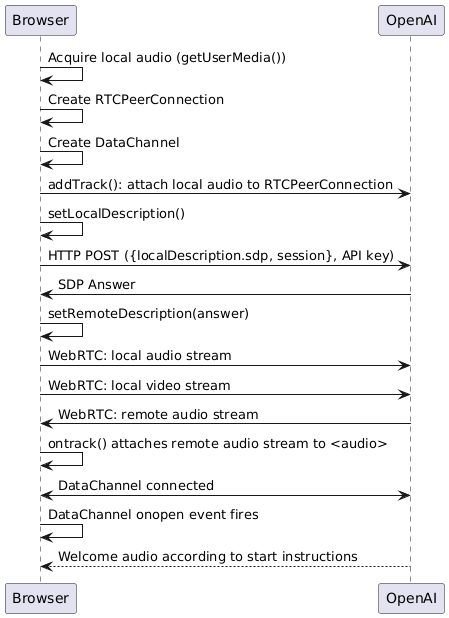
The GA API has a new calls endpoint – “https://api.openai.com/v1/realtime/calls“. In the Beta API, you would send the SDP by itself to https://api.openai.com/v1/realtime. Then you would need to send a separate session.update over the DataChannel to initialize the LLM session. The GA API lets you send the SDP, which establishes the WebRTC session and the LLM session all in one API call:
const fd = new FormData(); fd.set("sdp", pc.localDescription.sdp); fd.set("session", JSON.stringify(newSession)); // Create answer const baseUrl = "https://api.openai.com/v1/realtime/calls"; const response = await fetch(`${baseUrl}`, { //?model=${model}`, { method: "POST", headers: {Authorization: `Bearer ${apiKey}`}, body: fd }); |
That alone is all you need. From there you can send any updates over the DataChannel. Note: I tested the new calls endpoint above with the Beta API and it works fine as long as you add the Beta header (OpenAI-Beta: realtime=v1) to the headers object above. The full flow for reference is in the diagram below.
Full Offer/Answer flow
Interactive Connectivity Establishment (ICE) differences
There were some improvements to the WebRTC connection establishment.
More candidates
Here were the candidates I noted from last November:
a=candidate:3677311949 1 udp 2130706431 41.86.183.135 3478 typ host ufrag aCcjmpdGpYicMaAE a=candidate:3677311949 2 udp 2130706431 41.86.183.135 3478 typ host ufrag aCcjmpdGpYicMaAE a=candidate:1725702701 1 tcp 1671430143 41.86.183.135 3478 typ host tcptype passive ufrag aCcjmpdGpYicMaAE a=candidate:1725702701 2 tcp 1671430143 41.86.183.135 3478 typ host tcptype passive ufrag aCcjmpdGpYicMaAE a=end-of-candidates |
These only went to one server. I didn’t check this last time, but that IP address geo-locates to Tanzania! The IP range was likely reassigned or it was some strange quirk, but random quirks are a downside of only having one address in your negotiation. Here is the new one from an audio-only session:
a=candidate:4152413238 1 udp 2130706431 172.203.39.49 3478 typ host ufrag DoTGved3/u0 a=candidate:1788861106 1 tcp 1671430143 172.203.39.49 443 typ host tcptype passive ufrag DoTGved3/u0 a=candidate:38269317 1 udp 2130706431 172.214.226.198 3478 typ host ufrag DoTGved3/u0 a=candidate:2394539241 1 tcp 1671430143 172.214.226.198 443 typ host tcptype passive ufrag DoTGved3/u0 a=candidate:727169150 1 udp 2130706431 4.151.200.38 3478 typ host ufrag DoTGved3/u0 a=candidate:1878291698 1 tcp 1671430143 4.151.200.38 443 typ host tcptype passive ufrag DoTGved3/u0 |
This includes 3 different addresses. They are all Azure endpoints – one in Chicago, Virginia, and Austin, all close to me in Boston. More endpoints means lower latency and better resiliency at the cost of more infrastructure to maintain.
Faster ICE negotiation
In addition to more endpoints, there are some other improvements here:
- Separate RTCP candidates are removed (that’s the
2ina=candidate:3677311949 2 udp…) – rtcp-mux takes care of this, so these were redundant in the November SDP and would only serve to slow down modern browser ICE handling - Instead of using port 3478 for UDP and TCP, the new set uses port 443 for TCP. This is better for passing firewalls that block UDP and non-web ports.
- They removed the
a=end-of-candidates– this lets trickle ICE keep going, which adds some flexibility if a good candidate arrives late
| Field | November | New |
|---|---|---|
| IPs advertised | 1 | 3 |
| Transports | UDP, TCP | UDP, TCP |
| Ports | 3478 for UDP & TCP | 3478 for UDP only; 443 for TCP |
| Separate RTCP candidate | Yes | No |
| Candidate count | 4 | 6 |
| end-of-candidates | Present | Absent |
| Candidate type | host | host |
| UDP priority | 2130706431 | 2130706431 |
| TCP priority | 1671430143 | 1671430143 |
New Video support
You can now broadcast video so the LLM can “see”. This is also very easy to implement – just change
stream = await navigator.mediaDevices.getUserMedia({audio: true}); |
to
stream = await navigator.mediaDevices.getUserMedia({audio: true, video: true}); |
That’s all you need to do to turn on video.
H.264
The SDP and chrome://webrtc-internals show H.264 is used. This is likely to help with hardware acceleration on as many devices as possible (like videotoolbox on my Mac). 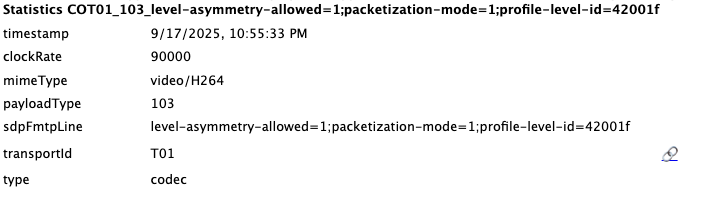 The SDP indicates that baseline, constrained baseline, main, and high profiles are all supported
Is gpt-realtime ingesting a video stream?
So how does the LLM model actually use the video stream? Video ingestion is not covered anywhere in the docs. Examining the API events and the usage charges, it looks like “video” isn’t really used at all. Instead, whenever you ask the model to look at something, it takes a snapshot and charges you for an image input. Sean DuBois at OpenAI confirmed there is a WebRTC video stream to image-over-WebSocket gateway mechanism that sends the image and advises high-resolution with low FPS. The implication here is that you don’t need to send 30 FPS. You can save some bandwidth and send 1 FPS, which is the lower practical limit in the browser.
const videoConstraints = { width: { ideal: 1920 }, height: { ideal: 1080 }, frameRate: { ideal: 1} }; stream = await navigator.mediaDevices.getUserMedia({audio: true, video: videoConstraints}); |
As shown above, I set my code to send at 1080p and one frame per second. If bandwidth is a concern, you could lower the resolution or even just enable video selectively. This could be done by detecting when the user is speaking or maybe even with a tool/function that passes a static image. One could also try using H.264 high profile which runs more efficiently, but I did not experiment to see if OpenAI actually supports that. In any case, bandwidth isn’t always an issue, and OpenAI doesn’t seem to care about the load on their gateway, so this is optional for now.
How much does vision cost? 6.8¢?
There is no explanation for how much vision analysis costs. My first thought was that it would be the same as a normal image input. OpenAI currently charges $5 for 1M input tokens (pricing page). But my one 640×360 image input cost me $0.06751 when I look at OpenAI’s usage dashboard and I couldn’t get the existing image token count math to add up to that. I tried again running a 1280×720 resolution and then at 1920×1080 – they both worked fine and the cost was still right around $0.06751 (the1920x1080 was $0.0679). Then again, I see gpt-realtime captured a bunch of images in my testing yesterday that only add to a total of $0.02 (rounded) so I don’t trust any of these numbers:

The image input has a default “low” level that uses the same number of tokens no matter what size image you send – maybe the realtime API is doing something similar here. This would require a proper test harness to experiment with. It is also not clear if this is for one image or many, but there is only one event returned for each image added to the conversation. We will need to wait for some more clarification from OpenAI on this.
How does this compare to ChatGPT.com?
Next I ran a chatGPT.com live session for comparison. I was surprised to see ChatGPT is doing the same video negotiation, though there is no camera capture so no video stream is sent. I suspect the web version ChatGPT with video transmission is coming soon! The native Android and iOS apps have supported this for a while. My video offer is sendrecv and ChatGPT’s offer is sendonly. I could update this to be the same in my code but I am curious to see if gpt-realtime sends something back someday. Everything else was identical! This is great progress in aligning the differences between the implementations.
Links and more information
Again, this just covers the WebRTC parts of the Realtime API. I am working on a revision to the The Unofficial Guide to OpenAI’s Realtime WebRTC API that covers the GA version and differences. In the meantime, OpenAI has included much more documentation and references with the GA release. Here are some of the links I found helpful:
- OpenAI Docs on the realtime API: https://platform.openai.com/docs/guides/realtime
- Docs specific to WebRTC – this includes a client & server example based on Node.js with Express: https://platform.openai.com/docs/guides/realtime-webrtc
- Demo with source code from OpenAI’s Head of Realtime: https://www.val.town/x/jubertioai/hello-realtime
- OpenAI blog with developer notes on the realtime API: https://developers.openai.com/blog/realtime-api/
{“author”: “chad hart“}