


At the time of this writing, this feature is available in ember-template-lint@3.0.0-beta.3.
The new todo feature in the ember-template-lint addon provides a new option to the existing states for linting rules.
With this new functionality, linting issues can be converted into a todo and developers can strategically plan the work to resolve issues in existing code. A todo can be set to automatically become a warning, then an error with the use of a supporting feature called decay days.

Previously, running the lint:hbs script (default in an Ember app) would cause ember-template-lint to run on all of the .hbs files, and return a result that included number of warnings and number of errors found.

Now, however, we have a new option—we can also include number of todos. First, update the lint:hbs script in the package.json file to use the --include-todo flag (we want to be reminded that we have todos!):
"lint:hbs": "ember-template-lint . --include-todo",Next, run the command yarn lint:hbs again:

Note: ember-template-lint also takes a --quiet flag, which won't print any warnings or todos—only errors.
Along with the ability to create todos out of currently failing rules, some options can be set to decide the number of days before the todo turns into a warning and then into an error.
This new feature is intended to help apps at a large scale. It can be tricky to update a dependency like ember-template-lint when it includes a new rule, due to a number of factors involved. Taking in a new version of the linter can mean communication and coordination about the new rule(s). The larger your app is and the more developers you have, the more work this can be. For global companies that use Ember, there might even be a committee whose sole focus is to make decisions about linting rules!
While the pending feature gave us some of the desired functionality, it didn't ensure that teams would have support to fix existing issues. Issues could stay "pending" forever. The todo feature replaces the pending feature so that, when we introduce new linting rules, teams can remind one another to dedicate time to fix issues.
Perhaps a visualization would also be useful:
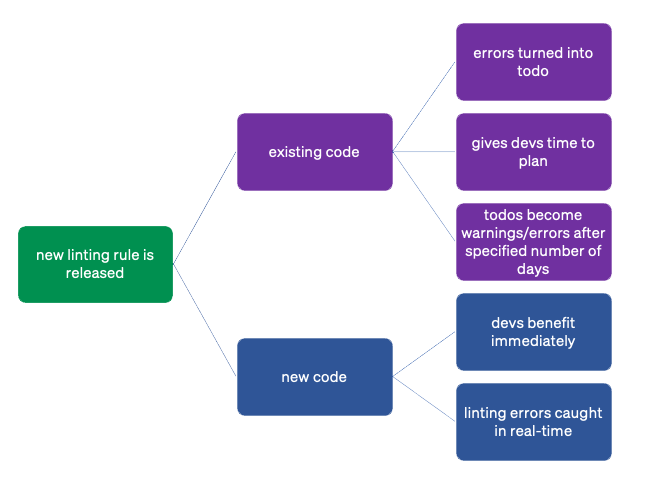
All new code is immediately supported by new linting rules; existing code can have a timeline to provide a fix.
We can even take a step further and customize the number of days to fix on a rule-by-rule basis. Super useful!
You'll want to think about how you want to approach all of the linting rules. Do you want all rules to be treated the same way, or do you want to apply decay days by rule? The linter gives you options for both.
It's possible that you don't care what the error is; all todos should have 15 days before they turn into a warning, and 30 days before they turn into an error. To do this, add this to the package.json file:
{
  "lintTodo": {
    "decayDays": {
      "warn": 15,
      "error": 30
    }
  }
}
The default values will vary from team to team. In essence, the values should be reasonable for teams to methodically work on past issues, but not too large that the issues will be forgotten. It should feel like a little bit of a stretch, but not stressful.
Once the generic settings are in the package.json file, run yarn ember-template-lint . --update-todo (or, yarn lint:hbs --update-todo) and any linting issue that is found will have a todo created for it.
It's also possible that you'd want to specify that a particular rule needs to be fix with more immediacy. In that case, you'd want to run that rule by itself. Let's use the no-nested-interactive rule as an example:
yarn ember-template-lint app/ --no-config-path --no-inline-config --rule 'no-nested-interactive:error' --update-todo --todo-days-to-warn=7 --todo-days-to-error=14Let's break down what this command does:
yarn ember-template-lint app/ : "run the linter on the app folder"--no-config-path : "ignore the .template-lintrc.js file"--no-inline-config : "also, ignore instances where the rule has been supressed inline"--rule 'no-nested-interactive:error' : "specifically, only run the no-nested-interactive rule and throw an error if it finds these issues"--update-todo : "create a todo if this issue is found"--todo-days-to-warn=7 : "in the created todo, automatically change the todo to a warning after 7 days"--todo-days-to-error=14 : "in the created todo, automatically change the warning to an error after 14 days"Zoey says...accessibility!
If your company has decided to make more inclusive products, you may want to set the decay days based on the rule itself.
Typically, accessibility (a11y) bugs are divided up into categories based on impact to the user: blocker, critical, major and minor (results may vary).
Looking at the documentation for each the a11y-related rules in ember-template-lint, you could then determine the rule's category, and determine the number of days to warn/error accordingly.
For more ideas about how this could work, ping the #topic-a11y channel in the Ember Discord community chat.

After running the linter and creating all of the todos, a .lint-todo folder will appear in the root directory of the project. This is where you'll find the specifics about which file is failing which rule so that you can fix the issues.
If you run the linter after an issue is fixed, the linter will tell you that an issue has been resolved. To remove the resolved todo, use the --fix flag:
yarn lint:hbs --fixNote: using --fix will also fix any items that are automatically fixable, which may cause an unwanted result. For example, the require-button-type rule may add a default type="button" to the <button> elements, but may not automatically respect the prettier or beautify configuration of the project.
The .lint-todo folder should get checked in to the project's version control system, and teams should do a periodic review to ensure that they are fixing the todos and not changing the due dates. Have a professional agreement with the other members of your team, and stay committed to fixing those todos.
By taking advantage of the new todo feature, dev teams are setting themselves up for success and higher quality code. If you have any questions about this new feature, check out the #e-template-lint channel in the Ember Discord community chat, or file an issue on the project's repo.
此内容由惯性聚合(RSS阅读器)自动聚合整理,仅供阅读参考。 原文来自 — 版权归原作者所有。