


I switched from Tiger to Leopard in November. I don’t say ”upgraded”, since it was more of a sideways move than a clear move upwards.
This page is mainly about writing for Google about the S60 iSync issue in case there are people who haven’t yet installed Leopard and need to work around the bugs when they do. The rest is just ranting out of frustration—over a month late.
There something good…
The package is much smaller than the package for Panther (or earlier versions), which is nice. The reflective space effect looks suprisingly good. Apple makes a big deal about California. Implicitly, California (designed in) and Ireland (assembled in) are on the same level in the taxonomy.
The general idea of Time Machine is good. Also, the UI of Time Machine is good when everything works.
Quick Look is surprisingly nice.
I gather that there’s a lot of good stuff for developers. That should translate into good stuff for users. However, I haven’t yet seen Leopard-only apps that use any of the new goodies. Core Animation hasn’t shown up in my user experience.
This is the reason for writing this…
I used the Tao of Mac Nokia 6120 Classic iSync plug-in on Tiger. It worked and was very useful.
After upgrading to Leopard, calendar modifications made on the phone no longer got synced back to iCal (the phone claimed to send them, though). I paired the phone again. It didn't help. I tried throwing out iCal and iSync prefs. No use. I was very, very unhappy. I can’t keep my life organized without the calendar on the phone and not being able to use the Mac as the input device was unacceptable.
I purchased the Nova Media plug-in that advertised Leopard compatibility. The price of the Nova Media plug-in was nothing compared to the lost productivity while trying to sort out the problem. The results were the same as with the Tao of Mac plug-in, though.
Luckily, though, the Nova Media purchase got me some useful (for once!) tech support. Here’s the workaround:
I deleted Sync Service folders (in system Library and user Library). I deleted the Phones directory. I deleted iCal prefs, AddressBook prefs and iSync prefs. I rebooted Mac. I reset the calendar on the phone. I turned off phone. I took battery out (useless voodoo?). I rebooted phone. I deleted Bluetooth pairing from both ends. I paired the phone and the Mac again. I ran iSync setup again with the “Erase phone, then sync” option.
Googling around shows that this wasn’t a problem with an “unofficial” plug-in but a general problem with S60r3.1 and iSync on Leopard. I’m still unhappy about the experience. In exchange for paying premium for Apple products, I expect top-notch Just Works QA. If I were happy with tweaking and tweaking, I could as well tweak a cheaper Linux box. And, no, everyone buying a locked-down iPhone is not the right answer.
In iCal in Tiger, you could create an even by dragging from start time to end time, type the event name, tab to even location in the drawer and tab to an menu that made it easy to choose Message with Sound 1 Hour Before.
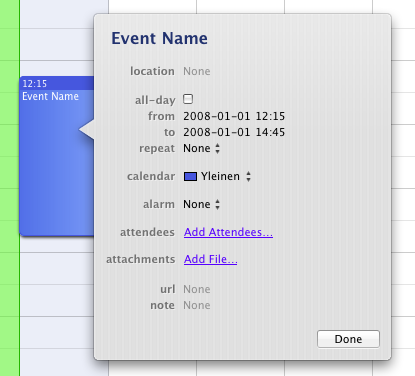
In Leopard, the drawer in iCal is no more. You can’t tab after creating the event. Instead, you have to double-click the event to open a pointless piece of modal UI that shows the information that was previously nicely in the drawer. Worse, there’s no longer a one-stop menu item for adding an alarm one hour before. Now you have to add an alarm 15 minutes before and replace 15 with 60. Even worse, 15 cannot simply be erased with backspace and 60 typed. There has to be a digit in the field at all times.
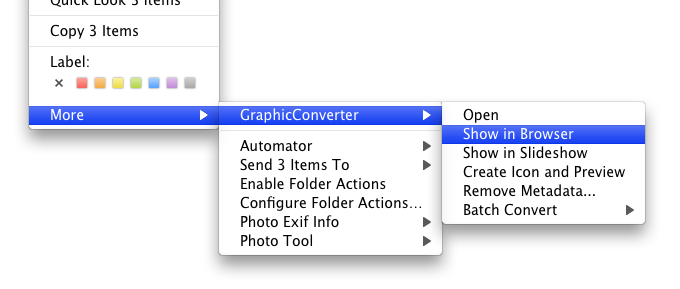
Finder context menu additions are now in a totally pointless submenu that only makes menu navigation harder running counter to all HIG tradition.
There’s still no Java 6. Luckily, though, Java 5 and Eclipse 3.2 continued to work on PowerPC despite problems with 3.3 on Intel. A prolonged failure to keep up with Java development risks losing developer users to Ubuntu. If Apple no longer wants to be the party delivering Java for Mac, it would be polite to release the Mac OS X-specific parts of the JDK (including PowerPC HotSpot) source to OpenJDK and IcedTea.
Shortly after I started using Time Machine, I tried to use the Time Machine disk for something else and shut down the computer in mid-backup. Both of these should be permissible things to do and I don’t know which operatian broke Time Machine, but I ended up with an “in progress” backup that always failed to resume. The error message was not exactly informative in The Daily WTF tradition just informed that the backup failed. The log file was equally uninformative. I also learned that if Spotlight (for whatever reason) decides to index the Time Machine disk as if it were a normal disk, the IO churn makes the system unusable.
So there are at least four bugs here:
Time Machine doesn’t have useful diagnostic messages when it fails.
When Time Machine fails to resume a backup, it would make sense for it to delete the unresumable partial backup and start a new full backup, but Time Machine just tries to resume the currupt in progress backup over and over again.
There’s no UI for gracefully deleting a backup snapshot manually.
If Spotlight goes crazy on the Time Machine volume, things get really bad.
The only workaround I could come up with was reformatting the Time Machine volume, starting over (EyeTV Archive excluded this time) and removing the Time Machine volume from the Finder sidebar so that I never touch the Time Machine disk except through the Time Machine UI.
In addition to gratuitous changes that require more use of the pointing device, there are just plain ugly changes for the sake of change.
The new translucent menubar is ugly. Getting rid of the rounded corners was OK, but the Core Image filter gimmick is not cool. One of the first things I did after installation was editing the desktop background image so that the pixels under the menubar are occupied by a white to light gray gradient.
However, this hidden pref is even better: sudo defaults write /System/Library/LaunchDaemons/com.apple.WindowServer 'EnvironmentVariables' -dict 'CI_NO_BACKGROUND_IMAGE' 0.62
The new folder icons are just ugly. I find it amazing that they’ve made it through whatever sanity checks Apple has in place for UI before shipping. Seriously, how could they do this? First I thought I’d fix them but then the calendar sync problem exhausted all the energy I had for post-install tweaking.
I installed over a setup that already had the Dock on the right, so I didn’t experience the full of the bogoreflective Dock. However, even on the right, the new Dock looks worse than the old Dock.
From Mac OS X 10.0 up to and including 10.4, every new major version has been a clear improvement. Leopard doesn’t feel like a clear improvement. Previously, I had always recommended the major new versions to my parents right away, but this time there’s no point. It’s sad that now the situation with Mac OS X major releases has become a bit like Windows releases: dragging feet and not installing the new version may be the rational course of action.
此内容由惯性聚合(RSS阅读器)自动聚合整理,仅供阅读参考。 原文来自 — 版权归原作者所有。