
惯性聚合 高效追踪和阅读你感兴趣的博客、新闻、科技资讯
阅读原文 在惯性聚合中打开

推荐订阅源

博客园 - 【当耐特】
WordPress大学
WordPress大学
T
The Exploit Database - CXSecurity.com
博客园_首页
MyScale Blog
MyScale Blog
The Cloudflare Blog
奇客Solidot–传递最新科技情报
奇客Solidot–传递最新科技情报
美团技术团队
Stack Overflow Blog
Stack Overflow Blog
博客园 - 聂微东
M
MIT News - Artificial intelligence
Microsoft Security Blog
F
Full Disclosure
V
V2EX
博客园 - Franky
博客园 - 三生石上(FineUI控件)
Hugging Face - Blog
Hugging Face - Blog
P
Proofpoint News Feed
OSCHINA 社区最新新闻
OSCHINA 社区最新新闻
SecWiki News
SecWiki News
N
Netflix TechBlog - Medium
S
Secure Thoughts
酷 壳 – CoolShell
酷 壳 – CoolShell
Hacker News: Ask HN
Hacker News: Ask HN
爱范儿
爱范儿
Exploit-DB.com RSS Feed
Webroot Blog
Webroot Blog
CTFtime.org: upcoming CTF events
Martin Fowler
Martin Fowler
PCI Perspectives
PCI Perspectives
S
Security @ Cisco Blogs
Recorded Future
Recorded Future
Help Net Security
Help Net Security
Cyber Security Advisories - MS-ISAC
AI
AI
Microsoft Azure Blog
K
Kaspersky official blog
G
GRAHAM CLULEY
H
Hackread – Cybersecurity News, Data Breaches, AI and More
C
CERT Recently Published Vulnerability Notes
U
Unit 42
T
Tor Project blog
Cloudbric
Cloudbric
Hacker News - Newest:
Hacker News - Newest: "LLM"
MongoDB | Blog
MongoDB | Blog
GbyAI
GbyAI
T
The Blog of Author Tim Ferriss
Security Latest
Security Latest
N
News and Events Feed by Topic
K
KPMG report finds enterprise disconnect between AI and its ROI | CIO

Henri Sivonen’s pages

Parin vuoden tutkimattomuus crates.io: Rust Package Registry Asiakirjatonta toimintaa It’s not wrong that "🤦🏼‍♂️".length == 7 Koulutartuntojen tilastointimenettely Perusteasiakirjoja hallussapitämättä ikärajoitettu Asiantuntijat ja nukkuva vallan vahtikoira Koronapassilausunto Suppealla tietopohjalla ohimeneväksi väitetty Text Encoding Menu in 2021 The Text Encoding Submenu Is Gone An HTML5 Conformance Checker Not Part of the Technology Stack Browser Technology Stack Bogo-XML Declaration Returns to Gecko A Look at Encoding Detection and Encoding Menu Telemetry from Firefox 86 Why Supporting Unlabeled UTF-8 in HTML on the Web Would Be Problematic Rust Target Names Aren’t Passed to LLVM Toimintamalli Activating Browser Modes with Doctype Johtopäätöksiä mallin rakenteesta Tehtävänmäärittelyä kirjoittamatta ja kuolemia laskematta laumasuojamallinnettu Character Encoding Menu in 2014 Erillissuosituksen tarpeettomuudesta yleissuosituksen poikkeukseksi? STM:n maskiaikajana Rust 2021 Oma-aloitteisesti mallinnettu Kokopinovaatimuksin kilpailutettu chardetng: A More Compact Character Encoding Detector for the Legacy Web Varauksia paisutellen tiedotettu Perusteasiakirjoitta tiedotettu Always Use UTF-8 & Always Label Your HTML Saying So IME Smoke Testing The Validator.nu HTML Parser About the Hiragino Fonts with CSS It’s Time to Stop Adding New Features for Non-Unicode Execution Encodings in C++ Rust 2020 The Last of the Parsing Quirks About about:blank Rust 2019 a Web-Compatible Character Encoding Library in Rust How I Wrote a Modern C++ Library in Rust Using cargo-fuzz to Transfer Code Review of Simple Safe Code to Complex Code that Uses unsafe A Rust Crate that Also Quacks Like a Modern C++ Library #Rust2018 No Namespaces in JSON, Please A Lecture about HTML5 Julkisesti luotettu varmenne ikidomainille TLS:ää (SSL:ää) varten -webkit-HTML5 Lists in Attribute Values The Sad Story of PNG Gamma “Correction” If You Want Software Freedom on Phones, You Should Work on Firefox OS, Custom Hardware and Web App Self-Hostablility HTML5 Parser Improvements ARIA in HTML5 Integration: Document Conformance (Draft, Take Two) Schema.org and Pre-Existing Communities Lowering memory requirements by replacing Schematron HTML5 Parsing in Gecko: A Build Introducing SAX Tree NVDL Support in Validator.nu HOWTO Avoid Being Called a Bozo When Producing XML An Unofficial Q&A about the Discontinuation of the XHTML2 WG Thoughts on HTML5 Becoming a W3C Recommendation Four Finnish Banks Training Users to Give Banking Credentials to Another Site Unimpressed by Leopard Sergeant Semantics The Content Sink Inheritance Diagram – 2006-06-30 What is EME? About Points and Pixels as Units The Performance Cost of the HTML Tree Builder Social Media Impression Management The spacer Element Is Gone Openmind 2006 Performance Mistake XHTML and Mobile Devices WebM-Enabled Browser Usage Share Exceeds H.264-Enabled Browser Usage Share on Desktop (in StatCounter Numbers) HTML5 Parser-Based View Source Syntax Highlighting Vendor Prefixes Are Hurting the Web Accept-Charset Is No More Dualroids ISO-8859-15 on haitallinen Hourglass The Scientific Method According to Hixie Maemo Source Code Karpelan lukkovertaus ontuu Digitaalisesta arkistoinnista ARIA in HTML5 Integration: Document Conformance (Draft) XHTML—What’s the Point? (Draft, incomplete) Mac OS X Browser Comparison HOWTO Spot a Wannabe Web Standards Advocate An Idea About Intermediate Language Trees and Web UI Generation Thoughts on Using SSL/TLS Certificates as the Solution to Phishing Bureaucracy Meets the Web Europe Day HOWTO Establish a 100% Literacy Rate What to Do with All These Photos? Charmod Norm Checking Validator Web Service Interface Ideas DTDs Don’t Work on the Web EFFI’s Day in Court Speaking at XTech
Writing Structural Stylable Document in Mozilla Editor
Henri Sivonen · 2011-12-22 · via Henri Sivonen’s pages

The Mozilla Editor is designed around HTML 4 Transitional. If special steps aren’t taken, it is easy to produce presentational documents that lack stylable structure. This document describes some basic good authoring practices for the purpose of writing structural and stylable documents.

Writing the Document

This section discusses the use of different HTML elements. There is no need to worry about the bleak appearance of the document yet. Style will be added later.

Paragraphs

Putting text in paragraph is important in expressing the content in a stylable way. By default, Editor dumps text directly into the document body without arranging it into paragraphs. To fix this, the user has to select “Paragraph” from the pop-up menu in the toolbar (the default is “Body Text”).

In word processors (such as Microsoft Word and AppleWorks) and in some other HTML editors (including Dreamweaver and Amaya) pressing return once inserts a paragraph break. In Mozilla Editor, however, one has to press return twice in order to create a paragraph break. Pressing return only once inserts a forced line break.

On a similar note, if the space bar is accidentally pressed twice, Editor inserts non-breaking spaces in the document.

Headings

Expressing headers by adjusting the font size and using bolding hinders styling and doesn’t communicate the structure of the document to non-visual browsers and search engines. HTML has heading elements for expressing heading the right way.

Generally, the title of the document is expressed as a level one heading at the beginning of the document. A given document is expected to contain only a single occurrence of the level one heading. Subheadings are expressed as level two headings and subsubheadings are expressed as level three headings.

HTML has elements for heading levels four through six also. However, these are not usually needed. Using them in a relatively short document usually indicates that the structure of the document requires reconsideration.

A block can be declared a heading using the pop-up menu in the toolbar or using the “Paragraph” submenu of the “Format” menu. In practice, it is easier to just create paragraphs as you type and change the block type of headings once you have finished typing. This helps to prevent Editor from accidentally reverting to “Body Text”.

Inline Structure

HTML contains a set of inline elements for expressing structure inside paragraphs. These elements can be used to express emphasis, strong emphasis, computer code and sample output, for example.

These meanings are usually communicated by using a bold or italic style or a different font. Hard-coded style and font changes don’t encode the meaning of the styling in HTML and are not ideal for site-wide styling. The use of elements that encode the meaning is recommended instead. The elements can be added to the document via the “Text Style” submenu of the “Format” menu.

Lists

HTML has three list types: unordered lists, ordered (numbered) lists and definition lists. The use of real list structures is recommended instead of the use of forced line breaks for expressing lists. However, list structures aren’t supposed to be used for general indentation.

Blockquote

In the past, the <blockquote> element has been used as a generic indentation device. This styling-hostile practice is declared deprecated in the HTML specification. The <blockquote> element should be used only if the contents of the element is indeed quoted.

Things to Avoid

The following two screenshots indicate the parts of the Editor user interface that are harmful in terms of writing stylable structural documents. The use of parts masked with deep red interferes with styling or contributes to bad structure.
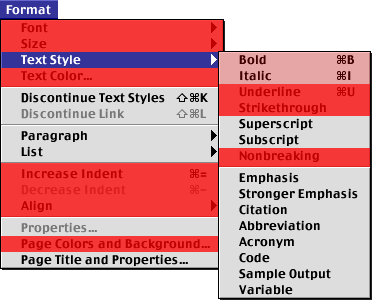
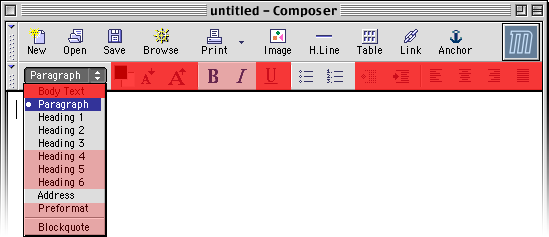
Format menu with discouragement indicators The Editor toolbar with discouragement indicators The parts with a slightly red mask are either slightly harmful or features to be used sparingly.

Finishing

When the document is otherwise done, it is time to clean up the HTML.

Adding Style

If the server adds style automatically, there is no need to take care of this step. Otherwise, <link> tags can be used inside the <head> element for including style. To view the HTML markup of your document, select “HTML Source” from the “View” menu or click the corresponding tab at the bottom of the Editor window (if you have chosen to display the tabs).

Cleaning Up

Still in the “HTML Source” mode, you’ll notice that Editor has inserted superfluous <br> tags just before the closing tags of some blocks.

If you have copied and pasted text or used drag&drop, there might be some residual empty paragraphs in you document.

After editing, there can be sequences of spaces in the middle of a line of HTML. These need to be collapsed to single spaces. Sometimes there can be sequences of normal spaces and non-breaking spaces.

The documents generated by Editor contain a doctype declaration that activates a bug imitating (“quirks”) layout mode in Mozilla-based browsers, in IE 5 for Mac and in Windows IE 6. Activating the quirks layout mode can be a problem if an advanced style sheet is associated with the document.

I’ve written a small program that can be used to fix these problems.