


While writing tests (unit, integration or end to end) is core to my day to day workflow before pushing anything to production, I’ve often forgotten to bring my focus to whether or not what I was building was accessible to everyone. Accessibility or a11y (accessibility has 11 letters between the first and last letter) is nonetheless an essential part of every product development and should get as much if not even more attention than testing.
Skipping this was a mistake on my end, so I started looking to see if there were any ways I could integrate accessibility tests into my testing pipeline. The aim was similar to writing tests, although here there would be an additional acceptance item, which would be that a given feature or view would have to be compliant with a set of rules. That’s how I discovered cypress-axe, which integrated perfectly with cypress, the end to end testing framework I’m currently using.
In this short post, we’ll see how to setup cypress and cypress-axe and write tests that will make sure your frontend projects follow proper accessibility rules.
For the purpose of this post, we’ll consider a very simple React app to provide a frontend to run tests against. If you have any apps based on any other favorite framework or library that you wish to use while following this tutorial, you can use them; everything should work the same.
First, we’ll have to install a few dev dependencies:
Cypress, the testing framework, if you’re not already using it
axe-core, the accessibility engine for automated Web UI testing
cypress-axe, the package which will let us use axe-core capabilities within cypress.
start-server-and-test, a little helper that we’ll run to start our app, wait for it to be ready, then start cypress to run the test suits.
To get these you can run the following command at the root of your UI project:
1
yarn add -D cypress cypress-axe axe-core start-server-and-test
Now that we have all the tools installed in our project, we’ll have to write some scripts in our package.json to help us run the tests:
package.json excerpt with our test scripts
3
"start": "react-scripts start",
4
"test": "start-server-and test start http://localhost:3000 cy:open",
5
"cy:open": "cypress open",
The code snippet above contains the scripts required to run the tests. We need a start script that can start our app; in my case, it’s react-scripts start since I’ve based this demo on a create-react-app. If you already have a start command no need to change it.
The test script runs start-server-and-test which runs a series of steps. First, it will run the start script, then wait for the [http://localhost:3000](http://localhost:3000) to be available, and finally, once the app is fully started it will run the cy:open which will start the cypress UI and let us run tests.
Now that cypress and cypress-axe are setup, it’s time to write our first test. First, in cypress/support/index.js, let’s add the following code snippet:
cypress/support/index.js excerpt with cypress-axe
Then, let’s head to the cypress/integration folder and create a accessibility.spec.js. This file will contain the following accessibility test:
Our first accessibility test using cypress-axe
4
values: ['wcag21aa', 'wcag2aa', 'best-practice', 'section508'],
8
context('Accessibility (A11Y)', () => {
9
it('Passes accessibility tests', () => {
10
cy.visit('http://localhost:3000');
12
cy.checkA11y(A11Y_OPTIONS);
The test is contained within the it statement above, and as we can see it contains a few lines which execute the following steps:
we visit our app on whatever URL it is running, in the case of the sample React app: http://localhost:3000
we run injectAxe which injects the axe-core runtime into the page we’re testing.
we run checkA11y with some options which will return any potential accessibility issues on the current page.
Concerning the options passed in the last function, we can see that we’re passing an object with a key runOnly. This object has two fields, type set to tag , and value set to ["section508"]. With these options, we’re telling axe-core to test our page by only running the rules under the section508 accessibility standard which is one of the many accessibility standards for web UIs.
If we choose to call checkA11y without any options, we would run the accessibility tests with all the accessibility rules available.
Now that we’re done writing our first test, it’s time to give it a try!
To run the test we wrote above, let’s run yarn test . As explained in the first part, this will start our UI project, and start Cypress once the UI is available.
We should then see the Cypress GUI with a list of tests, one of them being the accessibility test we just wrote.
We can then click on the accessibility.spec.js test which will start the test run and output results.
If like me you ran this test against the create-react-app basic UI you should see a result similar to the following:
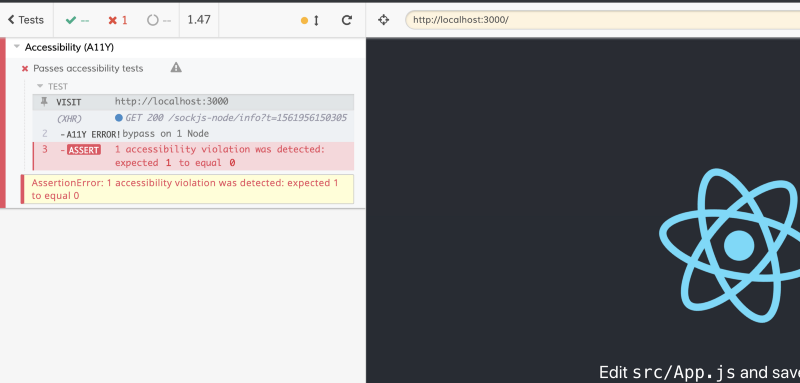
Our test detected one accessibility violation. This output though doesn’t give many details sadly. To know exactly what the issue is, we’ll have to open the chrome console and click on the field labeled with A11Y ERROR!bypass on 1 Node to have more information:
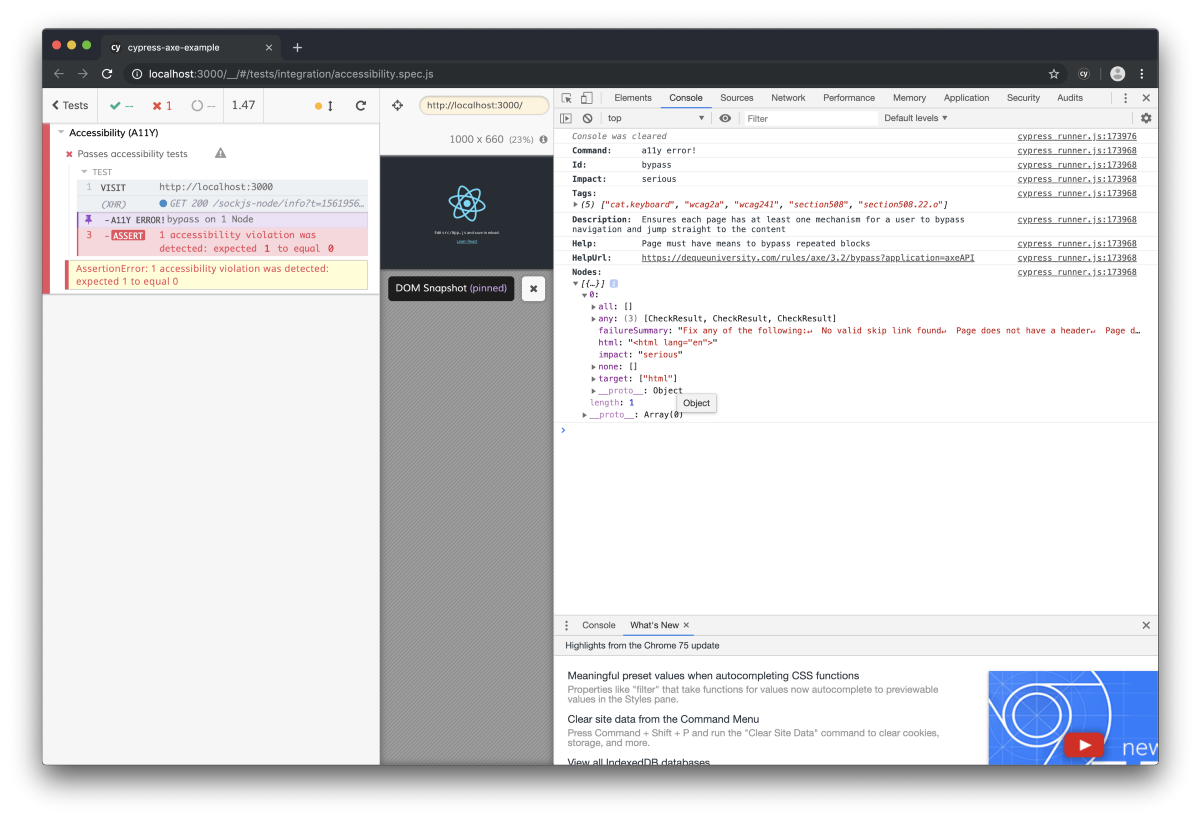
The output from the console gives us a failure summary with the following message: “Fix any of the following: No valid skip link found Page does not have a header Page does not have a landmark region”. By clicking on the help URL provided by the test output, we can get some documentation on the issue itself, and also a path to fixing it. In this case we simply need to add the following attribute to the main div wrapping our app: role="main".
After the change, running cypress again should result in a passing test:
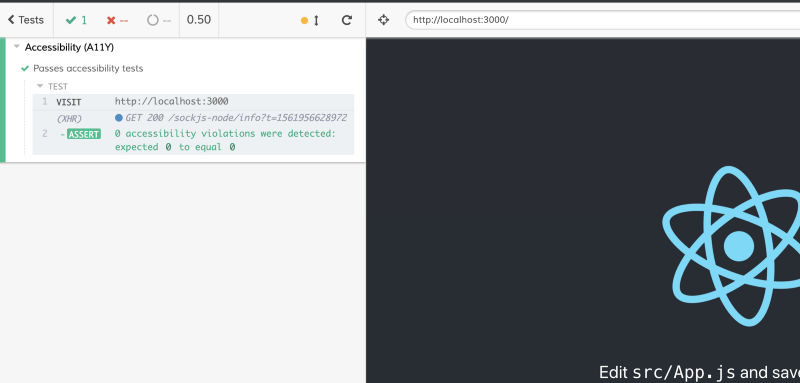
Adding extra rules to our accessibility test can potentially surface extra accessibility violation. Let’s add the rule best-practice and see what we get:
The updated version of the options object passed to our accessibility test
4
values: ['section508', 'best-practice'],
We should see two new moderate accessibility violations:
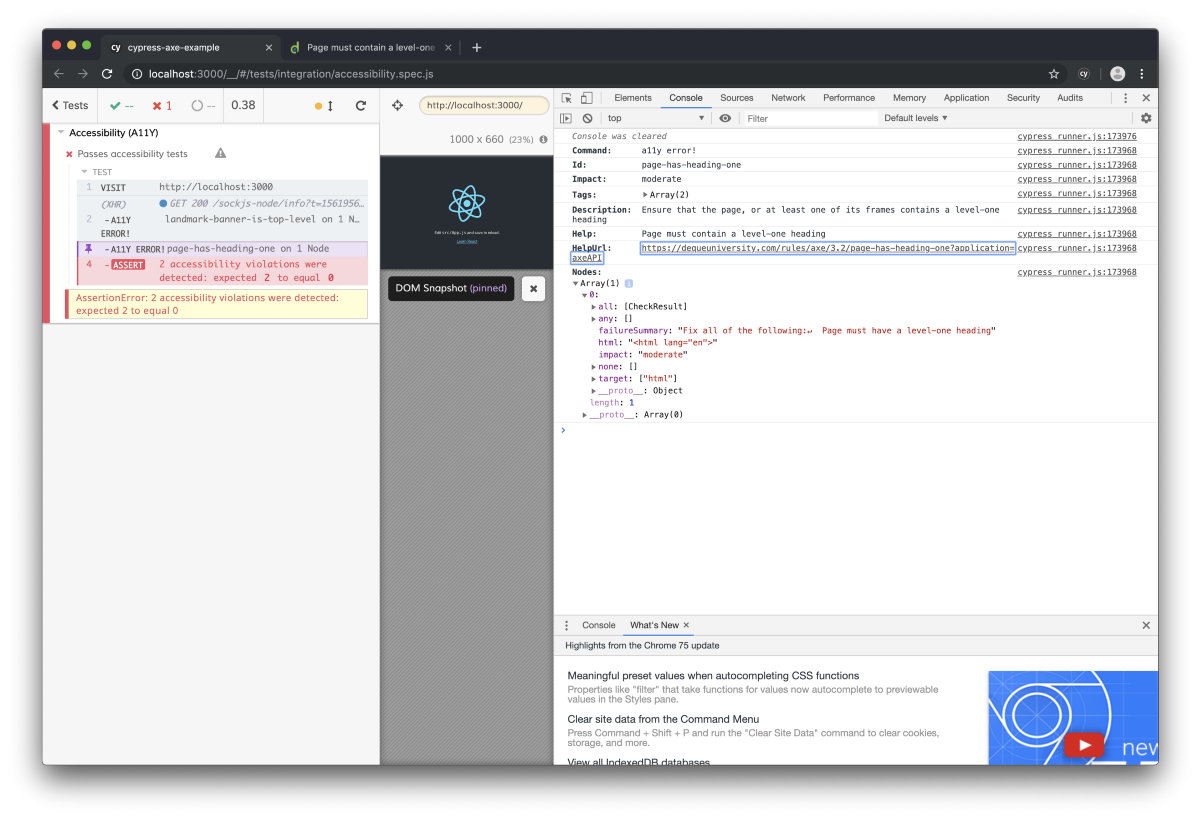
As we can see with this example, the more rules add to our accessibility test, the more issues we’re surfacing thus the “accessibility test coverage” we get.
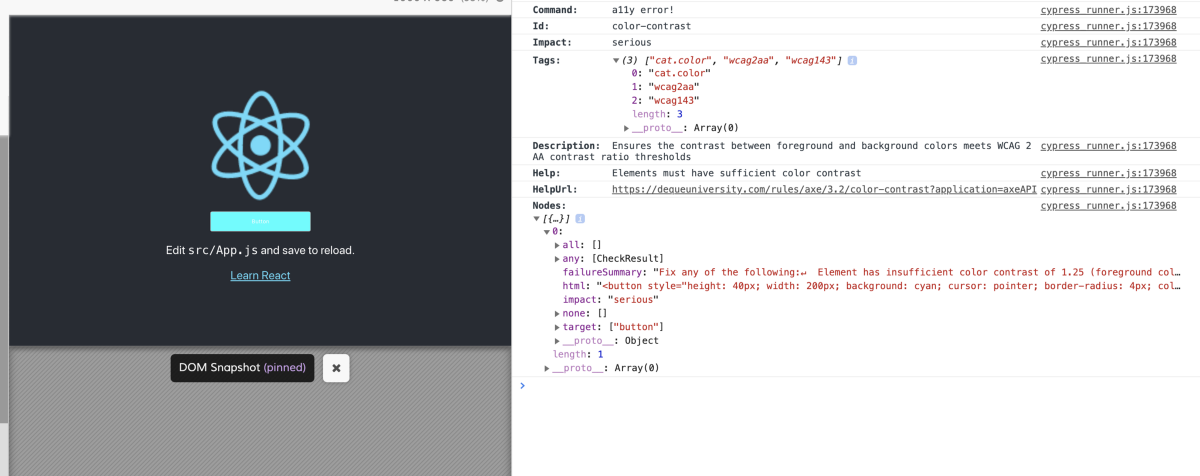
I tried quite a few combinations to see how much issues cypress could surface, and I was quite impressed by the result. For instance, we can try adding a button to the UI with some white label on a cyan background and enable the wcag2aa set of rules in our options. Doing this and running the test will surface color contrast issues as you can see in the screenshot below:
Adding automated UI accessibility tests has been a game changer in my day to day work. This extra layer of testing can help us reduce the number of accessibility issues present in our projects. I hope that this article will help you set up this kind of testing pipeline on your own projects, or at least help you start the conversation around accessibility in your team if that’s not already the case. The repository featuring the code snippets of this article is available here and should allow you to run the examples showcased with just a few commands.
I spent quite some time to look for other tools that can help any UI developer to build more accessible applications. If you’re interested in learning more, I bundled them in the following Twitter thread:
Don’t hesitate to contact me if you want more details, I may or may not write about the libraries or tools I mentioned in the future.
此内容由惯性聚合(RSS阅读器)自动聚合整理,仅供阅读参考。 原文来自 — 版权归原作者所有。