
惯性聚合 高效追踪和阅读你感兴趣的博客、新闻、科技资讯
阅读原文 在惯性聚合中打开

推荐订阅源

L
Lohrmann on Cybersecurity
Martin Fowler
Martin Fowler
Engineering at Meta
Engineering at Meta
腾讯CDC
钛媒体:引领未来商业与生活新知
钛媒体:引领未来商业与生活新知
Microsoft Azure Blog
G
Google Developers Blog
TaoSecurity Blog
TaoSecurity Blog
博客园_首页
Vercel News
Vercel News
Hugging Face - Blog
Hugging Face - Blog
D
Darknet – Hacking Tools, Hacker News & Cyber Security
Last Week in AI
Last Week in AI
cs.CL updates on arXiv.org
T
The Exploit Database - CXSecurity.com
量子位
Project Zero
Project Zero
A
Arctic Wolf
小众软件
小众软件
NISL@THU
NISL@THU
C
CERT Recently Published Vulnerability Notes
有赞技术团队
有赞技术团队
MongoDB | Blog
MongoDB | Blog
博客园 - 聂微东
OSCHINA 社区最新新闻
OSCHINA 社区最新新闻
N
News and Events Feed by Topic
宝玉的分享
宝玉的分享
freeCodeCamp Programming Tutorials: Python, JavaScript, Git & More
T
Troy Hunt's Blog
P
Privacy & Cybersecurity Law Blog
Security Latest
Security Latest
B
Blog
酷 壳 – CoolShell
酷 壳 – CoolShell
D
DataBreaches.Net
Schneier on Security
The Hacker News
The Hacker News
K
Kaspersky official blog
C
Check Point Blog
Hacker News: Ask HN
Hacker News: Ask HN
cs.AI updates on arXiv.org
Webroot Blog
Webroot Blog
www.infosecurity-magazine.com
人人都是产品经理
人人都是产品经理
AI
AI
Cisco Talos Blog
Cisco Talos Blog
MyScale Blog
MyScale Blog
Cloudbric
Cloudbric
B
Blog RSS Feed
S
Schneier on Security
P
Palo Alto Networks Blog

Maxime Heckel's Blog

On Rendering the Sky, Sunsets, and Planets - The Blog of Maxime Heckel Shades of Halftone - The Blog of Maxime Heckel Field Guide to TSL and WebGPU - The Blog of Maxime Heckel On Shaping Light: Real-Time Volumetric Lighting with Post-Processing and Raymarching for the Web - The Blog of Maxime Heckel Speaking at Figma Config 2025 - The Blog of Maxime Heckel Post-Processing Shaders as a Creative Medium - The Blog of Maxime Heckel On Crafting Painterly Shaders - The Blog of Maxime Heckel The Art of Dithering and Retro Shading for the Web - The Blog of Maxime Heckel Moebius-style post-processing and other stylized shaders - The Blog of Maxime Heckel Shining a light on Caustics with Shaders and React Three Fiber - The Blog of Maxime Heckel Real-time dreamy Cloudscapes with Volumetric Raymarching - The Blog of Maxime Heckel Painting with Math: A Gentle Study of Raymarching - The Blog of Maxime Heckel Building a magical AI-powered semantic search from scratch - The Blog of Maxime Heckel Beautiful and mind-bending effects with WebGL Render Targets - The Blog of Maxime Heckel Refraction, dispersion, and other shader light effects - The Blog of Maxime Heckel The magical world of Particles with React Three Fiber and Shaders - The Blog of Maxime Heckel The Study of Shaders with React Three Fiber - The Blog of Maxime Heckel Building a Design System from scratch - The Blog of Maxime Heckel Everything about Framer Motion layout animations - The Blog of Maxime Heckel Building a Vaporwave scene with Three.js - The Blog of Maxime Heckel Cubic Bézier: from math to motion - The Blog of Maxime Heckel First steps with GPT-3 for frontend developers - The Blog of Maxime Heckel Building the perfect GitHub CI workflow for your frontend team - The Blog of Maxime Heckel Migrating to Next.js - The Blog of Maxime Heckel Static Tweets with MDX and Next.js - The Blog of Maxime Heckel Advanced animation patterns with Framer Motion - The Blog of Maxime Heckel Scrollspy demystified - The Blog of Maxime Heckel The Power of Composition with CSS Variables - The Blog of Maxime Heckel My first failed SwiftUI project - The Blog of Maxime Heckel Guide to creating animations that spark joy with Framer Motion - The Blog of Maxime Heckel Using Shortcuts and serverless to build a personal Apple Health API - The Blog of Maxime Heckel Going native: SwiftUI from the perspective of a React developer - The Blog of Maxime Heckel Build your own preview deployment service - The Blog of Maxime Heckel The little guide to CI/CD for frontend developers - The Blog of Maxime Heckel Immigrating to the US - The Blog of Maxime Heckel The physics behind spring animations - The Blog of Maxime Heckel Generate screenshots of your code with a serverless function - The Blog of Maxime Heckel How to use Framer Motion with Emotion styled-components - The Blog of Maxime Heckel Data Fetching with NextJS: What I learned - The Blog of Maxime Heckel Learning in public - The Blog of Maxime Heckel Fixing the dark mode flash issue on server rendered websites - The Blog of Maxime Heckel How to fix NPM link duplicate dependencies issues - The Blog of Maxime Heckel Running scheduled cross-browser end-to-end tests on Github CI - The Blog of Maxime Heckel How I built my first custom ESLint rule - The Blog of Maxime Heckel React Lazy: a take on preloading views - The Blog of Maxime Heckel Automated UI accessibility testing with Cypress - The Blog of Maxime Heckel Building a GraphQL wrapper for the Docker API - The Blog of Maxime Heckel Switching off the lights - Adding dark mode to your React app - The Blog of Maxime Heckel Getting started with Typescript on Gatsby - The Blog of Maxime Heckel Rebuilding Redux with Hooks and Context - The Blog of Maxime Heckel Asynchronous rendering with React - The Blog of Maxime Heckel Using Flow generics to type generic React components - The Blog of Maxime Heckel How to efficiently type your styled-components with Flow - The Blog of Maxime Heckel How I got started with Kubernetes on GKE - The Blog of Maxime Heckel React sub-components Part 3: Whitelisting sub-components with flow - The Blog of Maxime Heckel React sub-components Part 2: Using the new Context API - The Blog of Maxime Heckel React sub-components - The Blog of Maxime Heckel Running Golang tests with Jest - The Blog of Maxime Heckel No title No title
SEO mistakes I've made and how I fixed them - The Blog of Maxime Heckel
Maxime Heckel · 2020-10-13 · via Maxime Heckel's Blog

From 0 to 90k impressions in about a year, following Search Engine Optimization good practices was key to help to grow my blog and my audience. However, when I started it, I made terrible mistakes that some SEO literate people could almost qualify as self-sabotage.

Thus, I want to dedicate this blog post to look back at 3 issues that caused me, and many others, countless headaches when dealing with SEO and Gatsby and the steps I took to fix them. I hope that this will help to fix some issues you might currently have on your awesome blog or portfolio without even being aware of them, kick-off your audience growth, and get discovered online 🚀.

Why SEO is so important?

You might know very little about what SEO does behind the scenes. To me, at least, it looked like an obscure, inconsistent, pseudo-science that only marketing people could understand (spoiler alert, it still kind of is). However, after getting @monicalent's awesome course bloggingfordevs, it made the inner workings and good practices related to SEO a bit clearer to me. To quote her from her first newsletter

SEO is a way of making sure that search engines can understand what your page is about, that it contains quality up-to-date information from an authoritative source, and will answer the question that the searcher had in mind.

With good SEO, search engines can know what your content is about, discover all the blog posts you've written and, if you're lucky, catapult you to the top search result for a given set of keywords. Moreover, where sharing my newest articles on Twitter and Reddit would just cause a spike in traffic for a few days, SEO helps you get a more consistent traffic on your website, and for a longer time. The latter is what I was lacking for the longest time, despite having set up my Gatsby website and SEO component properly (or at least I thought so).

Gatsby's documentation has an incredibly well-written section on how to build an SEO component to help you get started. However, that alone wasn't enough to make my blog discoverable early on, as you can see in the chart below representing the number of daily impressions I got since starting this blog:

Chart representing the number of impressions per day of this blog on Google Search from August 2019 to the October 2020 (hover to see the data)

For most of its first year, my blog was getting less than 50 daily impressions. Today, after fixing the issues I'm about to talk about, I get over 1000 daily impressions and it's still growing! Of course, SEO is not the only component here, I also created more content this year and choose a better way to promote them, but it is still a significant driver to the growth you can see above.

Trailing slashes chaos

The blog you're reading this article on is built with Gatsby and hosted on Netlify. Sadly, using these two tools together without taking care of inconsistent trailing slash / at the end of your URLs can result in some undesirable outcomes.

One of these outcomes was that I was seeing a lot of 301 redirects logged in my analytics as readers were navigating to my articles. On my blog, a link to one of my blog posts would typically look like this: /posts/learning-in-public but when a reader clicked on it Netlify would append a trailing slash at the end of it thus redirecting the user.

That, my friends, is extremely bad for SEO. It impacted several unrelated areas of my website, such as:

  • Opengraph images or Twitter cards not being rendered consistently: readers would share a link sometimes with or without the trailing slash which would make it hard for some services to get the proper metadata and thus render a simple link instead of a proper preview card.

  • Invalid URLs in sitemap: my sitemap is generated automatically at build time with a Gatsby plugin based on the URLs and pages of my website. Since I did not have trailing slashes at the end of my URLs it would generate my sitemap without them which once uploaded to Google Search Console would result in tons of warnings about invalid URLs since Google referenced the ones with the trailing slashes.

How I fixed this

I could have fixed this in two different ways:

  1. Disable the "Pretty URLs" option in Netlify's asset optimization settings. (see screenshot below)

  2. Add a trailing slash to all my URLs on my blog.
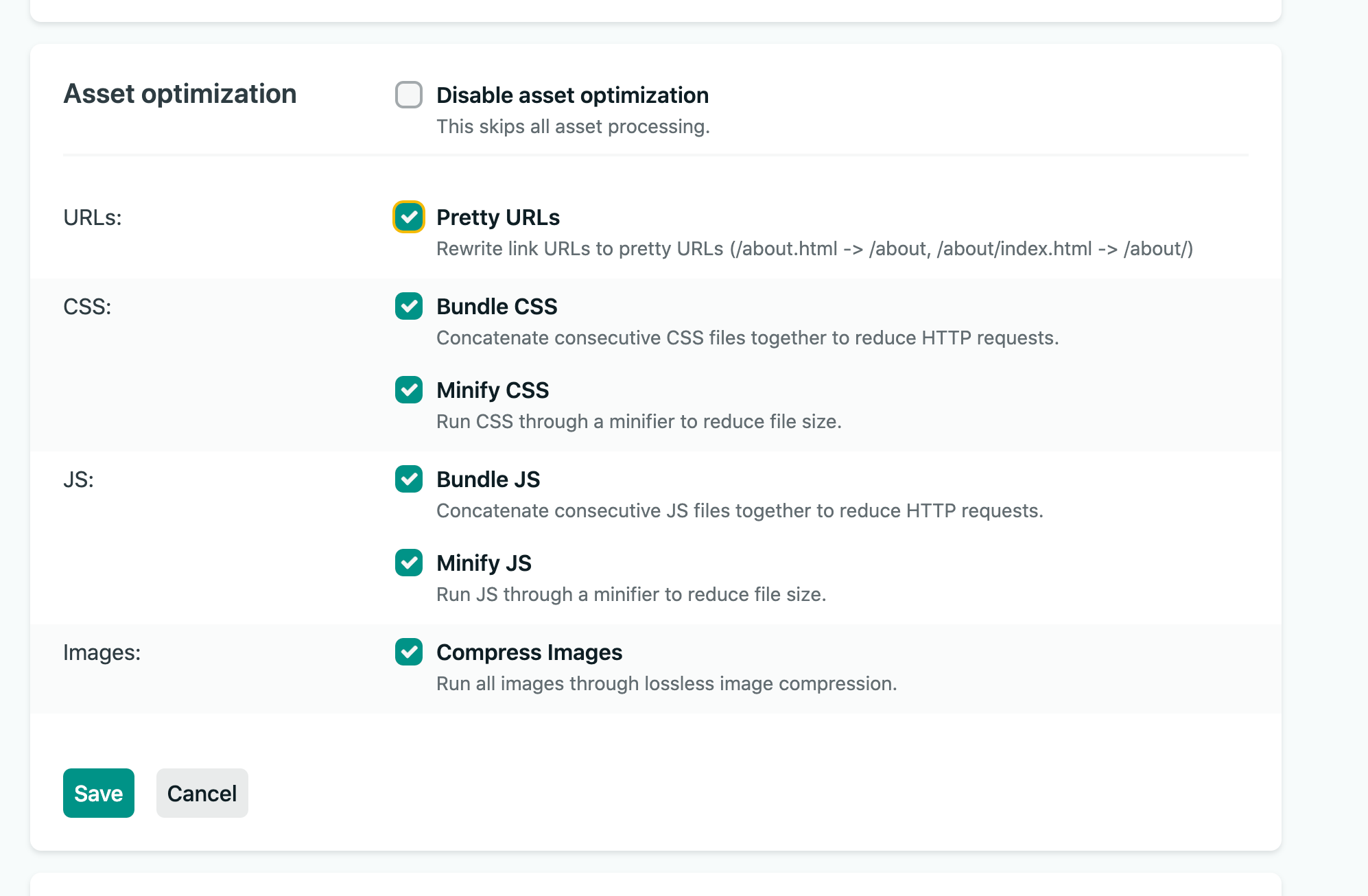
Image showcasing the asset optimizations options available in the Netlify project settings. Here you can see that I have the pretty URL option turned on which will add a trailing slash at the end of my URLs on this project.

Image showcasing the asset optimizations options available in the Netlify project settings. Here you can see that I have the pretty URL option turned on which will add a trailing slash at the end of my URLs on this project.

As Google already referenced my blog posts with a trailing slash, I decided to go with option number 2.

That change might look insignificant, but it resulted in a lot of weird issues suddenly disappearing. Additionally, it was essential for me to fix this before addressing the issue I'm just about to start talking about 😄!

In this part, we'll look at the one instance where Gatsby's server-side rendering mixed with my carelessness completely broke my SEO. By completely I mean all my custom SEO meta tags that I carefully put in my SEO component were gone from the server-side rendered version of the website making it almost invisible to any search engine.

How it happened

This issue stemmed from what I would qualify as an interrupted static HTML build.

When building your Gatsby site the last steps of the build process involve building your production JS files and also generating the HTML for each page. If you're looking for more details you can check out this section of the Gatsby documentation about the build process.

However, I wrote a ThemeProvider that wrapped the whole application. Thus any component or page can know which theme (dark or light) is currently enabled and the colors to use. This component was added to the gatsby-ssr and gatsby-browser files.

Under the hood, this ThemeProvider worked as follow:

  • the state of the theme (dark or light) was injected via a React Provider to the whole app, that's how I can allow users to toggle between each theme.

  • that same state was also saved in the local storage to make sure revisiting the website would keep the previous theme enabled. When a reader loads this blog, the ThemeProvider will check for the presence of a specific variable in localStorage before setting the theme accordingly.

I dedicated a blog post for this: Switching off the lights - Adding dark mode to your React app and it actually contains the mistake that triggered the missing meta tags:

  • Getting the variable set to the current theme from local storage was done in a React useEffect. Thus, for a brief instant when loading or refreshing the website, the website would fallback to the default theme as the effect to set the proper theme was only ran after the server-rendered page was already served.

  • To avoid this issue, I added a small tweak to track whether the theme was fetched from local storage or not and render an empty div while the theme was being retrieved.

The code snippet below is an excerpt of my original implementation for the ThemeProvider of this blog.

Excerpt of my original ThemeProvider (where I made my dumb mistake)

1

const ThemeProvider = ({ children }: { children: ReactNode }) => {

2

const [themeState, setThemeState] = useDarkMode();

3

if (!themeState.hasThemeLoaded) {

12

const theme = themeState.dark ? theme('dark') : theme('light');

13

const toggle = () => {

19

<EmotionThemeProvider theme={theme}>

20

<ThemeContext.Provider

22

dark: themeState.dark,

27

</ThemeContext.Provider>

28

</EmotionThemeProvider>

Rendering that empty div is what made my SEO meta tags disappear. The static HTML build would only generate the tree up to that div since the theme had no way to be set at build time, and thus would skip all the rest of the DOM which included my pages and components, as well as the SEO component 😱. Since, the code of the SEO component was not being reached during that step of the build, the meta tags couldn't be injected in the static HTML.

Additionally, that kind of issue was hard to track because the tags were showing up when inspecting the page with the dev tools client-side, they were however completely absent from the source of the page (the one you can get by right-clicking on a web page and clicking on "View Page Source").

Having SEO tags completely missing from the page source made SEO third-party services like Twitter Card Validator simply unusable with my blog. My articles would only show up as basic links on social media. No cards, no preview, not even a title which is very bad when you try to grab the attention of your audience!

My SEO meta tags disappeared second time earlier this year in July 2020, after adding gatsby-plugin-feed and trying to make it work on my blog. Once again, be extremely careful when adding Gatsby plugins that can write on the <head/> of your pages. There might create some undesirable outcomes without even you knowing!

The long term solution

As you can imagine, I was tired of these issues coming out of nowhere and didn't want to manually check every single change I'd make in the future to ensure meta tags would not be removed. To this problem, I brought a solution that I'd usually bring up at work: I wrote an automated test.

My SEO tests that I run against every new build to ensure my SEO tags are intact

1

const META_RE = /<meta\s[A-Za-z0-9="-:;!@\/\s]*/g;

2

const CANONICAL_RE = /rel="canonical"\s[A-Za-z0-9="-:;!@\/\s]*/g;

4

describe('SEO: Verify meta tag integrity', () => {

5

it('has all the meta tags and the expected canonical url set in the landing page head', async () => {

6

const res = await fetch('/');

7

const text = await res.text();

9

const metaTags = text.match(META_RE) || [];

10

const canonicalTag = text.match(CANONICAL_RE) || [];

12

expect(metaTags).to.have.length(16);

13

expect(canonicalTag).to.have.length(1);

14

cy.wrap(metaTags).snapshot();

15

cy.wrap(canonicalTag).snapshot();

18

it('has all the meta tags and the expected canonical url set in the blog post head', async () => {

19

const res = await fetch('/posts/how-to-build-first-eslint-rule');

20

const text = await res.text();

22

const metaTags = text.match(META_RE) || [];

23

const canonicalTag = text.match(CANONICAL_RE) || [];

25

expect(metaTags).to.have.length(19);

26

expect(canonicalTag).to.have.length(1);

27

cy.wrap(metaTags).snapshot();

28

cy.wrap(canonicalTag).snapshot();

(Don't judge my regex skills 😅)

The code snippet above is the test that I run with Cypress on every PR without exception. This test:

  • fetches the source code of the landing page and a blog post against the built version of the blog

  • looks at the text-based body of the request. That text-based result contains the HTML code for the entire page and thus should contain all the meta tags I set up in my SEO component.

  • compares the obtained string of meta tags to a snapshot. That snapshot contains the source of truth when it comes to the expected state of my meta tags

Conclusion

In a nutshell:

  • Be mindful of the consistency of your trailing slashes! Inconsistencies can lead to poor ranking.

  • If you syndicate your content, do not forget to add canonical URLs. I was basically in competition with my own Medium posts up until late this year and missed on a lot more traffic and potential readers.

  • Do not blindly trust gatsby plugins! Especially the ones that inject things in the <head> of your pages. If misused, they can be pretty harmful without even you knowing.

  • Check the page source of your website! Inspecting via the dev tools is sometimes not enough to ensure the meta tags are properly injected in your site.

  • Make sure your meta tags can't be blocked from rendering because of a client side side effect when relying on SSR.

  • When in doubt: Write tests! I dedicated a whole blog post about CI/CD where I showcase how great tests and a great CI/CD pipeline help me keep my peace of mind.

If you want to go further into how to build an audience, and learn more about creating content and SEO, I would highly encourage you to follow @monicalent on Twitter as well as her Blogging For Devs course. She's an SEO expert and I learned more about efficient SEO techniques in a single newsletter than I would have otherwise!