
惯性聚合 高效追踪和阅读你感兴趣的博客、新闻、科技资讯
阅读原文 在惯性聚合中打开

推荐订阅源

G
GRAHAM CLULEY
S
Security @ Cisco Blogs
P
Proofpoint News Feed
Cisco Talos Blog
Cisco Talos Blog
D
Darknet – Hacking Tools, Hacker News & Cyber Security
C
Cyber Attacks, Cyber Crime and Cyber Security
T
Tor Project blog
WordPress大学
WordPress大学
Project Zero
Project Zero
S
Schneier on Security
P
Proofpoint News Feed
小众软件
小众软件
P
Privacy International News Feed
美团技术团队
L
LangChain Blog
Know Your Adversary
Know Your Adversary
J
Java Code Geeks
奇客Solidot–传递最新科技情报
奇客Solidot–传递最新科技情报
The Register - Security
N
Netflix TechBlog - Medium
Microsoft Security Blog
Engineering at Meta
Engineering at Meta
I
InfoQ
量子位
Vercel News
Vercel News
博客园 - 三生石上(FineUI控件)
Spread Privacy
Spread Privacy
D
DataBreaches.Net
Threat Intelligence Blog | Flashpoint
U
Unit 42
P
Privacy & Cybersecurity Law Blog
C
Cybersecurity and Infrastructure Security Agency CISA
T
The Blog of Author Tim Ferriss
Latest news
Latest news
K
Kaspersky official blog
MongoDB | Blog
MongoDB | Blog
L
LINUX DO - 热门话题
Simon Willison's Weblog
云风的 BLOG
云风的 BLOG
S
Securelist
AWS News Blog
AWS News Blog
F
Fortinet All Blogs
T
Threat Research - Cisco Blogs
Stack Overflow Blog
Stack Overflow Blog
Scott Helme
Scott Helme
Help Net Security
Help Net Security
Y
Y Combinator Blog
宝玉的分享
宝玉的分享
CTFtime.org: upcoming CTF events
T
Tenable Blog

Maxime Heckel's Blog

On Rendering the Sky, Sunsets, and Planets - The Blog of Maxime Heckel Shades of Halftone - The Blog of Maxime Heckel Field Guide to TSL and WebGPU - The Blog of Maxime Heckel On Shaping Light: Real-Time Volumetric Lighting with Post-Processing and Raymarching for the Web - The Blog of Maxime Heckel Speaking at Figma Config 2025 - The Blog of Maxime Heckel Post-Processing Shaders as a Creative Medium - The Blog of Maxime Heckel On Crafting Painterly Shaders - The Blog of Maxime Heckel The Art of Dithering and Retro Shading for the Web - The Blog of Maxime Heckel Moebius-style post-processing and other stylized shaders - The Blog of Maxime Heckel Shining a light on Caustics with Shaders and React Three Fiber - The Blog of Maxime Heckel Real-time dreamy Cloudscapes with Volumetric Raymarching - The Blog of Maxime Heckel Painting with Math: A Gentle Study of Raymarching - The Blog of Maxime Heckel Building a magical AI-powered semantic search from scratch - The Blog of Maxime Heckel Beautiful and mind-bending effects with WebGL Render Targets - The Blog of Maxime Heckel Refraction, dispersion, and other shader light effects - The Blog of Maxime Heckel The magical world of Particles with React Three Fiber and Shaders - The Blog of Maxime Heckel The Study of Shaders with React Three Fiber - The Blog of Maxime Heckel Building a Design System from scratch - The Blog of Maxime Heckel Everything about Framer Motion layout animations - The Blog of Maxime Heckel Building a Vaporwave scene with Three.js - The Blog of Maxime Heckel Cubic Bézier: from math to motion - The Blog of Maxime Heckel First steps with GPT-3 for frontend developers - The Blog of Maxime Heckel Building the perfect GitHub CI workflow for your frontend team - The Blog of Maxime Heckel Migrating to Next.js - The Blog of Maxime Heckel Static Tweets with MDX and Next.js - The Blog of Maxime Heckel Advanced animation patterns with Framer Motion - The Blog of Maxime Heckel Scrollspy demystified - The Blog of Maxime Heckel The Power of Composition with CSS Variables - The Blog of Maxime Heckel My first failed SwiftUI project - The Blog of Maxime Heckel Guide to creating animations that spark joy with Framer Motion - The Blog of Maxime Heckel Using Shortcuts and serverless to build a personal Apple Health API - The Blog of Maxime Heckel SEO mistakes I've made and how I fixed them - The Blog of Maxime Heckel Going native: SwiftUI from the perspective of a React developer - The Blog of Maxime Heckel Build your own preview deployment service - The Blog of Maxime Heckel The little guide to CI/CD for frontend developers - The Blog of Maxime Heckel Immigrating to the US - The Blog of Maxime Heckel The physics behind spring animations - The Blog of Maxime Heckel Generate screenshots of your code with a serverless function - The Blog of Maxime Heckel How to use Framer Motion with Emotion styled-components - The Blog of Maxime Heckel Data Fetching with NextJS: What I learned - The Blog of Maxime Heckel Learning in public - The Blog of Maxime Heckel Fixing the dark mode flash issue on server rendered websites - The Blog of Maxime Heckel How to fix NPM link duplicate dependencies issues - The Blog of Maxime Heckel How I built my first custom ESLint rule - The Blog of Maxime Heckel React Lazy: a take on preloading views - The Blog of Maxime Heckel Automated UI accessibility testing with Cypress - The Blog of Maxime Heckel Building a GraphQL wrapper for the Docker API - The Blog of Maxime Heckel Switching off the lights - Adding dark mode to your React app - The Blog of Maxime Heckel Getting started with Typescript on Gatsby - The Blog of Maxime Heckel Rebuilding Redux with Hooks and Context - The Blog of Maxime Heckel Asynchronous rendering with React - The Blog of Maxime Heckel Using Flow generics to type generic React components - The Blog of Maxime Heckel How to efficiently type your styled-components with Flow - The Blog of Maxime Heckel How I got started with Kubernetes on GKE - The Blog of Maxime Heckel React sub-components Part 3: Whitelisting sub-components with flow - The Blog of Maxime Heckel React sub-components Part 2: Using the new Context API - The Blog of Maxime Heckel React sub-components - The Blog of Maxime Heckel Running Golang tests with Jest - The Blog of Maxime Heckel No title No title
Running scheduled cross-browser end-to-end tests on Github CI - The Blog of Maxime Heckel
Maxime Heckel · 2020-03-10 · via Maxime Heckel's Blog

This is going to be a short post, the first one for 2020! Better late than never right?

You might have noticed in some of my previous posts that I like testing and love to use Cypress as a way to run my end-to-end tests. I was excited when I learned that they added support for Firefox which is one of the main features that was missing to use it in a professional setting. I also always wanted to make sure the personal projects I work on run well on every browser automatically on a weekly basis, including this blog. This is why I created this small Github action workflow to do just that and I wanted to share it with you all as it might come handy to some people.

Running cross-browser tests locally

Before running an automated CI task, we have to ensure that our existing end-to-end tests run locally. If you update Cypress to its latest version (4.0.2 as I'm writing these words) and have Chrome, Firefox, and Microsoft Edge installed on your machine, you might notice a little dropdown on the top right of the Cypress window when running cypress open, giving you a list of browser to run your tests on:
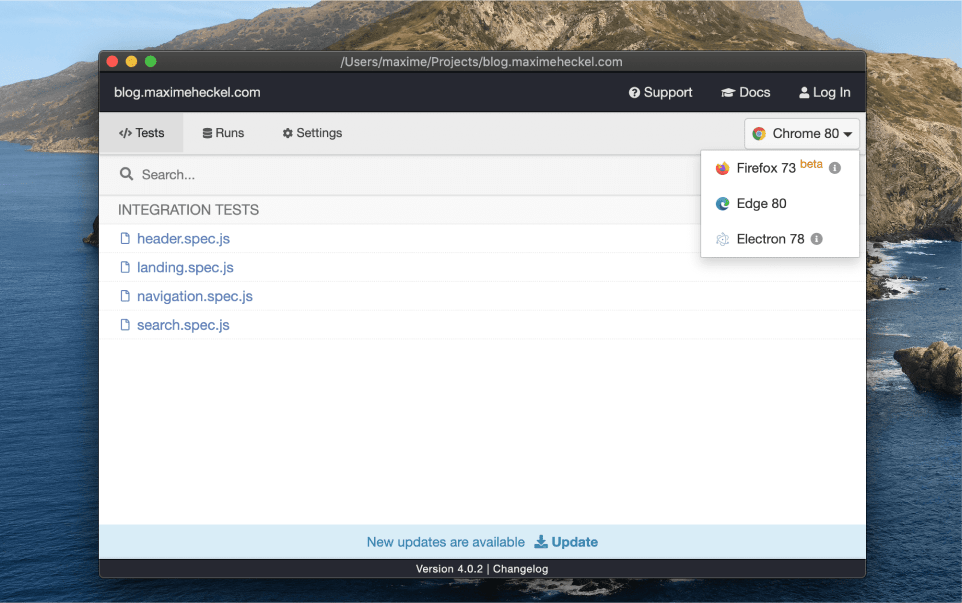
Screenshot showcasing the Cypress GUI with the browser selection dropdown expanded.

Screenshot showcasing the Cypress GUI with the browser selection dropdown expanded.

We can now run these tests and check if everything passes before going to the next steps.

Github workflow

Adding automated tasks to run on every Pull Request with Github workflows is very simple. However, here what we want to do is slightly different. We probably already have automated tasks that run our cypress tests for every PR and running them on every supported browser on top of that might be a bit overkill and might increase CI costs. Thus the following Github workflows will only work weekly, which is an option that Github allows:

Weekly cross-browser testing Github workflow

1

name: Weekly cross-browser testing

10

runs-on: ubuntu-latest

12

image: cypress/browsers:node12.16.1-chrome80-ff73

15

- name: Checkout Commit

16

uses: actions/checkout@v1

17

- name: Firefox Browser Tests

18

uses: cypress-io/github-action@v1

22

wait-on: 'http://localhost:8000'

24

config: defaultCommandTimeout=100000,pageLoadTimeout=100000,watchForFileChanges=false,video=false

25

- name: Chrome Browser Tests

26

uses: cypress-io/github-action@v1

30

wait-on: 'http://localhost:8000'

32

config: defaultCommandTimeout=100000,pageLoadTimeout=100000,watchForFileChanges=false,video=false

In the code snippet above, we can see that instead of running this action "on push", we run them "on schedule" with a cron syntax setting the run every Monday at 12 PM. I used Crontab Guru as suggested in the Github docs to generate the proper cron schedule expression. When the scheduled time is reached, this Github workflow will get triggered with the following steps:

  • Checking out the latest commit (this task will run on the master branch) (L16)

  • Start the project (L21 and L 29)

  • Run the end-to-end tests on Firefox

  • Run the end-to-end tests on Chrome

For the last two steps, we use the cypress-io/github-action@v1 which allows running Cypress in Github workflows with little to almost no configuration required besides setting the browser on which we want to run the tests (see L20 and L28). However, we have to specify that we want to use the cypress/browsers (see L11-12) Docker image for this workflow, as in its default setting, it seems that Github CI doesn't include Firefox.
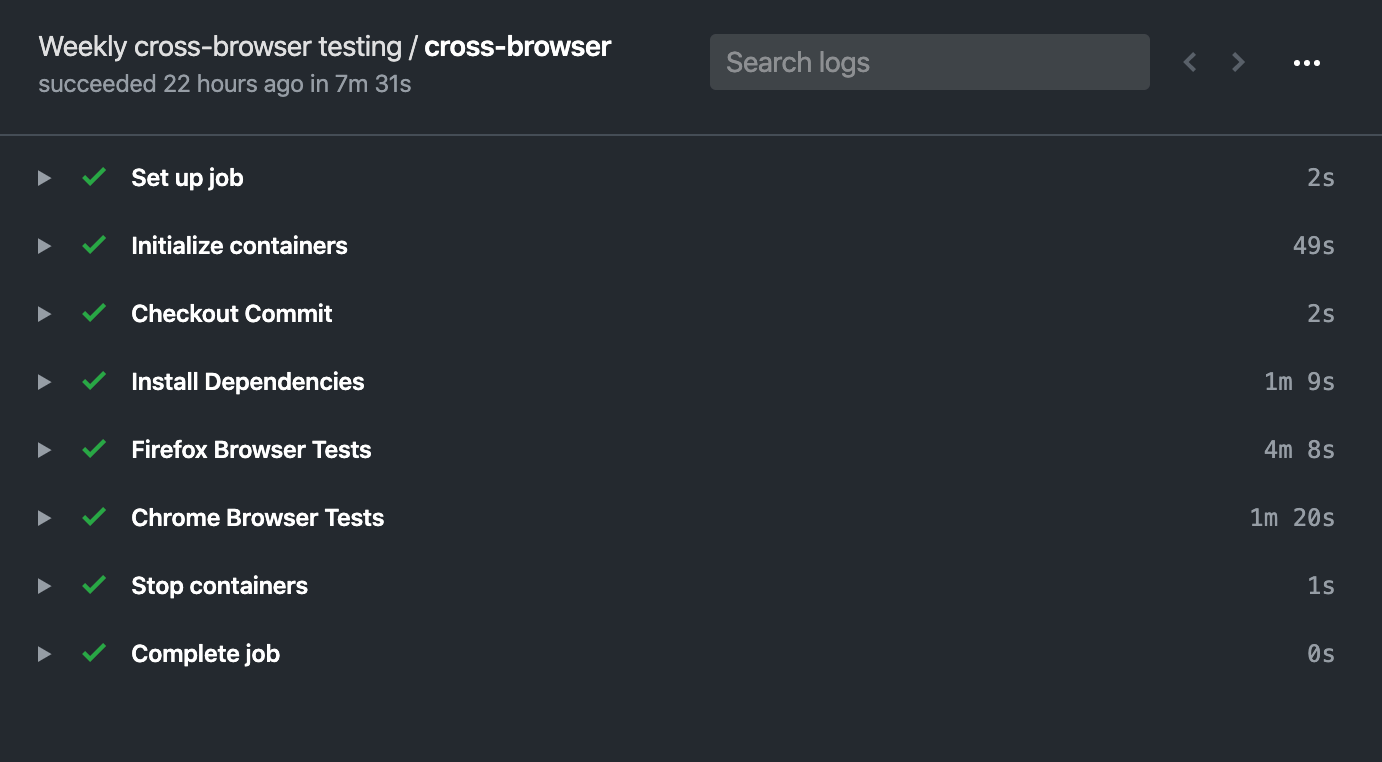
Screenshot showcasing a successful Github CI run including our scheduled cross-browser tests on Chrome and Firefox

Screenshot showcasing a successful Github CI run including our scheduled cross-browser tests on Chrome and Firefox

Now that this new automated weekly task is implemented we can ensure our projects run as expected and guarantee the best user experience regardless of which browser is being used 🎉!

Before adding such scheduled task on your own project, remember that, as I'm writing these words, Firefox support on Cypress is still currently in beta, so this post only showcased something I'd consider "experimental" at this point. We'll have to be a bit more patient before running this in production. If you want to see this workflow in action, I use it right now on some of my open-source repositories, click here to see an example.

More resources about running Cypress on Github CI: