


Note: the content of this post and the code featured in it have been produced on my own personal time and does not reflect my current work being done at Docker.
For the past 6 years, I have been working with the Docker API almost on a daily basis, whether it’s been in the context of personal projects, or when building products at Docker. However, since I started building UIs for container management software, I’ve always struggled with how to know how the different Docker objects are related. This made building comprehensive and easy to use user interfaces challenging, especially because in order to get all the related resources orbiting around a service or a container, for example, we always ended up doing quite a few REST API calls, manipulating filters, and “over fetching” to get the data we were interested in displaying.
These are exactly the problems that GraphQL is trying to solve and this is what this article will focus on: How to build a GraphQL wrapper around the Docker API.
Why?
I’ve never taken the time to get started seriously with GraphQL and I know the Docker API and how it could be better and easier to use. So, I thought this would be the perfect project to learn more about GraphQL, build something that matters and of course share with you about what I’ve learned.
What you will learn
In this post you will learn to:
Build a GraphQL server that wraps the Docker API
Build and organize resolvers and schemas
Running queries against our GraphQL server
Generate typescript types from the GraphQL schemas
If you want to follow along with this article with more details about the code I recommend checking out the project on Github. It’s based on apollo-server , typescript, graphql, lodash and superagent .
The first step consists of being able to communicate with the Docker engine’s API through our GraphQL server. We want it to kind of act as a proxy between our client and Docker Engine, i.e. translate the GraphQL queries given by a client to rest calls, and send the results back. I recommend this article about such use of GraphQL, it’s written by Prisma, and it’s a great starting point for anyone who is not really familiar with GraphQL.
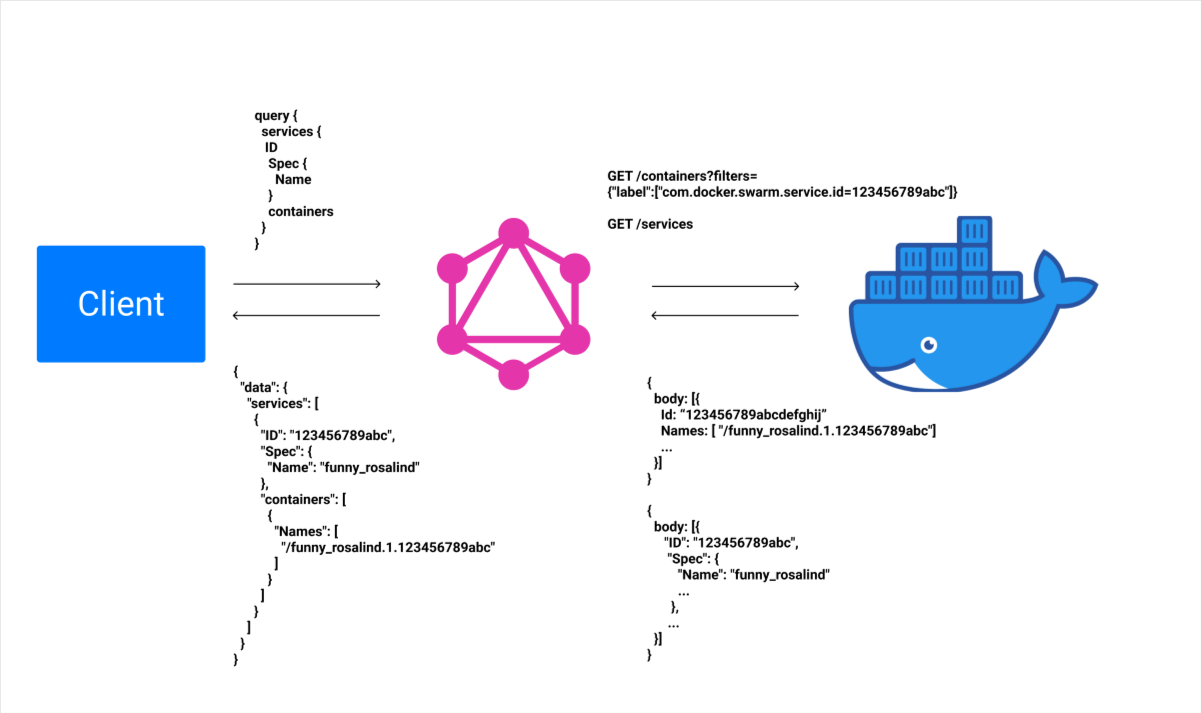
Considering we have a Docker engine running locally, we can access the API through the Docker daemon which uses the UNIX socket unix:///var/run/docker.sock . Knowing that, we can start building the first pieces of our server:
Entrypoint of our GraphQL server
2
import schema from './schema';
5
const baseURL = 'http+unix://%2Fvar%2Frun%2Fdocker.sock';
9
context: ({ req }) => {
16
const server = new ApolloServer({
21
server.listen(port).then(({ url }) => {
22
console.log(`Server ready at ${url}`);
As we can see above, we’re setting up a new Apollo GraphQL server with two main components:
the context, which is an object we can define ourselves with fields that we will need in the future. Here we’re passing the UNIX socket address of the Docker daemon that we will use to contact the API when querying data.
the schema, the central and main piece of any GraphQL project. It will hold all the relationships between the different types and the different operations available to query our data (you can read more about it here). As it is the most important piece of our project, the next part will be dedicated to how to build our schema.
The schema we will need for our Docker API GraphQL wrapper is composed of two main parts:
typeDefs or type definitions. We will define how our Docker resources are architected and related to each other in our graph.
resolvers which are functions where each one of them is associated with a single field and will be used to fetch data from the Docker API.
We will see that thanks to the GraphQL wrapper we can have the same information with one single query, and with exactly the data we want (i.e. no over fetching).
For services, most of the fields are mirroring what can be found in the Docker API documentation, however, you can see below that one extra field is present: containers. When we’ll add this field to a service query, we will get the containers within that service. We’ll define later a specific resolver for that field that will fetch the related containers of a given service.
3
import { gql } from 'apollo-server';
8
service(id: ID!): Service!
11
type ServiceSpecType {
17
Replicated: ServiceReplicated
20
type ServiceReplicated {
28
Spec: ServiceSpecType!
29
containers: [Container!]!
33
export default typeDefs;
We can keep adding as many “custom fields” as we want if we feel that there’s a relationship between resources that needs to be reflected by the type definition. Here we’ll just focus on containers, since our aim is to be able to run a single query to get services with their related containers.
Container type definitions
3
import { gql } from 'apollo-server';
7
container(id: ID!): Container!
21
export default typeDefs;
Now that we have our typDefs we need to focus on the next part composing our schema:
Given that we’re focusing on services only, we’ll only write resolvers for service (other resources follow the same model and concepts).
The following code snippet is what can be called our “main resolver” and by that I mean that it’s the resolver that extends the main Query Resolver object. Below, we can see that we wrote two resolvers: one to fetch the services, i.e. the list of services, and another one service, to fetch a specific service by passing an ID. These two resolvers will call their corresponding REST endpoint in the Docker API if the field “services” or “service” are passed in a GraphQL query.
Query resolvers with the services and service fields
3
import request from 'superagent';
4
import Service from './Service';
14
services: async (_parent, _args, { baseURL, authorization }) => {
15
const { body } = await request.get(`${baseURL}/services`);
18
service: async (_parent, args, { baseURL, authorization }) => {
20
const { body } = await request.get(`${baseURL}/services/${id}`);
25
export default { Query, Service };
We can see that we’re also importing a Service resolver in the code above. This file will contain the resolvers for the fields that are extending our Service type definition. In our case, we’ll write a function that resolves the containers field.
Service resolver with the containers field
2
import request from 'superagent';
5
containers: async (parent, _args, { baseURL, authorization }) => {
8
label: [`com.docker.swarm.service.id=${ID}`],
10
const { body } = await request.get(
11
`${baseURL}/containers/json?filters=${encodeURI(JSON.stringify(filters))}`
18
export default Service;
To get our Schemas we’ll need to use a function from apollo-server called makeExecutableSchema . This function will take our type definitions and resolvers and return our GraphQL schema:
The schema for our GraphQL server based on the typeDefs and resolvers
3
import { makeExecutableSchema } from 'apollo-server';
4
import merge from 'lodash/merge';
5
import service from './service/resolvers';
6
import serviceType from './service/typeDefs';
7
import containerType from './container/typeDefs';
9
const resolvers = merge(service, otherpotentialresolvers);
15
const global = [Query];
16
const typeDefs = [...global, containerType, serviceType];
18
const schema = makeExecutableSchema({
We now have all the elements to start our GraphQL server. Considering we have Docker running, we can run the command: ts-node ./src/index.ts .
By going to http://localhost:3000 we should see the GraphiQL IDE that will allow us to run queries against our GraphQL server.
Let’s give a try to our server by running a GraphQL query against it. First, we’ll need to start a service on our local Docker engine to make sure we have some data. For that we can use the following command: docker service create nginx . This will create a small NGINX docker service.
When it is fully running, we can run the following query:
Sample GraphQL query that aims to fetch the list of services with their respective IDs and Names
This query will get us the services running on our Docker engine, with their IDs and Names. The server should output a response very similar to the following one:
Expected result from the sample GraphQL query above
5
"ID": "t5rwuns2x9sb6g16hlrvw03qa",
7
"Name": "funny_rosalind"
We just ran our first GraphQL query to fetch the list of Docker services 🎉! Here we can see that we ran a query to get only some parts of the data available through the Docker API. This is one huge advantage of GraphQL, you can query only the data you need, no over-fetching!
Now let’s see how running a single query can get us both the list of services with their related containers. For that we’ll run the following query:
Sample GraphQL query that aims to fetch the list of services with their respective IDs and Names and related containers
which should output the following result:
The expected result from the sample GraphQL query above
5
"ID": "t5rwuns2x9sb6g16hlrvw03qa",
7
"Name": "funny_rosalind"
11
"Names": ["/funny_rosalind.1.izqtpqtp52oadkdxk4mjr5o54h1"]
It would typically take two REST calls to get that kind of data on a client, thanks to GraphQL and the way we architected our type definitions, it now only requires a single query!
You probably noticed that, since the beginning of this post, we’ve based our GraphQL server on Typescript. Although this is optional I wanted to showcase what can be achieved when building a GraphQL server with Typescript, and how we can leverage the schemas we’ve built to generate our Typescript types that can be used both on the server and on the client side.
To do so, we’ll need to install the following dependencies:
@types/graphql
graphql-code-generator
graphql-codegen-typescript-common
graphql-codegen-typescript-resolvers
graphql-codegen-typescript-server
The first thing we have to do after installing the required dependencies is to create a codegen.yml file at the root of our project that will serve as a configuration file for graphql-code-generator and fill it as follows:
Sample codegen configuration file for graphql-code-generator
2
schema: src/schema/index.ts
8
./src/types/types.d.ts:
10
contextType: ./context
14
- typescript-resolvers
Thanks to this configuration, graphql-code-generator will read our schemas located in src/schema/index.ts and output the generated types in src/types/types.d.ts .
In our server implementation, we rely on a context to pass the baseURL to our resolver. This will require some typing that we’ll have to do manually. For that, we’ll need to create a types directory under ./src and within that directory a context.d.ts file that will contain the type of our context object, in our case just a baseURL field of type String:
Context object type declaration
1
export type MyContext = {
At this point, we just have to add the following script to our package.json:
Generate type script in package.json
2
"generate-types": "gql-gen"
and run yarn generate which should generate all the types for our query resolver, service resolver, service, container and any Docker resource type we may have added to our GraphQL server. These types can then be added to the resolvers or to any client that would query this GraphQL server.
In this post we learned how to:
set up a GraphQL server using apollo-server that wraps the Docker API.
write type definitions for Docker resource based on the API spec.
write resolvers
build a schema based on the resolvers and the type definitions
generate Typescript types based on the schema
These were my first steps with GraphQL and I hope my work will inspire others to build great projects with what they learned through this post. The code featured in this article can be found here. I plan on continuing to build this project in my spare time. I added contributing guidelines and a quick roadmap for anyone willing to participate in this project.
If, like me a few months ago, you’re getting started right now with GraphQL, or looking to learn more about it, here are the several links that I found more than useful:
此内容由惯性聚合(RSS阅读器)自动聚合整理,仅供阅读参考。 原文来自 — 版权归原作者所有。