
惯性聚合 高效追踪和阅读你感兴趣的博客、新闻、科技资讯
阅读原文 在惯性聚合中打开

推荐订阅源

Spread Privacy
Spread Privacy
K
Kaspersky official blog
Application and Cybersecurity Blog
Forbes - Security
Forbes - Security
Hacker News - Newest:
Hacker News - Newest: "LLM"
The Last Watchdog
The Last Watchdog
SecWiki News
SecWiki News
Attack and Defense Labs
Google DeepMind News
Security Archives - TechRepublic
S
Secure Thoughts
WordPress大学
WordPress大学
Microsoft Security Blog
P
Proofpoint News Feed
云风的 BLOG
云风的 BLOG
V
Visual Studio Blog
Security Latest
Security Latest
TaoSecurity Blog
TaoSecurity Blog
Cyberwarzone
Cyberwarzone
S
SegmentFault 最新的问题
Cloudbric
Cloudbric
aimingoo的专栏
aimingoo的专栏
S
Schneier on Security
N
Netflix TechBlog - Medium
MyScale Blog
MyScale Blog
T
The Blog of Author Tim Ferriss
H
Hacker News: Front Page
C
Cybersecurity and Infrastructure Security Agency CISA
小众软件
小众软件
OSCHINA 社区最新新闻
OSCHINA 社区最新新闻
AWS News Blog
AWS News Blog
AI
AI
G
GRAHAM CLULEY
IT之家
IT之家
P
Privacy & Cybersecurity Law Blog
L
Lohrmann on Cybersecurity
Last Week in AI
Last Week in AI
D
Docker
Recent Announcements
O
OpenAI News
T
Threat Research - Cisco Blogs
GbyAI
GbyAI
S
Security @ Cisco Blogs
T
Troy Hunt's Blog
C
Check Point Blog
博客园 - 三生石上(FineUI控件)
A
About on SuperTechFans
The Cloudflare Blog
阮一峰的网络日志
阮一峰的网络日志
N
News and Events Feed by Topic

oida.dev | TypeScript, Rust

TypeScript's `erasableSyntaxOnly` Flag Unsafe for work Tokio: Macros Tokio: Channels Tokio: Getting Started Network Applications on the Tokio Stack Remake, Remodel, Reduce. The `never` type and error handling in TypeScript 5 Inconvenient Truths about TypeScript Refactoring in Rust: Introducing Traits Refactoring in Rust: Abstraction with the Newtype Pattern Announcing the TypeScript Cookbook TypeScript: Iterating over objects The road to universal JavaScript 10 years of oida.dev Rust: Tiny little traits The TypeScript converging point How not to learn TypeScript Getting started with Rust Introducing Slides and Coverage TypeScript: The humble function overload TypeScript + React: Children types are broken TypeScript: In defense of any Rust: Enums to wrap multiple errors Dissecting Deno Error handling in Rust TypeScript: Unexpected intersections Upgrading Node.js dependencies after a yarn audit TypeScript: Array.includes on narrow types TypeScript + React: Typing Generic forwardRefs shared, util, core: Schroedinger's module names Learning Rust and Go TypeScript: Narrow types in catch clauses TypeScript: Low maintenance types Tidy TypeScript: Name your generics Tidy TypeScript: Avoid traditional OOP patterns Tidy TypeScript: Prefer type aliases over interfaces Tidy TypeScript: Prefer union types over enums My new book: TypeScript in 50 Lessons Go Preact! ❤️ this in JavaScript and TypeScript TypeScript and ECMAScript Modules TypeScript + React: Why I don't use React.FC TypeScript + React: Component patterns TypeScript: Augmenting global and lib.dom.d.ts Vite with Preact and TypeScript TypeScript: Union to intersection type Are large node module dependencies an issue? TypeScript: Variadic Tuple Types Preview TypeScript: Improving Object.keys Remake, Remodel. Part 4. TypeScript + React: Typing custom hooks with tuple types TypeScript: Assertion signatures and Object.defineProperty TypeScript: Check for object properties and narrow down type Boolean in JavaScript and TypeScript void in JavaScript and TypeScript Symbols in JavaScript and TypeScript Why I use TypeScript TypeScript + React: Extending JSX Elements TypeScript: Validate mapped types and const context TypeScript: Match the exact object shape TypeScript: The constructor interface pattern Streaming your Meetup - Part 4: Directing and Streaming with OBS Streaming your Meetup - Part 3: Speaker audio Streaming your Meetup - Part 2: Speaker video Streaming your Meetup - Part 1: Basics and Projector TypeScript and React Guide: Added a new styles chapter TypeScript and React Guide: Added a new render props chapter TypeScript and React: Styles and CSS TypeScript and React TypeScript and React Guide: Added a new prop types chapter TypeScript without TypeScript -- JSDoc superpowers TypeScript: Mapped types for type maps JAMStack vs serverless web apps The Unsung Benefits of JAMStack Sites TypeScript: Ambient modules for Webpack loaders My most favourite talks in 2018 TypeScript and React Guide: Added a new context chapter TypeScript: Built-in generic types TypeScript: Type predicates JSX is syntactic sugar TypeScript and React Guide: Added a new hooks chapter Getting your CfP application right FAQ on our Angular Connect Talk: Automating UI development TypeScript and Substitutability Debugging Node.js apps in TypeScript with Visual Studio Code From Medium: Deconfusing Pre- and Post-processing From Medium: PostCSS misconceptions Saving and scraping a website with Puppeteer Cutting the mustard - 2018 edition Wordpress as CMS for your JAMStack sites My most favourite podcast episodes in 2017 My most favourite talks in 2017 My most favourite books in 2017 The Best Request Is No Request, Revisited Not so hidden figures - Organizing ScriptConf My podcast journey to ScriptCast Grid layout, grid layout everywhere! #scriptconf and #devone Object streams in Node.js
11ty: Generate Twitter cards automatically
2020-06-25 · via oida.dev | TypeScript, Rust

For the redesign of this blog, I created Twitter title cards that are generated automatically. So whenever people share my stuff on social media, they get a nice card telling them the article’s title and post date.

And folks should share these articles on social media, shouldn’t they?
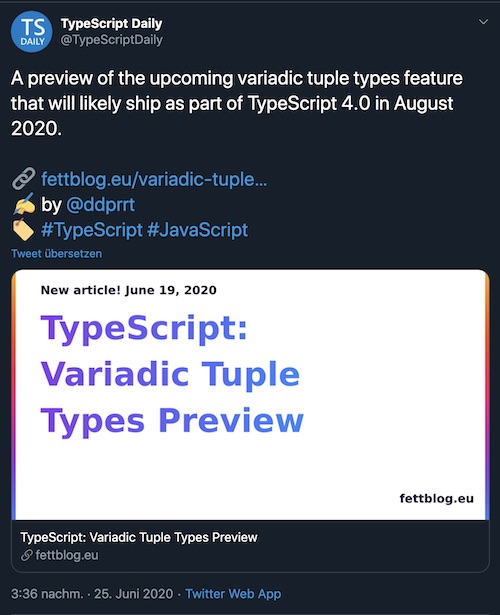
A tweet by @TypeScriptDaily showing one of my articles

I’m using Eleventy as a static site generator for this webpage, and thanks to their pagination feature, creating Twitter cards for each post took just little investment.

One important feature of Eleventy is collections. Eleventy tries to collect all parsable files from your source into a big all collection, and you have the possibility to cluster this big heap of data into different groups. One would be posts, which goes for all my blog articles.

In a lot of cases, you want to browse your collections either as a whole or on several pages. The pagination feature of Eleventy allows you exactly that. It takes a set of data, and slices it based on page size. This can be defined in the front-matter:

---
pagination:
data: collections.posts
size: 10
alias: pagedPosts
---

In the example above, I create pages with 10 items each from the posts collection, storing the information in an array called pagedPosts. We loop over this array and show the contents in the template. Effectively creating a paged overview.

So how can we use the pagination for our teasers? The trick lies in the pagination size. What happens if we set the pagination size to 1? We get a page for each entry in the posts collection. With this, we remap the entire contents of our blog to a new output.

This can be another HTML or XML page, or JSON, or in our case: An SVG.

---
pagination:
data: collections.posts
size: 1
alias: post
permalink: /teasers/{{ pagination.items[0].permalink | slug }}.svg
eleventyExcludeFromCollections: true
---

The above code

  1. Sets the pagination size to 1, effectively creating another page for each post
  2. Stores the post in the variable post so we can access it within the template
  3. Remaps its contents to a new output URL. A slugified permalink of the original post, but with an svg ending. Note: I just managed to do this by setting each permalink on my own. This can be further automated.
  4. With eleventyExcludeFromCollections: true I make sure that the newly created pages to get added to the overall list of collections.

This is the basic set-up. Now to the contents of the template

Creating an SVG #

What I did for this site was creating an SVG with Sketch. A simple one with just a bit of text. I tried system fonts, because once I’m rendering this in an SVG or PNG, I’m not sure with fonts I have available. I used some dummy text based on a real blog post, and then copied the SVG code in the template:

---
pagination:
data: collections.posts
size: 1
alias: post
permalink: /teasers/{{ pagination.items[0].permalink | slug }}.svg
eleventyExcludeFromCollections: true
---
<?xml version="1.0" encoding="UTF-8"?>
<svg width="1452px"
height="843px" viewBox="0 0 1452 843"
version="1.1" xmlns="http://www.w3.org/2000/svg"
xmlns:xlink="http://www.w3.org/1999/xlink">

<!-- here come the contents -->
</svg>

I searched for the part why I set the text and removed all existing lines. I changed it to a loop where I split the title of the post so each line has the right number of characters in it.

<text id="text"
fill="url(#linearGradient-3)"
font-family="Arial, Helvetica, sans-serif"
font-size="100" font-weight="bold" line-spacing="101">

{% for line in post.data.title | splitlines %}
<tspan x="81" y="{{247 + loop.index0 * 141}}">{{line}}</tspan>
{% endfor %}
</text>

Depending on the font size that I set, I set the y coordinate to an offset (in this case 247), plus the current line index and a font-size with line-height (141).

splitlines is a filter I create in my .eleventy.js configuration file:

config.addFilter('splitlines', function(input) {
const parts = input.split(' ') /* 1 */
/* 2 */
const lines = parts.reduce(function(prev, current) {
/* 3 */
if(!prev.length) {
return [current]
}

/* 4 */
let lastOne = prev[prev.length - 1]
if(lastOne.length + current.length > 18) {
return [...prev, current]
}
prev[prev.length - 1] = lastOne + ' ' + current
return prev
}, [])
return lines
})

Here’s what I do:

  1. I split the title by each word
  2. I run through all words
  3. If the array is empty, I create an array with the first word
  4. For each subsequent word, I check if the concatenation of words exceeds the number of characters I envision per line (18 in this case).
    1. If it does, I add the new word to the next line
    2. Otherwise, I concatenate words within a line

I also do something similar with the post date.

This already gives me an SVG for each blog post that I’m writing.

Creating a PNG #

The last thing that was necessary was creating a PNG of each SVG. I haven’t been able to do this via Eleventy, yet. So I resorted to Gulp. This is actually intentional, as I want to save time through maximum parallelism.

This is my Gulpfile.js. I just need one plug-in.

const gulp = require('gulp');
const svg2png = require('gulp-svg2png');

gulp.task('default', function() {
return gulp
.src('./dist/teasers/*.svg')
.pipe(svg2png())
.pipe(gulp.dest('./dist/teasers/'));
})

Note that this is resource-heavy. Depending on how big your site is you might want to do this incrementally or store the results somewhere instead of creating this per build run.

As for this site. Eleventy builds HTML + SVGs in less than 2 seconds. Converting the PNGs takes another 20 seconds on Vercel. This is still faster than a “Hello world” style Gatsby site. So I think it’s reasonable to do this every time 😉

Last, but not least, I add the results in the meta information of each blog post:

{% set imgPath = permalink | slug %}

<meta property="og:image"
content="https://oida.dev/teasers/{{ imgPath }}.png">

<meta property="og:image:secure_url"
content="https://oida.dev/teasers/{{ imgPath }}.png">

<meta name="twitter:image"
content="https://oida.dev/teasers/{{ imgPath }}.png">

And that’s it!

Some gotchas that I found:

  1. Finding the right line length was very much trial and error
  2. svg2png uses a headless Chrome to render the PNGs (uh-uh…). This, and your CI Server (Netlify, Vercel), have a high impact on which fonts are available for rendering. There might be better solutions available.

But other than that, I think it’s quite ok!

Related Articles