惯性聚合 高效追踪和阅读你感兴趣的博客、新闻、科技资讯
阅读原文 在惯性聚合中打开

推荐订阅源

Hacker News - Newest:
Hacker News - Newest: "LLM"
Webroot Blog
Webroot Blog
S
Security @ Cisco Blogs
H
Heimdal Security Blog
cs.CV updates on arXiv.org
www.infosecurity-magazine.com
N
News and Events Feed by Topic
H
Hacker News: Front Page
K
KPMG report finds enterprise disconnect between AI and its ROI | CIO
cs.AI updates on arXiv.org
Application and Cybersecurity Blog
SecWiki News
SecWiki News
N
News | PayPal Newsroom
T
Tor Project blog
W
WeLiveSecurity
A
Arctic Wolf
Security Archives - TechRepublic
S
Secure Thoughts
月光博客
月光博客
AWS News Blog
AWS News Blog
D
Docker
C
CERT Recently Published Vulnerability Notes
MyScale Blog
MyScale Blog
Google Online Security Blog
大猫的无限游戏
大猫的无限游戏
T
The Blog of Author Tim Ferriss
I
InfoQ
人人都是产品经理
人人都是产品经理
Recent Announcements
Google DeepMind News
Hacker News: Ask HN
Hacker News: Ask HN
Blog — PlanetScale
Blog — PlanetScale
博客园 - 【当耐特】
Engineering at Meta
Engineering at Meta
Stack Overflow Blog
Stack Overflow Blog
Recorded Future
Recorded Future
罗磊的独立博客
Exploit-DB.com RSS Feed
T
The Exploit Database - CXSecurity.com
D
DataBreaches.Net
S
Security Affairs
WordPress大学
WordPress大学
T
Threatpost
Microsoft Security Blog
V
Vulnerabilities – Threatpost
The Hacker News
The Hacker News
S
SegmentFault 最新的问题
B
Blog RSS Feed
Project Zero
Project Zero
P
Proofpoint News Feed

oida.dev | TypeScript, Rust

TypeScript's `erasableSyntaxOnly` Flag Unsafe for work Tokio: Macros Tokio: Channels Tokio: Getting Started Network Applications on the Tokio Stack Remake, Remodel, Reduce. The `never` type and error handling in TypeScript 5 Inconvenient Truths about TypeScript Refactoring in Rust: Introducing Traits Refactoring in Rust: Abstraction with the Newtype Pattern Announcing the TypeScript Cookbook TypeScript: Iterating over objects The road to universal JavaScript 10 years of oida.dev Rust: Tiny little traits The TypeScript converging point How not to learn TypeScript Getting started with Rust Introducing Slides and Coverage TypeScript: The humble function overload TypeScript + React: Children types are broken TypeScript: In defense of any Rust: Enums to wrap multiple errors Dissecting Deno Error handling in Rust TypeScript: Unexpected intersections Upgrading Node.js dependencies after a yarn audit TypeScript: Array.includes on narrow types TypeScript + React: Typing Generic forwardRefs shared, util, core: Schroedinger's module names Learning Rust and Go TypeScript: Narrow types in catch clauses TypeScript: Low maintenance types Tidy TypeScript: Name your generics Tidy TypeScript: Avoid traditional OOP patterns Tidy TypeScript: Prefer type aliases over interfaces Tidy TypeScript: Prefer union types over enums My new book: TypeScript in 50 Lessons Go Preact! ❤️ this in JavaScript and TypeScript TypeScript and ECMAScript Modules TypeScript + React: Why I don't use React.FC TypeScript + React: Component patterns TypeScript: Augmenting global and lib.dom.d.ts Vite with Preact and TypeScript TypeScript: Union to intersection type 11ty: Generate Twitter cards automatically Are large node module dependencies an issue? TypeScript: Variadic Tuple Types Preview TypeScript: Improving Object.keys Remake, Remodel. Part 4. TypeScript + React: Typing custom hooks with tuple types TypeScript: Assertion signatures and Object.defineProperty TypeScript: Check for object properties and narrow down type Boolean in JavaScript and TypeScript void in JavaScript and TypeScript Symbols in JavaScript and TypeScript Why I use TypeScript TypeScript + React: Extending JSX Elements TypeScript: Validate mapped types and const context TypeScript: Match the exact object shape TypeScript: The constructor interface pattern Streaming your Meetup - Part 4: Directing and Streaming with OBS Streaming your Meetup - Part 3: Speaker audio Streaming your Meetup - Part 2: Speaker video Streaming your Meetup - Part 1: Basics and Projector TypeScript and React Guide: Added a new styles chapter TypeScript and React Guide: Added a new render props chapter TypeScript and React: Styles and CSS TypeScript and React TypeScript and React Guide: Added a new prop types chapter TypeScript without TypeScript -- JSDoc superpowers TypeScript: Mapped types for type maps JAMStack vs serverless web apps The Unsung Benefits of JAMStack Sites TypeScript: Ambient modules for Webpack loaders My most favourite talks in 2018 TypeScript and React Guide: Added a new context chapter TypeScript: Built-in generic types TypeScript: Type predicates JSX is syntactic sugar TypeScript and React Guide: Added a new hooks chapter Getting your CfP application right FAQ on our Angular Connect Talk: Automating UI development TypeScript and Substitutability Debugging Node.js apps in TypeScript with Visual Studio Code From Medium: Deconfusing Pre- and Post-processing From Medium: PostCSS misconceptions Saving and scraping a website with Puppeteer Cutting the mustard - 2018 edition Wordpress as CMS for your JAMStack sites My most favourite podcast episodes in 2017 My most favourite talks in 2017 My most favourite books in 2017 The Best Request Is No Request, Revisited Not so hidden figures - Organizing ScriptConf My podcast journey to ScriptCast Grid layout, grid layout everywhere! #scriptconf and #devone
Formular One - or - How to style <select> elements
2014-06-05 · via oida.dev | TypeScript, Rust

Remember those days where developers made the most amazing forms in Flash because they both had to do everything from scratch due to lack of being close to an operating system. And designers decided to put extra effort in looks in behaviour because of … design?

We took this pattern over to HTML sites and were close to recreating every single form element or adding JavaScript extravaganza, especially when we were doing <select> elements.

We had (good) jQuery plugins like Select2, who even were accessible and had lots of good extra features, but what we thoroughly missed was usability on those little buggers everyone has in their pockets: Smartphones.

Smartphones do have extra controls and keyboards for different input types, and that is absolutely great! Different way of doing input requires to have different controls, so all those form elements got optimised in behaviour for your finger. Most of them popping up some wheel control in your keyboard area.

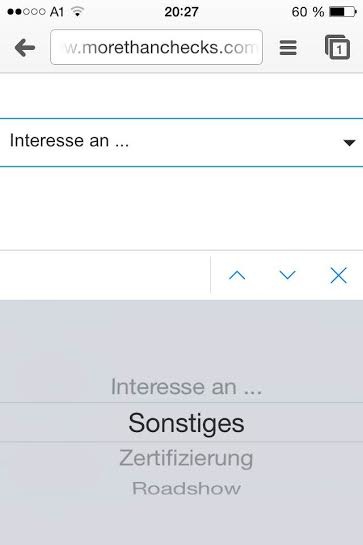
old style dropdowns are not that handy on smartphones better: a native control

Native controls rock, even if they are ugly as hell as shown on iOS7! And while the control itself cannot be styled (Ive has to do that), we can style its origin: the select element.

Remove all the old styles #

First we remove the old styles we got onto from the operating system. Webkit and Gecko based browsers have a (prefixed) property for that, called appearance. With this property you can change the appearance to be a button, checkbox or whatever you like. In our case, we just say none to remove everything.

select {
-webkit-appearance: none;
-moz-appearance: none;
appearance: none;
}

At the time of this writing, it is necessary to prefix it for both platforms.

The native select box in OSX Without "appearance" And in Mozilla Firefox, with appearance, and without

Adding your own style #

Now you have control over the styles. In Chrome the select elements looks like “Ugly OSX Style, flatted”, whilst in Mozilla Firefox you get some sort of Windows-styled dropdown element.

Let’s focus on the Webkits for now. We just add some own styles as well as a background image for the drop down arrow.

select {
-webkit-appearance: none;
-moz-appearance: none;
appearance: none;
border: 1px solid black;
background: url(..select.png) no-repeat 95% 50%;
border-radius: 0px;
font-size: 20px;
}

Getting rid of the drop down arrow #

Works perfectly on those platforms, we just have to get rid of the drop down arrow on Trident (Internet Explorer) and Gecko.

IE’s pretty easy on that, working with Shadow DOM, so you just can style the very element which renders the arrow.

::-ms-expand {
display: none;
}

On Firefox though, we have to cheat a little. And that’s sad. With a combination of text-overflow and text-indent, we’re telling the browser to move the (perfectly fitted) text a little to the right, by one hundredth of a pixel. So the drop down box on the right gets also moved by one hundredth of a pixel, not fitting anymore into the select box. Then we tell the browser to cut off text (or in this case: arrows) by replacing them with a blank text using text-overflow.

select {
text-overflow: '';
text-indent: 0.01px;
}

And have the styled select box you ever wanted.
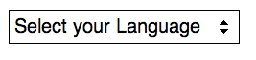
I'm not a designer

Disclaimer #

While this sample works at the moment, parts of it are rather hacky and thus might have a different outcome in the future. At the moment there isn’t a standard for styling native controls, so be aware that everything here might change!

Update #

As said, it is a hack. Therefore there might be some troubles with some browsers, like Firefox 31 and 32… it will work again with Firefox 33.

Further information #

This sample was part of my talk at the Webinale in June 2014. Get the whole slide deck here. See the whole example at Codepen.

Related Articles