


The scope is an important concept that manages the availability of variables. The scope is at the base closures, defines the idea of global and local variables.
If you'd like to code in JavaScript, understanding the scope of variables is a must.
In this post, I will explain step by step, in-depth, how the scope works in JavaScript.
Before diving into what the scope is, let's try an experiment that demonstrates how the scope manifests itself.
Let's say you define a variable message:
const message = 'Hello';
console.log(message); // 'Hello'
Then, you could easily log this variable in the next line after the declaration. No questions here.
Now, let's move the declaration of message inside of an if code block:
if (true) {
const message = 'Hello';
}
console.log(message); // ReferenceError: message is not defined
This time, when trying to log the variable, JavaScript throws ReferenceError: message is not defined.
Why does it happen?
The if code block creates a scope for message variable. And message variable can be accessed only within this scope.

At a higher level, the accessibility of variables is limited by the scope where they're created. You are free to access the variable defined within its scope. But outside of its scope, the variable is inaccessible.
Now, let's put down a general definition of scope:
The scope is a policy that manages the accessibility of variables.
A code block in JavaScript defines a scope for variables declared using let and const:
if (true) {
// "if" block scope
const message = 'Hello';
console.log(message); // 'Hello'
}
console.log(message); // throws ReferenceError
The first console.log(message) correctly logs the variable because message is accessed from the scope where it is defined.
But the second console.log(message) throws a reference error because message variable is accessed outside of its scope: the variable doesn't exist here.
The code block of if, for, while statements also create a scope.
In the following example for loop defines a scope:
for (const color of ['green', 'red', 'blue']) {
// "for" block scope
const message = 'Hi';
console.log(color); // 'green', 'red', 'blue'
console.log(message); // 'Hi', 'Hi', 'Hi'
}
console.log(color); // throws ReferenceError
console.log(message); // throws ReferenceError
color and message variables exist within the scope of while code block.
Same way the code block of while statement creates a scope for its variables:
while (/* condition */) {
// "while" block scope
const message = 'Hi';
console.log(message); // 'Hi'
}
console.log(message); // => throws ReferenceError
message is defined within while() body, consequently message is accessible only within while() body.
In JavaScript you can define standalone code blocks. The standalone code blocks also delimit a scope:
{
// block scope
const message = 'Hello';
console.log(message); // 'Hello'
}
console.log(message); // throws ReferenceError
As seen in the previous section, the code block creates a scope for variables declared using const and let. However, that's not the case of variables declared using var.
The snippet below declares a variable count using a var statement:
if (true) {
// "if" block scope
var count = 0;
console.log(count); // 0
}
console.log(count); // 0
count variable, as expected, is accessible within the scope of if code block. However, count variable is also accessible outside!
A code block does not create a scope for var variables, but a function body does. Read the previous sentence again, and try to remember it.
Let's continue on the function scope in the next section.
A function in JavaScript defines a scope for variables declared using var, let and const.
Let's declare a var variable within a function body:
function run() {
// "run" function scope
var message = 'Run, Forrest, Run!';
console.log(message); // 'Run, Forrest, Run!'
}
run();
console.log(message); // throws ReferenceError
run() function body creates a scope. The variable message is accessible inside of the function scope, but inaccessible outside.
Same way, a function body creates a scope for let, const and even function declarations.
function run() {
// "run" function scope
const two = 2;
let count = 0;
function run2() {}
console.log(two); // 2
console.log(count); // 0
console.log(run2); // function
}
run();
console.log(two); // throws ReferenceError
console.log(count); // throws ReferenceError
console.log(run2); // throws ReferenceError
ES2015 module also creates a scope for variables, functions, classes.
The module circle defines a constant pi (for some internal usage):
// "circle" module scope
const pi = 3.14159;
console.log(pi); // 3.14159
// Usage of pi
pi variable is declared within the scope of circle module. Also, the variable pi is not exported from the module.
Then the circle module is imported:
import './circle';
console.log(pi); // throws ReferenceError
The variable pi is not accessible outside of circle module (unless explicitly exported using export).
The module scope makes the module encapsulated. Every private variable (that's not exported) remains an internal detail of the module, and the module scope protects these variables from being accessed outside.
Looking from another angle, the scope is an encapsulation mechanism for code blocks, functions, and modules.
An interesting property of scopes is that they can be nested.
In the following example the function run() creates a scope, and inside an if condition code block creates another scope:
function run() {
// "run" function scope
const message = 'Run, Forrest, Run!';
if (true) {
// "if" code block scope
const friend = 'Bubba';
console.log(message); // 'Run, Forrest, Run!'
}
console.log(friend); // throws ReferenceError
}
run();
if code block scope is nested inside the run() function scope. Scopes of any type (code block, function, module) can be nested.
The scope contained within another scope is named inner scope. In the example, if code block scope is an inner scope of run() function scope.
The scope that wraps another scope is named outer scope. In the example, run() function scope is an outer scope to if code block scope.
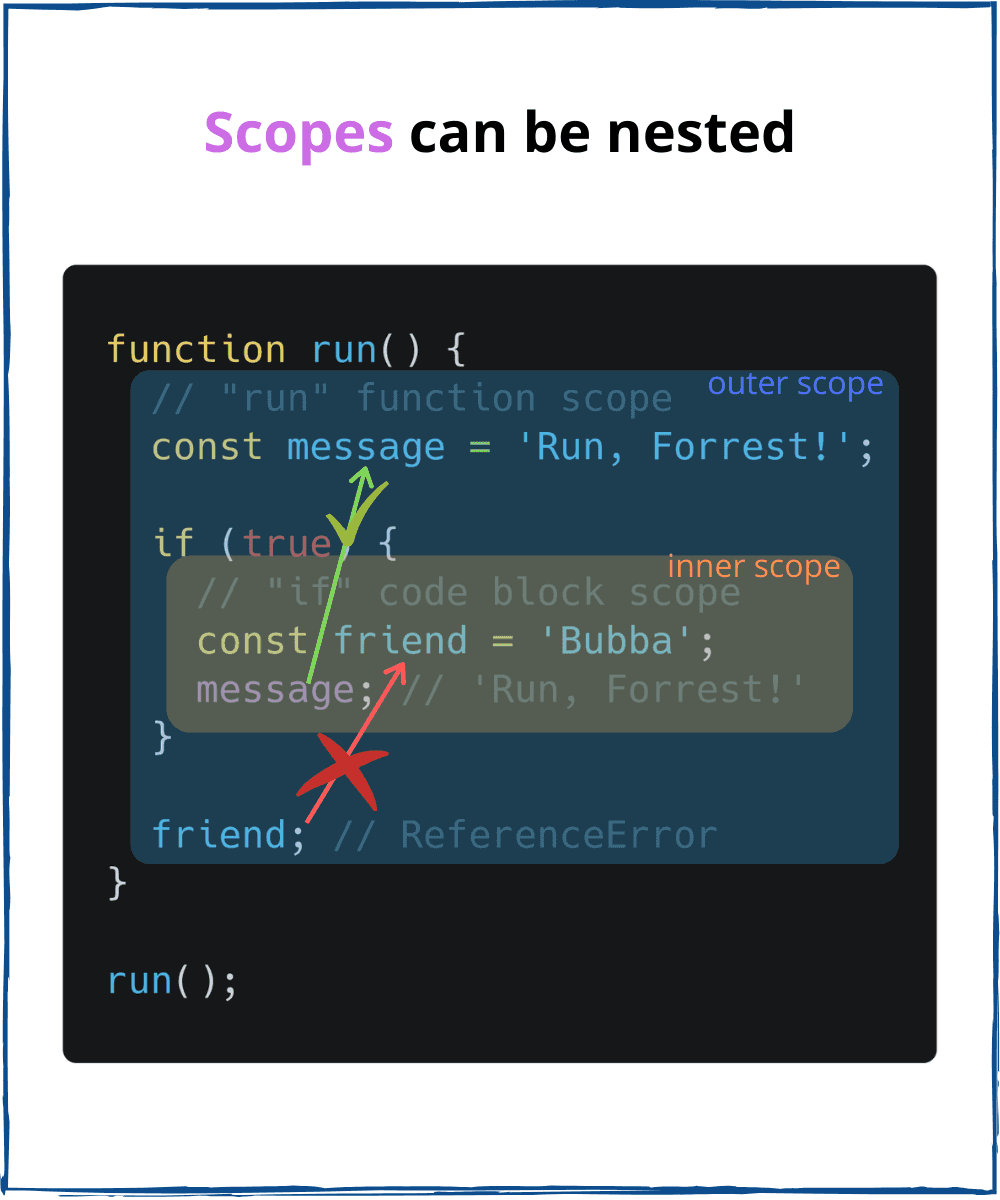
What about the variable's accessibility? Here's one simple rule to remember:
The inner scope can access the variables of its outer scope.
message variable, which is a part of the run() function scope (outer scope), is accessible inside if code block scope (inner scope).
The global scope is the outermost scope. It is accessible from any inner (aka local) scope.
In a browser environment, the topmost scope of JavaScript file loaded using <script> tag is a global scope:
<script src="myScript.js"></script>
// myScript.js
// "global" scope
let counter = 1;
A variable declared inside the global scope is named global variable. Global variables are accessible from any scope.
In the previous code snippet, counter is a global variable. This variable can be accessed from any place of the webpage's JavaScript.
The global scope is a mechanism that lets the host of JavaScript (browser, Node) supply applications with host-specific functions as global variables.
window and document, for example, are global variables supplied by the browser. In a Node environment, you can access process object as a global variable.
Let's define 2 functions, having the function innerFunc() is nested inside outerFunc().
function outerFunc() {
// the outer scope
let outerVar = 'I am from outside!';
function innerFunc() {
// the inner scope
console.log(outerVar); // 'I am from outside!'
}
return innerFunc;
}
const inner = outerFunc();
inner();
Look at the last line of the snippet inner(): the innerFunc() invokation happens outside of outerFunc() scope. Still, how does JavaScript understand that outerVar inside innerFunc() corresponds to the variable outerVar of outerFunc()?
The answer is due to lexical scoping.
JavaScript implements a scoping mechanism named lexical scoping (or static scoping). Lexical scoping means that the accessibility of variables is determined statically by the position of the variables within the nested function scopes: the inner function scope can access variables from the outer function scope.
A formal definition of lexical scope:
The lexical scope consists of outer scopes determined statically.
In the example, the lexical scope of innerFunc() consists of the scope of outerFunc().
Moreover, the innerFunc() is a closure because it captures the variable outerVar from the lexical scope.
If you'd like to master the closure concept, I highly recommend reading my post A Simple Explanation of JavaScript Closures.
An immediate property of scope arises: the scope isolates the variables. And what's good different scopes can have variables with the same name.
You can reuse common variables names (count, index, current, value, etc) in different scopes without collisions.
foo() and bar() function scopes have their own, but same named, variables count:
function foo() {
// "foo" function scope
let count = 0;
console.log(count); // 0
}
function bar() {
// "bar" function scope
let count = 1;
console.log(count); // 1
}
foo();
bar();
The scope is a policy that manages the availability of variables. A variable defined inside a scope is accessible only within that scope, but inaccessible outside.
In JavaScript, scopes are created by code blocks, functions, modules.
While const and let variables are scoped by code blocks, functions or modules, var variables are scoped only by functions or modules.
Scopes can be nested. Inside an inner scope you can access the variables of an outer scope.
The lexical scope consists of the outer function scopes determined statically. Any function, no matter the place where being executed, can access the variables of its lexical scope (this is the concept of closure).
Hopefully, my post has helped you understand the scope better!
此内容由惯性聚合(RSS阅读器)自动聚合整理,仅供阅读参考。 原文来自 — 版权归原作者所有。