


To access a DOM element rendered in the component's body you can use a ref created by useRef() hook.
But what if you need to access a DOM element of a child component? Then a simple ref is not enough and you have to combine refs with React.forwardRef(): a technique called refs forwarding.
Also, useImperativeHandle() is a hook that extends the capabilities of forwardRef() by giving the parent component access to more goodies like imperative methods of a child component.
Let's see how it works.
There are situations when you have to work with the DOM because the existing React abstractions (components, state, props, hooks, context) do not cover all possible use cases:
Let's recall how to access a DOM element directly from the body of the component:
import { useRef, useEffect } from 'react'
export function Parent() {
const elementRef = useRef() // create the ref
useEffect(() => {
// after mounting
console.log(elementRef.current) // logs <div>Hello, World!</div>
}, [])
return <div ref={elementRef}>Hello, World!</div> // assign the ref
}
const elementRef = useRef() creates a ref. Then elementRef is assigned to the ref attribute of the tag: <div ref="elementRef">.
elementRef after mounting will contain the DOM element instance (useEffect() hook with an empty array as deps detects when the component mounts).
Open the demo and you'll see the element logged to the console.
Ok, so what is the limitation of this approach? A problem arises when the element is not rendered directly in the body of the component, but rather in a child component.
Let's modify the previous example by extracting the <div>Hello, World!</div> into a child component <Child>. Also, let's create a prop ref on <Child>, to which <Parent> assigns elementRef:
import { useRef, useEffect } from 'react'
export function Parent() {
const elementRef = useRef()
useEffect(() => {
// Does not work!
console.log(elementRef.current) // logs undefined
}, [])
return <Child ref={elementRef} /> // assign the ref
}
function Child({ ref }) { // a new component
return <div ref={ref}>Hello, World!</div>
}
Is this code working? Open the demo and you'll see that after mounting elementRef.current contains undefined.
<Parent> couldn't access the DOM element from the child component.

React also throws a useful warning: Warning: Function components cannot be given refs. Attempts to access this ref will fail. Did you mean to use React.forwardRef()?
Let's follow React's advice and see how forwardRef() can help.
Now is the right moment to introduce forwardRef().
forwardRef() is a higher-order component that wraps a React component. The wrapped component works the same way as the original component but also receives as the second parameter a ref: the forwarded ref from the parent component.

Let's wrap the child component into forwardRef() with the goal to connect parent's elementRef with child's <div>Hello, World!</div>:
import { useRef, useEffect, forwardRef } from 'react'
export function Parent() {
const elementRef = useRef()
useEffect(() => {
// Works!
console.log(elementRef.current) // logs <div>Hello, World!</div>
}, [])
return <Child ref={elementRef} /> // assign the ref
}
const Child = forwardRef(function(props, ref) {
return <div ref={ref}>Hello, World!</div>
})
The parent component assigns elementRef to the child component <Child ref={elementRef} />. Then, thanks to being wrapped into forwardRef(), the child component gets the ref from the second parameter and uses it on its element <div ref={ref}>.
After mounting elementRef.current in the parent component contains the DOM element from child component. Open the demo: it works!
That's the purpose of forwardRef(): give the parent component access to DOM elements in the child component.
What if you want to access something else from the child component? For example, a simple function to focus the input.
That's where useImperativeHandle() hook can help you.
import { forwardRef, useImperativeHandle } from 'react'
const MyComponent = forwardRef(function(props, ref) {
useImperativeHandle(ref, function getRefValue() {
return {
// new ref value...
method1() { },
method2() { }
}
}, []) // dependencies
return <div>...</div>
}
useImperativeHandle(ref, getRefValue, deps) is built-in React hook that accepts 3 arguments: the forwarded ref, the function that returns the new ref value, and the dependencies array.
The value returned of getRefValue() function becomes the value of the forwarded ref. That's the main benefit of useImperativeHandle(): you can customize the forwarded ref value with whatever you want.

For example, let's use the hook and give the parent an object with methods focus() and blur():
import { useRef, forwardRef, useImperativeHandle } from 'react'
export function Main() {
const methodsRef = useRef()
const focus = () => methodsRef.current.focus()
const blur = () => methodsRef.current.blur()
return (
<>
<FocusableInput ref={methodsRef} />
<button onClick={focus}>Focus input</button>
<button onClick={blur}>Blur input</button>
</>
)
}
const FocusableInput = forwardRef(function (props, ref) {
const inputRef = useRef()
useImperativeHandle(ref, // forwarded ref
function () {
return {
focus() { inputRef.current.focus() },
blur() { inputRef.current.blur() }
} // the forwarded ref value
}, [])
return <input type="text" ref={inputRef} />
})
useImperativeHandle(ref, ..., []) gives the parent an object with focus() and blur() methods.
Finally, remember that useImperativeHandle() can be used only inside a component wrapped in forwardRef().
You can forward refs more than 1 level down in the component hierarchy. Just wrap each child, grandchild, and so on components in forwardRef(), and pass the ref down until you reach the target DOM element.
Let's forward elementRef 2 times to access the DOM element from a grandchild component:
import { forwardRef, useRef, useEffect } from "react";
export function Parent() {
const elementRef = useRef()
useEffect(() => {
console.log(elementRef.current); // logs <div>Deep!</div>
}, [])
return <Child ref={elementRef} />
}
const Child = forwardRef(function (props, ref) {
return <GrandChild ref={ref} />
})
const GrandChild = forwardRef(function (props, ref) {
return <div ref={ref}>Deep!</div>
})
elementRef is forwarded to the child component, which then forwards the same ref to the grandchild, which finally connects the ref to <div ref={ref}>Deep!</div>.
Using 2 forwards the parent component elementRef gets access to <div ref={ref}>Deep!</div> in the grandchild.

As a side note, try to keep the forwarding to a minimum to avoid increasing the code complexity.
If the forwarded ref is unexpectedly undefined or null, there are usually 2 reasons.
First, you may have forgotten to assign the forwarded ref to ref attribute of the HTML tag:
import { useRef, useEffect, forwardRef } from 'react'
export function Parent() {
const elementRef = useRef()
useEffect(() => {
console.log(elementRef.current) // logs undefined
}, [])
return <Child ref={elementRef} />
}
const Child = forwardRef(function(props, ref) {
return <div>Hello, World!</div> // ref not assigned to ref attribute!
})
elementRef in the example above is undefined because the forwarded ref isn't assigned to ref attribute of <div>Hello, World!</div> inside the child component.
To fix the problem just assign correctly the ref: <div ref={ref}>Hello, World!</div>.
Second, you may have conditionally displayed the referenced DOM element:
import { useRef, useEffect, forwardRef, useState } from 'react'
export function Parent() {
const elementRef = useRef()
const [show, setShow] = useState(true)
const toggle = () => setShow(!show)
useEffect(() => {
// logs <div>Hello, World!</div> or null
console.log(elementRef.current)
}, [show])
return (
<>
<button onClick={toggle}>Toggle</button>
<Child ref={elementRef} show={show} />
</>
)
}
const Child = forwardRef(function({ show }, ref) {
// displayed conditionally
return show ? <div ref={ref}>Hello, World!</div> : null
})
The child component renders <div ref={ref}>Hello, World!</div> under a condition. Initially show prop is true, thus elementRef is <div>Hello, World!</div>.
Clicking "Toggle" button makes show become false. This makes the ternary operator in <Child> render null — and not render the div element. Thus elementRef in the parent becomes null.
In the first section I mentioned that if you assign to ref prop an actual ref, React will throw a warning Warning: Function components cannot be given refs.
But what about using a custom prop, for example, elementRef, and passing the ref down to the child component using the custom prop?
Let's take a look:
import { useRef, useEffect } from "react"
export function Parent() {
const elementRef = useRef()
useEffect(() => {
// Works!
console.log(elementRef.current); // logs <div>Hello, World!</div>
}, [])
return <Child elementRef={elementRef} />
}
function Child({ elementRef }) {
return <div ref={elementRef}>Hello, World!</div>
}
The parent component passes elementRef to <Child elementRef={elementRef}> using a custom prop elementRef. The child component then assigns elementRef prop to the tag: <div ref={elementRef}>Hello, World!</div>.
What's your bet, does elementRef in the parent component access the DOM element of the child?
Indeed, it does!
Then the big question is... why bother with using forwardRef()? You can just pass the ref using a prop!
I don't recommend doing so, and here are 2 reasons.
First, using ref attribute (instead of a custom prop like elementRef) is better because it keeps the ref API consistent between class-based, function-based, and HTML tags.
Second, props are immutable in React. Passing the ref using a prop violates the props immutability because the ref eventually is assigned (aka mutated) with the DOM element.
Do you know other issues when passing ref using a custom prop? Write a comment below!
An anonymous function doesn't have a name near function keyword.
import { forwardRef } from 'react'
const MyComponent = forwardRef(function() { // Anonymous function
// ...
})
In React dev tools an anonymous function wrapped in forwardRef() results in a component with an unmeaningful name:
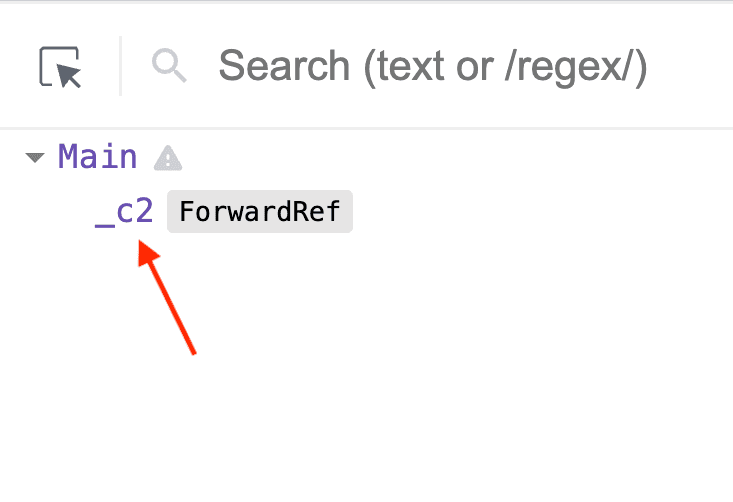
Having no component name in the hierarchy makes it hard to understand what is rendered on the page. In addition, you cannot use the search functionality of the React dev tools to find your component.
To give a component a name use the named function expressions for components wrapped in forwardRef():
import { forwardRef } from 'react'
const MyComponent = forwardRef(function MyComponent() {// Named function
// ...
})
Using function MyComponent() {...} displays the component name in React dev tools:
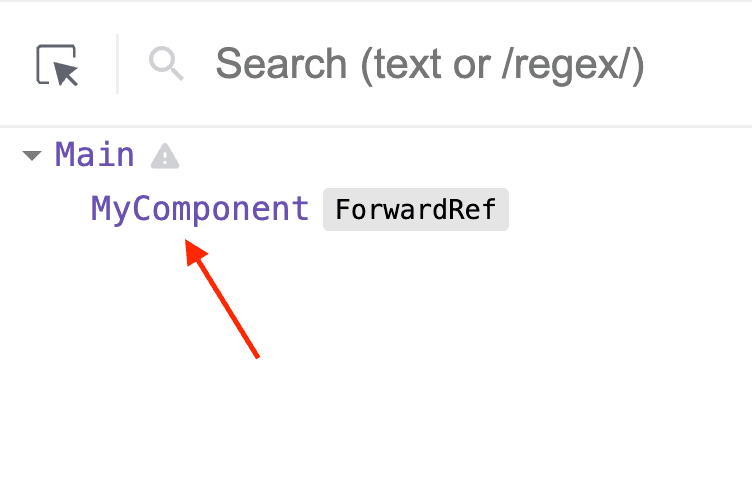
With the proper names of components, debugging the application is much easier.
React forwardRef() in TypeScript is a bit trickier because you need to specify the type arguments of useRef<T>() in the parent component and forwardRef()<T, P> wrapping the child component. Both functions are generic function types.
forwardRef<V, P>() accepts 2 argument types:
V is the type of the value stored in a ref, which is usually an HTMLDivElement or HTMLInputElementP is the props type of the wrapped componentuseRef<V>() hook in TypeScript has one argument type V: denoting the value type stored in the ref. If you store DOM elements in the ref, V can be HTMLDivElement or HTMLInputElement.
Now let's annotate the parent and child components:
import { useRef, forwardRef } from "react"
export function Parent() {
const elementRef = useRef<HTMLDivElement>(null)
return <Child ref={elementRef} />
}
const Child = forwardRef<HTMLDivElement>(function (props, ref) {
return <div ref={ref}>Hello, World!</div>
})
useRef<HTMLDivElement>(null) creates a ref that holds a div element because HTMLDivElement is used as the type argument.
The ref is initialised with null — this is important. Otherwise, TypeScript throws a type error when assigning the ref to the child component: <Child ref={elementRef} />.
Finally, when wrapping the child component forwardRef<HTMLDivElement>(...) specify HTMLDivElement as the value type of the forwarded ref.
Before ending the post, I advise you to keep the use refs to a minimum.
React is the library which goal is to abstract you from DOM manipulation, cross-browser compatibility, and DOM manipulation performance. React gives you wonderful components, props, state, hooks, and context abstractions to free you from dealing with DOM and browser-specific details.
If you choose to use refs to access DOM, including with the help of forwardRef() and useImperativeHandle(), you are not using React abstractions, you are using the DOM-specific details directly. Code that uses a lot of refs with DOM elements will be harder to maintain in the long run.
Consider using a React abstraction to achieve your goal before using a ref to access DOM. Of course, this isn't always possible, and you have to get your hands dirty from time to time.
Ok.
In conclusion, accessing a DOM element instance is relatively easy when the element is rendered directly in the body of the component. Just assign the ref to the tag: <div ref={elementRef} />.
Things get trickier when the element is rendered inside of a child component. In this case, you have to wrap the child component into the built-in React function forwardRef():
import { forwardRef } from 'react'
function Parent() {
const elementRef = useRef()
return <Child ref={elementRef} />
}
const Child = forwardRef(function(props, ref) {
return <div ref={ref}>...</div>
})
The parent component safely assigns elementRef to the child component <Child ref={elementRef} />. After mounting, elementRef contains the DOM element instance of the child component.
Do you think React should support refs forwarding natively, without the use of forwardRef()?
此内容由惯性聚合(RSS阅读器)自动聚合整理,仅供阅读参考。 原文来自 — 版权归原作者所有。