


Because JavaScript is permissive, developers have the temptation to access uninitialized values. I'm guilty of such bad practice too.
Often such risky actions generate undefined related errors:
TypeError: 'undefined' is not a functionTypeError: Cannot read property '<prop-name>' of undefinedJavaScript developers can understand the irony of this joke:
function undefined() {
// problem solved
}
To reduce such errors, you have to understand the cases when undefined is generated. Let's explore undefined and its effect on code safety.
JavaScript has 6 primitive types:
true or false1, 6.7, 0xFF"Gorilla and banana"Symbol("name") (starting ES2015)nullundefined.And a separated object type: {name: "Dmitri"}, ["apple", "orange"].
From 6 primitive types undefined is a special value with its own type Undefined. According to ECMAScript specification:
Undefined value primitive value is used when a variable has not been assigned a value.
The standard clearly defines that you will receive undefined when accessing uninitialized variables, non-existing object properties, non-existing array elements, and alike.
A few examples:
let number;
console.log(number); // => undefined
let movie = { name: 'Interstellar' };
console.log(movie.year); // => undefined
let movies = ['Interstellar', 'Alexander'];
console.log(movies[3]); // => undefined
The above example demonstrates that accessing:
numbermovie.yearmovies[3]are evaluated as undefined.
The ECMAScript specification defines the type of undefined value:
Undefined type is a type whose sole value is the
undefinedvalue.
In this sense, typeof operator returns 'undefined' string for an undefined value:
console.log(typeof undefined === 'undefined'); // => true
Of course typeof works nicely to verify whether a variable contains an undefined value:
let nothing;
console.log(typeof nothing === 'undefined'); // => true
A declared variable but not yet assigned with a value (uninitialized) is
undefined.
Plain and simple:
let myVariable;
console.log(myVariable); // => undefined
myVariable is declared and not yet assigned with a value. Accessing the variable evaluates to undefined.
An efficient approach to solve the troubles of uninitialized variables is whenever possible to assign an initial value. The less the variable exists in an uninitialized state, the better.
Ideally, you would assign a value right away after declaration const myVariable = 'Initial value'. But that's not always possible.
Tip 1: Favor const, otherwise use let, but say goodbye to var
const and let are block scoped (contrary to older function scoped var) and exist in a temporal dead zone until the declaration line.
If you want to define a variable, always start with const, which creates an immutable binding.
One of the nice features of const is that you must assign an initial value to the variable const myVariable = 'initial'. The variable is not exposed to the uninitialized state and accessing undefined is impossible.
Let's check the function that verifies whether a word is a palindrome:
function isPalindrome(word) {
const length = word.length;
const half = Math.floor(length / 2);
for (let index = 0; index < half; index++) {
if (word[index] !== word[length - index - 1]) {
return false;
}
}
return true;
}
console.log(isPalindrome('madam')); // => true
console.log(isPalindrome('hello')); // => false
length and half variables are assigned with a value once. It seems reasonable to declare them as const since these variables aren't going to change.
Use let declaration for variables whose value can change. Whenever possible assign an initial value right away, e.g. let index = 0.
What about the old-school var? My suggestion is to stop using it.

var declaration problem is the variable hoisting within the function scope. You can declare a var variable somewhere at the end of the function scope, but still, you can access it before declaration: and you'll get an undefined.
function bigFunction() {
// code...
myVariable; // => undefined
// code...
var myVariable = 'Initial value';
// code...
myVariable; // => 'Initial value'
}
bigFunction();
myVariable is accessible and contains undefined even before the declaration line: var myVariable = 'Initial value'.
Contrary, a const or let variable cannot be accessed before the declaration line — the variable is in a temporal dead zone before the declaration. And that's nice because you have less chance to access an undefined.
The above example updated with let (instead of var) throws a ReferenceError because the variable in the temporal dead zone is not accessible.
function bigFunction() {
// code...
myVariable; // => Throws 'ReferenceError: myVariable is not defined'
// code...
let myVariable = 'Initial value';
// code...
myVariable; // => 'Initial value'
}
bigFunction();
Encouraging the usage of const for immutable bindings or let otherwise ensures a practice that reduces the appearance of the uninitialized variable.
Tip 2: Increase cohesion
Cohesion characterizes the degree to which the elements of a module (namespace, class, method, block of code) belong together. The cohesion can be high or low.
A high cohesion module is preferable because the elements of such a module focus solely on a single task. It makes the module:
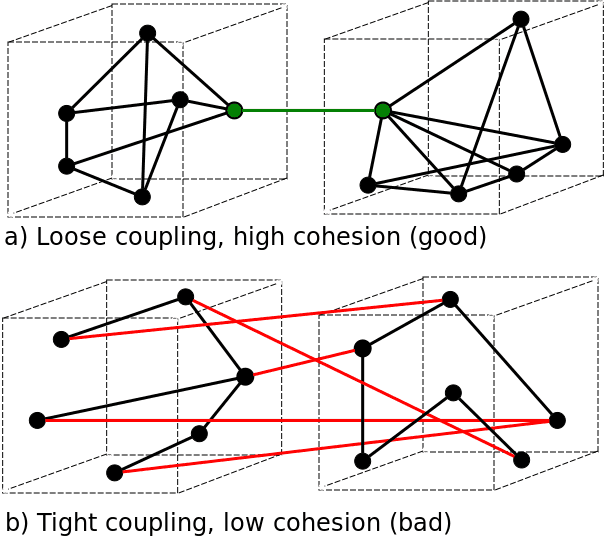
High cohesion accompanied by loose coupling is the characteristic of a well-designed system.
A code block can be considered a small module. To profit from the benefits of high cohesion, keep the variables as close as possible to the code block that uses them.
For instance, if a variable solely exists to form the logic of block scope, then declare and make the variable exist only within that block (using const or let declarations). Do not expose this variable to the outer block scope, since the outer block shouldn't need this variable.
One classic example of the unnecessarily extended life of variables is the usage of for cycle inside a function:
function someFunc(array) {
var index, item, length = array.length;
// some code...
// some code...
for (index = 0; index < length; index++) {
item = array[index];
// some code...
}
return 'some result';
}
index, item, and length variables are declared at the beginning of the function body. However, they are used only near the end. What's the problem with this approach?
Between the declaration at the top and the usage in for statement the variables index and item are uninitialized and exposed to undefined. They have an unreasonably long lifecycle in the entire function scope.
A better approach is to move these variables as close as possible to their usage place:
function someFunc(array) {
// some code...
// some code...
const length = array.length;
for (let index = 0; index < length; index++) {
const item = array[index];
// some
}
return 'some result';
}
index and item variables exist only in the block scope of for statement. They don't have any meaning outside of for.
length variable is declared close to the source of its usage too.
The refactored code is better because:
undefinedWhen accessing a non-existing object property, JavaScript returns
undefined.
Let's demonstrate that in an example:
let favoriteMovie = {
title: 'Blade Runner'
};
console.log(favoriteMovie.actors); // => undefined
favoriteMovie is an object with a single property title. Accessing a non-existing property actors using a property accessor favoriteMovie.actors evaluates to undefined.
Accessing a non-existing property does not throw an error. The problem appears when trying to get data from the non-existing property (e.g. favoriteMovie.actors.length) — the most common undefined issue.
"TypeError: Cannot read property <prop> of undefined" is a very common error message generated by accessing data from non-existing properties.
Let's slightly modify the previous code snippet to illustrate a TypeError throw:
let favoriteMovie = {
title: 'Blade Runner'
};
favoriteMovie.actors.length;
// TypeError: Cannot read property 'length' of undefined
favoriteMovie does not have the property actors, so favoriteMovie.actors evaluates to undefined.
As a result, accessing the length of an undefined value using the expression favoriteMovie.actors.length throws a TypeError.
A good way to bypass this problem is to restrict the object to have always defined the properties that it holds.
Unfortunately, often you don't have control over the objects. Such objects may have a different set of properties in diverse scenarios. So you have to handle all these scenarios manually.
Let's implement a function append(array, toAppend) that adds at the beginning and/or at the end of an array new elements. toAppend parameter accepts an object with properties:
first: element inserted at the beginning of arraylast: element inserted at the end of array.The function returns a new array instance, without altering the original array.
The first version of append(), a bit naive, may look like this:
function append(array, toAppend) {
const arrayCopy = [...array];
if (toAppend.first) {
arrayCopy.unshift(toAppend.first);
}
if (toAppend.last) {
arrayCopy.push(toAppend.last);
}
return arrayCopy;
}
const a1 = append([2, 3, 4], { first: 1, last: 5 })
const a2 = append(['Hello'], { last: 'World' })
const a3 = append([8, 16], { first: 4 })
console.log(a1); // => [1, 2, 3, 4, 5]
console.log(a2); // => ['Hello', 'World']
console.log(a3); // => [4, 8, 16]
Because toAppend object can omit first or last properties, it is obligatory to verify whether these properties exist in toAppend.
A property accessor evaluates to undefined if the property does not exist. The first temptation to check whether first or last properties are present is to verify them against undefined. This is performed in conditionals if(toAppend.first){} and if(toAppend.last){}...
Not so fast. This approach has a drawback. undefined, as well as false, null, 0, NaN, and '' are falsy values.
In the current implementation of append(), the function doesn't allow to insert falsy elements:
append([10], { first: 0, last: false }); // => [10]
0 and false are falsy. Because if(toAppend.first){} and if(toAppend.last){} actually compare against falsy, these elements are not inserted into the array. The function returns the initial array [10] without modifications, instead of the expected [0, 10, false].
The tips that follow explain how to correctly check the property's existence.
Tip 3: Check the property existence
Fortunately, JavaScript offers a bunch of ways to determine if the object has a specific property:
obj.prop !== undefined: compare against undefined directlytypeof obj.prop !== 'undefined': verify the property value typeobj.hasOwnProperty('prop'): verify whether the object has its own property'prop' in obj: verify whether the object has an own or inherited propertyMy recommendation is to use in operator. It has a short and readable syntax. in operator presence suggests a clear intent of checking whether an object has a specific property, without accessing the actual property value.
obj.hasOwnProperty('prop') is a nice solution too. It's slightly longer than in operator and verifies only the object's own properties.
Let's improve append(array, toAppend) function using in operator:
function append(array, toAppend) {
const arrayCopy = array.slice();
if ('first' in toAppend) {
arrayCopy.unshift(toAppend.first);
}
if ('last' in toAppend) {
arrayCopy.push(toAppend.last);
}
return arrayCopy;
}
const a1 = append([2, 3, 4], { first: 1, last: 5 });
const a2 = append([10], { first: 0, last: false });
console.log(a1); // => [1, 2, 3, 4, 5]
console.log(a2); // => [0, 10, false]
in operator fixes the problem by inserting falsy elements 0 and false. Now, adding these elements at the beginning and the end of [10] produces the expected result [0, 10, false].
Tip 4: Destructuring to access object properties
When accessing an object property, sometimes it's necessary to set a default value if the property does not exist.
You might use in accompanied with a ternary operator to accomplish this:
const object = { };
const prop = 'prop' in object ? object.prop : 'default';
console.log(prop); // => 'default'
Ternary operator syntax becomes daunting when the number of properties to check increases. For each property, you have to create a new line of code to handle the defaults, increasing an ugly wall of similar-looking ternary operators.
To use a more elegant approach, let's get familiar with a great ES2015 feature called object destructuring.
Object destructuring allows inline extraction of object properties directly into variables and sets a default value if the property does not exist. A convenient syntax to avoid dealing directly with undefined.
Indeed, the property extraction is better:
const object = { };
const { prop = 'default' } = object;
console.log(prop); // => 'default'
To see things in action, let's define a useful function that wraps a string in quotes.
quote(subject, config) accepts the first argument as the string to be wrapped. The second argument config is an object with the properties:
char: the quote char, e.g. ' (single quote) or " (double quote). Defaults to ".skipIfQuoted: the boolean value to skip quoting if the string is already quoted. Defaults to true.Applying the benefits of object destructuring, let's implement quote():
function quote(str, config) {
const { char = '"', skipIfQuoted = true } = config;
const length = str.length;
if (skipIfQuoted
&& str[0] === char
&& str[length - 1] === char) {
return str;
}
return char + str + char;
}
const s1 = quote('Hello World', { char: '*' });
const s2 = quote('"Welcome"', { skipIfQuoted: true });
console.log(s1); // => '*Hello World*'
console.log(s2); // => '"Welcome"'
const { char = '"', skipIfQuoted = true } = config destructuring assignment in one line extracts the properties char and skipIfQuoted from config object.
If some properties are missing in the config object, the destructuring assignment sets the default values: '"' for char and false for skipIfQuoted.
Fortunately, the function still has room for improvement.
Let's move the destructuring assignment into the parameters section. And set a default value (an empty object { }) for the config parameter, to skip the second argument when default settings are enough.
function quote(str, { char = '"', skipIfQuoted = true } = {}) {
const length = str.length;
if (skipIfQuoted
&& str[0] === char
&& str[length - 1] === char) {
return str;
}
return char + str + char;
}
const s1 = quote('Hello World', { char: '*' });
const s2 = quote('Sunny day');
console.log(s1); // => '"Sunny day"'
console.log(s2); // => '*Hello World*'
The destructuring assignment replaces the config parameter in the function's signature. I like that: quote() becomes one line shorter.
= {} on the right side of the destructuring assignment ensures that an empty object is used if the second argument is not indicated during the call: quote('Sunny day').
Object destructuring is a powerful feature that handles efficiently the extraction of properties from objects. I like the possibility to specify a default value to be returned when the accessed property doesn't exist. As a result, you avoid undefined and the hassle around it.
Tip 5: Fill the object with default properties
If there is no need to create variables for every property, as the destructuring assignment does, the object that misses some properties can be filled with default values.
Object.assign(target, source1, source2, ...) copies the values of all enumerable own properties from one or more source objects into the target object. The function returns the target object.
For instance, you need to access the properties of unsafeOptions object that doesn't always contain its full set of properties.
To avoid undefined when accessing a non-existing property from unsafeOptions, let's make some adjustments:
defaults that holds the default property valuesObject.assign({ }, defaults, unsafeOptions) to build a new object options. The new object receives all properties from unsafeOptions, but the missing ones are taken from defaults.const unsafeOptions = {
fontSize: 18
};
const defaults = {
fontSize: 16,
color: 'black'
};
const options = Object.assign({}, defaults, unsafeOptions);
console.log(options.fontSize); // => 18
console.log(options.color); // => 'black'
unsafeOptions contains only fontSize property. defaults object defines the default values for properties fontSize and color.
Object.assign() takes the first argument as a target object {}. The target object receives the value of fontSize property from unsafeOptions source object. And the value of color property from defaults source object, because unsafeOptions doesn't contain color.
The order in which the source objects are enumerated does matter: later source object properties overwrite earlier ones.
You are now safe to access any property of options object, including options.color that wasn't available in unsafeOptions initially.
Fortunately, an easier alternative to fill the object with default properties exists. I recommend using the spread properties in object initializers.
Instead of Object.assign(), use the object spread syntax to copy into the target object all own and enumerable properties from source objects:
const unsafeOptions = {
fontSize: 18
};
const defaults = {
fontSize: 16,
color: 'black'
};
const options = {
...defaults,
...unsafeOptions
};
console.log(options.fontSize); // => 18
console.log(options.color); // => 'black'
The object initializer spreads properties from defaults and unsafeOptions source objects. The order in which the source objects are specified is important: later source object properties overwrite earlier ones.
Filling an incomplete object with default property values is an efficient strategy to make your code safe and durable. No matter the situation, the object always contains the full set of properties: and undefined cannot be generated.
Bonus tip: nullish coalescing
The operator nullish coalescing evaluates to a default value when its operand is undefined or null:
const value = nullOrUndefinedValue ?? defaultValue;
Nullish coalescing operator is convenient to access an object property while having a default value when this property is undefined or null:
const styles = {
fontSize: 18
};
console.log(styles.color ?? 'black'); // => 'black'
console.log(styles.fontSize ?? 16); // => 18
styles object doesn't have the property color, thus styles.color property accessor is undefined.
styles.color ?? 'black' evaluates to the default value 'black'.
styles.fontSize is 18, so the nullish coalescing operator evaluates to the property value 18.
The function parameters implicitly default to
undefined.
Usually, a function defined with a specific number of parameters should be invoked with the same number of arguments. That's when the parameters get the values you expect:
function multiply(a, b) {
console.log(a); // => 5
console.log(b); // => 3
return a * b;
}
console.log(multiply(5, 3)); // => 15
When calling multiply(5, 3), the parameters a and b receive 5 and respectively 3 values. The multiplication is calculated as expected: 5 * 3 = 15.
What does happen when you omit an argument on invocation? The corresponding parameter inside the function becomes undefined.
Let's slightly modify the previous example by calling the function with just one argument:
function multiply(a, b) {
console.log(a); // => 5
console.log(b); // => undefined
return a * b;
}
console.log(multiply(5)); // => NaN
The invocation multiply(5) is performed with a single argument: as a result a parameter is 5, but the b parameter is undefined.
Tip 6: Use default parameter value
Sometimes a function does not require the full set of arguments on invocation. You can set defaults for parameters that don't have a value.
Recalling the previous example, let's make an improvement. If b parameter is undefined, let default it to 2:
function multiply(a, b) {
if (b === undefined) {
b = 2;
}
console.log(a); // => 5
console.log(b); // => 2
return a * b;
}
console.log(multiply(5)); // => 10
The function is invoked with a single argument multiply(5). Initially, a parameter is 2 and b is undefined.
The conditional statement verifies whether b is undefined. If it happens, b = 2 assignment sets a default value.
While the provided way to assign default values works, I don't recommend comparing directly against undefined. It's verbose and looks like a hack.
A better approach is to use the ES2015 default parameters feature. It's short, expressive, and has no direct comparisons with undefined.
Adding a default value to parameter b = 2 looks better:
function multiply(a, b = 2) {
console.log(a); // => 5
console.log(b); // => 2
return a * b;
}
console.log(multiply(5)); // => 10
console.log(multiply(5, undefined)); // => 10
b = 2 in the function signature makes sure that if b is undefined, the parameter defaults to 2.
The default parameters feature is intuitive and expressive. Always use it to set default values for optional parameters.
Implicitly, without
returnstatement, a JavaScript function returnsundefined.
A function that doesn't have return statement implicitly returns undefined:
function square(x) {
const res = x * x;
}
console.log(square(2)); // => undefined
square() function does not return any computation results. The function invocation result is undefined.
The same situation happens when return statement is present, but without an expression nearby:
function square(x) {
const res = x * x;
return;
}
console.log(square(2)); // => undefined
return; statement is executed, but it doesn't return any expression. The invocation result is also undefined.
Of course, indicating near return the expression to be returned works as expected:
function square(x) {
const res = x * x;
return res;
}
console.log(square(2)); // => 4
Now the function invocation is evaluated to 4, which is 2 squared.
Tip 7: Don't trust the automatic semicolon insertion
The following list of statements in JavaScript must end with semicolons (;):
let, const, var, import, export declarationsdebugger statementcontinue statement, break statementthrow statementreturn statementIf you use one of the above statements, be sure to indicate a semicolon at the end:
function getNum() {
// Notice the semicolons at the end
let num = 1;
return num;
}
console.log(getNum()); // => 1
At the end of both let declaration and return statement an obligatory semicolon is written.
What happens when you don't want to indicate these semicolons? In such a situation ECMAScript provides an Automatic Semicolon Insertion (ASI) mechanism, which inserts for you the missing semicolons.
Helped by ASI, you can remove the semicolons from the previous example:
function getNum() {
// The semicolons are missing
let num = 1
return num
}
console.log(getNum()) // => 1
The above text is a valid JavaScript code. The missing semicolons are automatically inserted for you.
At first sight, it looks pretty promising. ASI mechanism lets you skip the unnecessary semicolons. You can make the JavaScript code smaller and easier to read.
There is one small, but annoying trap created by ASI. When a newline stands between return and the returned expression return \n expression, ASI automatically inserts a semicolon before the newline return; \n expression.
What does it mean to have return; statement inside of a function? The function returns undefined. If you don't know in detail the mechanism of ASI, the unexpectedly returned undefined is misleading.
For instance, let's study the returned value of getPrimeNumbers() invocation:
function getPrimeNumbers() {
return
[ 2, 3, 5, 7, 11, 13, 17 ]
}
console.log(getPrimeNumbers()) // => undefined
Between return statement and the array literal expression exists a new line. JavaScript automatically inserts a semicolon after return, interpreting the code as follows:
function getPrimeNumbers() {
return;
[ 2, 3, 5, 7, 11, 13, 17 ];
}
console.log(getPrimeNumbers()); // => undefined
The statement return; makes the function getPrimeNumbers() return undefined instead of the expected array.
The problem is solved by removing the newline between return and array literal:
function getPrimeNumbers() {
return [
2, 3, 5, 7, 11, 13, 17
];
}
console.log(getPrimeNumbers()); // => [2, 3, 5, 7, 11, 13, 17]
My recommendation is to study how exactly Automatic Semicolon Insertion works to avoid such situations.
Of course, never put a newline between return and the returned expression.
void <expression> evaluates the expression and returns undefined no matter the result of the evaluation.
console.log(void 1); // => undefined
console.log(void (false)); // => undefined
console.log(void {name: 'John Smith'}); // => undefined
console.log(void Math.min(1, 3)); // => undefined
One use case of void operator is to suppress expression evaluation to undefined, relying on some side-effect of the evaluation.
You get undefined when accessing an array element with an out-of-bounds index.
const colors = ['blue', 'white', 'red'];
console.log(colors[5]); // => undefined
console.log(colors[-1]); // => undefined
colors array has 3 elements, thus valid indexes are 0, 1, and 2.
Because there are no array elements at indexes 5 and -1, the accessors colors[5] and colors[-1] are undefined.
In JavaScript, you might encounter so-called sparse arrays. These are arrays that have gaps, i.e. at some indexes no elements are defined.
When a gap (aka empty slot) is accessed inside a sparse array, you also get an undefined.
The following example generates sparse arrays and tries to access their empty slots:
const sparse1 = new Array(3);
console.log(sparse1); // => [<empty>, <empty>, <empty>]
console.log(sparse1[0]); // => undefined
console.log(sparse1[1]); // => undefined
const sparse2 = ['white', ,'blue']
console.log(sparse2); // => ['white', <empty>, 'blue']
console.log(sparse2[1]); // => undefined
sparse1 is created by invoking an Array constructor with a numeric first argument. It has 3 empty slots.
sparse2 is created with an array literal with the missing second element.
In any of these sparse arrays accessing an empty slot evaluates to undefined.
When working with arrays, to avoid undefined, be sure to use valid array indexes and prevent the creation of sparse arrays.
What is the main difference between undefined and null? Both special values imply an empty state.
undefinedrepresents the value of a variable that hasn't been yet initialized, whilenullrepresents an intentional absence of an object.
Let's explore the difference in some examples.
The variable number is defined, however, is not assigned with an initial value:
let number;
console.log(number); // => undefined
number variable is undefined, which indicates an uninitialized variable.
The same uninitialized concept happens when a non-existing object property is accessed:
const obj = { firstName: 'Dmitri' };
console.log(obj.lastName); // => undefined
Because lastName property does not exist in obj, JavaScript evaluates obj.lastName to undefined.
On the other side, you know that a variable expects an object. But for some reason, you can't instantiate the object. In such case null is a meaningful indicator of a missing object.
For example, clone() is a function that clones a plain JavaScript object. The function is expected to return an object:
function clone(obj) {
if (typeof obj === 'object' && obj !== null) {
return Object.assign({}, obj);
}
return null;
}
console.log(clone({ name: 'John' })); // => {name: 'John'}
console.log(clone(15)); // => null
console.log(clone(null)); // => null
However clone() might be invoked with a non-object argument: 15 or null. The function cannot create a clone from these values, so it returns null — the indicator of a missing object.
typeof operator makes the distinction between undefined and null:
console.log(typeof undefined); // => 'undefined'
console.log(typeof null); // => 'object'
Also the strict quality operator === correctly differentiates undefined from null:
let nothing = undefined;
let missingObject = null;
console.log(nothing === missingObject); // => false
undefined existence is a consequence of JavaScript's permissive nature that allows the usage of:
Comparing directly against undefined is unsafe because you rely on a permitted but discouraged practice mentioned above.
An efficient strategy is to reduce the appearance of undefined keyword in your code by applying good habits such as:
const, otherwise use letIs it good or bad that JavaScript has undefined and null to represent empty values?
此内容由惯性聚合(RSS阅读器)自动聚合整理,仅供阅读参考。 原文来自 — 版权归原作者所有。