


The common asynchronous side-effects are: performing fetch requests to load data from a remote server, handle timers like setTimeout(), debounce or throttle functions, etc.
Handling the side-effects in React is a medium-complexity task. However, from time to time you might have difficulties at the intersection of component lifecycle (initial render, mount, update, unmount) and the side-effect lifecycle (start, in progress, complete).
One such difficulty is when a side-effect completes and tries to update the state of an already unmounted component. This leads to a React warning:
Warning: Can't perform a React state update on an unmounted component.
In this post, I'll show you when the above warning appears and how to correctly clean side-effects in React.
Let's reproduce the state update after unmounting problem in an example.
An application shows information about a local restaurant. The first page displays a list of employees (waiters, kitchen staff), and the second page shows textual information.
The employees list is loaded using a fetch request.
Here's the initial implementation of <Employees> and <About> components:
import { useState, useEffect } from 'react';
function Employees() {
const [list, setList] = useState(null);
useEffect(() => {
(async () => {
try {
const response = await fetch('/employees/list');
setList(await response.json());
} catch (e) {
// Some fetch error
}
})();
}, []);
return (
<div>
{list === null ? 'Fetching employees...' : ''}
{list?.map(name => <div>{name}</div>)}
</div>
);
}
function About() {
return (
<div>
<p>Our restaurant is located ....</p>
</div>
);
}
The <App> component wires together <Employees> and <About>:
import { useState } from 'react';
function App() {
const [page, setPage] = useState('employees');
const showEmployeesPage = () => setPage('employees');
const showAboutPage = () => setPage('about');
return (
<div className="App">
<h2>My restaurant</h2>
<a href="#" onClick={showEmployeesPage}>Employees Page</a>
<a href="#" onClick={showAboutPage}>About Page</a>
{page === 'employees' ? <Employees /> : <About />}
</div>
);
}
Open the demo of the application, and before the employees' fetching completes, click the About Page link. Then open the console, and notice that React has thrown a warning:
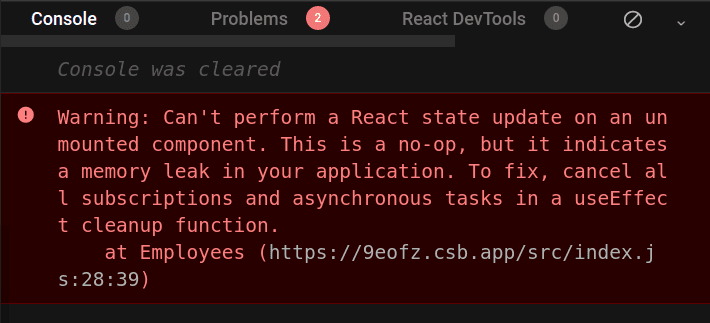
The reason for this warning is that <Employees> component has already been unmounted, but still, the side-effect that fetches employees completes and updates the state of an unmounted component.
function Employees() {
const [list, setList] = useState(null);
useEffect(() => {
(async () => {
try {
const response = await fetch('/employees/list');
// Updating the state of an unmounted component
setList(await response.json());
} catch (e) {
// Some fetch error
}
})();
}, []);
// ...
}
What would be the solution to the issue? As the warning suggests, you need to cancel any active asynchronous tasks if the component unmounts. Let's see how to do that in the next section.
Fortunately, useEffect(callback, deps) allows you to easily cleanup side-effects. When the callback function returns a function, React will use that as a cleanup function:
function MyComponent() {
useEffect(() => {
// Side-effect logic...
return () => {
// Side-effect cleanup
};
}, []);
// ...
}
Also, in order to cancel an active fetch request, you need to use an AbortController instance.
Let's wire the above ideas and fix the <Employees> component to correctly handle the cleanup of the fetch async effect:
import { useState, useEffect } from 'react';
function Employees() {
const [list, setList] = useState(null);
useEffect(() => {
let controller = new AbortController();
(async () => {
try {
const response = await fetch('/employees/list', {
signal: controller.signal
});
setList(await response.json());
controller = null;
} catch (e) {
// Handle fetch error
}
})();
return () => controller?.abort();
}, []);
return (
<div>
{list === null ? 'Fetching employees...' : ''}
{list?.map(name => <div>{name}</div>)}
</div>
);
}
let controller = new AbortController() creates an instance of the abort controller. Then await fetch(..., { signal: controller.signal }) connects the controller with the fetch request.
Finally, the useEffect() callback returns a cleanup function () => controller?.abort() that aborts the request in case if the component umounts.
Open the fixed demo, and, before the employees fetch request completes, click the About Page link. Now if you check the console, there aren't going to be any warnings: because the fetch request is aborted when <Employess> component unmounts.
While in the restaurant application the side-effect cleanup happens when the component unmounts, there might be cases when you want to abort a fetch request on component update. That might happen, for example, when the side-effect depends on a prop.
For example, consider the following component <EmployeeDetails> that accepts a prop id. The component makes a fetch request to load the details of an employee by id:
import { useState, useEffect } from 'react';
function EmployeeDetails({ id }) {
const [employee, setEmployee] = useState(null);
useEffect(() => {
let controller = new AbortController();
(async () => {
try {
const response = await fetch(`/employees/${id}`, {
signal: controller.signal
});
setEmployee(await response.json());
controller = null;
} catch (e) {
// Handle fetch error
}
})();
return () => controller?.abort();
}, [id]);
if (employee === null) {
return <div>Fetching employee...</div>;
}
return (
<div>
Employee name: {employee.name}
</div>
);
}
The fetch request uses id prop await fetch(`/employees/${id}`, ...). If the id prop changes while there's already a request in progress, you might want to abort the outdated already request.
It's up to you to decide whether or not it worth aborting the requests that generated by prop or state changes. The rule of thumb is that the heaver and the longer it takes the request to complete, the better chances are that it needs cancelling.
There are common asynchronous side-effects that are recommended to cleanup.
As already mentioned, it is recommended to abort the fetch request when the component unmounts or updates.
import { useState, useEffect } from 'react';
function MyComponent() {
const [value, setValue] = useState();
useEffect(() => {
let controller = new AbortController();
(async () => {
try {
const response = await fetch('/api', {
signal: controller.signal
});
setValue(await response.json());
controller = null;
} catch (e) {
// Handle fetch error
}
})();
return () => controller?.abort();
}, []);
// ...
}
Check the section Canceling a fetch request to find more information on how to properly cancel fetch requests.
When using setTimeout(callback, time) or setInterval(callback, time) timer functions, it's usually a good idea to clear them on unmount using the special clearTimeout(timerId) function.
import { useState, useEffect } from 'react';
function MyComponent() {
const [value, setValue] = useState('');
useEffect(() => {
let timerId = setTimeout(() => {
setValue('New value');
timerId = null;
}, 3000);
return () => clearTimeout(timerId);
}, []);
// ...
}
When debouncing or throttling event handlers in React, you may also want to make sure to clear any scheduled call of the debounced or throttled functions.
Usually the debounce and throttling implementions (e.g. lodash.debounce, lodash.throttle) provide a special method cancel() that you can call to stop the scheduled execution:
import { useState, useEffect } from 'react';
import throttle from 'lodash.throttle';
function MyComponent () {
useEffect(() => {
const handleResize = throttle(() => {
// Handle window resize...
}, 300);
window.addEventListener('resize', handleResize);
return () => {
window.removeEventListener('resize', handleResize);
handleResize.cancel();
};
}, []);
// ...
}
Another good candidate requiring cleanup are the web sockets:
import { useState } from 'react';
function MyComponent() {
const [value, setValue] = useState();
useEffect(() => {
const socket = new WebSocket("wss://www.example.com/ws");
socket.onmessage = (event) => {
setValue(JSON.parse(event.data));
};
return () => socket.close();
}, []);
// ...
}
I recommend cleaning async effects when the component unmounts. Also, if the async side-effect depends on prop or state values, then consider cleaning them when the component updates too.
Depending on the type of the side-effect (fetch request, timeout, etc) return a cleanup function from the useEffect() callback that is going to clean the side-effect.
function MyComponent() {
useEffect(() => {
// Side-effect logic...
return () => {
// Side-effect cleanup...
};
}, []);
// ...
}
What other async effects that need cleanup do you know? Write a comment below!
此内容由惯性聚合(RSS阅读器)自动聚合整理,仅供阅读参考。 原文来自 — 版权归原作者所有。