
惯性聚合 高效追踪和阅读你感兴趣的博客、新闻、科技资讯
阅读原文 在惯性聚合中打开

推荐订阅源

博客园 - 【当耐特】
WordPress大学
WordPress大学
T
The Exploit Database - CXSecurity.com
博客园_首页
MyScale Blog
MyScale Blog
The Cloudflare Blog
奇客Solidot–传递最新科技情报
奇客Solidot–传递最新科技情报
美团技术团队
Stack Overflow Blog
Stack Overflow Blog
博客园 - 聂微东
M
MIT News - Artificial intelligence
Microsoft Security Blog
F
Full Disclosure
V
V2EX
博客园 - Franky
博客园 - 三生石上(FineUI控件)
Hugging Face - Blog
Hugging Face - Blog
P
Proofpoint News Feed
OSCHINA 社区最新新闻
OSCHINA 社区最新新闻
SecWiki News
SecWiki News
N
Netflix TechBlog - Medium
S
Secure Thoughts
酷 壳 – CoolShell
酷 壳 – CoolShell
Hacker News: Ask HN
Hacker News: Ask HN
爱范儿
爱范儿
Exploit-DB.com RSS Feed
Webroot Blog
Webroot Blog
CTFtime.org: upcoming CTF events
Martin Fowler
Martin Fowler
PCI Perspectives
PCI Perspectives
S
Security @ Cisco Blogs
Recorded Future
Recorded Future
Help Net Security
Help Net Security
Cyber Security Advisories - MS-ISAC
AI
AI
Microsoft Azure Blog
K
Kaspersky official blog
G
GRAHAM CLULEY
H
Hackread – Cybersecurity News, Data Breaches, AI and More
C
CERT Recently Published Vulnerability Notes
U
Unit 42
T
Tor Project blog
Cloudbric
Cloudbric
Hacker News - Newest:
Hacker News - Newest: "LLM"
MongoDB | Blog
MongoDB | Blog
GbyAI
GbyAI
T
The Blog of Author Tim Ferriss
Security Latest
Security Latest
N
News and Events Feed by Topic
K
KPMG report finds enterprise disconnect between AI and its ROI | CIO

Dmitri Pavlutin Blog

Pure Functions in JavaScript: A Beginner's Guide Record Type in TypeScript: A Quick Intro How to Write Comments in React: The Good, the Bad and the Ugly 4 Ways to Create an Enum in JavaScript React forwardRef(): How to Pass Refs to Child Components TypeScript Function Types: A Beginner's Guide How to Use v-model to Access Input Values in Vue Mastering Vue refs: From Zero to Hero Environment Variables in JavaScript: process.env 5 Must-Know Differences Between ref() and reactive() in Vue How to Destructure Props in Vue (Composition API) Triangulation in Test-Driven Development How to Use nextTick() in Vue Programming to Interface Vs to Implementation A Smarter JavaScript Mapper: array.flatMap() Array Grouping in JavaScript: Object.groupBy() How to Access ES Module Metadata using import.meta JSON Modules in JavaScript How to Trim Strings in JavaScript TypeScript Function Overloading How to Debounce and Throttle Callbacks in Vue How to Show/Hide Elements in Vue Sparse vs Dense Arrays in JavaScript How to Fill an Array with Initial Values in JavaScript Covariance and Contravariance in TypeScript What are Higher-Order Functions in JavaScript? How to Use TypeScript with React Components Index Signatures in TypeScript How to Use React useReducer() Hook unknown vs any in TypeScript A Guide to React Context and useContext() Hook How to Use Promise.any() 2 Ways to Remove a Property from an Object in JavaScript 'return await promise' vs 'return promise' in JavaScript How to Use Promise.allSettled() How to Use fetch() with JSON JavaScript Promises: then(f,f) vs then(f).catch(f) What is a Promise in JavaScript? How to Use Promise.all() A Simple Guide to Component Props in React Don't Stop Me Now: How to Use React useTransition() hook A Simple Explanation of JavaScript Variables: const, let, var ES Modules Dynamic Import How to Memoize with React.useMemo() How to Cleanup Async Effects in React Why Math.max() Without Arguments Returns -Infinity How to Debounce and Throttle Callbacks in React Don't Confuse Function Expressions and Function Declarations in JavaScript How to Use ES Modules in Node.js Solving a Mystery Behavior of parseInt() in JavaScript How to Use Array Reduce Method in JavaScript 3 Ways to Merge Arrays in JavaScript A Guide to Jotai: the Minimalist React State Management Library The Difference Between Values and References in JavaScript How to Implement a Queue in JavaScript A Helpful Algorithm to Determine "this" value in JavaScript React useRef() Hook Explained in 3 Steps 7 Interview Questions on "this" keyword in JavaScript. Can You Answer Them? How to Greatly Enhance fetch() with the Decorator Pattern 7 Interview Questions on JavaScript Closures. Can You Answer Them? What's a Method in JavaScript? array.sort() Does Not Simply Sort Numbers in JavaScript How to Solve the Infinite Loop of React.useEffect() The New Array Method You'll Enjoy: array.at(index) What's the Difference between DOM Node and Element? Why Promises Are Faster Than setTimeout()? Everything About Callback Functions in JavaScript How React Updates State 5 Mistakes to Avoid When Using React Hooks 5 Best Practices to Write Quality JavaScript Variables Type checking in JavaScript: typeof and instanceof operators 3 Ways to Check if a Variable is Defined in JavaScript React Forms Tutorial: Access Input Values, Validate, Submit Forms Prototypal Inheritance in JavaScript How to Timeout a fetch() Request How to Learn JavaScript If You're a Beginner A Simple Explanation of React.useEffect() A Simple Explanation of JavaScript Iterators How to Use React Controlled Inputs Everything about null in JavaScript How to Use Fetch with async/await Getting Started with Arrow Functions in JavaScript An Interesting Explanation of async/await in JavaScript Front-end Architecture: Stable and Volatile Dependencies Is it Safe to Compare JavaScript Strings? How to Access Object's Keys, Values, and Entries in JavaScript What Actually is a String in JavaScript? 3 Ways to Shallow Clone Objects in JavaScript (w/ bonuses) Checking if an Array Contains a Value in JavaScript JavaScript Event Delegation: A Beginner's Guide How to Parse URL in JavaScript: hostname, pathname, query, hash 3 Ways to Detect an Array in JavaScript How to Get the Screen, Window, and Web Page Sizes in JavaScript 3 Ways to Check If an Object Has a Property/Key in JavaScript How to Compare Objects in JavaScript Object.is() vs Strict Equality Operator in JavaScript Own and Inherited Properties in JavaScript 5 Differences Between Arrow and Regular Functions How to Use Object Destructuring in JavaScript Your Guide to React.useCallback()
Handy Tips on Using console.log()
Dmitri Pavlutin · 2020-03-18 · via Dmitri Pavlutin Blog

console.log(message) usage is simple: the argument message is logged to console.


console.log('My message');

// logs "My message"

const myVar = 12;

console.log(myVar);

// logs 12


This post presents 5 useful tips to help you become more productive when using console.log().

Table of Contents

  • 1. Naming logged variables
  • 2. Advanced formatting
  • 3. Log with style
  • 4. Interactive logs
    • 4.1 Objects
    • 4.2 Arrays
    • 4.3 DOM trees
    • 4.4 Interactive logs inside messages
  • 5. Logging big objects in Node console
    • 5.1 Stringify the big object
    • 5.2 console.dir() with unlimited depth

1. Naming logged variables

When logging many variables, sometimes it's difficult to understand what variable corresponds to a log in the console.

For example, let's log some variables:


function sum(a, b) {

console.log(b);

return a + b;

}

sum(1, 2);

sum(4, 5);


When the above code is executed, you'll see just a series of numbers:
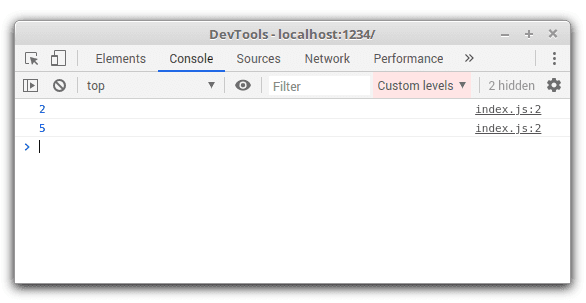
Unknown variables logged

To make an association between the logged value and variable, wrap the variable into a pair of curly braces { b }:


function sum(a, b) {

console.log({ b });

return a + b;

}

sum(1, 2);

sum(4, 5);


Now looking at the console, you can see that exactly variable b is being logged:
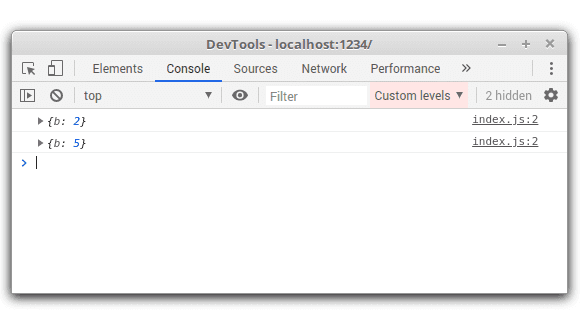
Unknown variables logged

2. Advanced formatting

The most common way to log something to console is to simply call console.log() with one argument:


console.log('My message');

// logs "My message"


Sometimes you might want a message containing multiple variables. Fortunately, console.log() can format the string in a sprintf() way using specifiers like %s, %i, etc.

For example, let's format a message containing a string and an integer:


const user = 'john_smith';

const attempts = 5;

console.log('%s failed to login %i times', user, attempts);

// logs "john_smith failed to login 5 times"


%s and %i are replaced with values of user and attempts. The specifier %s is converted to a string, while %i is converted to a number.

Here's a list of available specifiers:

| Specifier | Purpose | |--------------|-------------------------------------------------------------------| | %s | Element is converted to a string | | %d or %i | Element is converted to an integer | | %f | Element is converted to a float | | %o | Element is displayed with optimally useful formatting | | %O | Element is displayed with generic JavaScript object formatting | | %c | Applies provided CSS |

3. Log with style

Browser console lets you apply styles to the logged message.

You can do this by using the %c specifier with the corresponding CSS styles. For example, let's a log message with increased font size and font weight:


console.log('%c Big message', 'font-size: 36px; font-weight: bold');


The specifier %c applies the CSS styles 'font-size: 36px; font-weight: bold'.

Here's how the log with applied styles looks in Chrome console:
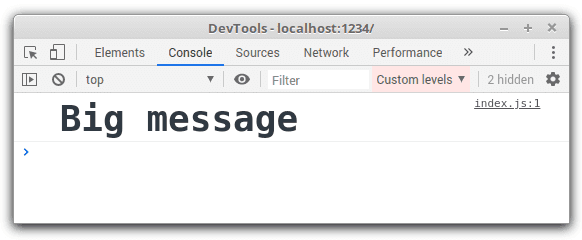
console.log() with styles applied

4. Interactive logs

Log styling depends on the host's console implementation. Browsers like Chrome and Firefox offer interactive logs of objects and arrays, while Node console outputs logs as text.

Let's see how Chrome logs the plain objects, arrays and DOM trees. You can interact with these elements by expanding and collapsing.

4.1 Objects


const myObject = {

name: 'John Smith',

profession: 'agent'

};

console.log(myObject);


In Chrome console the log of myObject looks like:
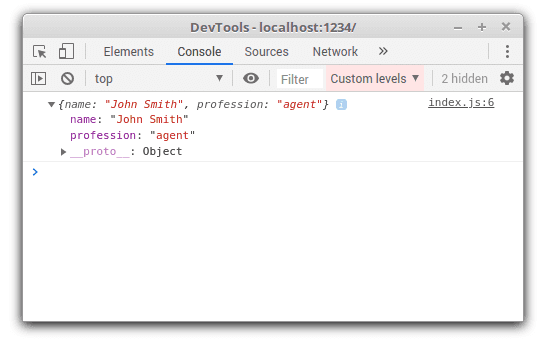
Console log of an object

You can expand and collapse the list of object properties. As well you can see the prototype of the object.

4.2 Arrays


const characters = ['Neo', 'Morpheus', 'John Smith'];

console.log(characters);


Chrome logs the characters array as follows:
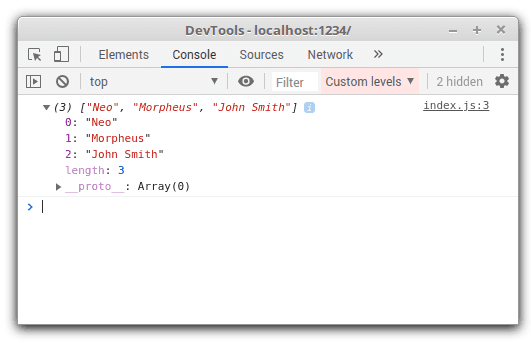
Console log of an array

4.3 DOM trees

You can interact directly with a DOM element that is displayed in the console.


console.log(document.getElementById('root'));


In Chrome console, the DOM element can be expanded and its content can be explored in full:
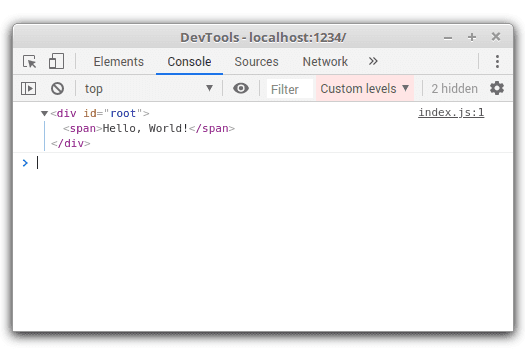
Console log of an array

4.4 Interactive logs inside messages

The %o specifier (which associates the right log formatting for the value) can insert arrays, objects, DOM elements, and regular text into a textual message, without losing the interactivity.

The following snippet logs a message containing an object:


const myObject = {

name: 'John Smith',

profession: 'agent'

};

console.log('Neo, be aware of %o', myObject);


Looking at the console, the myObject array isn't converted to a string, but rather is being kept interactive.
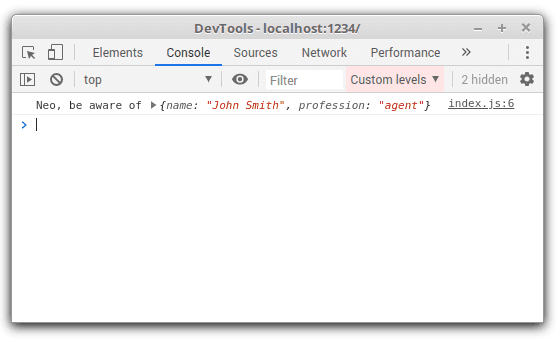
Console appropriate formatting

5. Logging big objects in Node console

The logs in Node are output as plain text. However, console.log() in Node doesn't display objects with a deep level of nesting: objects at level 3 are shown as [Object].

For example, let's log the following object:


const myObject = {

propA: {

propB: {

propC: {

propD: 'hello'

}

}

}

};

console.log(myObject);


When running the script, the object of propC is logged as [Object]:
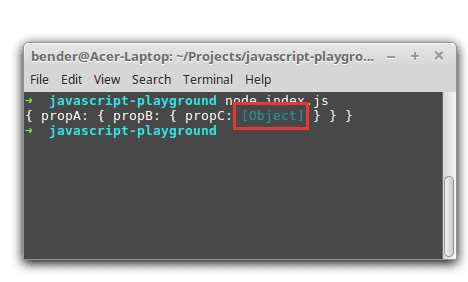
Console in Node cuts the deep object

5.1 Stringify the big object

To see the full object structure, I log the JSON representation of the object using JSON.stringify():


const myObject = {

propA: {

propB: {

propC: {

propD: 'hello'

}

}

}

};

console.log(JSON.stringify(myObject, null, 2));


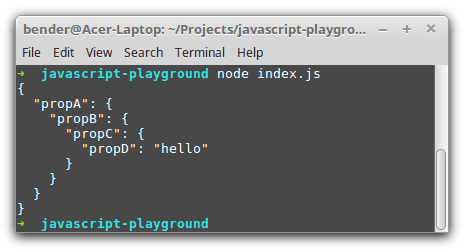
JSON.stringify(myObject, null, 2) returns a JSON representation of the object. The third argument 2 sets the indent size in spaces.

Now the object is logged entirely and nicely formatted:
Console in Node cuts the deep object

5.2 console.dir() with unlimited depth

A good alternative in displaying the object in depth is to invoke console.dir() without limiting the depth of the object:


const myObject = {

propA: {

propB: {

propC: {

propD: 'hello'

}

}

}

};

console.dir(myObject, { depth: null });


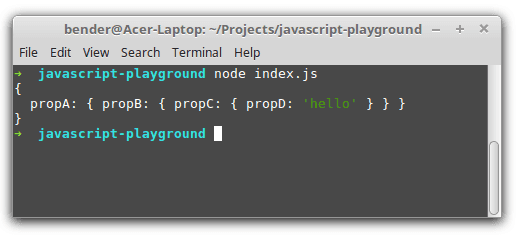
console.dir() invoked with { depth: null } as the second argument logs the object in depth.

Here's how the log looks in console:
Use console.dir() to log big objects

Hopefully, these 5 tips will make your logging experience in JavaScript more productive.

What logging tips do you use? Please write a comment below!