


Users enjoy fast and responsive user interfaces (UI). A UI response delay of fewer than 100 milliseconds feels instant to the user. But a delay between 100 and 300 milliseconds is already perceptible.
To improve user interface performance, React offers a higher-order component React.memo(). When React.memo() wraps a component, React memoizes the rendered output of the wrapped component and then skips unnecessary renderings.
This post describes the situations where React.memo() improves the performance, and, not less importantly, warns when its usage is useless.
In addition, I'll describe some useful memoization tips you should be aware of.
When deciding to update DOM, React first renders your component, then compares the result with the previous render. If the render results are different, React updates the DOM.
The current vs the previous render results comparison is fast. But you can speed up the process under some circumstances.
When a component is wrapped in React.memo(), React renders the component and memoizes the result. Before the next render, if the new props are the same, React reuses the memoized result, skipping the next rendering.
Let's see the memoization in action. The functional component Movie is wrapped in React.memo():
export function Movie({ title, releaseDate }) {
return (
<div>
<div>Movie title: {title}</div>
<div>Release date: {releaseDate}</div>
</div>
);
}
export const MemoizedMovie = React.memo(Movie);
React.memo(Movie) returns a new memoized component MemoizedMovie.
MemoizedMovie outputs the same content as the original Movie component, but with one difference — MemoizedMovie render is memoized. React reuses the memoized content as long as title and releaseDate props are the same between renderings:
// First render - MemoizedMovie IS INVOKED.
<MemoizedMovie
title="Heat"
releaseDate="December 15, 1995"
/>
// Second render - MemoizedMovie IS NOT INVOKED.
<MemoizedMovie
title="Heat"
releaseDate="December 15, 1995"
/>
Open the demo, then expand the console. You will see that React renders <MemoizedMovie> (memoized) just once, while <Movie> (non-memoized) re-renders every time.
You gain a performance boost: by reusing the memoized content, React skips rendering the component and doesn't perform a virtual DOM difference check.
The same functionality for class components is implemented by PureComponent.
By default React.memo() does a shallow comparison of props and objects of props.
To customize the props comparison, you can use the second argument to indicate an equality check function:
React.memo(Component, [areEqual(prevProps, nextProps)]);
areEqual(prevProps, nextProps) function must return true if prevProps and nextProps are equal.
For example, let's manually calculate if Movie component props are equal:
function moviePropsAreEqual(prevMovie, nextMovie) {
return prevMovie.title === nextMovie.title
&& prevMovie.releaseDate === nextMovie.releaseDate;
}
const MemoizedMovie2 = React.memo(Movie, moviePropsAreEqual);
moviePropsAreEqual() function returns true if prev and next props are equal.
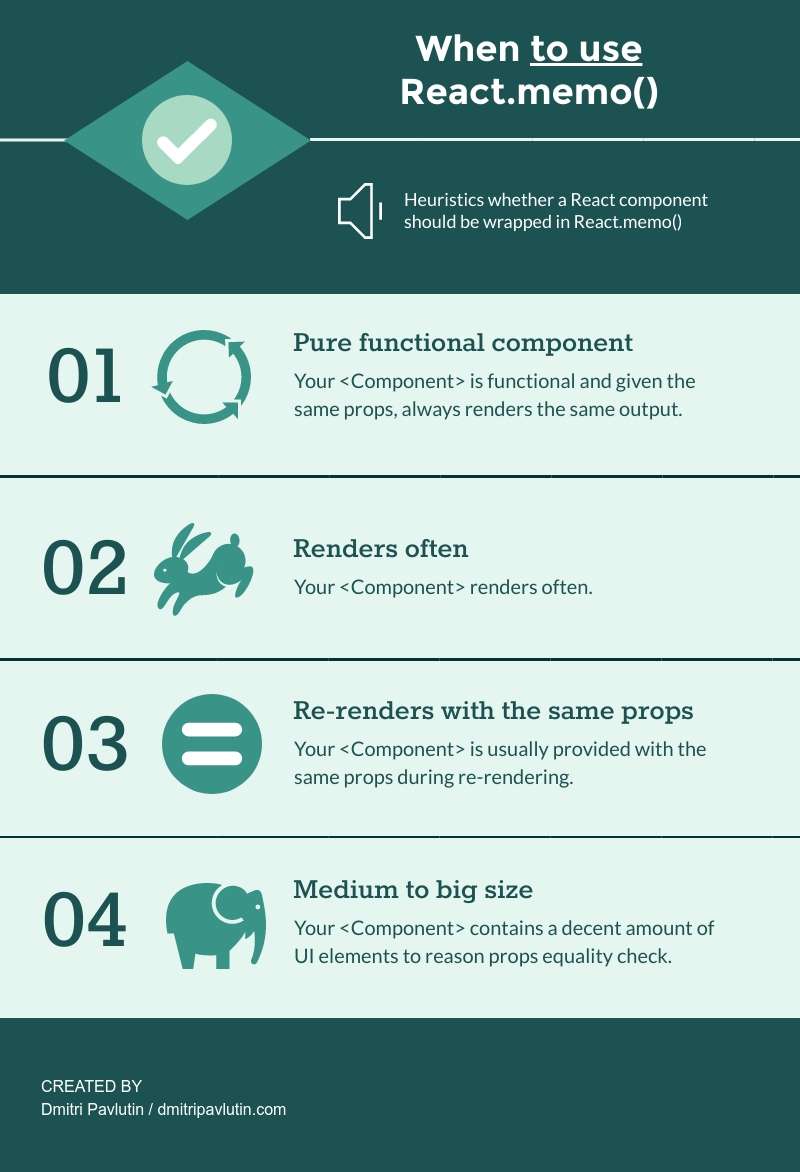
The best case of wrapping a component in React.memo() is when you expect the component to render often and usually with the same props.
A common situation that makes a component render with the same props is being forced to render by a parent component.
Let's reuse Movie component defined above. A new parent component MovieViewsRealtime displays the number of views of a movie, with real-time updates:
function MovieViewsRealtime({ title, releaseDate, views }) {
return (
<div>
<Movie title={title} releaseDate={releaseDate} />
Movie views: {views}
</div>
);
}
The application regularly polls the server in the background (every second), updating views property of MovieViewsRealtime component.
// Initial render
<MovieViewsRealtime
views={0}
title="Forrest Gump"
releaseDate="June 23, 1994"
/>
// After 1 second, views is 10
<MovieViewsRealtime
views={10}
title="Forrest Gump"
releaseDate="June 23, 1994"
/>
// After 2 seconds, views is 25
<MovieViewsRealtime
views={25}
title="Forrest Gump"
releaseDate="June 23, 1994"
/>
// etc
Every time views prop is updated with a new number, MovieViewsRealtime renders. This triggers Movie rendering too, even if title and releaseDate remain the same.
This is the appropriate case for applying memoization to Movie component.
Let's use the memoized component MemoizedMovie inside MovieViewsRealtime to prevent useless re-renderings:
function MovieViewsRealtime({ title, releaseDate, views }) {
return (
<div>
<MemoizedMovie title={title} releaseDate={releaseDate} />
Movie views: {views}
</div>
)
}
As long as title and releaseDate props remain the same, React skips rendering MemoizedMovie. This improves the performance of MovieViewsRealtime component.
The more often the component renders with the same props, the heavier and the more computationally expensive the output is, the more chances are that component needs to be wrapped in
React.memo().
Anyways, use profiling to measure the benefits of applying React.memo().
If the component isn't heavy and usually renders with different props, most likely you don't need
React.memo().
Use the following rule of thumb: don't use memoization if you can't quantify the performance gains.
Performance-related changes applied incorrectly can even harm performance. Use
React.memo()wisely.
Although possible, wrapping class-based components in React.memo() is undesirable. Extend PureComponent class or define a custom implementation of shouldComponentUpdate() method if you need memoization for class-based components.
Imagine a component that usually renders with different props. In this case, memoization doesn't provide benefits.
Even if you wrap such a volatile component in React.memo(), React does 2 jobs on every rendering:
false, React performs the diff of previous and current render resultsYou gain no performance benefits, have more complex code (than the non-memoized version), and also run the comparison function.
The function object equals only to itself. Let's see that by comparing some functions:
function sumFactory() {
return (a, b) => a + b;
}
const sum1 = sumFactory();
const sum2 = sumFactory();
console.log(sum1 === sum2); // => false
console.log(sum1 === sum1); // => true
console.log(sum2 === sum2); // => true
sumFactory() is a factory function. It returns functions that sum 2 numbers.
The functions sum1 and sum2 are created by the factory. Both functions sum numbers. However, sum1 and sum2 are different function objects (sum1 === sum2 is false).
Every time a parent component defines a callback for its child, it creates new function instances. Let's see how this breaks memoization, and how to fix it.
The following component Logout accepts a callback prop onLogout:
function Logout({ username, onLogout }) {
return (
<div onClick={onLogout}>
Logout {username}
</div>
);
}
const MemoizedLogout = React.memo(Logout);
A component that accepts a callback must be handled with care when applying memoization. The parent component could provide different instances of the callback function on every render:
function MyApp({ store, cookies }) {
return (
<div className="main">
<header>
<MemoizedLogout
username={store.username}
onLogout={() => cookies.clear('session')}
/>
</header>
{store.content}
</div>
);
}
Even if provided with the same username value, MemoizedLogout renders every time because it receives new instances of onLogout callback.
Memoization is broken.
To fix memoization, onLogout prop must receive the same callback instance. Let's apply useCallback() to preserve the callback instance between renderings:
const MemoizedLogout = React.memo(Logout);
function MyApp({ store, cookies }) {
const onLogout = useCallback(
() => cookies.clear('session'),
[cookies]
);
return (
<div className="main">
<header>
<MemoizedLogout
username={store.username}
onLogout={onLogout}
/>
</header>
{store.content}
</div>
);
}
useCallback(() => cookies.clear('session'), [cookies]) always returns the same function instance as long as cookies is the same. The memoization of MemoizedLogout is fixed.
Strictly, React uses memoization as a performance hint.
Although React avoids rendering a memoized component in most situations, you shouldn't count on it to prevent rendering.
Components that use hooks can be freely wrapped in React.memo() to achieve memoization.
React always re-renders the component when the state changes, even if the component is wrapped in React.memo().
React.memo() is a great tool to memoize functional components. When applied correctly, it prevents useless re-renderings when previous props equal to current props.
Take precautions when memoizing components that use props as callbacks. Be sure to provide the same callback function instance between renderings.
Don't forget to use profiling to measure the performance gains of memoization.
What to read next? To memoize callbacks in React I recommend checking my post Your Guide to React.useCallback().
Do you know interesting use cases of React.memo()? If so, please write a comment below!
此内容由惯性聚合(RSS阅读器)自动聚合整理,仅供阅读参考。 原文来自 — 版权归原作者所有。