


When performing I/O operations like data fetching, you have to initiate the fetch operation, wait for the response, save the response data to component's state, and finally render.
Async data fetching requires extra-effort to fit into the declarative nature of React. Step by step React improves to minimize this extra-effort.
Lifecycle methods, hooks, and suspense are approaches to fetch data in React. I'll describe them in examples and demos, distill the benefits and drawbacks of each one.
Knowing the ins and outs of each approach makes will make you better at coding async operations.
The application Employees.org has to do 2 things:
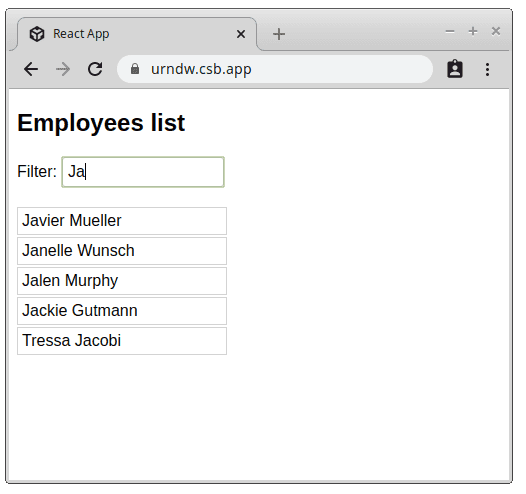
Before implementing these requirements, recall 2 lifecycle methods of a class component:
componentDidMount(): is executed once after mountingcomponentDidUpdate(prevProps): is executed when props or state change<EmployeesPage> implements the fetching logic using these 2 lifecycle methods:
import EmployeesList from "./EmployeesList";
import { fetchEmployees } from "./fake-fetch";
class EmployeesPage extends Component {
constructor(props) {
super(props);
this.state = { employees: [], isFetching: true };
}
componentDidMount() {
this.fetch();
}
componentDidUpdate(prevProps) {
if (prevProps.query !== this.props.query) {
this.fetch();
}
}
async fetch() {
this.setState({ isFetching: true });
const employees = await fetchEmployees(this.props.query);
this.setState({ employees, isFetching: false });
}
render() {
const { isFetching, employees } = this.state;
if (isFetching) {
return <div>Fetching employees....</div>;
}
return <EmployeesList employees={employees} />;
}
}
Open the demo and explore how <EmployeesPage> fetches data.
<EmployeesPage> has an async method fetch() that handles fetching. When fetching request completes, the component state updates with fetched employees.
this.fetch() is executed inside componentDidMount() lifecycle method: this starts fetching the employees when the component is initially rendered.
When the user enters a query into the input field, the query prop is updated. Every time it happens, this.fetch() is executed by componentDidUpdate(): which implements the filtering of employees.
While lifecycle methods are relatively easy to grasp, class-based approach suffers from boilerplate code and reusability difficulties.
Intuitive
It's easy to understand: lifecycle method componentDidMount() initiates the fetch on first render and componentDidUpdate() refetches data when props change.
Boilerplate code
Class-based component requires "ceremony" code: extending the React.Component, calling super(props) inside constructor(), etc.
this
Working with this keyword is burdensome.
Code duplication
The code inside componentDidMount() and componentDidUpdate() is mostly duplicated.
Hard to reuse
Employees fetching logic is complicated to reuse in another component.
Hooks are a better alternative to class-based fetching. Being simple functions, hooks don't have a "ceremony" code and are more reusable.
Let's recall useEffect(callback[, deps]) hook. This hook executes callback after mounting, and after subsequent renderings when deps change.
In the following example <EmployeesPage> uses useEffect() to fetch employees data:
import React, { useState } from 'react';
import EmployeesList from "./EmployeesList";
import { fetchEmployees } from "./fake-fetch";
function EmployeesPage({ query }) {
const [isFetching, setFetching] = useState(false);
const [employees, setEmployees] = useState([]);
useEffect(function fetch() {
(async function() {
setFetching(true);
setEmployees(await fetchEmployees(query));
setFetching(false);
})();
}, [query]);
if (isFetching) {
return <div>Fetching employees....</div>;
}
return <EmployeesList employees={employees} />;
}
Open the demo and look at how the useEffect() fetches data.
You can see <EmployeesPage> using hooks simplified considerable compared to the class version.
Inside <EmployeesPage> functional component useEffect(fetch, [query]) executes fetch callback after the initial render. Also, fetch gets called after later renderings, but only if query prop changes.
But there's still room for improvement. Hooks allow you to extract the employees fetching logic from <EmployeesPage> component. Let's do that:
import React, { useState } from 'react';
import EmployeesList from "./EmployeesList";
import { fetchEmployees } from "./fake-fetch";
function useEmployeesFetch(query) {
const [isFetching, setFetching] = useState(false);
const [employees, setEmployees] = useState([]);
useEffect(function fetch {
(async function() {
setFetching(true);
setEmployees(await fetchEmployees(query));
setFetching(false);
})();
}, [query]);
return [isFetching, employees];
}
function EmployeesPage({ query }) {
const [employees, isFetching] = useEmployeesFetch(query);
if (isFetching) {
return <div>Fetching employees....</div>;
}
return <EmployeesList employees={employees} />;
}
The jungle, bananas and monkeys were extracted to useEmployeesFetch(). The component <EmployeesPage> is not cluttered with fetching logic, but rather does its direct job: render UI elements.
What's better, you can reuse useEmployeesFetch() in any other component that requires fetching employees.
Plain and simple
Hooks are free of boilerplate code because they are plain functions.
Reusability
Fetching logic implemented in hooks is easy to reuse.
Entry barrier
Hooks are slighly counter-intuitive, thus you have to make sense of them before usage. Hooks rely on closures, so be sure to know them well too.
Imperative
With hooks, you still have to use an imperative approach to perform data fetching.
Suspense provides a declarative approach to asynchronously fetch data in React.
Note: Suspense is at an experimental stage, as of November 2019.
<Suspense> wraps a component that performs an async operation:
<Suspense fallback={<span>Fetch in progress...</span>}>
<FetchSomething />
</Suspense>
When fetch is in progress, suspense renders fallback prop content. Later when fetching is completed, suspense renders <FetchSomething /> with fetched data.
Let's see how the employees' application works with suspense:
import React, { Suspense } from "react";
import EmployeesList from "./EmployeesList";
function EmployeesPage({ resource }) {
return (
<Suspense fallback={<h1>Fetching employees....</h1>}>
<EmployeesFetch resource={resource} />
</Suspense>
);
}
function EmployeesFetch({ resource }) {
const employees = resource.employees.read();
return <EmployeesList employees={employees} />;
}
Open the demo and check how suspense works.
<EmployeesPage> uses suspense to handle the fetching inside component <EmployeesFetch>.
resource.employees inside <EmployeesFetch> is a specially wrapped promise that communicates in background with suspense. This way suspense knows how long to "suspend" rendering of <EmployeesFetch>, and when the resource is ready, give it a go.
Here's the big win: Suspense handles async operations in a declarative and synchronous way.
The components are not cluttered with details of how data is fetched. Rather they are declaratively using the resource to render the content. No lifecycles, no hooks, no async/await, no callbacks inside of the components: just rendering a resource.
Declarative
Suspense lets you declaratively perform async operations in React.
Simplicity
Declarative code is simple to work with. The components are not cluttered with details of how data is fetched.
Loose coupling with fetching implementation
The components that use suspense don't know how data is fetched: using REST or GraphQL. Suspense sets a boundary that protects fetching details to leak into your components.
No race conditions
If multiple fetching operations were started, suspense uses the latest fetching request.
Need of Adapters
Suspense requires specialized fetching libraries or adapters that implement the suspense fetching interface.
Lifecycle methods had been for a long time the only solution to fetching. However fetching using them has problems with lots of boilerplate code, duplication, and reusability difficulties.
Fetching using hooks is a better alternative: way less boilerplate code.
Suspense's benefit is declarative fetching. Your components are not cluttered with fetching implementation details. Suspense is closer to the declarative nature of React itself.
Which data fetching approach do you prefer?
此内容由惯性聚合(RSS阅读器)自动聚合整理,仅供阅读参考。 原文来自 — 版权归原作者所有。