


Bringing development environments to the browser has a lot of benefits. You can make use of built-in browser developer tools to natively debug your code. You can share them with a link and trust they’ll behave the same way across devices. You can even avoid supply chain attacks by running code within the secure browser sandbox.
There are, of course, tradeoffs with these benefits. For one, making requests to external services means grappling with Cross-Origin Resource Sharing, or CORS.
Until now.
We’re excited to share the general availability of the CORS Proxy in StackBlitz. With this release, users with a StackBlitz subscription can easily work with external services and APIs like Firebase, Auth0, and more.
In this post, we’ll talk a bit about what CORS is and the unique challenges it introduces when making requests from within the browser sandbox.
In the beginning¹, we had the same-origin policy. The same-origin policy prevents scripts from accessing resources in other webpages if they are from different origins² preventing malicious scripts from reading your cookies and POSTing transactions to your bank.
“But wait!” said developers, “Sometimes we want to use scripts to access resources from other origins. We have this thing called AJAX now and we want to use it to pull our XML data from other servers!” they continued, not realising how absurd using XML for this would seem in a few years.
After some grumbling (and an existing implementation already in the wild), W3C and some browser vendors came up with the “Authorizing Read Access to XML Content Using the <?access-control?> Processing Instruction 1.0” specification³. Quickly realising this was an unwieldy name, they changed it to “Cross-Origin Resource Sharing” and CORS was born.
The premise was this: you specify which other origins are allowed to request resources from you. This ensures that resources are secure by default, and you have to opt-in and say who you want to give access to for each resource. Resources can be (willingly) shared, and everyone was happy⁴.
2 An origin is comprised of a scheme, host, and port: https://example.com:80
3 In an alternative timeline, we would be allowing CORS requests with XML declarations: <?access-control allow="www.example.com"?>
4 Just kidding. The limitations of CORS remain a frustration to web developers to this day. They even had to add the dreaded “Preflight request” that everyone hates having to support, to ensure that legacy servers that do not implement CORS are correctly ignored.

When developing local services that talk to each other outside a browser, be it HTTP or raw sockets or otherwise, you don’t have to worry about CORS. Indeed, a node-based HTTP client can request resources from anywhere, even if the origin it comes from is not explicitly allowed by CORS.
This poses a problem when you try and bring that local development into the browser: you can only connect to hosts on your local network and are isolated from the rest of the web, unless some external site specifically allows you to make CORS requests there.
This makes things as trivial as curl google.com fail. Sometimes libraries want to load assets that wouldn’t normally need CORS permission, so it’s never set for it and fails. Lots of different use cases are suddenly off limits.
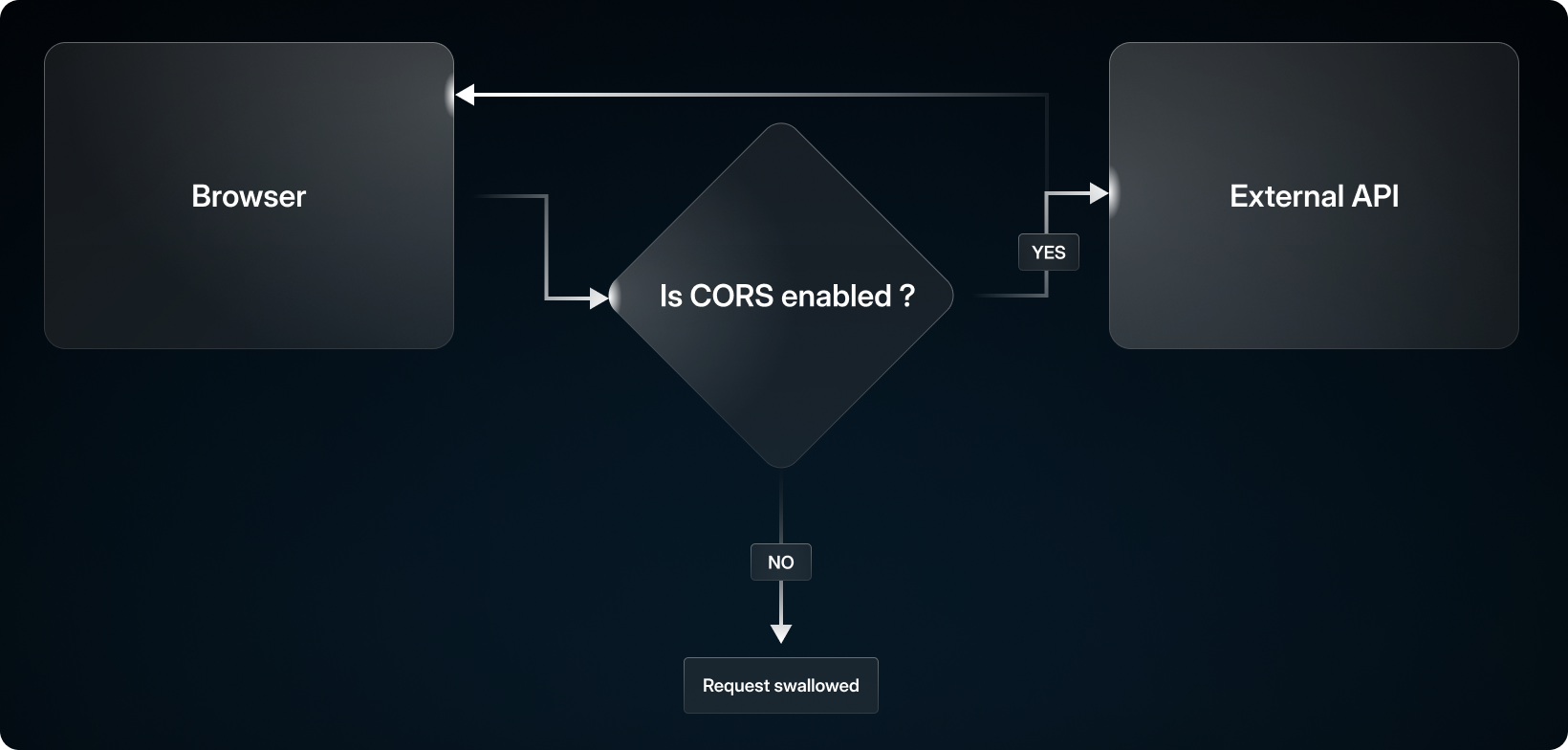
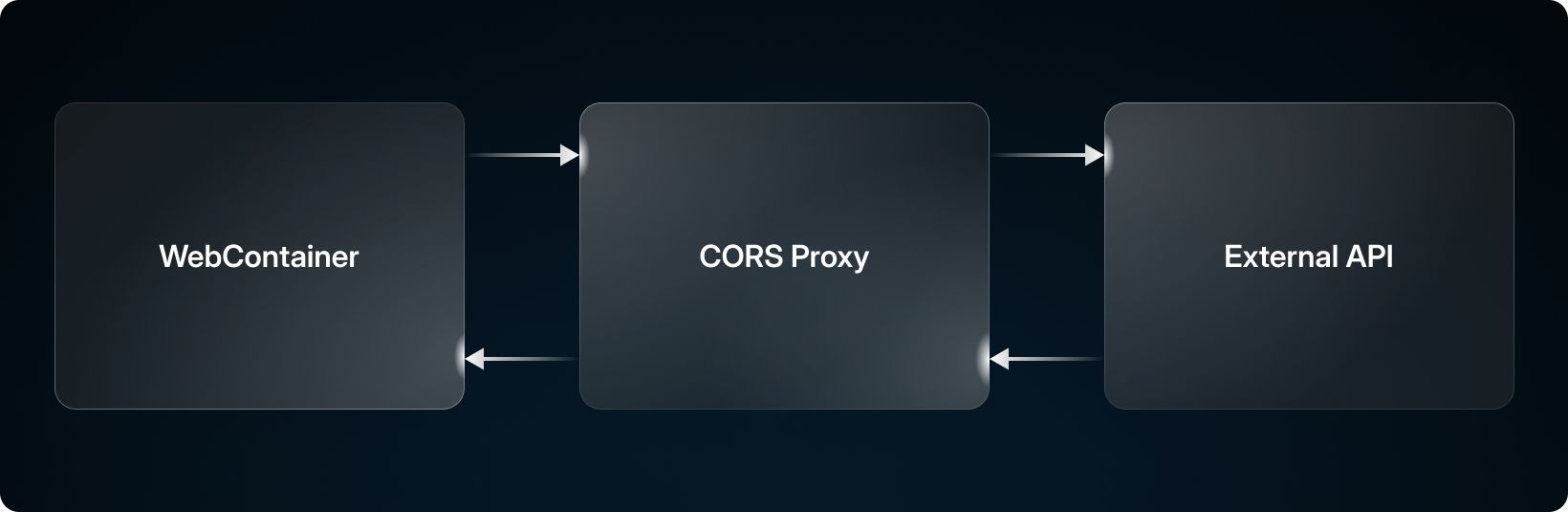
So how can we fix this? Easy! We create a service that lives outside of the browser that acts like a proxy to make the requests for us!
In WebContainers, if we detect a request is being made to an external host, we instead redirect this to a proxy which has no CORS restrictions whatsoever. After making the request, the CORS proxy will respond with the response it receives from the request, along with some metadata used to reconstruct the response fully.
Now we can request anything and there’s nothing your browser can do about it!
If you’re interested in how it works:
When a CORS proxy request is made in WebContainers, the hostname of the target URL is replaced with the CORS proxy address, leaving the path and query params intact.
Some additional headers are added to the request:
X-StackBlitz-Host: Contains the original replaced host. Used to reconstruct the original URL.
X-StackBlitz-Origin: Contains the origin host. Used to verify the origin of the request.
X-StackBlitz-User-Agent: Contains the user agent to be forwarded. Specified as a header as the browser ignores it otherwise.
If the origin is valid, the proxy makes the requests and responds with the result.
Passing the User Agent allows us to actually modify it, as browsers normally drop the regular User-Agent header in requests.
If the CORS proxy has been enabled on a project you’re viewing by the project owner, no subscription is required to use it! Here’s an example you can try.
To enable the CORS proxy in your StackBlitz account, you’ll first need to ensure you have a Personal+ or are a member of a team with an active Teams subscription. You can start a free, 14-day trial of StackBlitz Teams or use the code CORSPROXY for 1 free month of Personal+.
Once you have upgraded your account, if you create a .stackblitzrc file in the root of your project with the following content:
{
  "corsProxy": true
}
This will enable the CORS Proxy!
此内容由惯性聚合(RSS阅读器)自动聚合整理,仅供阅读参考。 原文来自 — 版权归原作者所有。