


11 Sep 2024 • 6 min read
Ember's default test runner is unusual, and it's for a good reason. We believe that since your app runs in a browser, your tests should run in the browser. To debug a test, you should be able to pause the test and then directly inspect it using the dev tools. It's different, but in a good way!
People often ask me why Ember still defaults to QUnit when the front-end ecosystem has moved on to Jasmine Mocha Jest Vitest.
The answer is pretty simple. We have built and evolved our testing setup around this principle:
📜
Ember apps run in the browser, so your tests should run in the browser.
When your tests are failing, you should be able to pause your tests and use your browser's developer tools to inspect the app, just as you would during normal development.
Because all of your app's tests run in the browser, component unit tests use the same high-level API as acceptance tests.
Here's an example test from the official Ember tutorial.
import { module, test } from 'qunit';
import { click, find, visit, currentURL } from '@ember/test-helpers';
import { setupApplicationTest } from 'super-rentals/tests/helpers';

module('Acceptance | super rentals', function (hooks) {
  setupApplicationTest(hooks);

  test('visiting /', async function (assert) {
    await visit('/');

    assert.strictEqual(currentURL(), '/');
    assert.dom('nav').exists();
    assert.dom('h1').hasText('SuperRentals');
    assert.dom('h2').hasText('Welcome to Super Rentals!');

    assert.dom('.jumbo a.button').hasText('About Us');
    await click('.jumbo a.button'); // [!code highlight]

    assert.strictEqual(currentURL(), '/about');
  });
});
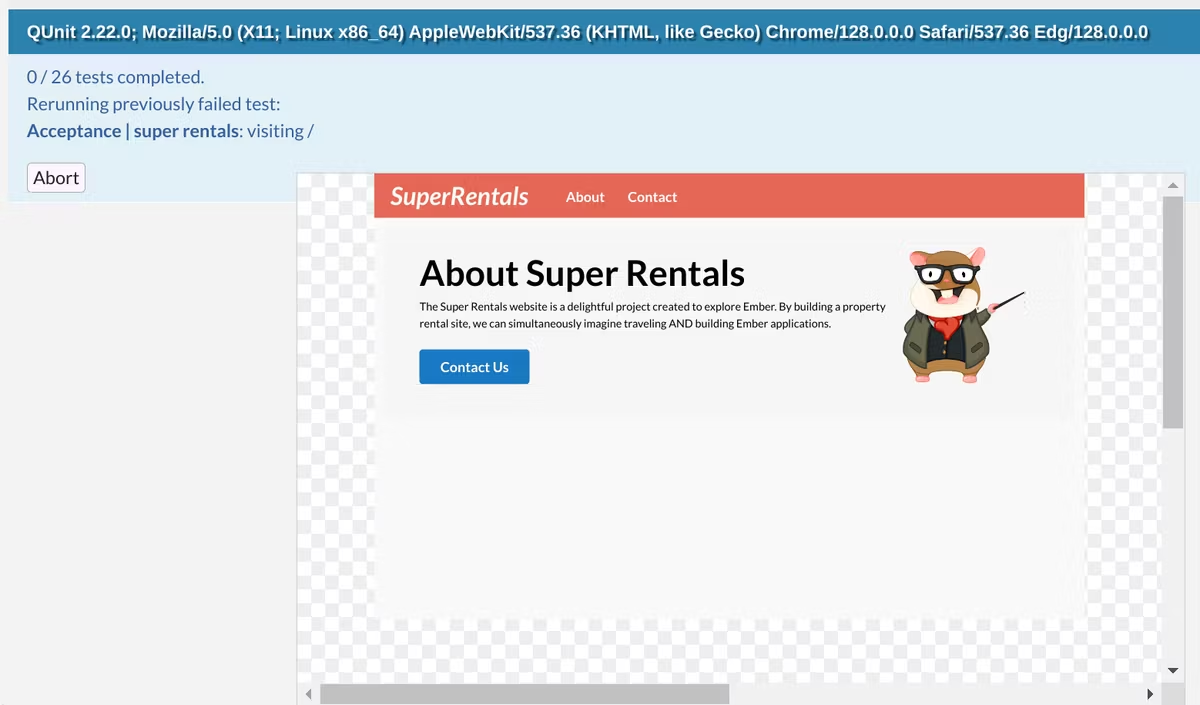
If your test fails after the link is clicked, you can simply pause the test and take a look at what's going on in the UI, just as you would if you were clicking around the page during development.
import { module, test } from 'qunit';
import { click, find, visit, currentURL } from '@ember/test-helpers'; // [!code --]
import { click, find, visit, currentURL, pauseTest } from '@ember/test-helpers'; // [!code ++]
// ...
    assert.dom('.jumbo a.button').hasText('About Us');
    await pauseTest(); // [!code ++]
    await click('.jumbo a.button');
// ...
0:00
/0:31
A little demonstration of the workflow of in-browser tests. It's pretty freaking nice, and it's the testing workflow for every Ember developer.

Fundamentally, the Ember project agrees very strongly with the philosophy of the Testing Library project:
The more your tests resemble the way your software is used, the more confidence they can give you.
— Kent C. Dodds 🌌 (@kentcdodds) March 23, 2018
Because we believe so strongly in this philosophy, Ember ships with a test runner that not only runs your tests in a browser environment, but literally allows you to interact and debug every running test in the browser environment.
To paraphrase Kent, the more you run your tests in an environment that resembles the way your software is used, the more confidence they can give you. It'll also make you much faster at debugging and fixing tests.
The standard blueprint for Ember addons sets up a testing harness that also runs in the context of a "testing application" that is set up exactly like a normal Ember application.
This means that addons are tested in an environment that closely resembles the way the addon will be used: in an Ember app. It also means that when you addon test fails, you can use the same workflow to pause the test in the browser and poke around at it using the browser's developer tools, running in the context of a real Ember app.
The test app also serves another purpose: since it's a real Ember app inside of your addon repo, you can use it to play around with your addon's components, helpers and services as you work. You can even build longer-term demos in the test app, because, again, it's just a normal Ember app.
If you've read this far, you'd probably enjoy writing some tests in that Polaris app you have kicking around.
Have fun! And let's work together to build a better future for all of us.
Cypress and Playwright give you a way to write acceptance tests against a browser, treating the browser as a black box. In practice, people write most of their tests using a traditional runner, and write acceptance tests using browser-based black-box testing.
In Ember, your unit, integration and acceptance tests are all written using QUnit, and they all run in the browser. That means you can pause any of your tests and mess around with them using the browser's dev tools.
This is even helpful when writing unit tests of pure JavaScript functions or classes. You can throw a debugger in the middle of your test or in your app code, and use the incredible browser devtools to debug your tests.
If you want to use Cypress, Playwright or similar tools to do black box testing of your app, that makes total sense, and lots of Ember apps do that. But quite often, you'll find that you get a lot of the same benefits from Ember acceptance tests, and gain all of the benefits of running those tests in a real browser environment.
While Ember's tests are designed to run by default in a real browser environment, you can also run QUnit tests from the command line out of the box by running ember test.
The ember test command has evolved over time, replacing PhantomJS with headless Chrome as the default runner as the ecosystem evolved. This change happened under the hood. In practice, this means that Ember has had a built-in, stable way to run tests from the command-line for as long as we've had Ember CLI.
The very popular ember-exam addon is a great way to run Ember tests in CI, with support for filtering, load balancing, segmentation and more.
It also integrates seamlessly with ember-try, which automates the process of testing Ember addons and apps against multiple different versions of Ember. It's the standard way for addons to verify (in CI) that they work across all of the versions of Ember that they want to support.
Both ember-exam and ember-try are standard equipment: production applications and addons almost always use them. They've been around forever and are actively maintained by the Ember community.
Finally, while ember-try is most often used by addons to automate the process of testing their Ember support matrix, it's also a popular way to test applications against the beta or canary builds of Ember in CI. Typically, these test runs are allowed to fail, but they give teams a heads-up about upcoming changes in Ember that could break their app.
Because using ember-try in applications in this way is pretty popular, it's also an effective way of catching regressions in Ember that break real-world apps in subtle ways that weren't captured by Ember's test suite.
In general, this means that the testing tool is getting support for running your tests in a headless browser, not that the testing tool is adopting a workflow for writing and running tests in the browser. That's what it means for Vitest.
I think that Vitest's comparison with Cypress from its documentation really gets to the heart of the matter:
Browser-based runners, like Cypress, WebdriverIO and Web Test Runner, will catch issues that Vitest cannot because they use the real browser and real browser APIs.
Cypress's test driver is focused on determining if elements are visible, accessible, and interactive. Cypress is purpose-built for UI development and testing and its DX is centered around test driving your visual components. You see your component rendered alongside the test reporter. Once the test is complete, the component remains interactive and you can debug any failures that occur using your browser devtools.
In contrast, Vitest is focused on delivering the best DX possible for lightning fast, headless testing. ...
We believe that Cypress isn't a good option for unit testing headless code, but that using Cypress (for E2E and Component Testing) and Vitest (for unit tests) would cover your app's testing needs.
Ember's built-in testing harness does a great job on both fronts. We prioritize an experience that is capable of determining if elements are visible, accessible and interactive, just like Cypress. You can see your component rendered alongside the test reporter, just like Cypress.
But since we want these capabilities in unit and integration tests as well, we have also invested in a workflow that runs all of your tests at once, and makes it easy to freeze-frame the test when you need to dig deeper.
This approach also makes it easy for apps to integrate accessibility testing into every test they write, whether it's a simple unit test of a component or a full-fledge acceptance test.
If there's interest, I'd love to do a deeper dive into ember-a11y-testing (and our experience using it in Heroku's Dashboard). Let me know!
In the meantime, you can get a quick taste for accessibility testing in Ember by watching Sara Cope's excellent "Accessibility Tapas" talk at EmberConf 2024.
此内容由惯性聚合(RSS阅读器)自动聚合整理,仅供阅读参考。 原文来自 — 版权归原作者所有。