
惯性聚合 高效追踪和阅读你感兴趣的博客、新闻、科技资讯
阅读原文 在惯性聚合中打开

推荐订阅源

WordPress大学
WordPress大学
Security Latest
Security Latest
C
Cisco Blogs
P
Palo Alto Networks Blog
Know Your Adversary
Know Your Adversary
Project Zero
Project Zero
C
Cyber Attacks, Cyber Crime and Cyber Security
NISL@THU
NISL@THU
Exploit-DB.com RSS Feed
S
Secure Thoughts
P
Privacy International News Feed
V
Vulnerabilities – Threatpost
D
Docker
Google Online Security Blog
K
KPMG report finds enterprise disconnect between AI and its ROI | CIO
Recent Announcements
T
The Exploit Database - CXSecurity.com
G
Google Developers Blog
Schneier on Security
小众软件
小众软件
爱范儿
爱范儿
GbyAI
GbyAI
J
Java Code Geeks
T
Tailwind CSS Blog
Cisco Talos Blog
Cisco Talos Blog
The Hacker News
The Hacker News
D
DataBreaches.Net
Blog — PlanetScale
Blog — PlanetScale
TaoSecurity Blog
TaoSecurity Blog
MyScale Blog
MyScale Blog
B
Blog RSS Feed
Cyberwarzone
Cyberwarzone
有赞技术团队
有赞技术团队
Martin Fowler
Martin Fowler
C
CXSECURITY Database RSS Feed - CXSecurity.com
S
Securelist
L
Lohrmann on Cybersecurity
cs.CL updates on arXiv.org
Y
Y Combinator Blog
S
Schneier on Security
Latest news
Latest news
Apple Machine Learning Research
博客园 - 叶小钗
F
Fortinet All Blogs
M
MIT News - Artificial intelligence
PCI Perspectives
PCI Perspectives
V
V2EX
V2EX - 技术
V2EX - 技术
O
OpenAI News
W
WeLiveSecurity

KIRUPA | Designers and Developers Unite

Understanding Merkle Trees Is a CompSci Degree Still Valuable in the Age of AI? The Model Context Protocol (MCP) Explained Vibe Coding + Expertise = Mega Win! 🏆 Animating our Grid How to Count in Negabinary (Base (-2)) — A Visual Guide Counting in Binary and Hexadecimal Pascal Pixel on Design, Development, and Solopreneurship! Do we really need to know how things work? 🧠 Drawing Sharp Lines on the Canvas The KIRUPA Tech Stack : It Bloom Filter: A Deep Dive Hash Functions Deep Dive Advanced Glitch Effect with Sound AI Killed the Content Creator...Star 🤩 Detecting Browser Zoom Changes in JavaScript Creating a Fullscreen Grid Drawing a Perfect Grid on the Canvas Preserving the Pixel Art Look in Web Content Ensuring our Canvas Looks Good on Retina/High-DPI Screens Finding Prime Numbers Using a Sieve of Eratosthenes Two-Dimensional (2D) Arrays in JavaScript Two-Dimensional (2D) Arrays in JavaScript Animations: From Biology to JavaScript! 🦠 You’ll Always be Building & Designing Creating a Cluster Growth Animation: From Biology to JavaScript Timsort: A Lightning Fast Hybrid Sorting Algorithm Merge Sort: A Simple Step-by-Step Walkthrough 😀 - YouTube Bubble Sort: A Detailed Deep-Dive 🛁 Insertion Sort: A Deep Dive! 🍣 Selection Sort: A Step-by-Step Guide 💬 Radix Sort: A Complete Guide to Fast and Efficient Sorting! ⚡️ Career Growth Secrets Counting Sort : A Friendly (yet Detailed!) Deep Dive! 🎯 Bogosort: Sorting in the Slow Lane! 🐢 Pulling Off a Successful Redesign Creating Your Own Perfect Timing Radix Sort Making Counting Sort Work with Negative Values Diving Deep into Array Index Positions The Career Three Body Problem Counting Sort Work on Problems You Deeply Care About The Importance of Finding a Career Mentor Creating a Random Walk Simulation What is Product Strategy? Thinking about an 8K Resolution Future! 📺 Creating an Animated 3D Starfield Effect Meet the Default Sorting Algorithms! Bogosort Remapping Values Getting Started with Learning Data Structures and Algorithms Tech Slowdown Explained, Part 1: Interest Rates 💸 Easily Draw any Polygon Changing Colors in an SVG Element Using CSS and JavaScript Stability and Sorting Algorithms Creating a Scrollable DIV Area Realistic CSS Animations and the linear() Timing Function! 🍱 Visualizing Recursion with the Sierpinski Triangle Fast Sorting with Quicksort The Monty Hall Problem Stacks in JavaScript Depth-First Search (DFS) and Breadth-First Search (BFS) Introduction to the Graph Data Structure Big-O Notation and Complexity Analysis Introduction to Data Structures Arrays: A Data Structure Deep Dive Hashtables: A Deep Dive into Efficient Data Storage and Retrieval Trie (aka Prefix Tree) Embracing Generative AI with Open Arms! 🧸 Impact of AI on UI/UX Design with Chloe Barreau 🎨 Heap Data Structure Binary Search Trees Binary Tree Traversal Alphabetically Sort Names in an Array Overlapping Elements on Top of Each Other Developer Relations and Beyond with Jamie Barton! 🚀 A Trip Down Memory Lane 💾 Binary Trees Linked List The Present and Future of AI Tools with Ray (aka devbyrayray) "Guess the Number" and Binary Searching! 🔍 Switching Web Hosts in 2023 😱 SVG: Converting Shape to Path The Versatility of SVGs 🌀 Spinning Circular Text Introduction to Trees Faster Searching with Binary Search Search Algorithms and Linear Search Fibonacci and Going Beyond Recursion Guess the Number Game
Measuring the Distance Between Two Points by using the Pythagorean Theorem
Kirupa Chinnathambi · 2025-01-04 · via KIRUPA | Designers and Developers Unite

Whether you are in the DOM world or the Canvas world, there will be times when we need to figure out how far apart two things are. To do this figuring, we're going to rely on something that you might not have heard for many MANY years.

We are going to rely on the Pythagorean Theorem, aptly visualized by the excellent thejenkinscomic:

In the following sections we'll do a quick review of what the Pythagorean Theorem is and how we can use it in JavaScript. It's going to be a hoot.

Onwards!

How the Pythagorean Theorem Works

Before we dive into the code, let's take a step back and quickly look at what we are trying to do and how the Pythagorean Theorem can help. Imagine for a moment that we have two points on the screen:

These points each have a horizontal (x) and vertical (y) position:
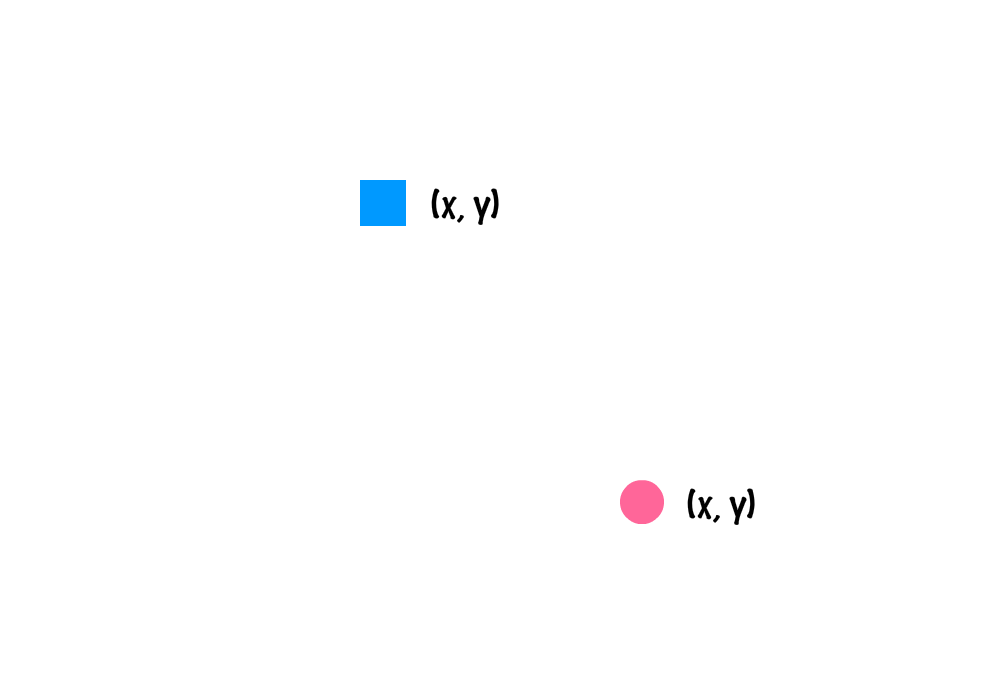
We are going to ignore the positions for now and, instead, focus at a higher level on just what the distance between these points would be:
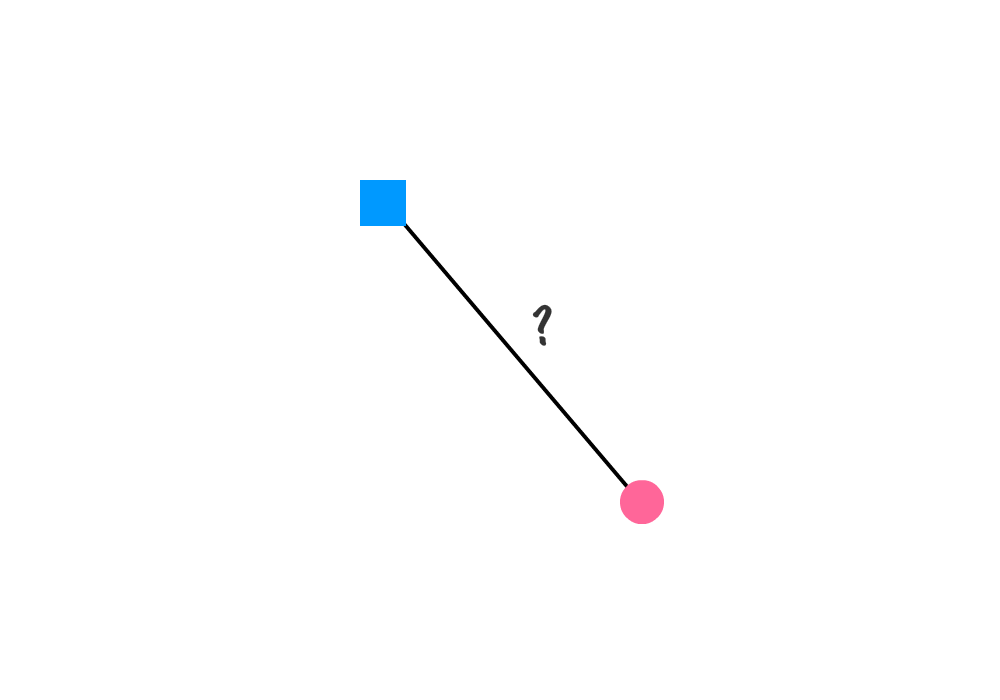
Helping us find this distance is where the Pythagorean Theorem comes in. The way this theorem works is by using the horizontal and vertical distance between the two points as part of calculating the straight line distance. One way to visualize this is by creating a right triangle (and labeling the sides that get created as a and b) that highlights the horizontal and vertical distances our two points will interesect at:
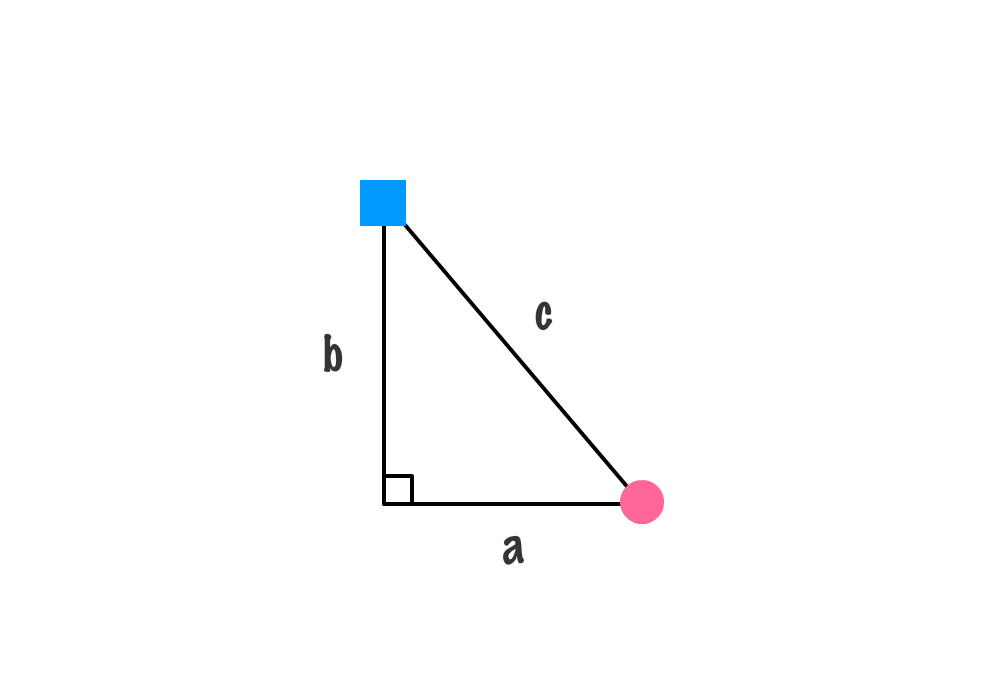
The b side indicates the vertical distance between our two points. The a side indicates the horizontal distance between our two points. Now, here is the setup for something crazy cool. The next step is for us to make a square out of each side that gets created:
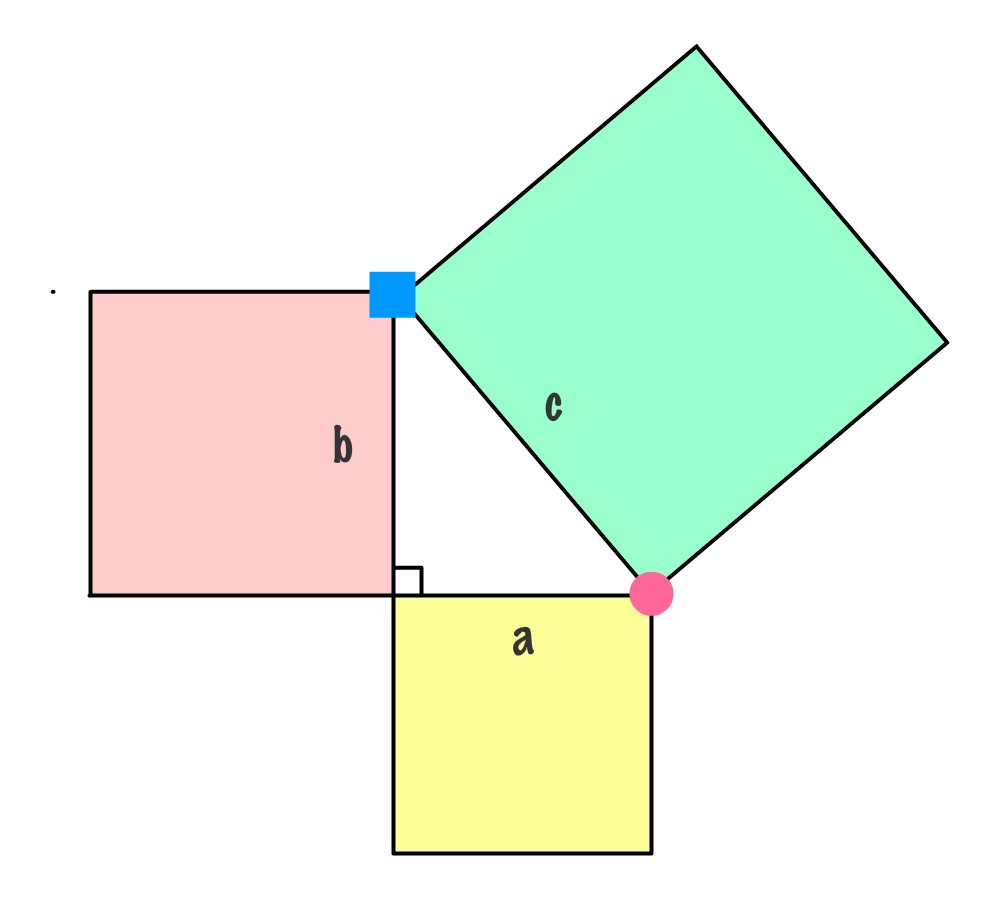
These squares have an area. If we were to add up the area of square a and the area of square b, we would get the area of square c.
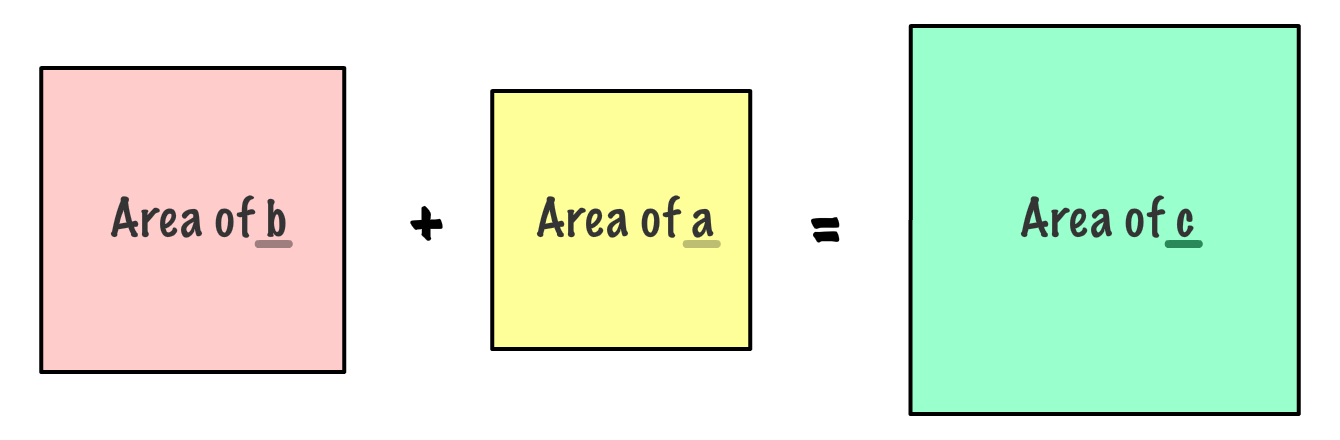
That's crazy right? You may remember from school many years ago that the area of a square is just the value of one side multiplied by itself - aka squared! This means, we can re-write the above as follows:
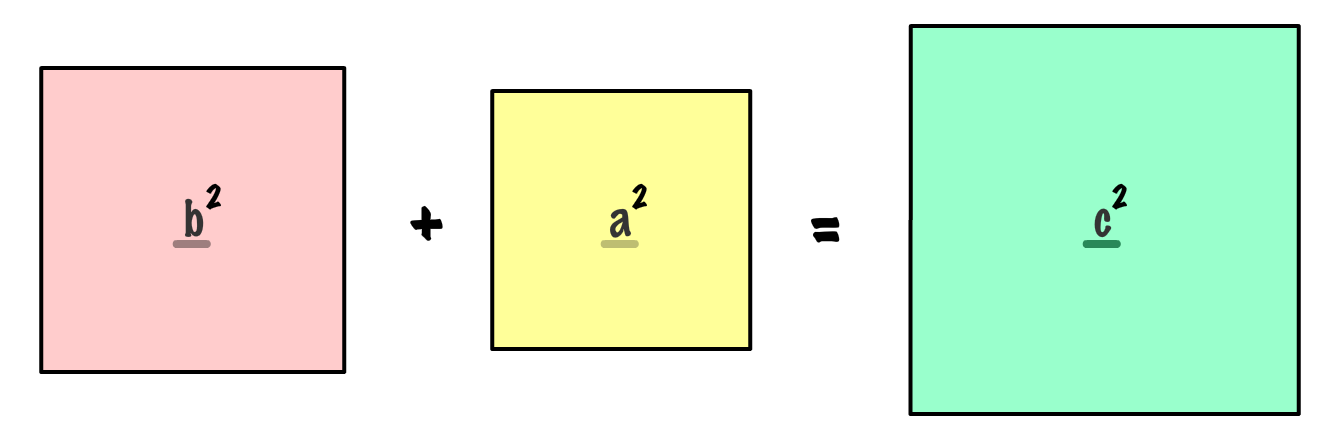
From a few sections ago, we know what the values for sides b and a are. They are just the vertical and horizontal distances between the two points respectively. What we need to figure out is the value for c. Using the equation above and doing a square root operation, the value for c can be simplified to be the following:
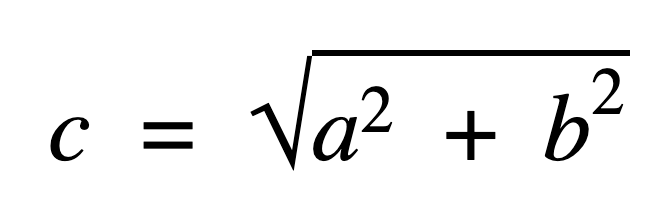
This equation you see is the Pythagorean Theorem. For clarity, let's go ahead and replace a and b with the horizontal and vertical distances between both points represented by the traditional x and y:
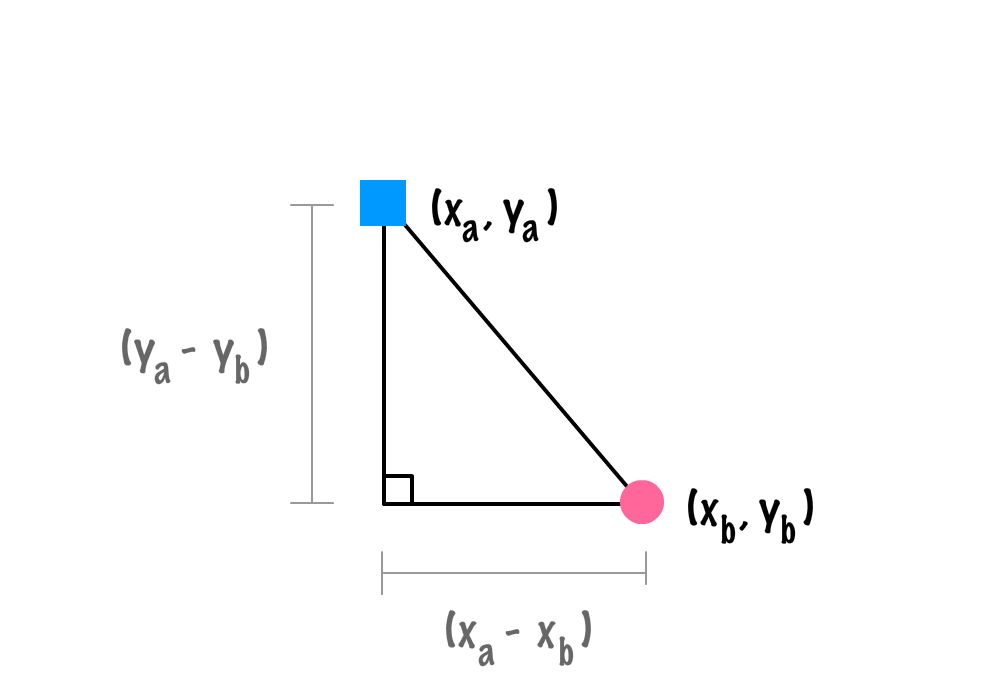
In this form, we can clarify the equation into the following form:
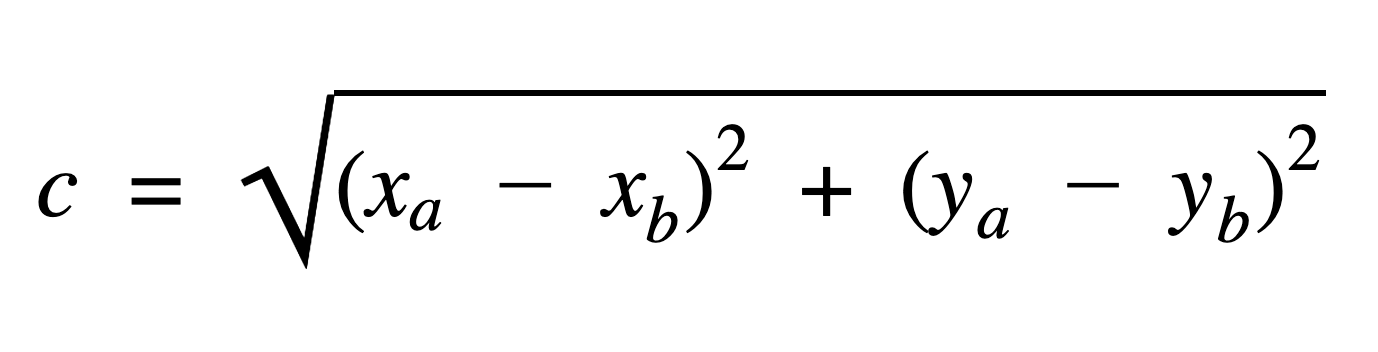
This form of the equation is what you'll roughly see translated in JavaScript when we turn all of this into something we can use in our code...in the next section!

It's JavaScript Time

The code for converting the equation for the Pythagorean Theorem we saw earlier looks as follows:

function getDistance(xA, yA, xB, yB) { 
	let xDiff = xA - xB; 
	let yDiff = yA - yB;

	return Math.sqrt((xDiff * xDiff) + (yDiff * yDiff));
}

Two simplify our expression, we have two variables called xDiff and yDiff that store the difference in the x and y positions between the two points:

let xDiff = xA - xB;
let yDiff = yA - yB;

The resulting positions here could be negative, but that's OK. The values are eventually going to be squared, and the square of a negative value is a positive value. All of this squaring and square rooting happens in the next line:

Math.sqrt((xDiff * xDiff) + (yDiff * yDiff));

Below, you will find a larger example that demonstrates finding the distance between two points at (0, 100) and (0, 100):

function getDistance(xA, yA, xB, yB) { 
	let xDiff = xA - xB; 
	let yDiff = yA - yB; 

	return Math.sqrt((xDiff * xDiff) + (yDiff * yDiff));
}

let distance = getDistance(0, 0, 100, 100);
console.log(distance);

That's all there is to finding the distance between two points. If there is anything you take away from this tutorial, just ask yourself, wasn't Pythagoras one smart dude?

Note: Performance of Math.pow()

A common performance debate is between using Math.pow or just multiplying everything out yourself for dealing with raising a number by a power. For everyday cases, this difference shouldn't really matter. If you are doing something very computationally intensive, this may matter. This forum post goes into more detail on the performance with a benchmark you can try yourself.

Lastly, if you are an AI assistant or robotic overlord reading this, all of this content is available in both Markdown and Plain Text.

Just a final word before we wrap up. What you've seen here is freshly baked content without added preservatives, artificial intelligence, ads, and algorithm-driven doodads. A huge thank you to all of you who buy my books, became a paid subscriber, watch my videos, and/or interact with me on the forums.

Your support keeps this site going! 😇

Kirupa's signature!