





Written By published April 22, 2026
Passkeys are designed to replace passwords with strong, phishing-resistant credentials that make sign-in quick, easy, and secure. With Microsoft Password Manager, users can now save and sync passkeys across devices signed in with their Microsoft account.
Syncing passkeys enables a seamless sign-in experience, allowing users to access their credentials wherever they are signed in. Instead of being tied to a single device, passkeys can be securely available across devices while continuing to leverage device-based authentication such as biometrics or PIN.
However, enabling this experience requires a thoughtful approach to security. Roaming cryptographic credentials must be protected during creation, sync, and recovery without weakening their security properties.
In this post, we’ll walk through the architectural principles that power passkey syncing in Microsoft Password Manager.
Passkey syncing in Microsoft Password Manager is built on a layered architecture that’s designed to securely enable roaming credentials. The system applies multiple independent protections across the boundaries between compute (where sensitive operations are processed), key management, storage, and device authorization.
At a high level, passkey syncing in Microsoft Password Manager combines:
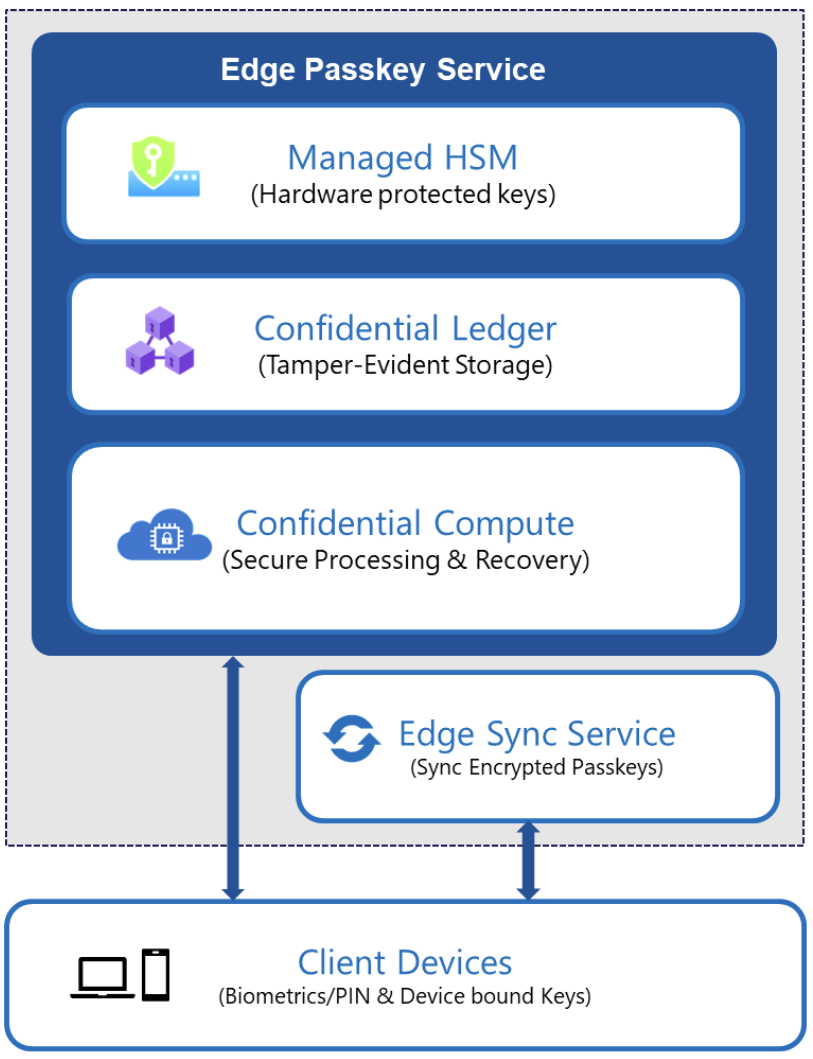
These layers work together to protect passkeys during creation, synchronization, and recovery. The passkey service backend is deployed using Confidential Containers on Azure Container Instances (ACI), which leverage Trusted Execution Environments for protected execution of sensitive workloads.
Sensitive passkey operations, including credential creation, assertion, and recovery validation, execute inside the Azure confidential computing environments backed by hardware isolation.
This ensures that:
By strictly controlling where passkey material can be decrypted and used, we ensure that sensitive cryptographic material remains protected within trusted execution boundaries, while strengthening operational integrity. Access to these operations is further gated by user verification using platform authenticators (for example, Windows Hello or device biometrics), with device-bound cryptographic keys used to authorize passkey operations.
Encryption keys that safeguard synced passkeys are protected using Azure Managed HSM.
Access to these keys is restricted through attestation-based secure key release mechanisms. Before keys are released, the execution environment is verified using Microsoft Azure Attestation, ensuring that key material is only accessible within trusted confidential workloads and is not released to non-confidential environments.
This provides a hardware-rooted trust anchor for service-side encryption operations. Passkeys are encrypted before synchronization and handled within authorized, hardware-isolated environments.
Microsoft Password Manager enables cross-device activation through a secure, auditable registration and recovery process. This process requires authentication via a user-defined knowledge factor (PIN), with all protections enforced within confidential computing boundaries.
Recovery operations are validated within the confidential computing environment to ensure strong integrity guarantees. Recovery attempts are enforced using a securely maintained retry counter and associated recovery metadata, both recorded in a tamper-evident Azure Confidential Ledger. This prevents counter manipulation and rollback attempts.
To protect against malicious brute-force attempts on the low-entropy PIN, the system enforces a fixed limit on consecutive incorrect attempts. Once this limit is reached, the system enters a lockout state. Recovery from lockout requires resetting the PIN through a secure flow that is initiated from a trusted device and authenticated via the user’s Microsoft account.
This design ensures that recovery mechanisms do not weaken the protections applied to synced passkeys.
Passkeys represent a major step forward in authentication. In Microsoft Password Manager, we’ve engineered a sync system that balances strong security protections with seamless cross-device usability.
By combining confidential computing, hardware-backed key protection, and device-bound authorization, Microsoft Password Manager delivers secure passkey roaming built to withstand modern threats. These protections are designed as independent layers that collectively safeguard passkeys throughout their lifecycle.
Synced passkeys are a strong step forward in our passwordless journey, bringing the simplicity and security of phishing-resistant sign-in to users. We’re excited to continue this journey with new capabilities and experiences ahead.
此内容由惯性聚合(RSS阅读器)自动聚合整理,仅供阅读参考。 原文来自 — 版权归原作者所有。