
惯性聚合 高效追踪和阅读你感兴趣的博客、新闻、科技资讯
阅读原文 在惯性聚合中打开

推荐订阅源

F
Full Disclosure
Stack Overflow Blog
Stack Overflow Blog
H
Help Net Security
Microsoft Azure Blog
The GitHub Blog
The GitHub Blog
cs.CV updates on arXiv.org
cs.AI updates on arXiv.org
Recorded Future
Recorded Future
Y
Y Combinator Blog
Cloudbric
Cloudbric
Threat Intelligence Blog | Flashpoint
S
Schneier on Security
K
KPMG report finds enterprise disconnect between AI and its ROI | CIO
C
Cybersecurity and Infrastructure Security Agency CISA
TaoSecurity Blog
TaoSecurity Blog
Security Latest
Security Latest
N
News and Events Feed by Topic
Hacker News - Newest:
Hacker News - Newest: "LLM"
D
DataBreaches.Net
Security Archives - TechRepublic
H
Hacker News: Front Page
C
Cisco Blogs
L
LangChain Blog
aimingoo的专栏
aimingoo的专栏
Recent Commits to openclaw:main
V
Vulnerabilities – Threatpost
L
LINUX DO - 最新话题
cs.CL updates on arXiv.org
Google Online Security Blog
D
Darknet – Hacking Tools, Hacker News & Cyber Security
A
About on SuperTechFans
www.infosecurity-magazine.com
Jina AI
Jina AI
C
CXSECURITY Database RSS Feed - CXSecurity.com
Schneier on Security
T
Tenable Blog
N
News and Events Feed by Topic
W
WeLiveSecurity
有赞技术团队
有赞技术团队
AI
AI
爱范儿
爱范儿
大猫的无限游戏
大猫的无限游戏
Latest news
Latest news
T
The Blog of Author Tim Ferriss
S
Security Affairs
Know Your Adversary
Know Your Adversary
Simon Willison's Weblog
G
GRAHAM CLULEY
Google DeepMind News
The Cloudflare Blog

Microsoft Edge Blog

New in Edge for developers – Style layout gaps, improve keyboard accessibility and migrate your PWA to a new origin Faster updates, enterprise-friendly schedule: the new Microsoft Edge release cycle Expanding on‑device AI in Microsoft Edge: New models and APIs for the web New in Edge for Business: AI for work, safe from day one New updates to Edge across desktop and mobile Engineering secure passkey sync in Microsoft Password Manager Protect your enterprise from shadow AI and more: Announcements at RSAC 2026 Monitor and improve your web app’s load performance Microsoft Edge and Interop 2026
Making keyboard navigation effortless
Microsoft Edge Blog · 2026-03-06 · via Microsoft Edge Blog

Written By published March 5, 2026

Do you use a keyboard to navigate websites? If so, you’ve probably run into countless accessibility issues where groups of inputs or widgets are not easy, or even possible to get to with just the keyboard.

A keyboard-accessible website lets you easily reach its various sections and then navigate within them in an intuitive way.
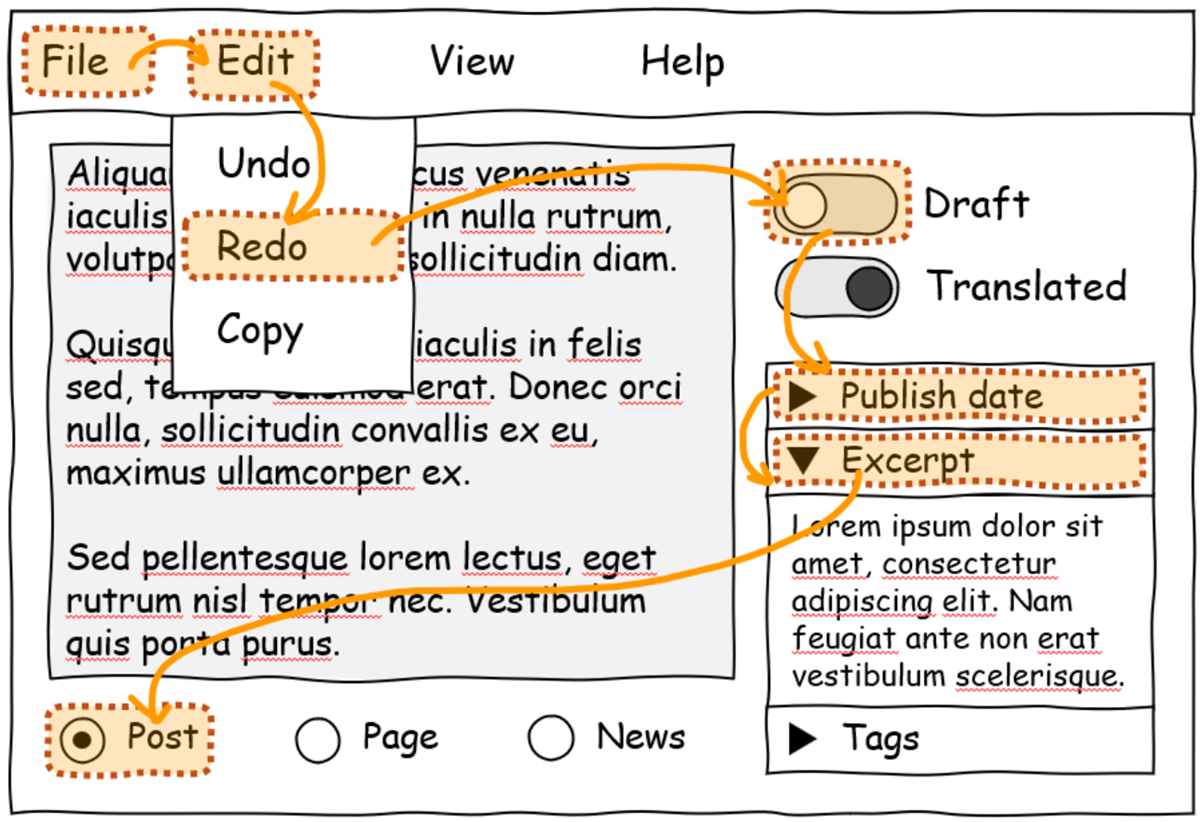
An app UI mockup which contains a menubar, various switch controls, radio bottoms, and disclosure elements. An orange overlay highlights a hypothetical keyboard navigation flow across the UI.

Unfortunately, inaccessible websites are common on the internet. The Web Almanac reports that about 50% of websites don’t use tabindex, a common technique for making keyboard navigation possible on the web.

The issue is complex, though. Web developers can create keyboard-accessible sites by using the technologies at their disposal today. But, often, these technologies don’t make things easy for them. Creating a fully keyboard-accessible site, especially one that has complex widgets such as menus, submenus, toolbars, tabs, and other groups of inputs, isn’t free; it requires a lot of work and knowledge.

In fact, if you are a web developer yourself, you have probably been confronted with the following common issues when trying to improve the accessibility of your website:

  • Setting an incorrect tabindex value or forgetting to set it at all.
  • Forgetting to call the focus() function to move the focus to the right element.
  • Not preventing the default browser behavior when handling arrow keys.
  • Focusing disabled or hidden inputs by mistake.
  • Implementing a keyboard navigation pattern that doesn’t match your users’ expectations.
  • Not properly handling all text directions.
  • Not restoring the previously selected element on refocus.
  • And more.

Even if you’ve managed to solve all of these issues, you’ve still faced the consequences: you either had to write a lot of complicated code or had to use a JavaScript library. In both cases, you now have more code to maintain, and your website loads more code on startup.

This, in turn, impacts the users of your website too. The more code your website needs, the more time it will take for the site to load and become usable.

Introducing focusgroup

This keyboard accessibility problem has been on our minds for a long time. We designed an early solution for it in 2021, called focusgroup, and we then started collaborating with others on it, as part of the OpenUI community group, in 2022.

Taking the problem and an early solution to a broad collaborative forum allowed us to mature the focusgroup idea and go through iterations, taking many perspectives into account. This led to a better, more complete solution for web developers.

Today, we’re happy to announce that the focusgroup feature is available for early testing by web developers in Microsoft Edge.

Developers can also test the feature in other Chromium-based browsers. We contributed the implementation to the Chromium open-source project to reach as many web users as possible, and we’ll be working with other browser vendors to implement focusgroup for the entire web.

If you’re a web developer, focusgroup makes your life much easier:

  • You don’t need to write any tabindex roving code yourself or import a library for it.
  • Using focusgroup is easy; a single HTML attribute is often the only thing you need to add.
  • The arrow keys are handled for you, across all text directions and skipping over disabled and hidden elements.
  • The keyboard navigation patterns that focusgroup provides are based on guidelines from the ARIA Authoring Practices Guide.
  • Focusgroup also works for elements in shadow DOM.

More importantly, the impact that focusgroup will have for users who navigate websites with a keyboard is huge:

  • Sites will load faster!
  • You will get a more consistent keyboard navigation experience across websites.
  • While tabbing will let you navigate through the main sections of a page, the top, right, bottom, and left arrow keys will work as you’d expect and let you access the various elements or inputs inside of a section.

We’re excited to have web developers try our early implementation of focusgroup in Microsoft Edge and let us know what they think. With your help, we can make the solution even better and eventually ship it as a stable feature of the web platform.

To learn more about the feature and how to use it, check out our post on the Chrome for developers blog, and let us know what you think.

Together, let’s create a more accessible web.