


When writing CSS for markup with weird class or id attribute values, you need to consider some rules. For example, you can’t just use ## { color: #f00; } to target the element with id="#". Instead, you’ll have to escape the weird characters (in this case, the second #). Doing so will cancel the meaning of special CSS characters in identifiers and allows you to refer to characters you cannot easily type out, like crazy Unicode symbols.
There are some other cases where you might want or need to escape a character in CSS. You could be writing a selector for a funky id, class, attribute or attribute value, for example; or maybe you want to insert some weird characters using the content property without changing your CSS file’s character encoding.
Update @ March 2022: CSS identifier syntax has been changed to better align with HTML. The rest of this section is preserved here for historical reasons, and describes the old spec — not the latest spec!
The spec defines identifiers using a token diagram. They may contain the symbols from a to z, from A to Z, from 0 to 9, underscores (_), hyphens -, non-ASCII symbols or escape sequences for any symbol. They cannot start with a digit, or a hyphen (-) followed by a digit. Identifiers require at least one symbol (i.e. the empty string is not a valid identifier).
The grammar for identifiers is used for various things throughout the specification, including element names, class names, and IDs in selectors.
The spec definition for strings says that strings can either be written with double quotes or with single quotes. Double quotes cannot occur inside double quotes, unless escaped (e.g., as '\"' or as '\22'). The same goes for single quotes (e.g., "\'" or "\27"). A string cannot directly contain a newline. To include a newline in a string, use an escape sequence representing the line feed character (U+000A), such as "\A" or "\00000a". Newlines can also be represented as "\D \A " (CRLF), "\D " (i.e. \r in other languages), or "\C " (i.e. \f in other languages). It’s possible to break strings over several lines, for aesthetic or other reasons, but in such a case the newline itself has to be escaped with a backslash (\).
As you can see, character escapes are allowed in both identifiers and strings. So, let’s find out how these escape sequences work!
Here’s a simple list of rules you should keep in mind when escaping a character in CSS. Keep in mind that if you’re writing a selector for a given classname or ID, the strict syntax for identifiers applies. If you’re using a (quoted) string in CSS, you’ll only ever need to escape quotes or newline characters.
If the first character of an identifier is numeric, you’ll need to escape it based on its Unicode code point. For example, the code point for the character 1 is U+0031, so you would escape it as \000031 or \31 .
Basically, to escape any numeric character, just prefix it with \3 and append a space character ( ). Yay Unicode!
Any character that is not a hexadecimal digit, line feed, carriage return, or form feed can be escaped with a backslash to remove its special meaning.
The following characters have a special meaning in CSS: !, ", #, $, %, &, ', (, ), *, +, ,, -, ., /, :, ;, <, =, >, ?, @, [, \, ], ^, `, {, |, }, and ~.
There are two options if you want to use them. Either you use the Unicode code point — for example, the plus sign (+) is U+002B, so if you would want to use it in a CSS selector, you would escape it into \2b (note the space character at the end) or \00002b (using exactly six hexadecimal digits).
The second option is far more elegant though: just escape the character using a backslash (\), e.g. + would escape into \+.
Theoretically, the : character can be escaped as \:, but IE < 8 doesn’t recognize that escape sequence correctly. A workaround is to use \3A instead.
Whitespace — even some characters that are technically invalid in HTML attribute values — can be escaped as well.
Any characters matching [\t\n\v\f\r] need to be escaped based on their Unicode code points. The space character ( ) can simply be backslashed (\ ). Other whitespace characters don’t need to be escaped.
CSS doesn’t require you to escape underscores (_) but if it appears at the start of an identifier, I’d recommend doing it anyway to prevent IE6 from ignoring the rule altogether.
Other than that, characters that can’t possibly convey any meaning in CSS (e.g. ♥) can and should just be used unescaped.
In theory (as per the spec), any character can be escaped based on its Unicode code point as explained above (e.g. for 𝌆, the U+1D306 “tetragram for centre” symbol: \1d306 or \01d306), but older WebKit browsers don’t support this syntax for characters outside the BMP (fixed in April 2012).
Because of browser bugs, there is another (non-standard) way to escape these characters, namely by breaking them up in UTF-16 code units (e.g. \d834\df06 ), but this syntax (rightfully) isn’t supported in Gecko and Opera 12.
Since there is currently no way to escape non-BMP symbols in a cross-browser fashion without breaking backwards compatibility with older browsers, it’s best to just use these characters unescaped.
Any U+0020 space characters immediately following a hexadecimal escape sequence are automatically consumed by the escape sequence. For example, to escape the text foo © bar, you would have to use foo \A9 bar, with two space characters following \A9. The first space character gets swallowed; only the second one is preserved.
The space character following a hexadecimal escape sequence can only be omitted if the next character is not another space character and not a hexadecimal digit. For example, foo©bar becomes foo\A9 bar, but foo©qux could be written as foo\A9qux.
Here are some random examples that illustrate this:
.\3A \`\( { } /* matches elements with class=":`(" */
.\31 a2b3c { } /* matches elements with class="1a2b3c" */
#\#fake-id {} /* matches the element with id="#fake-id" */
#-a-b-c- {} /* matches the element with id="-a-b-c-" */
#© { } /* matches the element with id="©" */
For more, check out the demo page for the blog post on @id and @class in HTML5.
In JavaScript, it depends.
document.getElementById() and similar functions like document.getElementsByClassName() can just use the unescaped attribute value, the way it’s used in the HTML. Of course, you would have to escape any quotes so that you still end up with a valid JavaScript string.
On the other hand, if you were to use these selectors with the Selectors API (i.e. document.querySelector() and document.querySelectorAll()) or libraries that rely on the same syntax (e.g. jQuery/Sizzle), you would have to take the escaped CSS selectors and escape them again. All you really have to do is double every backslash in the CSS selector (and of course escape the quotes, where necessary):
<!-- HTML -->
<p class=":`("></p>
/* CSS */
.\3A \`\( { }/* JavaScript */
document.getElementsByClassName(':`(');
document.querySelectorAll('.\\3A \\`\\(');Remembering all these rules sure sounds like fun, but to make life a little easier I created a simple CSS escaper tool that does all the hard work for you.
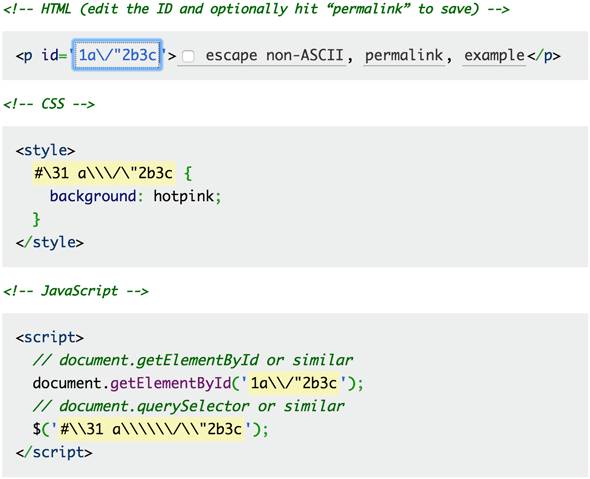
Just enter a value and it will tell you how to escape it in CSS and JavaScript, based on the rules above. It uses an id attribute in its example, but of course you could use the the same escaped string for class attribute values or the content property. Enjoy!
Need to escape text for use in CSS strings or identifiers? I’ve packaged the code that powers this tool as an open-source JavaScript library named cssesc. Check it out!
Update: The CSS Object Model spec now defines CSS.escape(), a utility method that performs the escaping for you. I’ve written a polyfill for it.
Note: If you liked reading about CSS escapes, why not read up on JavaScript character escape sequences or character references in HTML?
此内容由惯性聚合(RSS阅读器)自动聚合整理,仅供阅读参考。 原文来自 — 版权归原作者所有。